
Icons appended on analyses names in the DQ Repository
When you create any analysis type from the Profiling perspective of the Talend Studio, a corresponding analysis item is listed under the Analyses folder in the DQ Repository tree view.
Information noteNote: The number of the analyses created in the studio will be indicated next to this
Analyses folder in the DQ Repository
tree view.
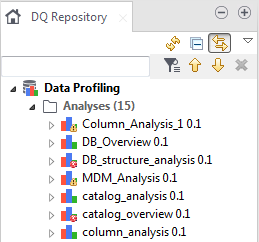
This analysis list will give you an idea about any problems in one or more of your analyses before even opening the analysis.
If an analysis fails to run, a small red-cross icon will be appended on it. If an analysis runs correctly but has violated thresholds, a warning icon is appended on such analysis.