Defining the user information and assigning the user to the application
Procedure
From the Okta top menu, select Directory > People.
Select the user you want to edit then go to the
Profile tab.
You can decide to add a new user and assign him/her the
desired roles.
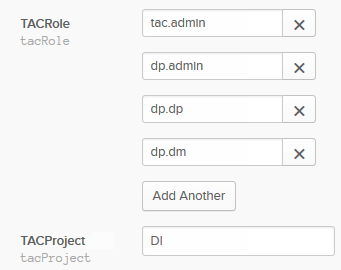
Set the desired roles values and click Add Another to add several user roles.
Information noteNote: You must use the same role and project type values in Talend Administration Center SSO configuration.
Do the same for the project type value ((Either, DI (Data
Integration), DQ (Data Management) or NPA (No Project Access)).
Open the People view in a
new browser tab and click Assign to
People.
Enter the username(s) and email address(es) of the person(/people) you want to
assign to the application.
The assigned applications will be shown on the user applications page.
Once your application and users are set in Okta, you need to link
the Identity Provider to Talend Administration Center in order to retrieve
the user information you have defined.
Did this page help you?
If you find any issues with this page or its content – a typo, a missing step, or a technical error – please let us know!