
Viewing code and executing the Route
Procedure
-
Click the Code tab at the bottom of the
design workspace to check the generated code.
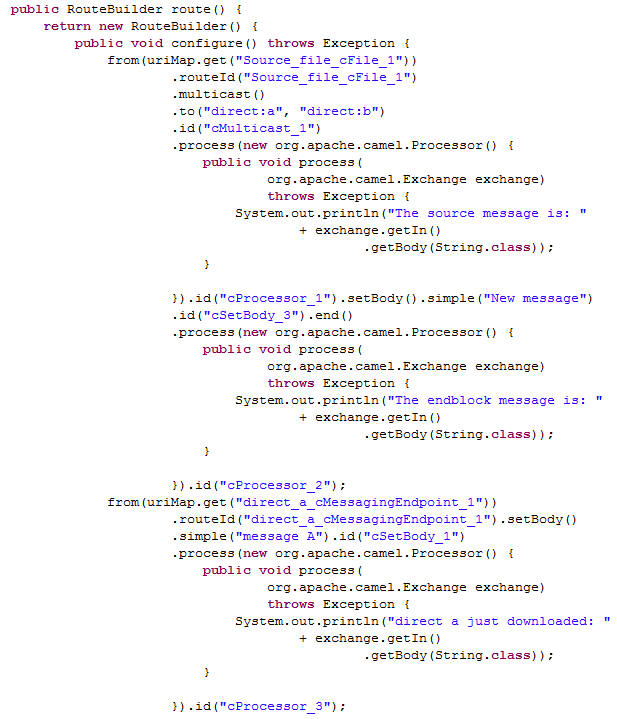 In the partially shown code, the source message is routed from "Source_file_cFile_1" .to direct:a and direct:b via "cMulticast_1". The message is then processed by "cProcessor_1" and given the message body "New message" by "cSetBody_3". The .end block of the route is processed by "cProcessor_2". The message from "direct_a_cMessagingEndpoint_1" is set the message body "message A" by "cSetBody_1" and processed by "cProcessor_3". The message from direct:b is processed similarly.
 -
Click the Run view to display it and
click the Run button to launch the
execution of your Route. You can also press F6 to execute it.
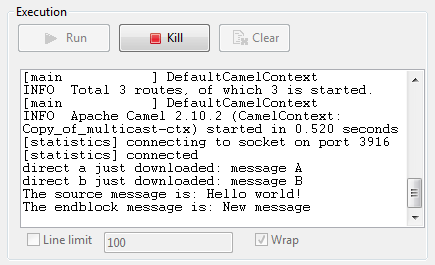 RESULT: The source file message is Hello world!. The message routed to direct:a and direct:b is set the message body message A and message B respectively. The end block message of this Route is New message that is set by the component labeled Set_new_body.