Skip to main content Skip to complementary content

Configure the Parent Job

Before you begin

  • You have configured the parent Job as previously.
  • You have defined the context variable called email in the child Job.

Procedure

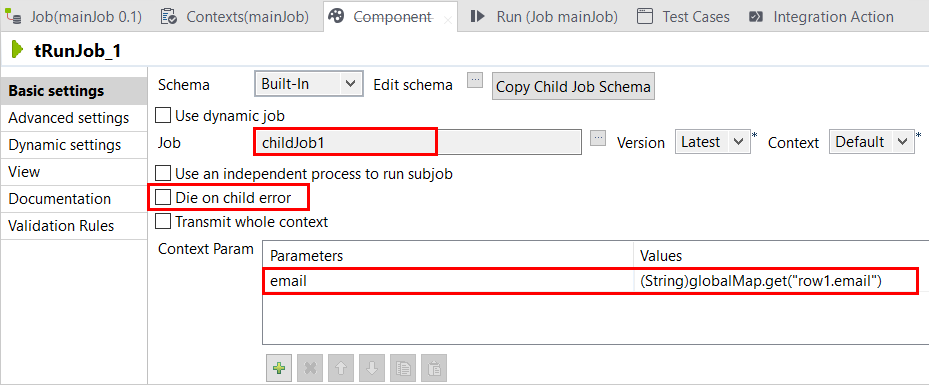
  1. Double-click the tRunJob_1 to open its Basic settings view.
  2. In the Job field, select the Job to be called in and processed, in this example childJob1.
  3. Clear the Die on child error check box so that the parent Job will not stop even though an error occurs in the child Job.
  4. In the Context Param table, pass the current email from the main Job to the child Job.
    • Click the [+] button to add the parameter defined in the Context view of the child Job, in this example email.
    • Define its value, (String)globalMap.get("row1.email").
  5. Press Ctrl+S to save your Job.

Did this page help you?

If you find any issues with this page or its content – a typo, a missing step, or a technical error – please let us know!