Configuring the basic settings of the tBRMS
component
Procedure
Click tBRMS to open its Basic settings view.
Click [...] next to Edit schema to open the schema editor.
The input schema to the left is automatically retrieved from tMap.
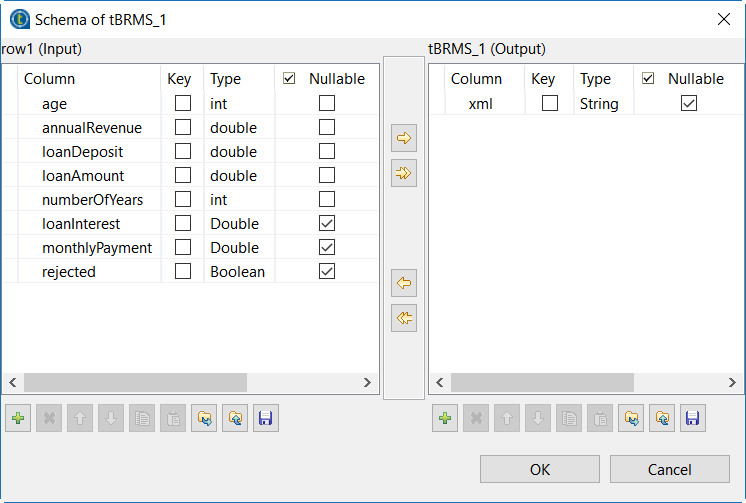
In the output area to the right, click [+] to add a new column which will serve to write the output
data to an XML file. Enter a name for the column and define the Type as String.
Click OK to validate your changes and
close the dialog box.
From the XML Field list, select the name
of the XML column you entered in the output schema.
From the Choose rule module list, select Use latest deployment from Drools
workbench to download the Jar file from the Drools
repository.
For further information on using Drools to
build and deploy business rules, see Talend Administration Center User Guide.
From the Choose
distribution list, select Redhat
Decision Manager 7.3.
In the Drools Workbench Url, enter the address of the
Drools Workbench .
Type in the user name and the password used to
connect to the Drools Workbench.
Next to Module List,
click [...] to open the Deploy Package dialog box.
In this dialog box, the URL, Username and Password fields are already filled with the
corresponding information you entered in the earlier steps.
Click [...] to browse
the Jar files in the Select Package dialog
box and select the jar package org.talend.bank for this
example.
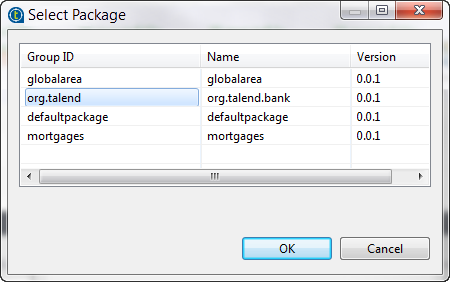
From the list next to the selected jar package,
select the class org.talend.bank.LoanSimulator and then click OK to close the dialog box.
A Talend program transforms the business rule library into a form which can
be used in the Job and creates an XSD file at the root of your studio, at
/studio_path/Drools/<project_name>. The XSD file records
the mapping between the incoming data flow and the objects to be handled by the
Drools engine.
In the Drools Flow ID (optional) field,
enter, between quotation marks, the ID of Drools flow to be used when
executing the rules of interest.
In this example, it is loanflow.
For more information about Drools flow, see the relevant Drools manuals.
Did this page help you?
If you find any issues with this page or its content – a typo, a missing step, or a technical error – please let us know!