Skip to main content Skip to complementary content

Create a demo Job

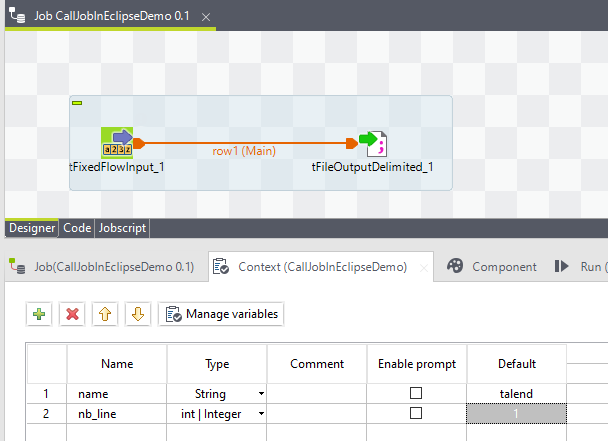
This example begins by creating an example Job called CallJobInEclipseDemo.

In this Job, you will:

  • Define two context variables: nb_line and name.
  • Use a tFixedFlowInput component to create rows of data and append them to a file named D:/file/out.txt.

Procedure

  1. Create and define the context variables in the Context view:
    • name: type String
    • nb_line: type Integer
  2. Click the Default field of each variable and set their default values, talend and 1 respectively.
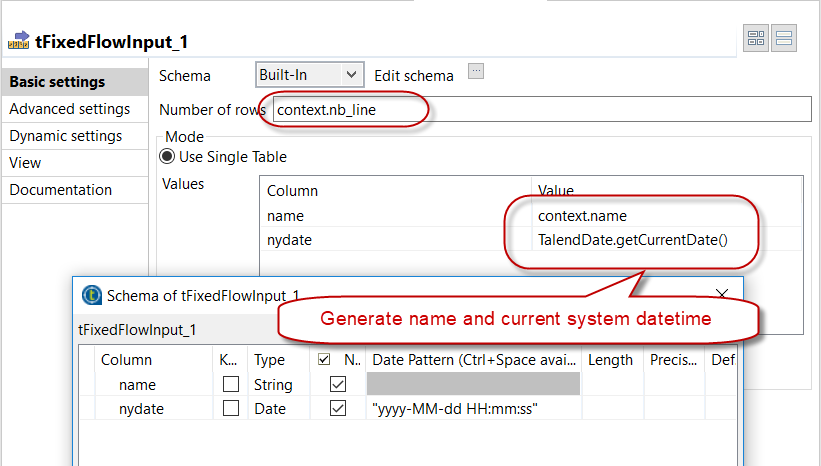
  3. Configure the tFixedFlowInput component in order to generate an input data:
  4. Configure the tFileOutputDelimited component in order to output the data into a file (D:/file/out.txt in this example).
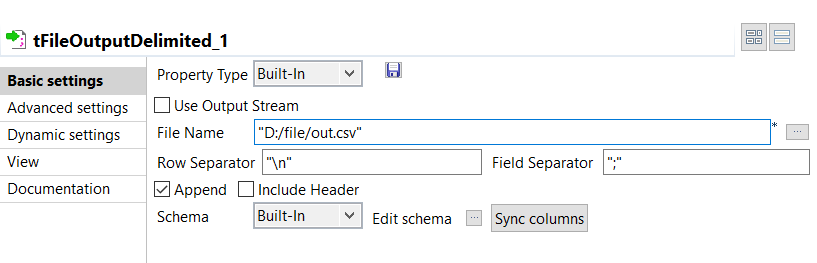
  5. Select the Append check box.
    The data will be added to an existing file, and not overwritten every time the Job is executed.
  6. Execute the Job to ensure it works well.
  7. Open the file D:file/out.txt to check that the data is properly appended: Default name 'talend' appended with the current system timestamp.
    talend;2014-08-04 09:34:13
  8. Export the Job.

Did this page help you?

If you find any issues with this page or its content – a typo, a missing step, or a technical error – please let us know!