기본 콘텐츠로 건너뛰기
보완적인 콘텐츠로 건너뛰기
Qlik.com
Community
Learning
Qlik 리소스
한국어 (변경)
Deutsch
English
Español
Français
Italiano
日本語
한국어
Nederlands
Polski
Português (Brasil)
Русский
Svenska
Türkçe
中文(中国)
中文(台灣)
닫기
설명서
클라우드
Client-Managed
추가 설명서
클라우드
Qlik Cloud
홈
소개
Qlik Cloud의 새로운 기능
Qlik Talend Cloud란?
분석
Data Integration
관리
자동화
Qlik 개발자
Talend Cloud
홈
릴리스 메모
API Portal
기타 클라우드 솔루션
Stitch
Upsolver
Client-Managed
클라이언트 관리 — 분석
사용자용 Qlik Sense
관리자용
Qlik Sense
개발자용
Qlik Sense
Qlik NPrinting
Connectors
Qlik GeoAnalytics
Qlik Alerting
사용자 및 관리자용
QlikView
개발자용
QlikView
Governance Dashboard
클라이언트 관리 — Data Integration
Qlik Replicate
Qlik Compose
Qlik Enterprise Manager
Qlik Gold Client
Qlik Catalog
NodeGraph (legacy)
Qlik Talend
Talend Studio
Talend ESB
Talend Administration Center
Talend Data Catalog
Talend Data Integration
Talend 데이터 관리
추가 설명서
추가 설명서
Qlik 문서 보관 파일
Talend 문서 보관 파일
온보딩
분석 시작
데이터 통합 시작하기
분석 사용자 온보딩
Qlik Sense에서 분석 시작
Qlik Cloud Analytics Standard 관리
Qlik Cloud Analytics Premium 및 Enterprise 관리
Qlik Sense
Business
관리
Qlik Sense
Enterprise
Saas 관리
Qlik Cloud 정부 관리
Windows에서
Qlik Sense
Enterprise
관리
데이터 통합 사용자 온보딩
Qlik Talend Data Integration 클라우드 시작하기
Talend Cloud 시작하기
비디오
마이그레이션 센터
평가 가이드
플레이북
관리자 플레이북
Qlik Sense 관리자 플레이북
Qlik 리소스
한국어 (변경)
Deutsch
English
Español
Français
Italiano
日本語
한국어
Nederlands
Polski
Português (Brasil)
Русский
Svenska
Türkçe
中文(中国)
中文(台灣)
검색
SearchUnify의 검색 로딩
제품에 대한 도움이 필요하면 Qlik 지원 센터에 문의하십시오.
Qlik 고객 포털
메뉴
닫기
SearchUnify의 검색 로딩
제품에 대한 도움이 필요하면 Qlik 지원 센터에 문의하십시오.
Qlik 고객 포털
여기에 피드백을 남겨주십시오.
마이그레이션 센터
Qlik Talend Cloud로 마이그레이션
Qlik Talend Cloud 마이그레이션 도구 키트
Talend Administration Center에서 마이그레이션
Talend 프로젝트 품질
사양 작업
사양 만들기
이 페이지에서
절차
결과
마지막 업데이트: 2026. 10. 14.
Availability-note
베타
베타 콘텐츠
사양은 프로젝트 품질 실행 중에 적용할 규칙 모음입니다.
절차
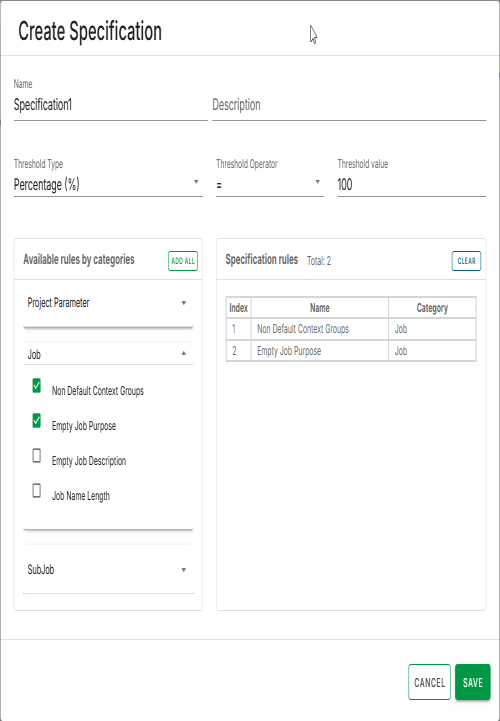
사양을 생성하려면
사양
페이지에서
생성
버튼을 클릭하십시오.
대화 상자가 열리면
범주별 규칙
에 범주별로 그룹화된 모든 규칙(규칙 이름)이 나열됩니다. 다음 정보를 입력할 수 있는 양식도 표시됩니다.
이름
: 사양에 대한 고유한 이름을 입력합니다.
설명
: 사양에 대한 설명을 입력합니다.
임계값
: 0부터 숫자 값을 입력하여 조건이 관찰되어야 하는 상한 또는 하한을 설정합니다.
ThresholdType
: You can select one of the two threshold types:
백분율
숫자형
Operator
: Comparison operator (compares with the threshold).
사양에 규칙을 추가하려면, 왼쪽 패널에서 확인란을 클릭하여 규칙을 선택합니다. 오른쪽에 선택된 규칙을
규칙
테이블에 표시합니다.
모든 세부 정보를 입력한 후,
저장
을 클릭하여 사양을 생성합니다.
결과
생성 대화 상자가 자동으로 닫히고 새 사양이
사양
페이지에 나열됩니다.
Visit the discussion forum
at community.qlik.com
이 페이지가 도움이 되었습니까?
이 페이지 또는 해당 콘텐츠에서 오타, 누락된 단계 또는 기술적 오류와 같은 문제를 발견하면 알려 주십시오!
여기에 피드백을 남겨주십시오.
이전 항목
사양 작업
다음 항목
사양 편집