
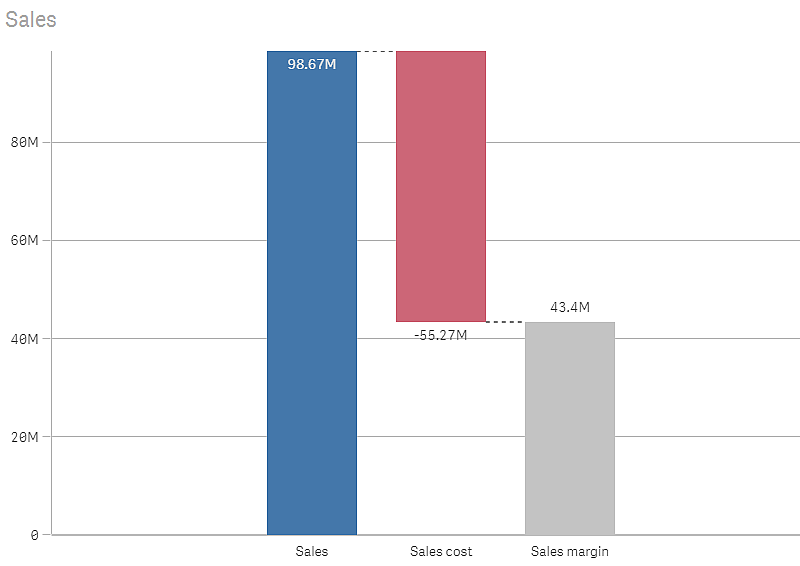
The waterfall chart is suitable for illustrating how an initial value is affected by intermediate positive and negative values. The starting and the final values are represented by whole bars, and intermediate values by floating bars. You can also show subtotals in the chart.
Number of dimensions and measures
In a waterfall chart you need to use one measure for each bar in the chart. The order of the measures defines the order of the bars in the chart. For each measure, you need to define how it affects the previous value.
Defining your measures
You can use the Measure operation option of each measure to set how it affects the previous value.
-
Add
The measure value adds to the previous bar. If this is the first measure, a whole bar is shown starting at 0.
-
Subtract
The measure value subtracts from the previous bar.
Information noteIf the data already contains a negative sign, the result of subtraction will be a positive change. -
Subtotals
The measure value is considered a subtotal.
Tip noteIf you do not have sub-totals as a field, you can add subtotals automatically by enabling Subtotals in the measure before you want the subtotal.
In the waterfall chart shown above, the first bar, Sales, is defined as Add. The second bar, Sales cost, is defined as Subtract, and the third bar, Sales margin, is defined as Subtotals.