
Last updated: 10/14/2025
The media library contains the images you can use in your app: in text & image visualizations, on story slides, and as thumbnails for apps, sheets, and stories.
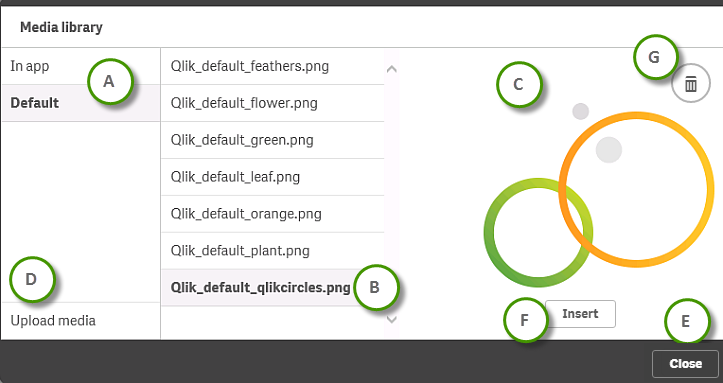
| A |
The folders in the media library. In app: The images in the app. You can delete images. Default: The default images are managed from the Qlik Management Console. If a new content library is shared through security rules defined in the Qlik Management Console, the library and its images becomes a part of the media library. |
Deleting image files from media library Managing a Qlik Sense site: Uploading objects to content libraries |
| B | A list of the images in the selected part of the media library. | |
| C | A preview of the selected image. |
|
| D | Click Upload media to upload a new image. | Uploading image files to media library |
| E | Click Cancel to close the media library dialog. | |
| F | Click Insert to use the selected image. |
Changing the thumbnail of an app |
| G | Click Ö to delete the selected image. | Deleting image files from media library |