
Data Discrepancy Troubleshooting Guide
Last updated: 9/15/2026If you’re missing data, this is the place to start.
In this article, we’ll walk you through the common causes for data discrepancies and how to diagnose them.
Data Incompatibilities
From time to time, Stitch may run into problems when attempting to load data into your destination. When data is deemed incompatible by the destination, the record will be “rejected” and logged in a table called _sdc_rejected. What looks like missing data may actually be a compatibility issue.
If you’re missing data, the first place you should look is in the _sdc_rejected table in the integration’s schema. Click here for more info on this table and how to use it to troubleshoot.
Data Loading
While Stitch is designed to quickly and efficiently process large amounts of data, it can take some time to replicate and load your data into your destination. What looks like missing data may actually be incomplete processing, meaning Stitch hasn’t finished loading all the data.
Processing time can be affected by a variety of factors:
- The volume of data being replicated,
- The integration’s Replication Frequency, and
- API quotas (for SaaS integrations).
Most data discrepancies can be solved by simply waiting and giving Stitch time to process and load the data.
You can keep an eye on an integration’s progress by using the Replication Stats dashboard.
Downtime
If a SaaS integration provider (ex: Salesforce) is undergoing maintenance or experiencing downtime, Stitch may be unable to replicate data. We recommend checking the provider’s status page for reported outages.
Stitch may also occasionally encounter performance issues. You can stay up-to-date with the latest by subscribing to our status page.
Queries
Before reporting a data discrepancy to Support, we recommend that you double-check how you’re querying the data.
Unless you specify a start date, the majority of SaaS integrations will sync historical data going back one year from the Stitch connection date.
To verify an integration's start date, click into the integration from the Stitch Dashboard. Click the Settings tab, then scroll down to the Sync Historical Data section.
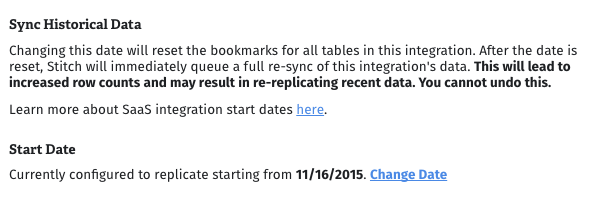
When querying in your destination, check that the timeframe you're querying for matches up with the integration's start date. If you find that the integration's start date was set incorrectly, you can reset it to queue a full re-sync.
Keep in mind that your destination may handle timestamp data in a specific way, even if your data source is configured to report in a specific timezone.
Consider this timestamp as an example: 2017-08-14 11:24:02 GMT-0400 (EDT)
Below is an explanation and example of how each destination will store this same data point.
| Data Warehouse | Explanation | Example Timestamp |
|---|---|---|
| PostgreSQL |
Timestamp data is stored as TIMESTAMP WITH TIME ZONE and converted to UTC using the appropriate offset for the timezone.
|
2017-08-14 15:24:02
|
| Redshift |
Timestamp data is stored as TIMESTAMP WITHOUT TIME ZONE and expressed as UTC without the timezone information.
|
2017-08-14 11:24:02
|
Make sure you're using a SQL client to directly query your destination. This will eliminate the possibility of:
- Report refresh lags, which can occur in visualization tools like Tableau or Mode,
- Third party defects or downtime, and
- Any other type of data delay.
Discrepancy Consistencies
When investigating a data discrepancy, look for consistencies such as records missing over a specific timeframe or issues that only affect certain records or data types.
For example: Formula fields in Salesforce can occasionally cause data discrepancies due to how they’re updated.
We recommend checking the Additional & Integration Specific Resources section for causes of common data discrepancies and how to resolve them.
Replication Frequency
If the missing records were created very recently, or if Stitch is replicating a large historical data set, you may need to wait for an update of your data to complete before they appear in your destination.
We recommend checking the integration’s Replication Frequency, located in the Settings tab of the Integration Details page. If it’s set to a lower frequency like 12 hours, you may want to increase it temporarily to ensure Stitch kicks off a replication job sooner rather than later. If replication is running, wait for it to complete before analyzing data discrepancies.
Replication Keys
When a table in a database integration is initially set to use Key-based Incremental Replication, a Replication Key must be defined. For Stitch to accurately replicate data, Replication Keys must align with how data in the table is updated.
If the table in question is set to use Key-based Incremental Replication, keep in mind that:
- Stitch won’t capture hard deletes.
- Replication Key columns with
NULLvalues are only replicated during an integration’s initial replication job. - Records that are updated over time should use a modification timestamp to ensure updates are captured.
- MongoDB Replication Keys have additional considerations. For example: Multiple data types in the Replication Key column can lead to missing data.
- Append-Only destinations. What looks like duplicate data may actually be updated records being appended to a table. Refer to the Understanding loading behavior guide for more info and examples.
Contacting support
If the discrepancy can’t be explained by any of the points above, reach out to support. Depending on the type of discrepancy, we’ll ask you to provide us some information that will help us investigate.
Row count discrepancies describe discrepancies that affect the number of records in your destination. Complete records may be missing, duplicated, etc.
Field value discrepancies describe discrepancies that affect values in individual columns.