Stitch’s Square integration replicates data using the Square V2 and Connect V1 APIs. Refer to the Schema section for a list of objects available for replication.
Square feature snapshot
A high-level look at Stitch's Square (v1) integration, including release status, useful links, and the features supported in Stitch.
Indicates if Replication Methods can be defined by you for tables in the integration.
Configurable Replication Methods are not supported for this integration. Stitch will use pre-defined replication methods for tables you set to replicate.
Unsupported
DATA SELECTION
Table selection
The ability to select individual tables for replication in the Stitch interface. If table selection is unavailable, all tables and all the columns they contain will be set to replicate by default.
This feature is supported for this version of the integration.
Supported
Column selection
The ability to select individual columns for replication in the Stitch interface. If column selection is unavailable, all columns will be set to replicate by default.
This feature is supported for this version of the integration.
Supported
Select all
Indicates if the integration supports selecting all available tables and columns.
Reports detailing the Loading phase of the replication process for a given integration. Includes the number of rows loaded for each table and error info, should an error occur.
This feature is supported for this version of the integration.
Supported
Connecting Square
Square setup requirements
To set up Square in Stitch, you need:
To log into your Square sandbox environment, if you’re connecting a sandbox. To allow Stitch to successfully access the sandbox, you must be logged into it prior to setting up the Square integration in Stitch.
If you’re connecting a production environment, start with Step 2 of this guide.
Step 1: Login to your Square sandbox environment
Information noteImportant:
If you’re connecting a Square sandbox, this step is required. Skip to Step 2 if you’re connecting a production environment.
To connect to your Square sandbox environment, you’ll need to login to your sandbox environment before completing the next step. This is required to grant Stitch authorization to access the sandbox environment. For more info, refer to the Square documentation.
On the Stitch Dashboard page, click the Add Integration button.
Click the Square icon.
Enter a name for the integration. This is the name that will display on the Stitch Dashboard for the integration; it’ll also be used to create the schema in your destination.
For example, the name “Stitch Square” would create a schema called stitch_square in the destination. Note: Schema names cannot be changed after you save the integration.
Check the Connect to a sandbox environment if choosing to connect to your Square sandbox. Note: Make sure you completed Step 1 before continuing.
Step 3: Define the historical replication start date
The Sync Historical Data setting defines the starting date for your Square integration.
This means that data equal to or newer than this date will be replicated to your data warehouse.
Change this setting if you want to replicate data beyond Square’s default setting of 1 year. For a detailed look at historical replication jobs, check out the Syncing Historical SaaS Data guide.
Step 4: Create a replication schedule
Information note
Replication schedules affect the time Extraction begins, not the time to data loaded. Refer to the Replication Scheduling documentation for more information.
In the Replication Frequency section, you’ll create the integration’s replication schedule. An integration’s replication schedule determines how often Stitch runs a replication job, and the time that job begins.
Square integrations support the following replication scheduling methods:
Note: If a replication job is currently in progress, new selections won’t be used until the next job starts.
For Square integrations, you can select:
Individual tables and columns
All tables and columns
Click the tabs to view instructions for each selection method.
In the integration’s Tables to Replicate tab, locate a table you want to replicate.
To track a table, click the checkbox next to the table’s name. A blue checkmark means the table is set to replicate.
To track a column, click the checkbox next to the column’s name. A blue checkmark means the column is set to replicate.
Repeat this process for all the tables and columns you want to replicate.
When finished, click the Finalize Your Selections button at the bottom of the screen to save your selections.
Information noteImportant:
Using the Select All feature will overwrite any previous selections. However, selections aren’t final until Finalize Your Selections is clicked. Clicking Cancel will restore your previous selections.
Refer to the Select All guide for more info about this feature.
Click into the integration from the Stitch Dashboard page.
Click the Tables to Replicate tab.
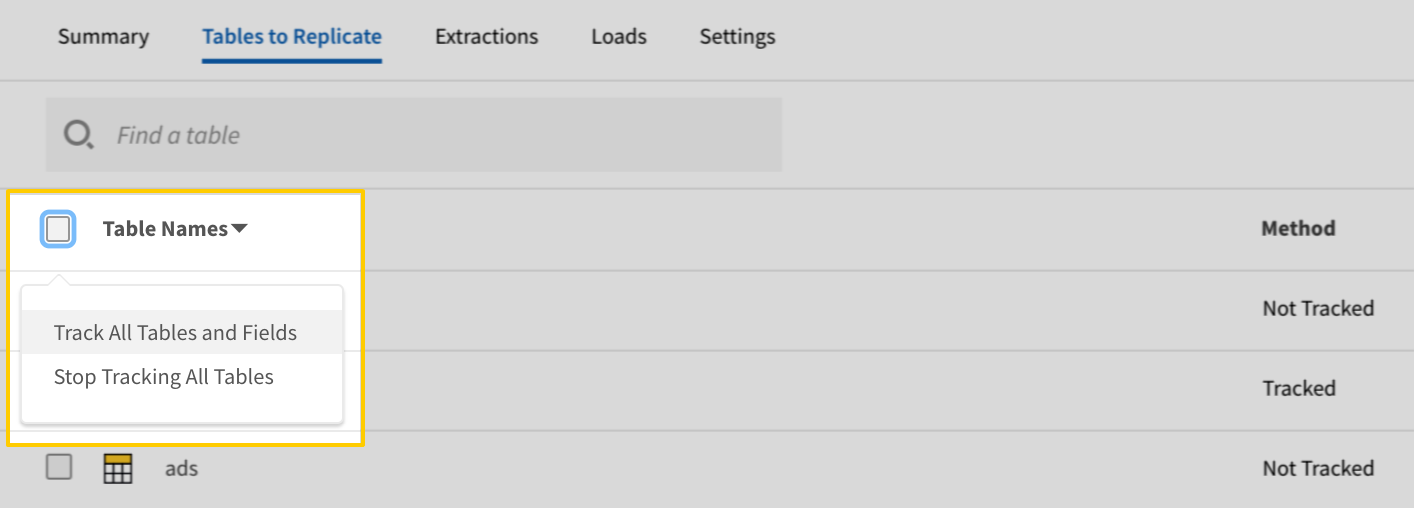
In the list of tables, click the box next to the Table Names column.
In the menu that displays, click Track all Tables and Fields:
The Track all Tables and Fields menu in the Tables to Replicate tab
Click the Finalize Your Selections button at the bottom of the page to save your data selections.
Initial and historical replication jobs
After you finish setting up Square, its Sync Status may show as Pending on either the Stitch Dashboard or in the Integration Details page.
For a new integration, a Pending status indicates that Stitch is in the process of scheduling the initial replication job for the integration. This may take some time to complete.
Information note
Initial replication jobs with Anchor Scheduling
If using Anchor Scheduling, an initial replication job may not kick off immediately. This depends on the selected Replication Frequency and Anchor Time. Refer to the Anchor Scheduling documentation for more information.
Free historical data loads
The first seven days of replication, beginning when data is first replicated, are free. Rows replicated from the new integration during this time won’t count towards your quota. Stitch offers this as a way of testing new integrations, measuring usage, and ensuring historical data volumes don’t quickly consume your quota.
Information noteReplication will continue after the seven days are over. If you’re no longer interested in this source, be sure to pause or delete the integration to prevent unwanted usage.
Square table reference
Information note
Schemas and versioning
Schemas and naming conventions can change from version to version, so we recommend verifying your integration’s version before continuing.
The schema and info displayed below is for version 1 of this integration.
Information note
Table and column names in your destination
Depending on your destination, table and column names may not appear as they are outlined below.
For example: Object names are lowercased in Redshift (CusTomERs > customers), while case is maintained in PostgreSQL destinations (CusTomERs > CusTomERs). Refer to the Loading Guide for your destination for more info.
bank_accounts
The bank_accounts contains information about a merchant’s bank account in Square.
Note: This table can’t be replicated if the Connect to a sandbox environment box is checked in the integration’s settings due to limits imposed by Square.
This is a nested data structure. If your destination doesn't natively support nested data, attributes in this object will be flattened into the table. <a href='/en-US/stitch/replication/loading/understanding-loading-row-usage-for-nested-data-structures' target='new'>Learn more</a>.
amount
INTEGER
currency
STRING
description
STRING
ended_at
DATE-TIME
expected_cash_money
OBJECT
This is a nested data structure. If your destination doesn't natively support nested data, attributes in this object will be flattened into the table. <a href='/en-US/stitch/replication/loading/understanding-loading-row-usage-for-nested-data-structures' target='new'>Learn more</a>.
amount
INTEGER
currency
STRING
id
STRING
opened_at
DATE-TIME
opened_cash_money
OBJECT
This is a nested data structure. If your destination doesn't natively support nested data, attributes in this object will be flattened into the table. <a href='/en-US/stitch/replication/loading/understanding-loading-row-usage-for-nested-data-structures' target='new'>Learn more</a>.
amount
INTEGER
currency
STRING
state
STRING
categories
The categories table contains information about item categories for a given location in Square.
This is a nested data structure. If your destination doesn't natively support nested data, attributes will be denested into a subtable. <a href='/en-US/stitch/replication/loading/understanding-loading-row-usage-for-nested-data-structures' target='new'>Learn more</a>.
category_data
OBJECT
This is a nested data structure. If your destination doesn't natively support nested data, attributes in this object will be flattened into the table. <a href='/en-US/stitch/replication/loading/understanding-loading-row-usage-for-nested-data-structures' target='new'>Learn more</a>.
name
STRING
id
STRING
is_deleted
BOOLEAN
present_at_all_locations
BOOLEAN
type
STRING
updated_at
DATE-TIME
version
INTEGER
customers
The customers contains information about customer profiles associated with your Square account.
This is a nested data structure. If your destination doesn't natively support nested data, attributes in this object will be flattened into the table. <a href='/en-US/stitch/replication/loading/understanding-loading-row-usage-for-nested-data-structures' target='new'>Learn more</a>.
address_line_1
STRING
administrative_district_level_1
STRING
country
STRING
locality
STRING
postal_code
STRING
birthday
DATE-TIME
STRING
company_name
STRING
created_at
DATE-TIME
creation_source
STRING
email_address
STRING
family_name
STRING
given_name
STRING
id
STRING
nickname
STRING
note
STRING
phone_number
STRING
preferences
OBJECT
This is a nested data structure. If your destination doesn't natively support nested data, attributes in this object will be flattened into the table. <a href='/en-US/stitch/replication/loading/understanding-loading-row-usage-for-nested-data-structures' target='new'>Learn more</a>.
email_unsubscribed
BOOLEAN
updated_at
DATE-TIME
discounts
The discounts table contains information about discounts for a given location in Square.
This is a nested data structure. If your destination doesn't natively support nested data, attributes will be denested into a subtable. <a href='/en-US/stitch/replication/loading/understanding-loading-row-usage-for-nested-data-structures' target='new'>Learn more</a>.
discount_data
OBJECT
This is a nested data structure. If your destination doesn't natively support nested data, attributes in this object will be flattened into the table. <a href='/en-US/stitch/replication/loading/understanding-loading-row-usage-for-nested-data-structures' target='new'>Learn more</a>.
amount_money
OBJECT
This is a nested data structure. If your destination doesn't natively support nested data, attributes in this object will be flattened into the table. <a href='/en-US/stitch/replication/loading/understanding-loading-row-usage-for-nested-data-structures' target='new'>Learn more</a>.
amount
INTEGER
currency
STRING
application_method
STRING
discount_type
STRING
label_color
STRING
modify_tax_basis
STRING
name
STRING
percentage
STRING
pin_required
BOOLEAN
id
STRING
is_deleted
BOOLEAN
present_at_all_locations
BOOLEAN
type
STRING
updated_at
DATE-TIME
version
INTEGER
employees
The employees table contains information about your employees in Square.
This is a nested data structure. If your destination doesn't natively support nested data, attributes will be denested into a subtable. <a href='/en-US/stitch/replication/loading/understanding-loading-row-usage-for-nested-data-structures' target='new'>Learn more</a>.
status
STRING
updated_at
DATE-TIME
inventories
The inventories table contains info about the current calculated stock count for a Square location.
This is a nested data structure. If your destination doesn't natively support nested data, attributes will be denested into a subtable. <a href='/en-US/stitch/replication/loading/understanding-loading-row-usage-for-nested-data-structures' target='new'>Learn more</a>.
id
STRING
is_deleted
BOOLEAN
item_data
OBJECT
This is a nested data structure. If your destination doesn't natively support nested data, attributes in this object will be flattened into the table. <a href='/en-US/stitch/replication/loading/understanding-loading-row-usage-for-nested-data-structures' target='new'>Learn more</a>.
abbreviation
STRING
available_electronically
BOOLEAN
available_for_pickup
BOOLEAN
available_online
BOOLEAN
category_id
STRING
description
STRING
item_options
ARRAY
This is a nested data structure. If your destination doesn't natively support nested data, attributes will be denested into a subtable. <a href='/en-US/stitch/replication/loading/understanding-loading-row-usage-for-nested-data-structures' target='new'>Learn more</a>.
item_option_id
STRING
label_color
STRING
legacy_tax_ids
ARRAY
This is a nested data structure. If your destination doesn't natively support nested data, attributes will be denested into a subtable. <a href='/en-US/stitch/replication/loading/understanding-loading-row-usage-for-nested-data-structures' target='new'>Learn more</a>.
modifier_list_info
ARRAY
This is a nested data structure. If your destination doesn't natively support nested data, attributes will be denested into a subtable. <a href='/en-US/stitch/replication/loading/understanding-loading-row-usage-for-nested-data-structures' target='new'>Learn more</a>.
enabled
BOOLEAN
modifier_list_id
STRING
name
STRING
product_type
STRING
skip_modifier_screen
BOOLEAN
tax_ids
ARRAY
This is a nested data structure. If your destination doesn't natively support nested data, attributes will be denested into a subtable. <a href='/en-US/stitch/replication/loading/understanding-loading-row-usage-for-nested-data-structures' target='new'>Learn more</a>.
variations
ARRAY
This is a nested data structure. If your destination doesn't natively support nested data, attributes will be denested into a subtable. <a href='/en-US/stitch/replication/loading/understanding-loading-row-usage-for-nested-data-structures' target='new'>Learn more</a>.
id
STRING
is_deleted
BOOLEAN
item_variation_data
OBJECT
This is a nested data structure. If your destination doesn't natively support nested data, attributes in this object will be flattened into the table. <a href='/en-US/stitch/replication/loading/understanding-loading-row-usage-for-nested-data-structures' target='new'>Learn more</a>.
inventory_alert_type
STRING
item_id
STRING
location_overrides
ARRAY
This is a nested data structure. If your destination doesn't natively support nested data, attributes will be denested into a subtable. <a href='/en-US/stitch/replication/loading/understanding-loading-row-usage-for-nested-data-structures' target='new'>Learn more</a>.
inventory_alert_threshold
INTEGER
inventory_alert_type
STRING
location_id
STRING
sold_out
BOOLEAN
track_inventory
BOOLEAN
name
STRING
ordinal
INTEGER
price_money
OBJECT
This is a nested data structure. If your destination doesn't natively support nested data, attributes in this object will be flattened into the table. <a href='/en-US/stitch/replication/loading/understanding-loading-row-usage-for-nested-data-structures' target='new'>Learn more</a>.
amount
INTEGER
currency
STRING
pricing_type
STRING
sku
STRING
track_inventory
BOOLEAN
user_data
STRING
present_at_all_locations
BOOLEAN
present_at_location_ids
ARRAY
This is a nested data structure. If your destination doesn't natively support nested data, attributes will be denested into a subtable. <a href='/en-US/stitch/replication/loading/understanding-loading-row-usage-for-nested-data-structures' target='new'>Learn more</a>.
type
STRING
updated_at
DATE-TIME
version
INTEGER
visibility
STRING
present_at_all_locations
BOOLEAN
present_at_location_ids
ARRAY
This is a nested data structure. If your destination doesn't natively support nested data, attributes will be denested into a subtable. <a href='/en-US/stitch/replication/loading/understanding-loading-row-usage-for-nested-data-structures' target='new'>Learn more</a>.
type
STRING
updated_at
DATE-TIME
version
INTEGER
locations
The locations table contains information about all of your business locations in Square.
This is a nested data structure. If your destination doesn't natively support nested data, attributes in this object will be flattened into the table. <a href='/en-US/stitch/replication/loading/understanding-loading-row-usage-for-nested-data-structures' target='new'>Learn more</a>.
address_line_1
STRING
address_line_2
STRING
address_line_3
STRING
administrative_district_level_1
STRING
administrative_district_level_2
STRING
administrative_district_level_3
STRING
country
STRING
first_name
STRING
last_name
STRING
locality
STRING
organization
STRING
postal_code
STRING
sublocality
STRING
sublocality_2
STRING
sublocality_3
STRING
business_email
STRING
business_hours
OBJECT
This is a nested data structure. If your destination doesn't natively support nested data, attributes in this object will be flattened into the table. <a href='/en-US/stitch/replication/loading/understanding-loading-row-usage-for-nested-data-structures' target='new'>Learn more</a>.
periods
ARRAY
This is a nested data structure. If your destination doesn't natively support nested data, attributes will be denested into a subtable. <a href='/en-US/stitch/replication/loading/understanding-loading-row-usage-for-nested-data-structures' target='new'>Learn more</a>.
day_of_week
STRING
end_local_time
STRING
start_local_time
STRING
business_name
STRING
capabilities
ARRAY
This is a nested data structure. If your destination doesn't natively support nested data, attributes will be denested into a subtable. <a href='/en-US/stitch/replication/loading/understanding-loading-row-usage-for-nested-data-structures' target='new'>Learn more</a>.
coordinates
OBJECT
This is a nested data structure. If your destination doesn't natively support nested data, attributes in this object will be flattened into the table. <a href='/en-US/stitch/replication/loading/understanding-loading-row-usage-for-nested-data-structures' target='new'>Learn more</a>.
latitude
NUMBER
longitude
NUMBER
country
STRING
created_at
DATE-TIME
currency
STRING
description
STRING
facebook_url
STRING
id
STRING
instagram_username
STRING
language_code
STRING
mcc
STRING
merchant_id
STRING
name
STRING
phone_number
STRING
status
STRING
timezone
STRING
twitter_username
STRING
type
STRING
website_url
STRING
modifier_lists
The modifier_lists table contains information about modifier lists for a given location in Square.
This is a nested data structure. If your destination doesn't natively support nested data, attributes will be denested into a subtable. <a href='/en-US/stitch/replication/loading/understanding-loading-row-usage-for-nested-data-structures' target='new'>Learn more</a>.
id
STRING
is_deleted
BOOLEAN
modifier_list_data
OBJECT
This is a nested data structure. If your destination doesn't natively support nested data, attributes in this object will be flattened into the table. <a href='/en-US/stitch/replication/loading/understanding-loading-row-usage-for-nested-data-structures' target='new'>Learn more</a>.
modifiers
ARRAY
This is a nested data structure. If your destination doesn't natively support nested data, attributes will be denested into a subtable. <a href='/en-US/stitch/replication/loading/understanding-loading-row-usage-for-nested-data-structures' target='new'>Learn more</a>.
id
STRING
is_deleted
BOOLEAN
modifier_data
OBJECT
This is a nested data structure. If your destination doesn't natively support nested data, attributes in this object will be flattened into the table. <a href='/en-US/stitch/replication/loading/understanding-loading-row-usage-for-nested-data-structures' target='new'>Learn more</a>.
modifier_list_id
STRING
name
STRING
on_by_default
BOOLEAN
ordinal
INTEGER
price_money
OBJECT
This is a nested data structure. If your destination doesn't natively support nested data, attributes in this object will be flattened into the table. <a href='/en-US/stitch/replication/loading/understanding-loading-row-usage-for-nested-data-structures' target='new'>Learn more</a>.
amount
INTEGER
currency
STRING
present_at_all_locations
BOOLEAN
type
STRING
updated_at
DATE-TIME
version
INTEGER
name
STRING
ordinal
INTEGER
selection_type
STRING
present_at_all_locations
BOOLEAN
type
STRING
updated_at
DATE-TIME
version
INTEGER
orders
The orders table contains information about order updates in Square.
This is a nested data structure. If your destination doesn't natively support nested data, attributes in this object will be flattened into the table. <a href='/en-US/stitch/replication/loading/understanding-loading-row-usage-for-nested-data-structures' target='new'>Learn more</a>.
amount
INTEGER
currency
STRING
card_details
OBJECT
This is a nested data structure. If your destination doesn't natively support nested data, attributes in this object will be flattened into the table. <a href='/en-US/stitch/replication/loading/understanding-loading-row-usage-for-nested-data-structures' target='new'>Learn more</a>.
avs_status
STRING
card
OBJECT
This is a nested data structure. If your destination doesn't natively support nested data, attributes in this object will be flattened into the table. <a href='/en-US/stitch/replication/loading/understanding-loading-row-usage-for-nested-data-structures' target='new'>Learn more</a>.
bin
STRING
card_brand
STRING
card_type
STRING
exp_month
INTEGER
exp_year
INTEGER
fingerprint
STRING
last_4
STRING
prepaid_type
STRING
cvv_status
STRING
entry_method
STRING
statement_description
STRING
status
STRING
category_data
OBJECT
This is a nested data structure. If your destination doesn't natively support nested data, attributes in this object will be flattened into the table. <a href='/en-US/stitch/replication/loading/understanding-loading-row-usage-for-nested-data-structures' target='new'>Learn more</a>.
name
STRING
closed_at
DATE-TIME
created_at
DATE-TIME
delay_action
STRING
delay_duration
STRING
delayed_until
STRING
discount_data
OBJECT
This is a nested data structure. If your destination doesn't natively support nested data, attributes in this object will be flattened into the table. <a href='/en-US/stitch/replication/loading/understanding-loading-row-usage-for-nested-data-structures' target='new'>Learn more</a>.
amount_money
OBJECT
This is a nested data structure. If your destination doesn't natively support nested data, attributes in this object will be flattened into the table. <a href='/en-US/stitch/replication/loading/understanding-loading-row-usage-for-nested-data-structures' target='new'>Learn more</a>.
amount
INTEGER
currency
STRING
discount_type
STRING
name
STRING
fulfillments
ARRAY
This is a nested data structure. If your destination doesn't natively support nested data, attributes will be denested into a subtable. <a href='/en-US/stitch/replication/loading/understanding-loading-row-usage-for-nested-data-structures' target='new'>Learn more</a>.
pickup_details
OBJECT
This is a nested data structure. If your destination doesn't natively support nested data, attributes in this object will be flattened into the table. <a href='/en-US/stitch/replication/loading/understanding-loading-row-usage-for-nested-data-structures' target='new'>Learn more</a>.
canceled_at
DATE-TIME
expired_at
DATE-TIME
expires_at
DATE-TIME
note
STRING
pickup_at
DATE-TIME
recipient
OBJECT
This is a nested data structure. If your destination doesn't natively support nested data, attributes in this object will be flattened into the table. <a href='/en-US/stitch/replication/loading/understanding-loading-row-usage-for-nested-data-structures' target='new'>Learn more</a>.
display_name
STRING
rejected_at
DATE-TIME
state
STRING
type
STRING
uid
STRING
id
STRING
is_deleted
BOOLEAN
line_items
ARRAY
This is a nested data structure. If your destination doesn't natively support nested data, attributes will be denested into a subtable. <a href='/en-US/stitch/replication/loading/understanding-loading-row-usage-for-nested-data-structures' target='new'>Learn more</a>.
base_price_money
OBJECT
This is a nested data structure. If your destination doesn't natively support nested data, attributes in this object will be flattened into the table. <a href='/en-US/stitch/replication/loading/understanding-loading-row-usage-for-nested-data-structures' target='new'>Learn more</a>.
amount
INTEGER
currency
STRING
catalog_object_id
STRING
gross_sales_money
OBJECT
This is a nested data structure. If your destination doesn't natively support nested data, attributes in this object will be flattened into the table. <a href='/en-US/stitch/replication/loading/understanding-loading-row-usage-for-nested-data-structures' target='new'>Learn more</a>.
amount
INTEGER
currency
STRING
name
STRING
note
STRING
quantity
STRING
total_discount_money
OBJECT
This is a nested data structure. If your destination doesn't natively support nested data, attributes in this object will be flattened into the table. <a href='/en-US/stitch/replication/loading/understanding-loading-row-usage-for-nested-data-structures' target='new'>Learn more</a>.
amount
INTEGER
currency
STRING
total_money
OBJECT
This is a nested data structure. If your destination doesn't natively support nested data, attributes in this object will be flattened into the table. <a href='/en-US/stitch/replication/loading/understanding-loading-row-usage-for-nested-data-structures' target='new'>Learn more</a>.
amount
INTEGER
currency
STRING
total_tax_money
OBJECT
This is a nested data structure. If your destination doesn't natively support nested data, attributes in this object will be flattened into the table. <a href='/en-US/stitch/replication/loading/understanding-loading-row-usage-for-nested-data-structures' target='new'>Learn more</a>.
amount
INTEGER
currency
STRING
uid
STRING
variation_name
STRING
variation_total_price_money
OBJECT
This is a nested data structure. If your destination doesn't natively support nested data, attributes in this object will be flattened into the table. <a href='/en-US/stitch/replication/loading/understanding-loading-row-usage-for-nested-data-structures' target='new'>Learn more</a>.
amount
INTEGER
currency
STRING
location_id
STRING
net_amounts
OBJECT
This is a nested data structure. If your destination doesn't natively support nested data, attributes in this object will be flattened into the table. <a href='/en-US/stitch/replication/loading/understanding-loading-row-usage-for-nested-data-structures' target='new'>Learn more</a>.
discount_money
OBJECT
This is a nested data structure. If your destination doesn't natively support nested data, attributes in this object will be flattened into the table. <a href='/en-US/stitch/replication/loading/understanding-loading-row-usage-for-nested-data-structures' target='new'>Learn more</a>.
amount
INTEGER
currency
STRING
service_charge_money
OBJECT
This is a nested data structure. If your destination doesn't natively support nested data, attributes in this object will be flattened into the table. <a href='/en-US/stitch/replication/loading/understanding-loading-row-usage-for-nested-data-structures' target='new'>Learn more</a>.
amount
INTEGER
currency
STRING
tax_money
OBJECT
This is a nested data structure. If your destination doesn't natively support nested data, attributes in this object will be flattened into the table. <a href='/en-US/stitch/replication/loading/understanding-loading-row-usage-for-nested-data-structures' target='new'>Learn more</a>.
amount
INTEGER
currency
STRING
tip_money
OBJECT
This is a nested data structure. If your destination doesn't natively support nested data, attributes in this object will be flattened into the table. <a href='/en-US/stitch/replication/loading/understanding-loading-row-usage-for-nested-data-structures' target='new'>Learn more</a>.
amount
INTEGER
currency
STRING
total_money
OBJECT
This is a nested data structure. If your destination doesn't natively support nested data, attributes in this object will be flattened into the table. <a href='/en-US/stitch/replication/loading/understanding-loading-row-usage-for-nested-data-structures' target='new'>Learn more</a>.
amount
INTEGER
currency
STRING
note
STRING
order_id
STRING
payment_id
STRING
present_at_all_locations
BOOLEAN
processing_fee
ARRAY
This is a nested data structure. If your destination doesn't natively support nested data, attributes will be denested into a subtable. <a href='/en-US/stitch/replication/loading/understanding-loading-row-usage-for-nested-data-structures' target='new'>Learn more</a>.
amount_money
OBJECT
This is a nested data structure. If your destination doesn't natively support nested data, attributes in this object will be flattened into the table. <a href='/en-US/stitch/replication/loading/understanding-loading-row-usage-for-nested-data-structures' target='new'>Learn more</a>.
amount
INTEGER
currency
STRING
effective_at
STRING
type
STRING
reason
STRING
receipt_number
STRING
receipt_url
STRING
refund_ids
ARRAY
This is a nested data structure. If your destination doesn't natively support nested data, attributes will be denested into a subtable. <a href='/en-US/stitch/replication/loading/understanding-loading-row-usage-for-nested-data-structures' target='new'>Learn more</a>.
refunded_money
OBJECT
This is a nested data structure. If your destination doesn't natively support nested data, attributes in this object will be flattened into the table. <a href='/en-US/stitch/replication/loading/understanding-loading-row-usage-for-nested-data-structures' target='new'>Learn more</a>.
amount
INTEGER
currency
STRING
refunds
ARRAY
This is a nested data structure. If your destination doesn't natively support nested data, attributes will be denested into a subtable. <a href='/en-US/stitch/replication/loading/understanding-loading-row-usage-for-nested-data-structures' target='new'>Learn more</a>.
amount_money
OBJECT
This is a nested data structure. If your destination doesn't natively support nested data, attributes in this object will be flattened into the table. <a href='/en-US/stitch/replication/loading/understanding-loading-row-usage-for-nested-data-structures' target='new'>Learn more</a>.
amount
INTEGER
currency
STRING
created_at
DATE-TIME
id
STRING
location_id
STRING
reason
STRING
status
STRING
tender_id
STRING
transaction_id
STRING
return_amounts
OBJECT
This is a nested data structure. If your destination doesn't natively support nested data, attributes in this object will be flattened into the table. <a href='/en-US/stitch/replication/loading/understanding-loading-row-usage-for-nested-data-structures' target='new'>Learn more</a>.
discount_money
OBJECT
This is a nested data structure. If your destination doesn't natively support nested data, attributes in this object will be flattened into the table. <a href='/en-US/stitch/replication/loading/understanding-loading-row-usage-for-nested-data-structures' target='new'>Learn more</a>.
amount
INTEGER
currency
STRING
service_charge_money
OBJECT
This is a nested data structure. If your destination doesn't natively support nested data, attributes in this object will be flattened into the table. <a href='/en-US/stitch/replication/loading/understanding-loading-row-usage-for-nested-data-structures' target='new'>Learn more</a>.
amount
INTEGER
currency
STRING
tax_money
OBJECT
This is a nested data structure. If your destination doesn't natively support nested data, attributes in this object will be flattened into the table. <a href='/en-US/stitch/replication/loading/understanding-loading-row-usage-for-nested-data-structures' target='new'>Learn more</a>.
amount
INTEGER
currency
STRING
tip_money
OBJECT
This is a nested data structure. If your destination doesn't natively support nested data, attributes in this object will be flattened into the table. <a href='/en-US/stitch/replication/loading/understanding-loading-row-usage-for-nested-data-structures' target='new'>Learn more</a>.
amount
INTEGER
currency
STRING
total_money
OBJECT
This is a nested data structure. If your destination doesn't natively support nested data, attributes in this object will be flattened into the table. <a href='/en-US/stitch/replication/loading/understanding-loading-row-usage-for-nested-data-structures' target='new'>Learn more</a>.
amount
INTEGER
currency
STRING
returns
ARRAY
This is a nested data structure. If your destination doesn't natively support nested data, attributes will be denested into a subtable. <a href='/en-US/stitch/replication/loading/understanding-loading-row-usage-for-nested-data-structures' target='new'>Learn more</a>.
return_line_items
ARRAY
This is a nested data structure. If your destination doesn't natively support nested data, attributes will be denested into a subtable. <a href='/en-US/stitch/replication/loading/understanding-loading-row-usage-for-nested-data-structures' target='new'>Learn more</a>.
applied_discounts
ARRAY
This is a nested data structure. If your destination doesn't natively support nested data, attributes will be denested into a subtable. <a href='/en-US/stitch/replication/loading/understanding-loading-row-usage-for-nested-data-structures' target='new'>Learn more</a>.
applied_money
OBJECT
This is a nested data structure. If your destination doesn't natively support nested data, attributes in this object will be flattened into the table. <a href='/en-US/stitch/replication/loading/understanding-loading-row-usage-for-nested-data-structures' target='new'>Learn more</a>.
amount
INTEGER
currency
STRING
discount_uid
STRING
uid
STRING
applied_taxes
ARRAY
This is a nested data structure. If your destination doesn't natively support nested data, attributes will be denested into a subtable. <a href='/en-US/stitch/replication/loading/understanding-loading-row-usage-for-nested-data-structures' target='new'>Learn more</a>.
applied_money
OBJECT
This is a nested data structure. If your destination doesn't natively support nested data, attributes in this object will be flattened into the table. <a href='/en-US/stitch/replication/loading/understanding-loading-row-usage-for-nested-data-structures' target='new'>Learn more</a>.
amount
INTEGER
currency
STRING
tax_uid
STRING
uid
STRING
base_price_money
OBJECT
This is a nested data structure. If your destination doesn't natively support nested data, attributes in this object will be flattened into the table. <a href='/en-US/stitch/replication/loading/understanding-loading-row-usage-for-nested-data-structures' target='new'>Learn more</a>.
amount
INTEGER
currency
STRING
catalog_object_id
STRING
gross_return_money
OBJECT
This is a nested data structure. If your destination doesn't natively support nested data, attributes in this object will be flattened into the table. <a href='/en-US/stitch/replication/loading/understanding-loading-row-usage-for-nested-data-structures' target='new'>Learn more</a>.
amount
INTEGER
currency
STRING
name
STRING
note
STRING
quantity
STRING
quantity_unit
OBJECT
This is a nested data structure. If your destination doesn't natively support nested data, attributes in this object will be flattened into the table. <a href='/en-US/stitch/replication/loading/understanding-loading-row-usage-for-nested-data-structures' target='new'>Learn more</a>.
measurement_unit
OBJECT
This is a nested data structure. If your destination doesn't natively support nested data, attributes in this object will be flattened into the table. <a href='/en-US/stitch/replication/loading/understanding-loading-row-usage-for-nested-data-structures' target='new'>Learn more</a>.
area_unit
STRING
custom_unit
OBJECT
This is a nested data structure. If your destination doesn't natively support nested data, attributes in this object will be flattened into the table. <a href='/en-US/stitch/replication/loading/understanding-loading-row-usage-for-nested-data-structures' target='new'>Learn more</a>.
abbreviation
STRING
name
STRING
generic_unit
STRING
length_unit
STRING
time_unit
STRING
type
STRING
volume_unit
STRING
weight_unit
STRING
precision
INTEGER
return_modifiers
ARRAY
This is a nested data structure. If your destination doesn't natively support nested data, attributes will be denested into a subtable. <a href='/en-US/stitch/replication/loading/understanding-loading-row-usage-for-nested-data-structures' target='new'>Learn more</a>.
base_price_money
OBJECT
This is a nested data structure. If your destination doesn't natively support nested data, attributes in this object will be flattened into the table. <a href='/en-US/stitch/replication/loading/understanding-loading-row-usage-for-nested-data-structures' target='new'>Learn more</a>.
amount
INTEGER
currency
STRING
catalog_object_id
STRING
name
STRING
source_modifier_uid
STRING
total_price_money
OBJECT
This is a nested data structure. If your destination doesn't natively support nested data, attributes in this object will be flattened into the table. <a href='/en-US/stitch/replication/loading/understanding-loading-row-usage-for-nested-data-structures' target='new'>Learn more</a>.
amount
INTEGER
currency
STRING
uid
STRING
source_line_item_uid
STRING
total_discount_money
OBJECT
This is a nested data structure. If your destination doesn't natively support nested data, attributes in this object will be flattened into the table. <a href='/en-US/stitch/replication/loading/understanding-loading-row-usage-for-nested-data-structures' target='new'>Learn more</a>.
amount
INTEGER
currency
STRING
total_money
OBJECT
This is a nested data structure. If your destination doesn't natively support nested data, attributes in this object will be flattened into the table. <a href='/en-US/stitch/replication/loading/understanding-loading-row-usage-for-nested-data-structures' target='new'>Learn more</a>.
amount
INTEGER
currency
STRING
total_tax_money
OBJECT
This is a nested data structure. If your destination doesn't natively support nested data, attributes in this object will be flattened into the table. <a href='/en-US/stitch/replication/loading/understanding-loading-row-usage-for-nested-data-structures' target='new'>Learn more</a>.
amount
INTEGER
currency
STRING
uid
STRING
variation_name
STRING
variation_total_price_money
OBJECT
This is a nested data structure. If your destination doesn't natively support nested data, attributes in this object will be flattened into the table. <a href='/en-US/stitch/replication/loading/understanding-loading-row-usage-for-nested-data-structures' target='new'>Learn more</a>.
amount
INTEGER
currency
STRING
source_order_id
STRING
uid
STRING
source
OBJECT
This is a nested data structure. If your destination doesn't natively support nested data, attributes in this object will be flattened into the table. <a href='/en-US/stitch/replication/loading/understanding-loading-row-usage-for-nested-data-structures' target='new'>Learn more</a>.
name
STRING
source_type
STRING
state
STRING
status
STRING
tax_data
OBJECT
This is a nested data structure. If your destination doesn't natively support nested data, attributes in this object will be flattened into the table. <a href='/en-US/stitch/replication/loading/understanding-loading-row-usage-for-nested-data-structures' target='new'>Learn more</a>.
name
STRING
tenders
ARRAY
This is a nested data structure. If your destination doesn't natively support nested data, attributes will be denested into a subtable. <a href='/en-US/stitch/replication/loading/understanding-loading-row-usage-for-nested-data-structures' target='new'>Learn more</a>.
amount_money
OBJECT
This is a nested data structure. If your destination doesn't natively support nested data, attributes in this object will be flattened into the table. <a href='/en-US/stitch/replication/loading/understanding-loading-row-usage-for-nested-data-structures' target='new'>Learn more</a>.
amount
INTEGER
currency
STRING
card_details
OBJECT
This is a nested data structure. If your destination doesn't natively support nested data, attributes in this object will be flattened into the table. <a href='/en-US/stitch/replication/loading/understanding-loading-row-usage-for-nested-data-structures' target='new'>Learn more</a>.
card
OBJECT
This is a nested data structure. If your destination doesn't natively support nested data, attributes in this object will be flattened into the table. <a href='/en-US/stitch/replication/loading/understanding-loading-row-usage-for-nested-data-structures' target='new'>Learn more</a>.
bin
STRING
card_brand
STRING
card_type
STRING
exp_month
INTEGER
exp_year
INTEGER
fingerprint
STRING
last_4
STRING
prepaid_type
STRING
entry_method
STRING
status
STRING
created_at
DATE-TIME
id
STRING
location_id
STRING
note
STRING
payment_id
STRING
transaction_id
STRING
type
STRING
total_discount_money
OBJECT
This is a nested data structure. If your destination doesn't natively support nested data, attributes in this object will be flattened into the table. <a href='/en-US/stitch/replication/loading/understanding-loading-row-usage-for-nested-data-structures' target='new'>Learn more</a>.
amount
INTEGER
currency
STRING
total_money
OBJECT
This is a nested data structure. If your destination doesn't natively support nested data, attributes in this object will be flattened into the table. <a href='/en-US/stitch/replication/loading/understanding-loading-row-usage-for-nested-data-structures' target='new'>Learn more</a>.
amount
INTEGER
currency
STRING
total_service_charge_money
OBJECT
This is a nested data structure. If your destination doesn't natively support nested data, attributes in this object will be flattened into the table. <a href='/en-US/stitch/replication/loading/understanding-loading-row-usage-for-nested-data-structures' target='new'>Learn more</a>.
amount
INTEGER
currency
STRING
total_tax_money
OBJECT
This is a nested data structure. If your destination doesn't natively support nested data, attributes in this object will be flattened into the table. <a href='/en-US/stitch/replication/loading/understanding-loading-row-usage-for-nested-data-structures' target='new'>Learn more</a>.
amount
INTEGER
currency
STRING
total_tip_money
OBJECT
This is a nested data structure. If your destination doesn't natively support nested data, attributes in this object will be flattened into the table. <a href='/en-US/stitch/replication/loading/understanding-loading-row-usage-for-nested-data-structures' target='new'>Learn more</a>.
amount
INTEGER
currency
STRING
type
STRING
updated_at
DATE-TIME
version
INTEGER
payments
The payments table contains information about all payments taken in Square.
This is a nested data structure. If your destination doesn't natively support nested data, attributes in this object will be flattened into the table. <a href='/en-US/stitch/replication/loading/understanding-loading-row-usage-for-nested-data-structures' target='new'>Learn more</a>.
amount
INTEGER
currency
STRING
card_details
OBJECT
This is a nested data structure. If your destination doesn't natively support nested data, attributes in this object will be flattened into the table. <a href='/en-US/stitch/replication/loading/understanding-loading-row-usage-for-nested-data-structures' target='new'>Learn more</a>.
auth_result_code
STRING
avs_status
STRING
card
OBJECT
This is a nested data structure. If your destination doesn't natively support nested data, attributes in this object will be flattened into the table. <a href='/en-US/stitch/replication/loading/understanding-loading-row-usage-for-nested-data-structures' target='new'>Learn more</a>.
bin
STRING
card_brand
STRING
card_type
STRING
cardholder_name
STRING
exp_month
INTEGER
exp_year
INTEGER
fingerprint
STRING
last_4
STRING
prepaid_type
STRING
cvv_status
STRING
entry_method
STRING
errors
ARRAY
This is a nested data structure. If your destination doesn't natively support nested data, attributes will be denested into a subtable. <a href='/en-US/stitch/replication/loading/understanding-loading-row-usage-for-nested-data-structures' target='new'>Learn more</a>.
category
STRING
code
STRING
detail
STRING
statement_description
STRING
status
STRING
created_at
DATE-TIME
customer_id
STRING
delay_action
STRING
delay_duration
STRING
delayed_until
DATE-TIME
id
STRING
location_id
STRING
note
STRING
order_id
STRING
processing_fee
ARRAY
This is a nested data structure. If your destination doesn't natively support nested data, attributes will be denested into a subtable. <a href='/en-US/stitch/replication/loading/understanding-loading-row-usage-for-nested-data-structures' target='new'>Learn more</a>.
amount_money
OBJECT
This is a nested data structure. If your destination doesn't natively support nested data, attributes in this object will be flattened into the table. <a href='/en-US/stitch/replication/loading/understanding-loading-row-usage-for-nested-data-structures' target='new'>Learn more</a>.
amount
INTEGER
currency
STRING
effective_at
DATE-TIME
type
STRING
receipt_number
STRING
receipt_url
STRING
reference_id
STRING
refund_ids
ARRAY
This is a nested data structure. If your destination doesn't natively support nested data, attributes will be denested into a subtable. <a href='/en-US/stitch/replication/loading/understanding-loading-row-usage-for-nested-data-structures' target='new'>Learn more</a>.
refunded_money
OBJECT
This is a nested data structure. If your destination doesn't natively support nested data, attributes in this object will be flattened into the table. <a href='/en-US/stitch/replication/loading/understanding-loading-row-usage-for-nested-data-structures' target='new'>Learn more</a>.
amount
INTEGER
currency
STRING
risk_evaluation
OBJECT
This is a nested data structure. If your destination doesn't natively support nested data, attributes in this object will be flattened into the table. <a href='/en-US/stitch/replication/loading/understanding-loading-row-usage-for-nested-data-structures' target='new'>Learn more</a>.
created_at
DATE-TIME
risk_level
STRING
source_type
STRING
status
STRING
total_money
OBJECT
This is a nested data structure. If your destination doesn't natively support nested data, attributes in this object will be flattened into the table. <a href='/en-US/stitch/replication/loading/understanding-loading-row-usage-for-nested-data-structures' target='new'>Learn more</a>.
amount
INTEGER
currency
STRING
updated_at
DATE-TIME
refunds
The refunds table contains information about refunds on items in Square.
This is a nested data structure. If your destination doesn't natively support nested data, attributes in this object will be flattened into the table. <a href='/en-US/stitch/replication/loading/understanding-loading-row-usage-for-nested-data-structures' target='new'>Learn more</a>.
amount
INTEGER
currency
STRING
created_at
DATE-TIME
id
STRING
location_id
STRING
order_id
STRING
payment_id
STRING
processing_fee
ARRAY
This is a nested data structure. If your destination doesn't natively support nested data, attributes will be denested into a subtable. <a href='/en-US/stitch/replication/loading/understanding-loading-row-usage-for-nested-data-structures' target='new'>Learn more</a>.
amount_money
OBJECT
This is a nested data structure. If your destination doesn't natively support nested data, attributes in this object will be flattened into the table. <a href='/en-US/stitch/replication/loading/understanding-loading-row-usage-for-nested-data-structures' target='new'>Learn more</a>.
amount
INTEGER
currency
STRING
effective_at
DATE-TIME
type
STRING
reason
STRING
status
STRING
updated_at
DATE-TIME
roles
The roles table contains information about employees’ roles in Square.
Note: This table can’t be replicated if the Connect to a sandbox environment box is checked in the integration’s settings due to limits imposed by Square.
This is a nested data structure. If your destination doesn't natively support nested data, attributes will be denested into a subtable. <a href='/en-US/stitch/replication/loading/understanding-loading-row-usage-for-nested-data-structures' target='new'>Learn more</a>.
updated_at
DATE-TIME
settlements
The settlements table contains information about deposits and withdrawals issued by Square.
Note: This table can’t be replicated if the Connect to a sandbox environment box is checked in the integration’s settings due to limits imposed by Square.
This is a nested data structure. If your destination doesn't natively support nested data, attributes will be denested into a subtable. <a href='/en-US/stitch/replication/loading/understanding-loading-row-usage-for-nested-data-structures' target='new'>Learn more</a>.
`type`
STRING
amount_money
OBJECT
This is a nested data structure. If your destination doesn't natively support nested data, attributes in this object will be flattened into the table. <a href='/en-US/stitch/replication/loading/understanding-loading-row-usage-for-nested-data-structures' target='new'>Learn more</a>.
amount
INTEGER
currency_code
STRING
fee_money
OBJECT
This is a nested data structure. If your destination doesn't natively support nested data, attributes in this object will be flattened into the table. <a href='/en-US/stitch/replication/loading/understanding-loading-row-usage-for-nested-data-structures' target='new'>Learn more</a>.
amount
INTEGER
currency_code
STRING
payment_id
STRING
id
STRING
initiated_at
DATE-TIME
status
STRING
total_money
OBJECT
This is a nested data structure. If your destination doesn't natively support nested data, attributes in this object will be flattened into the table. <a href='/en-US/stitch/replication/loading/understanding-loading-row-usage-for-nested-data-structures' target='new'>Learn more</a>.
amount
INTEGER
currency_code
STRING
shifts
The shifts table contains information about employee’s shifts in Square.
This is a nested data structure. If your destination doesn't natively support nested data, attributes will be denested into a subtable. <a href='/en-US/stitch/replication/loading/understanding-loading-row-usage-for-nested-data-structures' target='new'>Learn more</a>.
break_type_id
STRING
end_at
DATE-TIME
expected_duration
STRING
id
STRING
is_paid
BOOLEAN
name
STRING
start_at
DATE-TIME
created_at
DATE-TIME
employee_id
STRING
end_at
DATE-TIME
id
STRING
location_id
STRING
start_at
DATE-TIME
status
STRING
timezone
STRING
updated_at
DATE-TIME
version
INTEGER
wage
OBJECT
This is a nested data structure. If your destination doesn't natively support nested data, attributes in this object will be flattened into the table. <a href='/en-US/stitch/replication/loading/understanding-loading-row-usage-for-nested-data-structures' target='new'>Learn more</a>.
hourly_rate
OBJECT
This is a nested data structure. If your destination doesn't natively support nested data, attributes in this object will be flattened into the table. <a href='/en-US/stitch/replication/loading/understanding-loading-row-usage-for-nested-data-structures' target='new'>Learn more</a>.
amount
INTEGER
currency
STRING
title
STRING
taxes
The taxes table contains information about taxes enabled on your items in Square.
This is a nested data structure. If your destination doesn't natively support nested data, attributes will be denested into a subtable. <a href='/en-US/stitch/replication/loading/understanding-loading-row-usage-for-nested-data-structures' target='new'>Learn more</a>.
id
STRING
is_deleted
BOOLEAN
present_at_all_locations
BOOLEAN
tax_data
OBJECT
This is a nested data structure. If your destination doesn't natively support nested data, attributes in this object will be flattened into the table. <a href='/en-US/stitch/replication/loading/understanding-loading-row-usage-for-nested-data-structures' target='new'>Learn more</a>.
applies_to_custom_amounts
BOOLEAN
calculation_phase
STRING
enabled
BOOLEAN
inclusion_type
STRING
name
STRING
percentage
STRING
tax_type_id
STRING
tax_type_name
STRING
type
STRING
updated_at
DATE-TIME
version
INTEGER
Did this page help you?
If you find any issues with this page or its content – a typo, a missing step, or a technical error – please let us know!