
How to assess data quality in table recipes
마지막 업데이트: 2026. 10. 20.As you work on your table recipe, you can assess your data using built-in data quality tools. These tools offer a similar experience to those available when exploring datasets and data products.
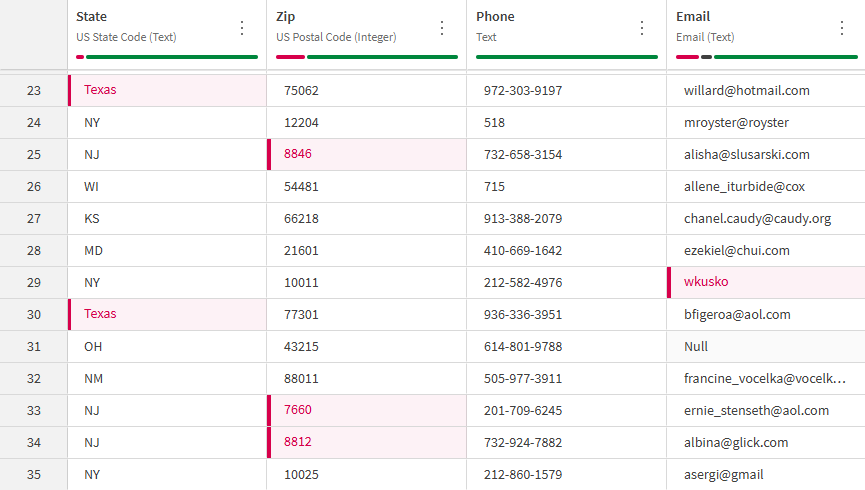
Features
-
Quality bars and semantic types available for each column in the Single Table view. Data quality is computed automatically upon opening the table recipe.
[link]
-
Ability to change semantic types of columns from the Single Table
[link]
-
Ability to filter on valid, invalid, empty, and null values in the Single Table view.
[link]
-
Ability to take direct action on data quality issues by processing invalid data within the Editor.
[link]
Permissions and access
Your access to data quality in table recipe depends on:
-
Your subscription
-
Your permissions in the tenant
Subscription requirements
- Qlik Talend Cloud 엔터프라이즈
- Qlik Talend Cloud 프리미엄
- Qlik Cloud Analytics 프리미엄
- Qlik Cloud Analytics 엔터프라이즈
- Qlik Sense Enterprise SaaS
Permissions
To access data quality in table recipe, you need the Data quality permission set to Allowed. This permission is assigned by a tenant administrator through default permissions or a custom role. For more information, see 기본 권한 및 사용자 지정 역할.