
The following figure provides an overview of the ports that are used in a default Qlik Sense installation.
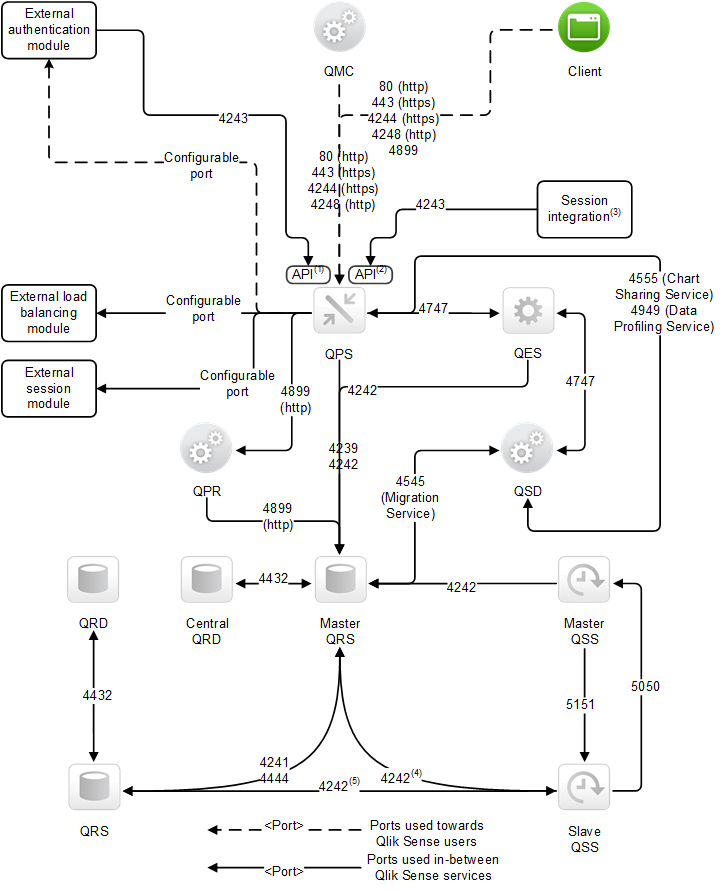
The superscript numbers in the figure refer to the following:
- The Authentication (ticket) API in the Qlik Sense Proxy Service (QPS).
- The Session API in the QPS.
- For example, a Single Sign-On (SSO) portal that uses the Session API.
- This port is used when the slave Qlik Sense Scheduler Service (QSS) is located on the central node in the site.
- This port is used when the slave QSS is located on a rim node.
The following table provides details on the ports in the figure.
| Port | Description |
|---|---|
| 80 |
Optional Qlik Sense Proxy Service (QPS) listen port. This port uses HTTP for communication. Information noteThis port is only available when client-side HTTP communication is enabled. This is managed in the Qlik Management Console (QMC).
|
| 443 |
Default Qlik Sense Proxy Service (QPS) listen port. This port uses HTTPS for communication. Tip noteMake sure that port 443 is available for the QPS to use, since the port is sometimes used by other software (for example, web servers).
|
| 4239 |
WebSocket server port. This port exposes parts of the Qlik Sense Repository Service (QRS) API over WebSocket. This port uses HTTPS for communication. |
| 4241 |
Communication port within multi-node sites for Qlik Sense Repository Service (QRS)-to-QRS synchronization. This port uses HTTPS for communication. |
| 4242 |
Qlik Sense Repository Service (QRS) REST API listen port. Also used by the QRS configuration service for the node registration process before the QRS API service is made available. This port uses HTTPS for communication. |
| 4243 |
Qlik Sense Proxy Service (QPS) REST API listen port. |
| 4244 |
Default Qlik Sense Proxy Service (QPS) authentication listen port. This port is used by the internal authentication module in the QPS when using NTLM in Microsoft Windows. This port uses HTTPS for communication. |
| 4248 |
Optional Qlik Sense Proxy Service (QPS) authentication listen port. The port is used by the internal authentication module in the QPS when using NTLM in Microsoft Windows. This port uses HTTP for communication.
Information noteThis port is only available when client-side HTTP communication is enabled. This is managed in the Qlik Management Console (QMC).
|
| 4432 |
Default listen port for the Qlik Sense Repository Database (QRD). The port is used to listen for connections from the Qlik Sense Repository Service (QRS). In a default Qlik Sense installation, the Qlik Sense Repository Service (QRS) uses the Qlik Sense Repository Database (QRD) service to read and write data in the repository database. A PostgreSQL database is used by default. |
| 4444 |
This port has two functions:
|
| 4545 | This port is used by the Migration Service for app migration purposes. The service is launched and managed by the Qlik Sense Service Dispatcher (QSD). |
| 4555 |
This port is used by the Chart Sharing Service for chart sharing between Qlik Sense users. The service is launched and managed by the Qlik Sense Service Dispatcher (QSD). This port uses HTTPS for communication. |
| 4747 |
Qlik Sense Engine Service (QES) listen port. This port is used for communication with the Qlik Sense web clients. This port uses HTTPS for communication. |
| 4899 |
Qlik Sense Printing Service (QPR) port. This port is used for export in Qlik Sense. This port uses HTTP for communication. |
| 4949 | This port is used by the Data Profiling Service when accessing and modifying the application load model. The service is launched and managed by the Qlik Sense Service Dispatcher (QSD). |
| 5050 |
Qlik Sense Scheduler Service (QSS) master REST engine. This port uses HTTPS for communication. |
| 5151 |
Qlik Sense Scheduler Service (QSS) slave REST engine. This port uses HTTPS for communication. |