Last updated: 10/8/2025
You can reuse property definitions that come built in with Qlik Sense.
Reusing Dimensions
When you reuse the Dimensions property panel accordion item, it includes the following:
- Add dimension
When you have added a dimension, you have the following default properties:
- Field
- Label
- Show null values
- Limitation
- Show others
- Others label
Example: Add Dimensions accordion
The example below depicts how to add a Dimensions accordion to the property panel of your visualization. Note that it is defined that the visualization must have exactly one dimension.

Reusing Measures
When you reuse the Measures property panel accordion item, it includes the following:
- Add measure
When you have added a measure, you have the following default properties:
- Label
- Expression
- Number formatting
Example: Add Measures accordion
This example depicts how we now also have added the definition of the Measures accordion to the property panel of our extension. Note that we also here define that the visualization must have exactly one measure.

Reusing Sorting
When you reuse the Sorting property panel accordion item, it includes the following:
- Labels of the dimension and measure used in the visualization
-
Sorting option (Auto or Custom)
The Custom option includes the following:
- Sort by expression (only available for dimensions)
- Sort numerically
- Sort alphabetically
- Sort by frequency (only available for filter panes)
Example: Add Sorting accordion
This example depicts how we now also have added the definition of the Sorting accordion to the property panel of your visualization. We have not made any alterations to the Sorting accordion pre-defined by Qlik Sense.

Reusing Add-ons
When you reuse the Addons property panel accordion item, it includes the following:
- Data handling
- Reference lines
Example: Add Add-ons accordion
This example depicts how we add the definition of the Add-ons accordion to the property panel of your visualization. We have not made any alterations to the Add-ons accordion pre-defined by Qlik Sense.

Reusing Appearance
When you reuse the Appearance property panel accordion item, it includes the following:
-
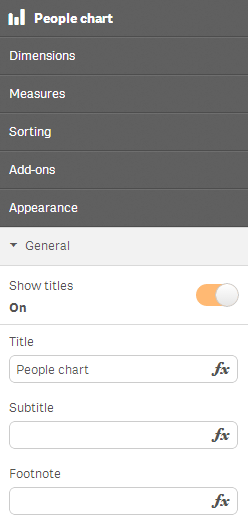
General
Includes settings for Title, Subtitle and Footnote
- Presentation (only available for visualizations that have more than one dimension)
- Colors and legend (only available in some types of visualizations)
- X-axis (only available in some types of visualizations)
- Y-axis (only available in some types of visualizations)
Example: Add Appearance accordion
This example depicts how we add the definition of the Appearance accordion to the property panel of your visualization. We have not made any alterations to the Add-ons accordion pre-defined by Qlik Sense.