Indicates if Replication Methods can be defined by you for tables in the integration.
Configurable Replication Methods are not supported for this integration. Stitch will use pre-defined replication methods for tables you set to replicate.
Unsupported
DATA SELECTION
Table selection
The ability to select individual tables for replication in the Stitch interface. If table selection is unavailable, all tables and all the columns they contain will be set to replicate by default.
This feature is supported for this version of the integration.
Supported
Column selection
The ability to select individual columns for replication in the Stitch interface. If column selection is unavailable, all columns will be set to replicate by default.
This feature is supported for this version of the integration.
Supported
Select all
Indicates if the integration supports selecting all available tables and columns.
Reports detailing the Loading phase of the replication process for a given integration. Includes the number of rows loaded for each table and error info, should an error occur.
This feature is supported for this version of the integration.
Supported
Connecting Stripe
Stripe setup requirements
To set up Stripe in Stitch, you need:
Administrator permissions in Stripe. This is required to grant Stitch access to Stripe.
On the Stitch Dashboard page, click the Add Integration button.
Click the Stripe icon.
Enter a name for the integration. This is the name that will display on the Stitch Dashboard for the integration; it’ll also be used to create the schema in your destination.
For example, the name “Stitch Stripe” would create a schema called stitch_stripe in the destination. Note: Schema names cannot be changed after you save the integration.
Step 2: Define the historical replication start date
The Sync Historical Data setting defines the starting date for your Stripe integration.
This means that data equal to or newer than this date will be replicated to your data warehouse.
Change this setting if you want to replicate data beyond Stripe’s default setting of 1 year. For a detailed look at historical replication jobs, check out the Syncing Historical SaaS Data guide.
Step 3: Create a replication schedule
Information note
Replication schedules affect the time Extraction begins, not the time to data loaded. Refer to the Replication Scheduling documentation for more information.
In the Replication Frequency section, you’ll create the integration’s replication schedule. An integration’s replication schedule determines how often Stitch runs a replication job, and the time that job begins.
Stripe integrations support the following replication scheduling methods:
Next, you’ll be prompted to sign into your Stripe account.
A screen explaining what you’re authorizing will display. Note: Stitch will only ever read your Stripe data, and cannot create charges or any other records in Stripe.
Click Sign in with Stripe to connect.
Sign into your Stripe account.
After the authorization process is successfully completed, you’ll be directed back to Stitch.
Click All Done.
Step 5: Set objects to replicate
Information noteIs an object missing or not replicating? Verify that the object meets the requirements for selection and replication.
Note: If a replication job is currently in progress, new selections won’t be used until the next job starts.
For Stripe integrations, you can select:
Individual tables and columns
All tables and columns
Click the tabs to view instructions for each selection method.
In the integration’s Tables to Replicate tab, locate a table you want to replicate.
To track a table, click the checkbox next to the table’s name. A blue checkmark means the table is set to replicate.
To track a column, click the checkbox next to the column’s name. A blue checkmark means the column is set to replicate.
Repeat this process for all the tables and columns you want to replicate.
When finished, click the Finalize Your Selections button at the bottom of the screen to save your selections.
Information noteImportant:
Using the Select All feature will overwrite any previous selections. However, selections aren’t final until Finalize Your Selections is clicked. Clicking Cancel will restore your previous selections.
Refer to the Select All guide for more info about this feature.
Click into the integration from the Stitch Dashboard page.
Click the Tables to Replicate tab.
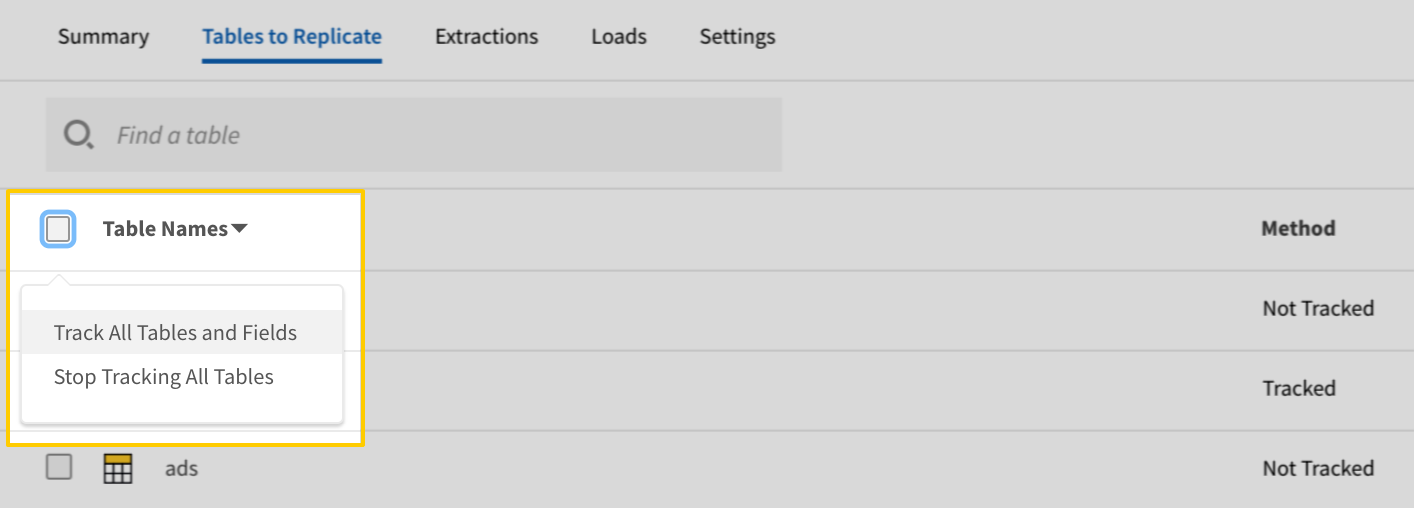
In the list of tables, click the box next to the Table Names column.
In the menu that displays, click Track all Tables and Fields:
The Track all Tables and Fields menu in the Tables to Replicate tab
Click the Finalize Your Selections button at the bottom of the page to save your data selections.
Initial and historical replication jobs
After you finish setting up Stripe, its Sync Status may show as Pending on either the Stitch Dashboard or in the Integration Details page.
For a new integration, a Pending status indicates that Stitch is in the process of scheduling the initial replication job for the integration. This may take some time to complete.
Information note
Initial replication jobs with Anchor Scheduling
If using Anchor Scheduling, an initial replication job may not kick off immediately. This depends on the selected Replication Frequency and Anchor Time. Refer to the Anchor Scheduling documentation for more information.
Free historical data loads
The first seven days of replication, beginning when data is first replicated, are free. Rows replicated from the new integration during this time won’t count towards your quota. Stitch offers this as a way of testing new integrations, measuring usage, and ensuring historical data volumes don’t quickly consume your quota.
Information noteReplication will continue after the seven days are over. If you’re no longer interested in this source, be sure to pause or delete the integration to prevent unwanted usage.
Stripe replication
Events table replication
Stripe will only provide 30 days of historical event data for the events table. Refer the the Stripe docs for more information about the events table.
Objects and events
In the Stripe API, there are two concepts:
Objects, which are items like charges, invoices, customers, etc.
Events, which are changes to objects. For example: An invoice being created, or its status going from draft to open.
Whenever an object is created or updated in Stripe, a corresponding event is created. Because Stripe creates and updates object records in this way, there are two types of tables in Stitch’s Stripe integration:
A table for events, which contains all events that have occurred for Stripe’s supported event types. This table acts as a history for an object record, showing how it has been changed over time.
Tables for objects, which contains the latest version of records. These are tables like customers, charges, invoices, etc.
Note: Updates based on events is only applicable to the type of object the event is for. For example: If a dispute object is updated, only the corresponding record in the disputes table will be updated. The related charge in the charges table will not be updated. To retrieve related data for different objects, you’ll need to use the events table. Refer to Stripe’s documentation for info about event types and the objects they describe.
Example event and object data replication over time
In the image below is an example of how records for the events and invoices tables will look as an invoice changes over time. Click the image to enlarge.
Schemas and naming conventions can change from version to version, so we recommend verifying your integration’s version before continuing.
The schema and info displayed below is for version 1 of this integration.
Information note
Table and column names in your destination
Depending on your destination, table and column names may not appear as they are outlined below.
For example: Object names are lowercased in Redshift (CusTomERs > customers), while case is maintained in PostgreSQL destinations (CusTomERs > CusTomERs). Refer to the Loading Guide for your destination for more info.
balance_transactions
The balance_transactions table contains info about transactions have have contributed to your Stripe account balance, including charges, transfers, etc.
This is a nested data structure. If your destination doesn't natively support nested data, attributes will be denested into a subtable. <a href='/en-US/stitch/replication/loading/understanding-loading-row-usage-for-nested-data-structures' target='new'>Learn more</a>.
amount
INTEGER
application
STRING
currency
STRING
description
STRING
type
STRING
id
STRING
net
INTEGER
object
STRING
source
STRING
sourced_transfers
ARRAY
This is a nested data structure. If your destination doesn't natively support nested data, attributes will be denested into a subtable. <a href='/en-US/stitch/replication/loading/understanding-loading-row-usage-for-nested-data-structures' target='new'>Learn more</a>.
status
STRING
type
STRING
updated
DATE-TIME
charges
The charges table contains info about charges to credit and debit cards.
This is a nested data structure. If your destination doesn't natively support nested data, attributes in this object will be flattened into the table. <a href='/en-US/stitch/replication/loading/understanding-loading-row-usage-for-nested-data-structures' target='new'>Learn more</a>.
address
OBJECT
This is a nested data structure. If your destination doesn't natively support nested data, attributes in this object will be flattened into the table. <a href='/en-US/stitch/replication/loading/understanding-loading-row-usage-for-nested-data-structures' target='new'>Learn more</a>.
city
STRING
country
STRING
line1
STRING
line2
STRING
postal_code
STRING
state
STRING
email
STRING
name
STRING
phone
STRING
calculated_statement_descriptor
STRING
captured
BOOLEAN
card
OBJECT
This is a nested data structure. If your destination doesn't natively support nested data, attributes in this object will be flattened into the table. <a href='/en-US/stitch/replication/loading/understanding-loading-row-usage-for-nested-data-structures' target='new'>Learn more</a>.
address_city
STRING
address_country
STRING
address_line1
STRING
address_line1_check
STRING
address_line2
STRING
address_state
STRING
address_zip
STRING
address_zip_check
STRING
brand
STRING
country
STRING
customer
STRING
cvc_check
STRING
dynamic_last4
STRING
exp_month
INTEGER
exp_year
INTEGER
fingerprint
STRING
funding
STRING
id
STRING
last4
STRING
metadata
OBJECT
This is a nested data structure. If your destination doesn't natively support nested data, attributes in this object will be flattened into the table. <a href='/en-US/stitch/replication/loading/understanding-loading-row-usage-for-nested-data-structures' target='new'>Learn more</a>.
name
STRING
object
STRING
tokenization_method
STRING
type
STRING
created
DATE-TIME
currency
STRING
customer
STRING
description
STRING
destination
STRING
dispute
STRING
disputed
BOOLEAN
failure_code
STRING
failure_message
STRING
fraud_details
OBJECT
This is a nested data structure. If your destination doesn't natively support nested data, attributes in this object will be flattened into the table. <a href='/en-US/stitch/replication/loading/understanding-loading-row-usage-for-nested-data-structures' target='new'>Learn more</a>.
stripe_report
STRING
id
STRING
invoice
STRING
livemode
BOOLEAN
metadata
OBJECT
This is a nested data structure. If your destination doesn't natively support nested data, attributes in this object will be flattened into the table. <a href='/en-US/stitch/replication/loading/understanding-loading-row-usage-for-nested-data-structures' target='new'>Learn more</a>.
object
STRING
on_behalf_of
STRING
order
STRING
outcome
OBJECT
This is a nested data structure. If your destination doesn't natively support nested data, attributes in this object will be flattened into the table. <a href='/en-US/stitch/replication/loading/understanding-loading-row-usage-for-nested-data-structures' target='new'>Learn more</a>.
network_status
STRING
reason
STRING
risk_level
STRING
risk_score
INTEGER
seller_message
STRING
type
STRING
paid
BOOLEAN
payment_intent
STRING
payment_method
STRING
payment_method_details
OBJECT
This is a nested data structure. If your destination doesn't natively support nested data, attributes in this object will be flattened into the table. <a href='/en-US/stitch/replication/loading/understanding-loading-row-usage-for-nested-data-structures' target='new'>Learn more</a>.
ach_credit_transfer
OBJECT
This is a nested data structure. If your destination doesn't natively support nested data, attributes in this object will be flattened into the table. <a href='/en-US/stitch/replication/loading/understanding-loading-row-usage-for-nested-data-structures' target='new'>Learn more</a>.
account_number
STRING
bank_name
STRING
routing_number
STRING
swift_code
STRING
ach_debit
OBJECT
This is a nested data structure. If your destination doesn't natively support nested data, attributes in this object will be flattened into the table. <a href='/en-US/stitch/replication/loading/understanding-loading-row-usage-for-nested-data-structures' target='new'>Learn more</a>.
account_holder_type
STRING
bank_name
STRING
country
STRING
fingerprint
STRING
last4
STRING
routing_number
STRING
alipay
OBJECT
This is a nested data structure. If your destination doesn't natively support nested data, attributes in this object will be flattened into the table. <a href='/en-US/stitch/replication/loading/understanding-loading-row-usage-for-nested-data-structures' target='new'>Learn more</a>.
bancontact
OBJECT
This is a nested data structure. If your destination doesn't natively support nested data, attributes in this object will be flattened into the table. <a href='/en-US/stitch/replication/loading/understanding-loading-row-usage-for-nested-data-structures' target='new'>Learn more</a>.
bank_code
STRING
bank_name
STRING
bic
STRING
iban_last4
STRING
preferred_language
STRING
verified_name
STRING
card
OBJECT
This is a nested data structure. If your destination doesn't natively support nested data, attributes in this object will be flattened into the table. <a href='/en-US/stitch/replication/loading/understanding-loading-row-usage-for-nested-data-structures' target='new'>Learn more</a>.
address_city
STRING
address_country
STRING
address_line1
STRING
address_line1_check
STRING
address_line2
STRING
address_state
STRING
address_zip
STRING
address_zip_check
STRING
brand
STRING
card_present
OBJECT
This is a nested data structure. If your destination doesn't natively support nested data, attributes in this object will be flattened into the table. <a href='/en-US/stitch/replication/loading/understanding-loading-row-usage-for-nested-data-structures' target='new'>Learn more</a>.
brand
STRING
country
STRING
emv_auth_data
STRING
exp_month
INTEGER
exp_year
INTEGER
fingerprint
STRING
funding
STRING
generated_card
STRING
last4
STRING
network
STRING
read_method
STRING
receipt
OBJECT
This is a nested data structure. If your destination doesn't natively support nested data, attributes in this object will be flattened into the table. <a href='/en-US/stitch/replication/loading/understanding-loading-row-usage-for-nested-data-structures' target='new'>Learn more</a>.
application_cryptogram
STRING
application_preferred_name
STRING
authorization_code
STRING
authorization_response_code
STRING
cardholder_verification_method
STRING
dedicated_file_name
STRING
terminal_verification_results
STRING
transaction_status_information
STRING
checks
OBJECT
This is a nested data structure. If your destination doesn't natively support nested data, attributes in this object will be flattened into the table. <a href='/en-US/stitch/replication/loading/understanding-loading-row-usage-for-nested-data-structures' target='new'>Learn more</a>.
address_line1_check
STRING
address_postal_code_check
STRING
cvc_check
STRING
country
STRING
customer
STRING
cvc_check
STRING
dynamic_last4
STRING
eps
OBJECT
This is a nested data structure. If your destination doesn't natively support nested data, attributes in this object will be flattened into the table. <a href='/en-US/stitch/replication/loading/understanding-loading-row-usage-for-nested-data-structures' target='new'>Learn more</a>.
verified_name
STRING
exp_month
INTEGER
exp_year
INTEGER
fingerprint
STRING
funding
STRING
giropay
OBJECT
This is a nested data structure. If your destination doesn't natively support nested data, attributes in this object will be flattened into the table. <a href='/en-US/stitch/replication/loading/understanding-loading-row-usage-for-nested-data-structures' target='new'>Learn more</a>.
bank_code
STRING
bank_name
STRING
bic
STRING
verified_name
STRING
id
STRING
ideal
OBJECT
This is a nested data structure. If your destination doesn't natively support nested data, attributes in this object will be flattened into the table. <a href='/en-US/stitch/replication/loading/understanding-loading-row-usage-for-nested-data-structures' target='new'>Learn more</a>.
bank
STRING
bic
STRING
iban_last4
STRING
verified_name
STRING
installments
OBJECT
This is a nested data structure. If your destination doesn't natively support nested data, attributes in this object will be flattened into the table. <a href='/en-US/stitch/replication/loading/understanding-loading-row-usage-for-nested-data-structures' target='new'>Learn more</a>.
plan
OBJECT
This is a nested data structure. If your destination doesn't natively support nested data, attributes in this object will be flattened into the table. <a href='/en-US/stitch/replication/loading/understanding-loading-row-usage-for-nested-data-structures' target='new'>Learn more</a>.
count
INTEGER
interval
STRING
type
STRING
klarna
OBJECT
This is a nested data structure. If your destination doesn't natively support nested data, attributes in this object will be flattened into the table. <a href='/en-US/stitch/replication/loading/understanding-loading-row-usage-for-nested-data-structures' target='new'>Learn more</a>.
last4
STRING
metadata
OBJECT
This is a nested data structure. If your destination doesn't natively support nested data, attributes in this object will be flattened into the table. <a href='/en-US/stitch/replication/loading/understanding-loading-row-usage-for-nested-data-structures' target='new'>Learn more</a>.
multibanco
OBJECT
This is a nested data structure. If your destination doesn't natively support nested data, attributes in this object will be flattened into the table. <a href='/en-US/stitch/replication/loading/understanding-loading-row-usage-for-nested-data-structures' target='new'>Learn more</a>.
entity
STRING
reference
STRING
name
STRING
network
STRING
object
STRING
p24
OBJECT
This is a nested data structure. If your destination doesn't natively support nested data, attributes in this object will be flattened into the table. <a href='/en-US/stitch/replication/loading/understanding-loading-row-usage-for-nested-data-structures' target='new'>Learn more</a>.
reference
STRING
verified_name
STRING
sepa_debit
OBJECT
This is a nested data structure. If your destination doesn't natively support nested data, attributes in this object will be flattened into the table. <a href='/en-US/stitch/replication/loading/understanding-loading-row-usage-for-nested-data-structures' target='new'>Learn more</a>.
bank_code
STRING
branch_code
STRING
country
STRING
fingerprint
STRING
last4
STRING
mandate
STRING
sofort
OBJECT
This is a nested data structure. If your destination doesn't natively support nested data, attributes in this object will be flattened into the table. <a href='/en-US/stitch/replication/loading/understanding-loading-row-usage-for-nested-data-structures' target='new'>Learn more</a>.
bank_code
STRING
bank_name
STRING
bic
STRING
country
STRING
iban_last4
STRING
verified_name
STRING
stripe_account
OBJECT
This is a nested data structure. If your destination doesn't natively support nested data, attributes in this object will be flattened into the table. <a href='/en-US/stitch/replication/loading/understanding-loading-row-usage-for-nested-data-structures' target='new'>Learn more</a>.
three_d_secure
OBJECT
This is a nested data structure. If your destination doesn't natively support nested data, attributes in this object will be flattened into the table. <a href='/en-US/stitch/replication/loading/understanding-loading-row-usage-for-nested-data-structures' target='new'>Learn more</a>.
authenticated
BOOLEAN
succeeded
BOOLEAN
version
STRING
tokenization_method
STRING
type
STRING
wallet
OBJECT
This is a nested data structure. If your destination doesn't natively support nested data, attributes in this object will be flattened into the table. <a href='/en-US/stitch/replication/loading/understanding-loading-row-usage-for-nested-data-structures' target='new'>Learn more</a>.
amex_express_checkout
OBJECT
This is a nested data structure. If your destination doesn't natively support nested data, attributes in this object will be flattened into the table. <a href='/en-US/stitch/replication/loading/understanding-loading-row-usage-for-nested-data-structures' target='new'>Learn more</a>.
apple_pay
OBJECT
This is a nested data structure. If your destination doesn't natively support nested data, attributes in this object will be flattened into the table. <a href='/en-US/stitch/replication/loading/understanding-loading-row-usage-for-nested-data-structures' target='new'>Learn more</a>.
dynamic_last4
STRING
google_pay
OBJECT
This is a nested data structure. If your destination doesn't natively support nested data, attributes in this object will be flattened into the table. <a href='/en-US/stitch/replication/loading/understanding-loading-row-usage-for-nested-data-structures' target='new'>Learn more</a>.
masterpass
OBJECT
This is a nested data structure. If your destination doesn't natively support nested data, attributes in this object will be flattened into the table. <a href='/en-US/stitch/replication/loading/understanding-loading-row-usage-for-nested-data-structures' target='new'>Learn more</a>.
billing_address
OBJECT
This is a nested data structure. If your destination doesn't natively support nested data, attributes in this object will be flattened into the table. <a href='/en-US/stitch/replication/loading/understanding-loading-row-usage-for-nested-data-structures' target='new'>Learn more</a>.
city
STRING
country
STRING
line1
STRING
line2
STRING
postal_code
STRING
state
STRING
email
STRING
name
STRING
shipping_address
OBJECT
This is a nested data structure. If your destination doesn't natively support nested data, attributes in this object will be flattened into the table. <a href='/en-US/stitch/replication/loading/understanding-loading-row-usage-for-nested-data-structures' target='new'>Learn more</a>.
city
STRING
country
STRING
line1
STRING
line2
STRING
postal_code
STRING
state
STRING
samsung_pay
OBJECT
This is a nested data structure. If your destination doesn't natively support nested data, attributes in this object will be flattened into the table. <a href='/en-US/stitch/replication/loading/understanding-loading-row-usage-for-nested-data-structures' target='new'>Learn more</a>.
type
STRING
visa_checkout
OBJECT
This is a nested data structure. If your destination doesn't natively support nested data, attributes in this object will be flattened into the table. <a href='/en-US/stitch/replication/loading/understanding-loading-row-usage-for-nested-data-structures' target='new'>Learn more</a>.
billing_address
OBJECT
This is a nested data structure. If your destination doesn't natively support nested data, attributes in this object will be flattened into the table. <a href='/en-US/stitch/replication/loading/understanding-loading-row-usage-for-nested-data-structures' target='new'>Learn more</a>.
city
STRING
country
STRING
line1
STRING
line2
STRING
postal_code
STRING
state
STRING
email
STRING
name
STRING
shipping_address
OBJECT
This is a nested data structure. If your destination doesn't natively support nested data, attributes in this object will be flattened into the table. <a href='/en-US/stitch/replication/loading/understanding-loading-row-usage-for-nested-data-structures' target='new'>Learn more</a>.
city
STRING
country
STRING
line1
STRING
line2
STRING
postal_code
STRING
state
STRING
wechat
OBJECT
This is a nested data structure. If your destination doesn't natively support nested data, attributes in this object will be flattened into the table. <a href='/en-US/stitch/replication/loading/understanding-loading-row-usage-for-nested-data-structures' target='new'>Learn more</a>.
card_present
OBJECT
This is a nested data structure. If your destination doesn't natively support nested data, attributes in this object will be flattened into the table. <a href='/en-US/stitch/replication/loading/understanding-loading-row-usage-for-nested-data-structures' target='new'>Learn more</a>.
amount_authorized
INTEGER
brand
STRING
cardholder_name
STRING
country
STRING
emv_auth_data
STRING
exp_month
INTEGER
exp_year
INTEGER
fingerprint
STRING
funding
STRING
generated_card
STRING
last4
STRING
network
STRING
overcapture_supported
BOOLEAN
read_method
STRING
receipt
OBJECT
This is a nested data structure. If your destination doesn't natively support nested data, attributes in this object will be flattened into the table. <a href='/en-US/stitch/replication/loading/understanding-loading-row-usage-for-nested-data-structures' target='new'>Learn more</a>.
account_type
STRING
application_cryptogram
STRING
application_preferred_name
STRING
authorization_code
STRING
authorization_response_code
STRING
cardholder_verification_method
STRING
dedicated_file_name
STRING
terminal_verification_results
STRING
transaction_status_information
STRING
type
STRING
receipt_email
STRING
receipt_number
STRING
receipt_url
STRING
refunded
BOOLEAN
refunds
ARRAY
This is a nested data structure. If your destination doesn't natively support nested data, attributes will be denested into a subtable. <a href='/en-US/stitch/replication/loading/understanding-loading-row-usage-for-nested-data-structures' target='new'>Learn more</a>.
review
STRING
shipping
OBJECT
This is a nested data structure. If your destination doesn't natively support nested data, attributes in this object will be flattened into the table. <a href='/en-US/stitch/replication/loading/understanding-loading-row-usage-for-nested-data-structures' target='new'>Learn more</a>.
source
OBJECT
This is a nested data structure. If your destination doesn't natively support nested data, attributes in this object will be flattened into the table. <a href='/en-US/stitch/replication/loading/understanding-loading-row-usage-for-nested-data-structures' target='new'>Learn more</a>.
ach_credit_transfer
OBJECT
This is a nested data structure. If your destination doesn't natively support nested data, attributes in this object will be flattened into the table. <a href='/en-US/stitch/replication/loading/understanding-loading-row-usage-for-nested-data-structures' target='new'>Learn more</a>.
account_number
STRING
bank_name
STRING
fingerprint
STRING
refund_account_holder_name
STRING
refund_account_holder_type
STRING
refund_account_number
STRING
refund_routing_number
STRING
routing_number
STRING
swift_code
STRING
address_city
STRING
address_country
STRING
address_line1
STRING
address_line1_check
STRING
address_line2
STRING
address_state
STRING
address_zip
STRING
address_zip_check
STRING
alipay
OBJECT
This is a nested data structure. If your destination doesn't natively support nested data, attributes in this object will be flattened into the table. <a href='/en-US/stitch/replication/loading/understanding-loading-row-usage-for-nested-data-structures' target='new'>Learn more</a>.
amount
INTEGER
bancontact
OBJECT
This is a nested data structure. If your destination doesn't natively support nested data, attributes in this object will be flattened into the table. <a href='/en-US/stitch/replication/loading/understanding-loading-row-usage-for-nested-data-structures' target='new'>Learn more</a>.
brand
STRING
card
OBJECT
This is a nested data structure. If your destination doesn't natively support nested data, attributes in this object will be flattened into the table. <a href='/en-US/stitch/replication/loading/understanding-loading-row-usage-for-nested-data-structures' target='new'>Learn more</a>.
address_line1_check
STRING
address_zip_check
STRING
brand
STRING
country
STRING
cvc_check
STRING
dynamic_last4
STRING
exp_month
INTEGER
exp_year
INTEGER
fingerprint
STRING
funding
STRING
last4
STRING
name
STRING
three_d_secure
STRING
tokenization_method
STRING
type
STRING
client_secret
STRING
country
STRING
created
DATE-TIME
currency
STRING
customer
STRING
cvc_check
STRING
dynamic_last4
STRING
eps
OBJECT
This is a nested data structure. If your destination doesn't natively support nested data, attributes in this object will be flattened into the table. <a href='/en-US/stitch/replication/loading/understanding-loading-row-usage-for-nested-data-structures' target='new'>Learn more</a>.
exp_month
INTEGER
exp_year
INTEGER
fingerprint
STRING
flow
STRING
funding
STRING
id
STRING
ideal
OBJECT
This is a nested data structure. If your destination doesn't natively support nested data, attributes in this object will be flattened into the table. <a href='/en-US/stitch/replication/loading/understanding-loading-row-usage-for-nested-data-structures' target='new'>Learn more</a>.
last4
STRING
livemode
BOOLEAN
metadata
OBJECT
This is a nested data structure. If your destination doesn't natively support nested data, attributes in this object will be flattened into the table. <a href='/en-US/stitch/replication/loading/understanding-loading-row-usage-for-nested-data-structures' target='new'>Learn more</a>.
multibanco
OBJECT
This is a nested data structure. If your destination doesn't natively support nested data, attributes in this object will be flattened into the table. <a href='/en-US/stitch/replication/loading/understanding-loading-row-usage-for-nested-data-structures' target='new'>Learn more</a>.
name
STRING
object
STRING
owner
OBJECT
This is a nested data structure. If your destination doesn't natively support nested data, attributes in this object will be flattened into the table. <a href='/en-US/stitch/replication/loading/understanding-loading-row-usage-for-nested-data-structures' target='new'>Learn more</a>.
address
OBJECT
This is a nested data structure. If your destination doesn't natively support nested data, attributes in this object will be flattened into the table. <a href='/en-US/stitch/replication/loading/understanding-loading-row-usage-for-nested-data-structures' target='new'>Learn more</a>.
city
STRING
country
STRING
line1
STRING
line2
STRING
postal_code
STRING
state
STRING
email
STRING
name
STRING
phone
STRING
verified_address
STRING
verified_email
STRING
verified_name
STRING
verified_phone
STRING
receiver
OBJECT
This is a nested data structure. If your destination doesn't natively support nested data, attributes in this object will be flattened into the table. <a href='/en-US/stitch/replication/loading/understanding-loading-row-usage-for-nested-data-structures' target='new'>Learn more</a>.
address
STRING
amount_charged
INTEGER
amount_received
INTEGER
amount_returned
INTEGER
refund_attributes_method
STRING
refund_attributes_status
STRING
redirect
OBJECT
This is a nested data structure. If your destination doesn't natively support nested data, attributes in this object will be flattened into the table. <a href='/en-US/stitch/replication/loading/understanding-loading-row-usage-for-nested-data-structures' target='new'>Learn more</a>.
failure_reason
STRING
return_url
STRING
status
STRING
url
STRING
statement_descriptor
STRING
status
STRING
tokenization_method
STRING
type
STRING
usage
STRING
source_transfer
STRING
statement_description
STRING
statement_descriptor
STRING
statement_descriptor_suffix
STRING
status
STRING
transfer_data
OBJECT
This is a nested data structure. If your destination doesn't natively support nested data, attributes in this object will be flattened into the table. <a href='/en-US/stitch/replication/loading/understanding-loading-row-usage-for-nested-data-structures' target='new'>Learn more</a>.
amount
INTEGER
destination
STRING
transfer_group
STRING
updated
DATE-TIME
coupons
The coupons table contains info about percent or amount-off discounts that may be applied to a customer. Note: Coupons only apply to invoices; they don’t apply to one-off charges.
This is a nested data structure. If your destination doesn't natively support nested data, attributes in this object will be flattened into the table. <a href='/en-US/stitch/replication/loading/understanding-loading-row-usage-for-nested-data-structures' target='new'>Learn more</a>.
name
STRING
object
STRING
percent_off
NUMBER
percent_off_precise
NUMBER
redeem_by
DATE-TIME
times_redeemed
INTEGER
updated
DATE-TIME
valid
BOOLEAN
customers
The customers table contains info about your customers.
This is a nested data structure. If your destination doesn't natively support nested data, attributes in this object will be flattened into the table. <a href='/en-US/stitch/replication/loading/understanding-loading-row-usage-for-nested-data-structures' target='new'>Learn more</a>.
city
STRING
country
STRING
line1
STRING
line2
STRING
postal_code
STRING
state
STRING
balance
INTEGER
cards
ARRAY
This is a nested data structure. If your destination doesn't natively support nested data, attributes will be denested into a subtable. <a href='/en-US/stitch/replication/loading/understanding-loading-row-usage-for-nested-data-structures' target='new'>Learn more</a>.
address_city
STRING
address_country
STRING
address_line1
STRING
address_line1_check
STRING
address_line2
STRING
address_state
STRING
address_zip
STRING
address_zip_check
STRING
brand
STRING
country
STRING
customer
STRING
cvc_check
STRING
dynamic_last4
STRING
exp_month
INTEGER
exp_year
INTEGER
fingerprint
STRING
funding
STRING
id
STRING
last4
STRING
metadata
OBJECT
This is a nested data structure. If your destination doesn't natively support nested data, attributes in this object will be flattened into the table. <a href='/en-US/stitch/replication/loading/understanding-loading-row-usage-for-nested-data-structures' target='new'>Learn more</a>.
name
STRING
object
STRING
tokenization_method
STRING
type
STRING
created
DATE-TIME
currency
STRING
default_card
STRING
default_source
STRING
delinquent
BOOLEAN
description
STRING
discount
OBJECT
This is a nested data structure. If your destination doesn't natively support nested data, attributes in this object will be flattened into the table. <a href='/en-US/stitch/replication/loading/understanding-loading-row-usage-for-nested-data-structures' target='new'>Learn more</a>.
coupon
OBJECT
This is a nested data structure. If your destination doesn't natively support nested data, attributes in this object will be flattened into the table. <a href='/en-US/stitch/replication/loading/understanding-loading-row-usage-for-nested-data-structures' target='new'>Learn more</a>.
amount_off
INTEGER
created
DATE-TIME
currency
STRING
duration
STRING
duration_in_months
INTEGER
id
STRING
livemode
BOOLEAN
max_redemptions
INTEGER
metadata
OBJECT
This is a nested data structure. If your destination doesn't natively support nested data, attributes in this object will be flattened into the table. <a href='/en-US/stitch/replication/loading/understanding-loading-row-usage-for-nested-data-structures' target='new'>Learn more</a>.
name
STRING
object
STRING
percent_off
INTEGER
percent_off_precise
NUMBER
redeem_by
DATE-TIME
times_redeemed
INTEGER
valid
BOOLEAN
customer
STRING
end
DATE-TIME
object
STRING
start
DATE-TIME
subscription
STRING
email
STRING
id
STRING
invoice_prefix
STRING
invoice_settings
OBJECT
This is a nested data structure. If your destination doesn't natively support nested data, attributes in this object will be flattened into the table. <a href='/en-US/stitch/replication/loading/understanding-loading-row-usage-for-nested-data-structures' target='new'>Learn more</a>.
custom_fields
ARRAY
This is a nested data structure. If your destination doesn't natively support nested data, attributes will be denested into a subtable. <a href='/en-US/stitch/replication/loading/understanding-loading-row-usage-for-nested-data-structures' target='new'>Learn more</a>.
default_payment_method
STRING
footer
STRING
livemode
BOOLEAN
metadata
OBJECT
This is a nested data structure. If your destination doesn't natively support nested data, attributes in this object will be flattened into the table. <a href='/en-US/stitch/replication/loading/understanding-loading-row-usage-for-nested-data-structures' target='new'>Learn more</a>.
name
STRING
next_invoice_sequence
INTEGER
object
STRING
phone
STRING
preferred_locales
ARRAY
This is a nested data structure. If your destination doesn't natively support nested data, attributes will be denested into a subtable. <a href='/en-US/stitch/replication/loading/understanding-loading-row-usage-for-nested-data-structures' target='new'>Learn more</a>.
shipping
OBJECT
This is a nested data structure. If your destination doesn't natively support nested data, attributes in this object will be flattened into the table. <a href='/en-US/stitch/replication/loading/understanding-loading-row-usage-for-nested-data-structures' target='new'>Learn more</a>.
address
OBJECT
This is a nested data structure. If your destination doesn't natively support nested data, attributes in this object will be flattened into the table. <a href='/en-US/stitch/replication/loading/understanding-loading-row-usage-for-nested-data-structures' target='new'>Learn more</a>.
city
STRING
country
STRING
line1
STRING
line2
STRING
postal_code
STRING
state
STRING
name
STRING
phone
STRING
sources
ARRAY
This is a nested data structure. If your destination doesn't natively support nested data, attributes will be denested into a subtable. <a href='/en-US/stitch/replication/loading/understanding-loading-row-usage-for-nested-data-structures' target='new'>Learn more</a>.
ach_credit_transfer
OBJECT
This is a nested data structure. If your destination doesn't natively support nested data, attributes in this object will be flattened into the table. <a href='/en-US/stitch/replication/loading/understanding-loading-row-usage-for-nested-data-structures' target='new'>Learn more</a>.
account_number
STRING
bank_name
STRING
fingerprint
STRING
refund_account_holder_name
STRING
refund_account_holder_type
STRING
refund_account_number
STRING
refund_routing_number
STRING
routing_number
STRING
swift_code
STRING
address_city
STRING
address_country
STRING
address_line1
STRING
address_line1_check
STRING
address_line2
STRING
address_state
STRING
address_zip
STRING
address_zip_check
STRING
alipay
OBJECT
This is a nested data structure. If your destination doesn't natively support nested data, attributes in this object will be flattened into the table. <a href='/en-US/stitch/replication/loading/understanding-loading-row-usage-for-nested-data-structures' target='new'>Learn more</a>.
amount
INTEGER
bancontact
OBJECT
This is a nested data structure. If your destination doesn't natively support nested data, attributes in this object will be flattened into the table. <a href='/en-US/stitch/replication/loading/understanding-loading-row-usage-for-nested-data-structures' target='new'>Learn more</a>.
brand
STRING
card
OBJECT
This is a nested data structure. If your destination doesn't natively support nested data, attributes in this object will be flattened into the table. <a href='/en-US/stitch/replication/loading/understanding-loading-row-usage-for-nested-data-structures' target='new'>Learn more</a>.
address_line1_check
STRING
address_zip_check
STRING
brand
STRING
country
STRING
cvc_check
STRING
dynamic_last4
STRING
exp_month
INTEGER
exp_year
INTEGER
fingerprint
STRING
funding
STRING
last4
STRING
name
STRING
three_d_secure
STRING
tokenization_method
STRING
type
STRING
client_secret
STRING
country
STRING
created
DATE-TIME
currency
STRING
customer
STRING
cvc_check
STRING
dynamic_last4
STRING
eps
OBJECT
This is a nested data structure. If your destination doesn't natively support nested data, attributes in this object will be flattened into the table. <a href='/en-US/stitch/replication/loading/understanding-loading-row-usage-for-nested-data-structures' target='new'>Learn more</a>.
exp_month
INTEGER
exp_year
INTEGER
fingerprint
STRING
flow
STRING
funding
STRING
id
STRING
ideal
OBJECT
This is a nested data structure. If your destination doesn't natively support nested data, attributes in this object will be flattened into the table. <a href='/en-US/stitch/replication/loading/understanding-loading-row-usage-for-nested-data-structures' target='new'>Learn more</a>.
last4
STRING
livemode
BOOLEAN
metadata
OBJECT
This is a nested data structure. If your destination doesn't natively support nested data, attributes in this object will be flattened into the table. <a href='/en-US/stitch/replication/loading/understanding-loading-row-usage-for-nested-data-structures' target='new'>Learn more</a>.
multibanco
OBJECT
This is a nested data structure. If your destination doesn't natively support nested data, attributes in this object will be flattened into the table. <a href='/en-US/stitch/replication/loading/understanding-loading-row-usage-for-nested-data-structures' target='new'>Learn more</a>.
name
STRING
object
STRING
owner
OBJECT
This is a nested data structure. If your destination doesn't natively support nested data, attributes in this object will be flattened into the table. <a href='/en-US/stitch/replication/loading/understanding-loading-row-usage-for-nested-data-structures' target='new'>Learn more</a>.
address
OBJECT
This is a nested data structure. If your destination doesn't natively support nested data, attributes in this object will be flattened into the table. <a href='/en-US/stitch/replication/loading/understanding-loading-row-usage-for-nested-data-structures' target='new'>Learn more</a>.
city
STRING
country
STRING
line1
STRING
line2
STRING
postal_code
STRING
state
STRING
email
STRING
name
STRING
phone
STRING
verified_address
STRING
verified_email
STRING
verified_name
STRING
verified_phone
STRING
receiver
OBJECT
This is a nested data structure. If your destination doesn't natively support nested data, attributes in this object will be flattened into the table. <a href='/en-US/stitch/replication/loading/understanding-loading-row-usage-for-nested-data-structures' target='new'>Learn more</a>.
address
STRING
amount_charged
INTEGER
amount_received
INTEGER
amount_returned
INTEGER
refund_attributes_method
STRING
refund_attributes_status
STRING
redirect
OBJECT
This is a nested data structure. If your destination doesn't natively support nested data, attributes in this object will be flattened into the table. <a href='/en-US/stitch/replication/loading/understanding-loading-row-usage-for-nested-data-structures' target='new'>Learn more</a>.
failure_reason
STRING
return_url
STRING
status
STRING
url
STRING
statement_descriptor
STRING
status
STRING
tokenization_method
STRING
type
STRING
usage
STRING
["TYPE", ["NULL", "STRING"]]
subscriptions
ARRAY
This is a nested data structure. If your destination doesn't natively support nested data, attributes will be denested into a subtable. <a href='/en-US/stitch/replication/loading/understanding-loading-row-usage-for-nested-data-structures' target='new'>Learn more</a>.
tax_exempt
STRING
tax_info
STRING
tax_info_verification
STRING
updated
DATE-TIME
disputes
This table contains information about customer disputes related to charges on their credit card.
This is a nested data structure. If your destination doesn't natively support nested data, attributes will be denested into a subtable. <a href='/en-US/stitch/replication/loading/understanding-loading-row-usage-for-nested-data-structures' target='new'>Learn more</a>.
id
STRING
charge
STRING
created
DATE-TIME
currency
STRING
evidence
STRING, OBJECT
This is a nested data structure. If your destination doesn't natively support nested data, attributes in this object will be flattened into the table. <a href='/en-US/stitch/replication/loading/understanding-loading-row-usage-for-nested-data-structures' target='new'>Learn more</a>.
access_activity_log
STRING
billing_address
STRING
cancellation_policy
STRING
cancellation_policy_disclosure
STRING
cancellation_rebuttal
STRING
customer_communication
STRING
customer_email_address
STRING
customer_name
STRING
customer_purchase_ip
STRING
customer_signature
STRING
duplicate_charge_documentation
STRING
duplicate_charge_explanation
STRING
duplicate_charge_id
STRING
product_description
STRING
receipt
STRING
refund_policy
STRING
refund_policy_disclosure
STRING
refund_refusal_explanation
STRING
service_date
STRING
service_documentation
STRING
shipping_address
STRING
shipping_carrier
STRING
shipping_date
STRING
shipping_documentation
STRING
shipping_tracking_number
STRING
uncategorized_file
STRING
uncategorized_text
STRING
evidence_details
OBJECT
This is a nested data structure. If your destination doesn't natively support nested data, attributes in this object will be flattened into the table. <a href='/en-US/stitch/replication/loading/understanding-loading-row-usage-for-nested-data-structures' target='new'>Learn more</a>.
due_by
DATE-TIME
has_evidence
BOOLEAN
past_due
BOOLEAN
submission_count
INTEGER
id
STRING
is_charge_refundable
BOOLEAN
livemode
BOOLEAN
metadata
OBJECT
This is a nested data structure. If your destination doesn't natively support nested data, attributes in this object will be flattened into the table. <a href='/en-US/stitch/replication/loading/understanding-loading-row-usage-for-nested-data-structures' target='new'>Learn more</a>.
object
STRING
reason
STRING
status
STRING
updated
DATE-TIME
events
The events table contains info about events. When an event occurs, a new event object is created. This table acts as the history of an object, allowing you to see how it has changed over time.
For example: When an invoice is created, an invoice.created event is created. When the draft invoice is finalized and updated to be open, an invoice.finalized event is created. When the invoice is sent to the customer, an invoice.sent event is created.
For more info about this table and how data is replicated, refer to the Replication section. Additionally, refer to Stripe’s documentation for info about event types and the objects they describe.
This is a nested data structure. If your destination doesn't natively support nested data, attributes in this object will be flattened into the table. <a href='/en-US/stitch/replication/loading/understanding-loading-row-usage-for-nested-data-structures' target='new'>Learn more</a>.
id
STRING
livemode
BOOLEAN
object
STRING
pending_webhooks
INTEGER
request
STRING
type
STRING
updated
DATE-TIME
invoice_items
The invoice_items table contains info about items contained in customer invoices.
This is a nested data structure. If your destination doesn't natively support nested data, attributes will be denested into a subtable. <a href='/en-US/stitch/replication/loading/understanding-loading-row-usage-for-nested-data-structures' target='new'>Learn more</a>.
id
STRING
invoice
STRING
livemode
BOOLEAN
metadata
OBJECT
This is a nested data structure. If your destination doesn't natively support nested data, attributes in this object will be flattened into the table. <a href='/en-US/stitch/replication/loading/understanding-loading-row-usage-for-nested-data-structures' target='new'>Learn more</a>.
object
STRING
period
OBJECT
This is a nested data structure. If your destination doesn't natively support nested data, attributes in this object will be flattened into the table. <a href='/en-US/stitch/replication/loading/understanding-loading-row-usage-for-nested-data-structures' target='new'>Learn more</a>.
end
DATE-TIME
start
DATE-TIME
plan
OBJECT
This is a nested data structure. If your destination doesn't natively support nested data, attributes in this object will be flattened into the table. <a href='/en-US/stitch/replication/loading/understanding-loading-row-usage-for-nested-data-structures' target='new'>Learn more</a>.
active
BOOLEAN
aggregate_usage
STRING
amount
INTEGER
amount_decimal
NUMBER
billing_scheme
STRING
created
DATE-TIME
currency
STRING
id
STRING
interval
STRING
interval_count
INTEGER
livemode
BOOLEAN
metadata
OBJECT
This is a nested data structure. If your destination doesn't natively support nested data, attributes in this object will be flattened into the table. <a href='/en-US/stitch/replication/loading/understanding-loading-row-usage-for-nested-data-structures' target='new'>Learn more</a>.
name
STRING
nickname
STRING
object
STRING
product
STRING
statement_description
STRING
statement_descriptor
STRING
tiers
ARRAY
This is a nested data structure. If your destination doesn't natively support nested data, attributes will be denested into a subtable. <a href='/en-US/stitch/replication/loading/understanding-loading-row-usage-for-nested-data-structures' target='new'>Learn more</a>.
flat_amount
INTEGER
unit_amount
INTEGER
up_to
INTEGER
tiers_mode
STRING
transform_usage
STRING
trial_period_days
INTEGER
updated
DATE-TIME
usage_type
STRING
proration
BOOLEAN
quantity
INTEGER
subscription
STRING
subscription_item
STRING
tax_rates
ARRAY
This is a nested data structure. If your destination doesn't natively support nested data, attributes will be denested into a subtable. <a href='/en-US/stitch/replication/loading/understanding-loading-row-usage-for-nested-data-structures' target='new'>Learn more</a>.
active
BOOLEAN
country
STRING
created
DATE-TIME
description
STRING
display_name
STRING
id
STRING
inclusive
BOOLEAN
jurisdiction
STRING
livemode
BOOLEAN
object
STRING
percentage
NUMBER
state
STRING
unit_amount
INTEGER
unit_amount_decimal
NUMBER
updated
DATE-TIME
invoice_line_items
The invoice_line_items table contains info about the line items contained in invoices.
Note: In order to replicate invoice line item data, the invoices table must also be set to replicate.
Invoice line item replication
To replicate invoice line items, Stitch will use the Replication Key of the corresponding invoice in the invoices table to detect new and updated records. This means that any time an invoice is updated, its associated line items will also be replicated.
For example: An invoice with five line items is updated when its status changes from draft to open. The record in invoices will be replicated, as will the records for its five line items. In this example, a total of six records will be replicated.
This is a nested data structure. If your destination doesn't natively support nested data, attributes will be denested into a subtable. <a href='/en-US/stitch/replication/loading/understanding-loading-row-usage-for-nested-data-structures' target='new'>Learn more</a>.
amount
INTEGER
discount
STRING
discountable
BOOLEAN
discounts
ARRAY
This is a nested data structure. If your destination doesn't natively support nested data, attributes will be denested into a subtable. <a href='/en-US/stitch/replication/loading/understanding-loading-row-usage-for-nested-data-structures' target='new'>Learn more</a>.
id
STRING
invoice
STRING
invoice_item
STRING
livemode
BOOLEAN
metadata
OBJECT
This is a nested data structure. If your destination doesn't natively support nested data, attributes in this object will be flattened into the table. <a href='/en-US/stitch/replication/loading/understanding-loading-row-usage-for-nested-data-structures' target='new'>Learn more</a>.
object
STRING
period
OBJECT
This is a nested data structure. If your destination doesn't natively support nested data, attributes in this object will be flattened into the table. <a href='/en-US/stitch/replication/loading/understanding-loading-row-usage-for-nested-data-structures' target='new'>Learn more</a>.
end
DATE-TIME
start
DATE-TIME
plan
OBJECT
This is a nested data structure. If your destination doesn't natively support nested data, attributes in this object will be flattened into the table. <a href='/en-US/stitch/replication/loading/understanding-loading-row-usage-for-nested-data-structures' target='new'>Learn more</a>.
active
BOOLEAN
aggregate_usage
STRING
amount
INTEGER
amount_decimal
NUMBER
billing_scheme
STRING
created
DATE-TIME
currency
STRING
id
STRING
interval
STRING
interval_count
INTEGER
livemode
BOOLEAN
metadata
OBJECT
This is a nested data structure. If your destination doesn't natively support nested data, attributes in this object will be flattened into the table. <a href='/en-US/stitch/replication/loading/understanding-loading-row-usage-for-nested-data-structures' target='new'>Learn more</a>.
name
STRING
nickname
STRING
object
STRING
product
STRING
statement_description
STRING
statement_descriptor
STRING
tiers
ARRAY
This is a nested data structure. If your destination doesn't natively support nested data, attributes will be denested into a subtable. <a href='/en-US/stitch/replication/loading/understanding-loading-row-usage-for-nested-data-structures' target='new'>Learn more</a>.
flat_amount
INTEGER
unit_amount
INTEGER
up_to
INTEGER
tiers_mode
STRING
transform_usage
STRING
trial_period_days
INTEGER
updated
DATE-TIME
usage_type
STRING
proration
BOOLEAN
quantity
INTEGER
subscription
STRING
subscription_item
STRING
tax_amounts
ARRAY
This is a nested data structure. If your destination doesn't natively support nested data, attributes will be denested into a subtable. <a href='/en-US/stitch/replication/loading/understanding-loading-row-usage-for-nested-data-structures' target='new'>Learn more</a>.
amount
INTEGER
inclusive
BOOLEAN
tax_rate
STRING
type
STRING
invoices
The invoices table contains info about invoices. Invoices are statements of amounts owed by customers, which can be one-off charges or generated periodically from a subscription.
Invoice line items
Full records for the line items associated with an invoice can be found in the invoice_line_items table. To replicate these records, you must set this table and the invoice_line_items table to replicate.
This is a nested data structure. If your destination doesn't natively support nested data, attributes will be denested into a subtable. <a href='/en-US/stitch/replication/loading/understanding-loading-row-usage-for-nested-data-structures' target='new'>Learn more</a>.
amount_due
INTEGER
amount_paid
INTEGER
amount_remaining
INTEGER
application_fee
INTEGER
attempt_count
INTEGER
attempted
BOOLEAN
auto_advance
BOOLEAN
billing
STRING
billing_reason
STRING
charge
STRING
closed
BOOLEAN
collection_method
STRING
created
INTEGER
currency
STRING
customer
STRING
customer_address
OBJECT
This is a nested data structure. If your destination doesn't natively support nested data, attributes in this object will be flattened into the table. <a href='/en-US/stitch/replication/loading/understanding-loading-row-usage-for-nested-data-structures' target='new'>Learn more</a>.
city
STRING
country
STRING
line1
STRING
line2
STRING
postal_code
STRING
state
STRING
customer_email
STRING
customer_name
STRING
customer_phone
STRING
customer_shipping
OBJECT
This is a nested data structure. If your destination doesn't natively support nested data, attributes in this object will be flattened into the table. <a href='/en-US/stitch/replication/loading/understanding-loading-row-usage-for-nested-data-structures' target='new'>Learn more</a>.
address
OBJECT
This is a nested data structure. If your destination doesn't natively support nested data, attributes in this object will be flattened into the table. <a href='/en-US/stitch/replication/loading/understanding-loading-row-usage-for-nested-data-structures' target='new'>Learn more</a>.
city
STRING
country
STRING
line1
STRING
line2
STRING
postal_code
STRING
state
STRING
name
STRING
phone
STRING
customer_tax_exempt
STRING
customer_tax_ids
ARRAY
This is a nested data structure. If your destination doesn't natively support nested data, attributes will be denested into a subtable. <a href='/en-US/stitch/replication/loading/understanding-loading-row-usage-for-nested-data-structures' target='new'>Learn more</a>.
type
STRING
value
STRING
date
DATE-TIME
default_payment_method
STRING
default_source
STRING
default_tax_rates
ARRAY
This is a nested data structure. If your destination doesn't natively support nested data, attributes will be denested into a subtable. <a href='/en-US/stitch/replication/loading/understanding-loading-row-usage-for-nested-data-structures' target='new'>Learn more</a>.
active
BOOLEAN
country
STRING
created
DATE-TIME
description
STRING
display_name
STRING
id
STRING
inclusive
BOOLEAN
jurisdiction
STRING
livemode
BOOLEAN
metadata
OBJECT
This is a nested data structure. If your destination doesn't natively support nested data, attributes in this object will be flattened into the table. <a href='/en-US/stitch/replication/loading/understanding-loading-row-usage-for-nested-data-structures' target='new'>Learn more</a>.
object
STRING
percentage
NUMBER
state
STRING
description
STRING
discount
OBJECT
This is a nested data structure. If your destination doesn't natively support nested data, attributes in this object will be flattened into the table. <a href='/en-US/stitch/replication/loading/understanding-loading-row-usage-for-nested-data-structures' target='new'>Learn more</a>.
coupon
OBJECT
This is a nested data structure. If your destination doesn't natively support nested data, attributes in this object will be flattened into the table. <a href='/en-US/stitch/replication/loading/understanding-loading-row-usage-for-nested-data-structures' target='new'>Learn more</a>.
amount_off
INTEGER
created
DATE-TIME
currency
STRING
duration
STRING
duration_in_months
INTEGER
id
STRING
livemode
BOOLEAN
max_redemptions
INTEGER
metadata
OBJECT
This is a nested data structure. If your destination doesn't natively support nested data, attributes in this object will be flattened into the table. <a href='/en-US/stitch/replication/loading/understanding-loading-row-usage-for-nested-data-structures' target='new'>Learn more</a>.
name
STRING
object
STRING
percent_off
INTEGER
percent_off_precise
NUMBER
redeem_by
DATE-TIME
times_redeemed
INTEGER
valid
BOOLEAN
customer
STRING
end
DATE-TIME
object
STRING
start
DATE-TIME
subscription
STRING
discounts
ARRAY
This is a nested data structure. If your destination doesn't natively support nested data, attributes will be denested into a subtable. <a href='/en-US/stitch/replication/loading/understanding-loading-row-usage-for-nested-data-structures' target='new'>Learn more</a>.
due_date
DATE-TIME
ending_balance
INTEGER
finalized_at
INTEGER
footer
STRING
forgiven
BOOLEAN
hosted_invoice_url
STRING
id
STRING
invoice_pdf
STRING
last_finalization_error
OBJECT
This is a nested data structure. If your destination doesn't natively support nested data, attributes in this object will be flattened into the table. <a href='/en-US/stitch/replication/loading/understanding-loading-row-usage-for-nested-data-structures' target='new'>Learn more</a>.
code
STRING
doc_url
STRING
message
STRING
param
STRING
payment_method_type
STRING
type
STRING
lines
ARRAY, OBJECT
This is a nested data structure. If your destination doesn't natively support nested data, attributes in this object will be flattened into the table. <a href='/en-US/stitch/replication/loading/understanding-loading-row-usage-for-nested-data-structures' target='new'>Learn more</a>.
livemode
BOOLEAN
metadata
OBJECT
This is a nested data structure. If your destination doesn't natively support nested data, attributes in this object will be flattened into the table. <a href='/en-US/stitch/replication/loading/understanding-loading-row-usage-for-nested-data-structures' target='new'>Learn more</a>.
next_payment_attempt
DATE-TIME
number
STRING
object
STRING
paid
BOOLEAN
payment
STRING
payment_intent
STRING
period_end
DATE-TIME
period_start
DATE-TIME
post_payment_credit_notes_amount
INTEGER
pre_payment_credit_notes_amount
INTEGER
receipt_number
STRING
starting_balance
INTEGER
statement_description
STRING
statement_descriptor
STRING
status
STRING
status_transitions
OBJECT
This is a nested data structure. If your destination doesn't natively support nested data, attributes in this object will be flattened into the table. <a href='/en-US/stitch/replication/loading/understanding-loading-row-usage-for-nested-data-structures' target='new'>Learn more</a>.
finalized_at
DATE-TIME
marked_uncollectible_at
DATE-TIME
paid_at
DATE-TIME
voided_at
DATE-TIME
subscription
STRING
subtotal
INTEGER
tax
INTEGER
tax_percent
NUMBER
total
INTEGER
total_discount_amounts
ARRAY
This is a nested data structure. If your destination doesn't natively support nested data, attributes will be denested into a subtable. <a href='/en-US/stitch/replication/loading/understanding-loading-row-usage-for-nested-data-structures' target='new'>Learn more</a>.
amount
INTEGER
discount
STRING
total_tax_amounts
ARRAY
This is a nested data structure. If your destination doesn't natively support nested data, attributes will be denested into a subtable. <a href='/en-US/stitch/replication/loading/understanding-loading-row-usage-for-nested-data-structures' target='new'>Learn more</a>.
amount
INTEGER
inclusive
BOOLEAN
tax_rate
STRING
transfer_data
OBJECT
This is a nested data structure. If your destination doesn't natively support nested data, attributes in this object will be flattened into the table. <a href='/en-US/stitch/replication/loading/understanding-loading-row-usage-for-nested-data-structures' target='new'>Learn more</a>.
amount
INTEGER
destination
STRING
updated
DATE-TIME
webhooks_delivered_at
DATE-TIME
payout_transactions
This table contains info about payout transactions.
The payouts table contains info about payouts, which occur when you receive funds from Stripe or initiate a payout to a bank account of the debit card of a connected Stripe account.
This is a nested data structure. If your destination doesn't natively support nested data, attributes in this object will be flattened into the table. <a href='/en-US/stitch/replication/loading/understanding-loading-row-usage-for-nested-data-structures' target='new'>Learn more</a>.
account_holder_name
STRING
account_holder_type
STRING
bank_name
STRING
country
STRING
currency
STRING
fingerprint
STRING
id
STRING
last4
STRING
metadata
OBJECT
This is a nested data structure. If your destination doesn't natively support nested data, attributes in this object will be flattened into the table. <a href='/en-US/stitch/replication/loading/understanding-loading-row-usage-for-nested-data-structures' target='new'>Learn more</a>.
name
STRING
object
STRING
routing_number
STRING
status
STRING
created
DATE-TIME
currency
STRING
date
DATE-TIME
description
STRING
destination
STRING
failure_balance_transaction
STRING
failure_code
STRING
failure_message
STRING
id
STRING
livemode
BOOLEAN
metadata
OBJECT
This is a nested data structure. If your destination doesn't natively support nested data, attributes in this object will be flattened into the table. <a href='/en-US/stitch/replication/loading/understanding-loading-row-usage-for-nested-data-structures' target='new'>Learn more</a>.
method
STRING
object
STRING
original_payout
STRING
recipient
STRING
reversed_by
STRING
source_transaction
STRING
source_type
STRING
statement_description
STRING
statement_descriptor
STRING
status
STRING
transfer_group
STRING
type
STRING
updated
DATE-TIME
plans
The plans table contains info about the plans in your Stripe account. A plan defines the base price, currency, and billing cycle for subscriptions.
This is a nested data structure. If your destination doesn't natively support nested data, attributes in this object will be flattened into the table. <a href='/en-US/stitch/replication/loading/understanding-loading-row-usage-for-nested-data-structures' target='new'>Learn more</a>.
name
STRING
nickname
STRING
object
STRING
product
STRING
statement_description
STRING
statement_descriptor
STRING
tiers
ARRAY
This is a nested data structure. If your destination doesn't natively support nested data, attributes will be denested into a subtable. <a href='/en-US/stitch/replication/loading/understanding-loading-row-usage-for-nested-data-structures' target='new'>Learn more</a>.
flat_amount
INTEGER
unit_amount
INTEGER
up_to
INTEGER
tiers_mode
STRING
transform_usage
STRING
trial_period_days
INTEGER
updated
DATE-TIME
usage_type
STRING
products
The products table contains info about the products in your Stripe account.
This is a nested data structure. If your destination doesn't natively support nested data, attributes will be denested into a subtable. <a href='/en-US/stitch/replication/loading/understanding-loading-row-usage-for-nested-data-structures' target='new'>Learn more</a>.
caption
STRING
created
DATE-TIME
deactivate_on
ARRAY
This is a nested data structure. If your destination doesn't natively support nested data, attributes will be denested into a subtable. <a href='/en-US/stitch/replication/loading/understanding-loading-row-usage-for-nested-data-structures' target='new'>Learn more</a>.
description
STRING
id
STRING
images
ARRAY
This is a nested data structure. If your destination doesn't natively support nested data, attributes will be denested into a subtable. <a href='/en-US/stitch/replication/loading/understanding-loading-row-usage-for-nested-data-structures' target='new'>Learn more</a>.
livemode
BOOLEAN
metadata
OBJECT
This is a nested data structure. If your destination doesn't natively support nested data, attributes in this object will be flattened into the table. <a href='/en-US/stitch/replication/loading/understanding-loading-row-usage-for-nested-data-structures' target='new'>Learn more</a>.
name
STRING
object
STRING
package_dimensions
OBJECT
This is a nested data structure. If your destination doesn't natively support nested data, attributes in this object will be flattened into the table. <a href='/en-US/stitch/replication/loading/understanding-loading-row-usage-for-nested-data-structures' target='new'>Learn more</a>.
height
NUMBER
length
NUMBER
weight
NUMBER
width
NUMBER
shippable
BOOLEAN
statement_descriptor
STRING
type
STRING
unit_label
STRING
updated
DATE-TIME
url
STRING
subscription_items
The subscription_items table contains info about subscription items. In Stripe, subscription items are used to create customer subscriptions with more than one plan.
This is a nested data structure. If your destination doesn't natively support nested data, attributes in this object will be flattened into the table. <a href='/en-US/stitch/replication/loading/understanding-loading-row-usage-for-nested-data-structures' target='new'>Learn more</a>.
usage_gte
INTEGER
cancel_at_period_end
BOOLEAN
canceled_at
DATE-TIME
created
DATE-TIME
current_period_end
DATE-TIME
current_period_start
DATE-TIME
customer
STRING
discount
OBJECT
This is a nested data structure. If your destination doesn't natively support nested data, attributes in this object will be flattened into the table. <a href='/en-US/stitch/replication/loading/understanding-loading-row-usage-for-nested-data-structures' target='new'>Learn more</a>.
ended_at
DATE-TIME
id
STRING
livemode
BOOLEAN
metadata
OBJECT
This is a nested data structure. If your destination doesn't natively support nested data, attributes in this object will be flattened into the table. <a href='/en-US/stitch/replication/loading/understanding-loading-row-usage-for-nested-data-structures' target='new'>Learn more</a>.
object
STRING
plan
OBJECT
This is a nested data structure. If your destination doesn't natively support nested data, attributes in this object will be flattened into the table. <a href='/en-US/stitch/replication/loading/understanding-loading-row-usage-for-nested-data-structures' target='new'>Learn more</a>.
active
BOOLEAN
aggregate_usage
STRING
amount
INTEGER
amount_decimal
NUMBER
billing_scheme
STRING
created
DATE-TIME
currency
STRING
id
STRING
interval
STRING
interval_count
INTEGER
livemode
BOOLEAN
metadata
OBJECT
This is a nested data structure. If your destination doesn't natively support nested data, attributes in this object will be flattened into the table. <a href='/en-US/stitch/replication/loading/understanding-loading-row-usage-for-nested-data-structures' target='new'>Learn more</a>.
name
STRING
nickname
STRING
object
STRING
product
STRING
statement_description
STRING
statement_descriptor
STRING
tiers
ARRAY
This is a nested data structure. If your destination doesn't natively support nested data, attributes will be denested into a subtable. <a href='/en-US/stitch/replication/loading/understanding-loading-row-usage-for-nested-data-structures' target='new'>Learn more</a>.
flat_amount
INTEGER
unit_amount
INTEGER
up_to
INTEGER
tiers_mode
STRING
transform_usage
STRING
trial_period_days
INTEGER
updated
DATE-TIME
usage_type
STRING
quantity
INTEGER
start
DATE-TIME
status
STRING
subscription
STRING
tax_percent
NUMBER
trial_end
DATE-TIME
trial_start
DATE-TIME
subscriptions
The subscriptions table contains info about subscriptions, which allow you to charge a customer on a recurring basis. A subscription ties a customer to a particular plan.
This is a nested data structure. If your destination doesn't natively support nested data, attributes in this object will be flattened into the table. <a href='/en-US/stitch/replication/loading/understanding-loading-row-usage-for-nested-data-structures' target='new'>Learn more</a>.
amount_gte
INTEGER
reset_billing_cycle_anchor
BOOLEAN
cancel_at
DATE-TIME
cancel_at_period_end
BOOLEAN
canceled_at
DATE-TIME
collection_method
STRING
created
DATE-TIME
current_period_end
DATE-TIME
current_period_start
DATE-TIME
customer
STRING
days_until_due
INTEGER
default_payment_method
STRING
default_source
STRING
discount
OBJECT
This is a nested data structure. If your destination doesn't natively support nested data, attributes in this object will be flattened into the table. <a href='/en-US/stitch/replication/loading/understanding-loading-row-usage-for-nested-data-structures' target='new'>Learn more</a>.
coupon
OBJECT
This is a nested data structure. If your destination doesn't natively support nested data, attributes in this object will be flattened into the table. <a href='/en-US/stitch/replication/loading/understanding-loading-row-usage-for-nested-data-structures' target='new'>Learn more</a>.
amount_off
INTEGER
created
DATE-TIME
currency
STRING
duration
STRING
duration_in_months
INTEGER
id
STRING
livemode
BOOLEAN
max_redemptions
INTEGER
metadata
OBJECT
This is a nested data structure. If your destination doesn't natively support nested data, attributes in this object will be flattened into the table. <a href='/en-US/stitch/replication/loading/understanding-loading-row-usage-for-nested-data-structures' target='new'>Learn more</a>.
name
STRING
object
STRING
percent_off
INTEGER
percent_off_precise
NUMBER
redeem_by
DATE-TIME
times_redeemed
INTEGER
valid
BOOLEAN
customer
STRING
end
DATE-TIME
object
STRING
start
DATE-TIME
subscription
STRING
ended_at
DATE-TIME
id
STRING
invoice_customer_balance_settings
OBJECT
This is a nested data structure. If your destination doesn't natively support nested data, attributes in this object will be flattened into the table. <a href='/en-US/stitch/replication/loading/understanding-loading-row-usage-for-nested-data-structures' target='new'>Learn more</a>.
consume_applied_balance_on_void
BOOLEAN
items
ARRAY
This is a nested data structure. If your destination doesn't natively support nested data, attributes will be denested into a subtable. <a href='/en-US/stitch/replication/loading/understanding-loading-row-usage-for-nested-data-structures' target='new'>Learn more</a>.
latest_invoice
STRING
livemode
BOOLEAN
metadata
OBJECT
This is a nested data structure. If your destination doesn't natively support nested data, attributes in this object will be flattened into the table. <a href='/en-US/stitch/replication/loading/understanding-loading-row-usage-for-nested-data-structures' target='new'>Learn more</a>.
next_pending_invoice_item_invoice
DATE-TIME
object
STRING
pause_collection
OBJECT
This is a nested data structure. If your destination doesn't natively support nested data, attributes in this object will be flattened into the table. <a href='/en-US/stitch/replication/loading/understanding-loading-row-usage-for-nested-data-structures' target='new'>Learn more</a>.
behavior
STRING
resumes_at
DATE-TIME
pending_invoice_item_interval
OBJECT
This is a nested data structure. If your destination doesn't natively support nested data, attributes in this object will be flattened into the table. <a href='/en-US/stitch/replication/loading/understanding-loading-row-usage-for-nested-data-structures' target='new'>Learn more</a>.
interval
STRING
interval_count
INTEGER
pending_setup_intent
STRING
plan
OBJECT
This is a nested data structure. If your destination doesn't natively support nested data, attributes in this object will be flattened into the table. <a href='/en-US/stitch/replication/loading/understanding-loading-row-usage-for-nested-data-structures' target='new'>Learn more</a>.
active
BOOLEAN
aggregate_usage
STRING
amount
INTEGER
billing_scheme
STRING
created
DATE-TIME
currency
STRING
id
STRING
interval
STRING
interval_count
INTEGER
livemode
BOOLEAN
metadata
OBJECT
This is a nested data structure. If your destination doesn't natively support nested data, attributes in this object will be flattened into the table. <a href='/en-US/stitch/replication/loading/understanding-loading-row-usage-for-nested-data-structures' target='new'>Learn more</a>.
name
STRING
nickname
STRING
object
STRING
product
STRING
statement_description
STRING
statement_descriptor
STRING
tiers
ARRAY
This is a nested data structure. If your destination doesn't natively support nested data, attributes will be denested into a subtable. <a href='/en-US/stitch/replication/loading/understanding-loading-row-usage-for-nested-data-structures' target='new'>Learn more</a>.
flat_amount
INTEGER
unit_amount
INTEGER
up_to
INTEGER
tiers_mode
STRING
transform_usage
STRING
trial_period_days
INTEGER
usage_type
STRING
quantity
INTEGER
schedule
STRING
start
DATE-TIME
start_date
DATE-TIME
status
STRING
tax_percent
NUMBER
transfer_data
OBJECT
This is a nested data structure. If your destination doesn't natively support nested data, attributes in this object will be flattened into the table. <a href='/en-US/stitch/replication/loading/understanding-loading-row-usage-for-nested-data-structures' target='new'>Learn more</a>.
amount_percent
NUMBER
destination
STRING
trial_end
DATE-TIME
trial_start
DATE-TIME
updated
DATE-TIME
transfers
The transfers table contains info about transfers sent to connected accounts.
This is a nested data structure. If your destination doesn't natively support nested data, attributes in this object will be flattened into the table. <a href='/en-US/stitch/replication/loading/understanding-loading-row-usage-for-nested-data-structures' target='new'>Learn more</a>.
object
STRING
recipient
STRING
reversals
ARRAY
This is a nested data structure. If your destination doesn't natively support nested data, attributes will be denested into a subtable. <a href='/en-US/stitch/replication/loading/understanding-loading-row-usage-for-nested-data-structures' target='new'>Learn more</a>.
reversed
BOOLEAN
source_transaction
STRING
source_type
STRING
statement_description
STRING
statement_descriptor
STRING
transfer_group
STRING
updated
DATE-TIME
Did this page help you?
If you find any issues with this page or its content – a typo, a missing step, or a technical error – please let us know!