
NetSuite (v1)
Last updated: 9/15/2026This integration is powered by Singer's NetSuite tap and certified by Stitch.
For support, contact Support.
NetSuite integration summary
Stitch’s NetSuite integration replicates data using the NetSuite SuiteTalk API (v2017_2). Refer to the Schema section for a list of objects available for replication.
NetSuite feature snapshot
A high-level look at Stitch's NetSuite (v1) integration, including release status, useful links, and the features supported in Stitch.
| STITCH | |||
| Release status |
Deprecated on July 13, 2023 |
Supported by
|
|
|
Stitch plan
|
Standard |
API availability
|
Not available
|
| Singer GitHub repository | |||
| REPLICATION SETTINGS | |||
|
Anchor Scheduling
|
Supported
|
Advanced Scheduling
|
Supported
|
|
Table-level reset
|
Unsupported
|
Configurable Replication Methods
|
Unsupported
|
| DATA SELECTION | |||
|
Table selection
|
Supported
|
Column selection
|
Supported
|
|
Select all
|
Supported
|
||
| TRANSPARENCY | |||
|
Extraction Logs
|
Supported
|
Loading Reports
|
Supported
|
Connecting NetSuite
NetSuite setup requirements
To set up NetSuite in Stitch, you need:
-
Administrator permissions in NetSuite. This is required to complete the setup steps in NetSuite.
Step 1: Whitelist Stitch's IP addresses
Step 1.1: Verify your Stitch account's data pipeline region
The IP addresses you’ll whitelist depend on the Data pipeline region your account is in.
- Sign into your Stitch account, if you haven’t already.
- Click User menu (your icon) > Edit User Settings and locate the Data pipeline region section to verify your account’s region.
-
Locate the list of IP addresses for your region:
Keep this list handy - you’ll need it in the next step.
Step 1.2: Add Stitch's IP addresses to your NetSuite company information
- Sign into your NetSuite account as an administrator.
- In your NetSuite account, click Setup > Company > Company Information.
-
In the Allowed IP addresses field, add a comma-delimited list of the Stitch IP addresses you retrieved in the previous step.
Note: Make sure you don’t overwrite or change any existing IP addresses in this field - doing so could cause access issues for you and other NetSuite users in your account.
This is an example of what the screen should look like, using Stitch’s North America IP addresses:

The Company Information screen in NetSuite with the Allowed IP Addresses field populated with Stitch's North America IP addresses - Click Save.
Step 2: Configure Web Services and authentication settings
To use Stitch’s NetSuite integration, you’ll need to enable Web Services and token-based authentication in your NetSuite account.
Step 2.1: Enable Web Services
In this step, you’ll enable Web Services for your NetSuite account. This is required to use NetSuite’s SuiteTalk API, which is what Stitch will use to extract data.
- Sign into your NetSuite account as an administrator, if you aren’t already signed in.
-
Using the global search, type
page: enableand click the Page: Enable Features result. For example:
NetSuite global search field - On the Enable Features page, click the SuiteCloud subtab.
- Locate the SuiteTalk (Web Services) section.
- Check the Web Services box.
Step 2.2: Enable token-based authentication
Next, you’ll enable token-based authentication for your NetSuite account. This is required to generate tokens and authenticate to the SuiteTalk API.
- On the Enable Features page, locate the Manage Authentication section. This should be after the SuiteTalk section.
-
Check the Token-based Authentication box. Your settings should look like this when finished:
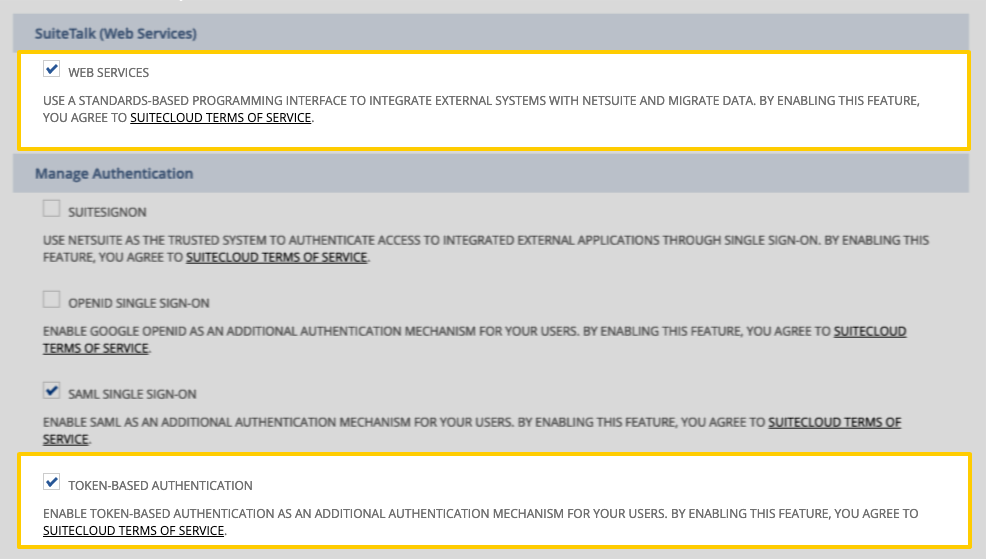
Highlighted Web Services and Token-based Authentication fields on the NetSuite Enable features page - Scroll to the bottom of the page and click Save.
Step 3: Create an integration record for Stitch
Next, you’ll create an integration record for Stitch. This will uniquely identify Stitch in your NetSuite account.
- Using the global search, type
page: integrationsand click the Page: Manage Integrations result. - On the Integrations page, click the New button.
- On the New Integration page, fill in the following fields:
- Name: Enter a name for the integration. For example:
Stitch - State: Select Enabled.
- Name: Enter a name for the integration. For example:
- In the Authentication tab, select the Token-based Authentication option.
- Click the Save button. The confirmation page will display a Consumer key/secret section.
- Copy the Consumer Key and Secret somewhere handy. You’ll need these credentials to complete the setup in Stitch.
Step 4: Create a Stitch NetSuite role and configure permissions
To connect NetSuite to Stitch, we recommend that you create a Stitch-specific role and user for us. We suggest this to ensure that Stitch doesn’t encounter issues with replication due to NetSuite’s API limitations.
Currently, a single NetSuite user is allowed to only have a single open API session at a time. If the user connected to Stitch has another connection elsewhere, replication problems will arise.
Step 4.1: Create a Stitch NetSuite role
- Using the global search, type
page: new roleand click the Page: New Role result. - On the Role page, enter a name for the role in the Name field. For example:
Stitch - In the Authentication section, check the Web Services Only Role box.
Step 4.2: Configure role permissions
Next, you’ll grant permissions to the role. In the tabs below, you’ll find the following:
- Adding permissions - Step-by-step instructions for adding permissions to the role on the Create Role page.
- Required permissions - The minimum permissions required to successfully connect Stitch to NetSuite.
- Object permissions - The permissions required to access and replicate data for specific objects in NetSuite. Stitch recommends granting only the permissions required for the objects you want to replicate.
About NetSuite permissions
Depending on which products are enabled in your NetSuite account, you might not see some of these permissions. If you don’t see a permission in your NetSuite account, skip it.
For more info about these permissions and how they work within NetSuite, refer to NetSuite’s Permissions Documentation spreadsheet, which can be downloaded here from their help center. You may need to log into NetSuite to access their documentation.
Refer to the other tabs in this section of the guide for the permissions you need to add.
To add a permission to the role:
- In the Permissions tab, click a subtab. For example: Transactions
- Using the Permission dropdown, search for the permission you want to add. Refer to the other tabs in this section for the permissions you need to add.
-
Using the Level dropdown, set the permission level to the corresponding level outlined in this guide:

The Transactions subsection in the Permissions section of the NetSuite Create Role page - Click Add.
- Repeat these steps until all permissions in the Required permissions tab and the desired permissions in the Object permissions tab have been added.
Note: If you don’t see a permission in NetSuite that is listed here, skip it. Some permissions are dependent on specific features being enabled in your NetSuite account.
These permissions are the minimum required to successfully connect Stitch to your NetSuite integration. While Stitch may be able to replicate some data using only these permissions, it is unlikely that Stitch will be able to replicate all possible NetSuite objects. Refer to the Object permissions tab to grant permissions for specific objects (tables).
| Permission | Tab | Level |
| Custom Body Fields | Setup | View |
| Custom Fields | Setup | View |
| Custom Record Types | Setup | View |
| Deleted Records | Setup |
Full
|
| Log in using Access Tokens | Setup |
Full
|
| SOAP Web Services | Setup |
Full
|
| User Access Tokens | Setup |
Full
|
In the table below are object-specific permissions and the tables they correspond to. The permissions for a given table must be granted to the Stitch role in order to access and replicate data for the table.
The columns in the table are as follows:
-
- If present, the table corresponds to a feature or features that must be enabled in NetSuite. If the feature or features aren't enabled in your account, the permission listed will not be available to grant and attempts to extract data for the corresponding table will result in permissions errors.
- Table name - The name of the Stitch table.
- Tab - The tab in the Create Role page that contains the permission.
- Permission - The permission required to access and replicate data for the table.
- Level - The level of permission required to access and replicate data for the table. This will usually be View.
| Table name | Permission | Tab | Level | |
| Account | Accounts | View | ||
|
|
AccountingPeriod | Manage Accounting Periods | Setup | View |
| Address | [Parent Record Permission] | Lists | View | |
|
|
BillingAccount | Customers | Lists | View |
|
|
BillingSchedule | Billing Schedules | View | |
|
|
Bin | Bins | Lists | View |
| Budget | Set Up Budgets | Lists | View | |
| CalendarEvent | Calendar | Lists | View | |
|
|
Campaign | Marketing Campaigns | Lists | View |
|
|
Charge | Charge | Transactions | View |
| Classification | [Parent Record Permission] | Lists | View | |
|
|
ConsolidatedExchangeRate | Currency | Lists | View |
| Contact | Contacts | Lists | View | |
|
|
ContactCategory | CRM Lists | Setup | View |
|
|
ContactRole | CRM Lists | Setup | View |
|
|
CostCategory | Accounting Lists | Setup | View |
|
|
CouponCode | Promotion | Lists | View |
| CurrencyRate | Currency | Lists | View | |
| CustomList | Custom Lists | Setup | View | |
| Customer | Customers | Lists | View | |
| CustomerCategory | Accounting Lists | Setup | View | |
| CustomerMessage | Accounting Lists | Setup | View | |
| CustomerStatus | Customer Status | Setup | View | |
| Deleted | Deleted Records | Setup | Full | |
| Department | Departments | Lists | View | |
| Employee | Employees | Lists | View | |
| EntityGroup | CRM Groups | Lists | View | |
| ExpenseCategory | Expense Categories | Lists | View | |
|
|
FairValuePrice | Fair Value Price | Lists | View |
| File | Documents and Files | Lists | View | |
| Folder | Documents and Files | Lists | View | |
|
|
GiftCertificate | Items | Lists | View |
|
|
GlobalAccountMapping | Global Account Mapping | Setup | View |
|
|
HcmJob | HCMJob Management | Lists | View |
|
|
InboundShipment | Inbound Shipment | Lists | View |
|
|
InventoryNumber | Items | Lists | View |
|
|
Issue | Issues | Lists | View |
| Item | [Item Type] | Lists | View | |
|
|
ItemAccountMapping | Item Account Mapping | Setup | View |
|
|
ItemDemandPlan | Item Demand Plan | Lists | View |
|
|
ItemRevision | Item Revisions | Lists | View |
|
|
ItemSupplyPlan | Item Supply Plan | Lists | View |
|
|
Job | Projects | Lists | View |
|
|
JobStatus | Projects | Lists | View |
|
|
JobType | Projects | Lists | View |
|
|
Location | Locations | Lists | View |
|
|
ManufacturingCostTemplate | Manufacturing Cost Template | Lists | View |
|
|
ManufacturingOperationTask | Work Orders | Transactions | View |
|
|
ManufacturingRouting | Manufacturing Routing | Lists | View |
| Message | Track Messages | Lists | View | |
|
|
Nexus | Tax Items | Lists | View |
| Note | Notes Tab | Lists | View | |
| NoteType | CRM Lists | Setup | View | |
|
|
Opportunity | Opportunity | Transactions | View |
|
|
OtherNameCategory | Accounting Lists | Setup | View |
|
|
Partner | Partners | Lists | View |
|
|
PartnerCategory | CRM Lists | Setup | View |
|
|
Paycheck | Individual Paycheck | Transactions | View |
| PaymentMethod | Payment Methods | Lists | View | |
|
|
PayrollItem | Payroll Items | Lists | View |
| PhoneCall | Phone Call | Lists | View | |
| PriceLevel | Accounting Lists | Setup | View | |
| PricingGroup | Accounting Lists | Setup | View | |
|
|
ProjectTask | Project Tasks | Lists | View |
|
|
PromotionCode | Promotions | Lists | View |
|
|
ResourceAllocation | Resource Allocations | Lists | View |
|
|
RevRecSchedule | Revenue Recognition Schedules | Lists | View |
|
|
RevRecTemplate | Revenue Recognition Schedules | Lists | View |
|
|
SalesRole | Sales Roles | Lists | View |
| SalesTaxItem | Tax Items | Lists | View | |
| SiteCategory | Presentation Categories | Lists | View | |
|
|
Solution | Knowledge Base | Lists | View |
|
|
Subsidiary | Subsidiaries | Lists | View |
|
|
SupportCase | Cases | Lists | View |
|
|
Task | Project Tasks | Lists | View |
| TaxGroup | Tax Groups | Lists | View | |
| TaxType | Tax Groups | Lists | View | |
| Term | Customer Payment | Transactions | View | |
|
|
TimeBill | Track Time | Transactions | View |
|
|
TimeEntry | Track Time | Transactions | View |
|
|
TimeSheet | Track Time | Transactions | View |
|
|
Topic | Knowledge Base | Lists | View |
|
|
UnitsType | Units | Lists | View |
|
|
Usage | Subscriptions | Lists | View |
| Vendor | Vendors | Lists | View | |
| VendorCategory | Accounting Lists | Setup | View | |
|
|
WinLossReason | Opportunity | Transactions | View |
| customrecord_[custom_record_name] | View |
Step 4.3: Save the role
After you’ve finished granting permissions to the role, click Save to create it.
Step 5: Create a Stitch NetSuite user

Next, you’ll create a dedicated NetSuite user for Stitch and assign the Stitch role to it.
- Using the global search, type
page: new employeeand click the Page: New Employees result. - In the Employee page, fill in the Name, Email, and any other required fields.
- Click the Access tab, located in the bottom half of the page.
- In the Access tab:
- Check the Give Access box.
- Check the Manually assign or change password box to create a password for the Stitch user.
- Enter a password in the Password field, then again in the Confirm Password field.
- In the Roles section, search the dropdown menu to locate the Stitch role you created in Step 4.
- Click Add once you’ve located the role.
- When finished, click Save to create the user.
Step 6: Create access tokens for Stitch
In this step, you’ll generate access tokens for the Stitch integration record (application) and user role.
- Using the global search, type
page: tokensand click the Page: Access Tokens result. - Click the New Access Token button.
- On the Access Token page, fill in the following fields:
- Click the Save button. The confirmation page will display a Token ID and Secret.
- Copy the Token ID and Secret somewhere handy. You’ll need these credentials to complete the setup in Stitch.
Step 7: Locate your NetSuite Account ID

- Using the global search, type
page: web servicesand click the Page: Web Services Preferences result. - In the Primary Information section, locate the Account ID field as shown in the image on the right.
Note: If your Account ID contains a suffix - 1234567_SB2, for example - it should be included when entering the ID into Stitch.
Step 8: Add NetSuite as a Stitch data source
- Sign into your Stitch account.
-
On the Stitch Dashboard page, click the Add Integration button.
-
Click the NetSuite icon.
-
Enter a name for the integration. This is the name that will display on the Stitch Dashboard for the integration; it’ll also be used to create the schema in your destination.
For example, the name “Stitch NetSuite” would create a schema called
stitch_netsuitein the destination. Note: Schema names cannot be changed after you save the integration. - In the Account field, enter the NetSuite account ID you retrieved in Step 7.
- In the Consumer Key field, paste the Consumer Key you generated when you created Stitch’s integration record.
- In the Token ID field, paste the Token ID you generated when you created Stitch’s access tokens.
- In the Consumer Secret field, paste the Consumer Secret you generated when you created Stitch’s integration record.
- In the Token Secret field, paste the Token Secret you generated when you created Stitch’s access tokens.
Step 9: Define the historical replication start date
The Sync Historical Data setting defines the starting date for your NetSuite integration. This means that data equal to or newer than this date will be replicated to your data warehouse.
Change this setting if you want to replicate data beyond NetSuite’s default setting of 1 year. For a detailed look at historical replication jobs, check out the Syncing Historical SaaS Data guide.
Step 10: Create a replication schedule
In the Replication Frequency section, you’ll create the integration’s replication schedule. An integration’s replication schedule determines how often Stitch runs a replication job, and the time that job begins.
NetSuite integrations support the following replication scheduling methods:
-
Advanced Scheduling using Cron (Advanced or Premium plans only)
To keep your row usage low, consider setting the integration to replicate less frequently. See the Understanding and Reducing Your Row Usage guide for tips on reducing your usage.
Step 11: Set objects to replicate
The last step is to select the tables and columns you want to replicate. Learn about the available tables for this integration.
Note: If a replication job is currently in progress, new selections won’t be used until the next job starts.
For NetSuite integrations, you can select:
-
Individual tables and columns
-
All tables and columns
Click the tabs to view instructions for each selection method.
- In the integration’s Tables to Replicate tab, locate a table you want to replicate.
-
To track a table, click the checkbox next to the table’s name. A blue checkmark means the table is set to replicate.
-
To track a column, click the checkbox next to the column’s name. A blue checkmark means the column is set to replicate.
- Repeat this process for all the tables and columns you want to replicate.
- When finished, click the Finalize Your Selections button at the bottom of the screen to save your selections.
- Click into the integration from the Stitch Dashboard page.
-
Click the Tables to Replicate tab.
- In the list of tables, click the box next to the Table Names column.
-
In the menu that displays, click Track all Tables and Fields:
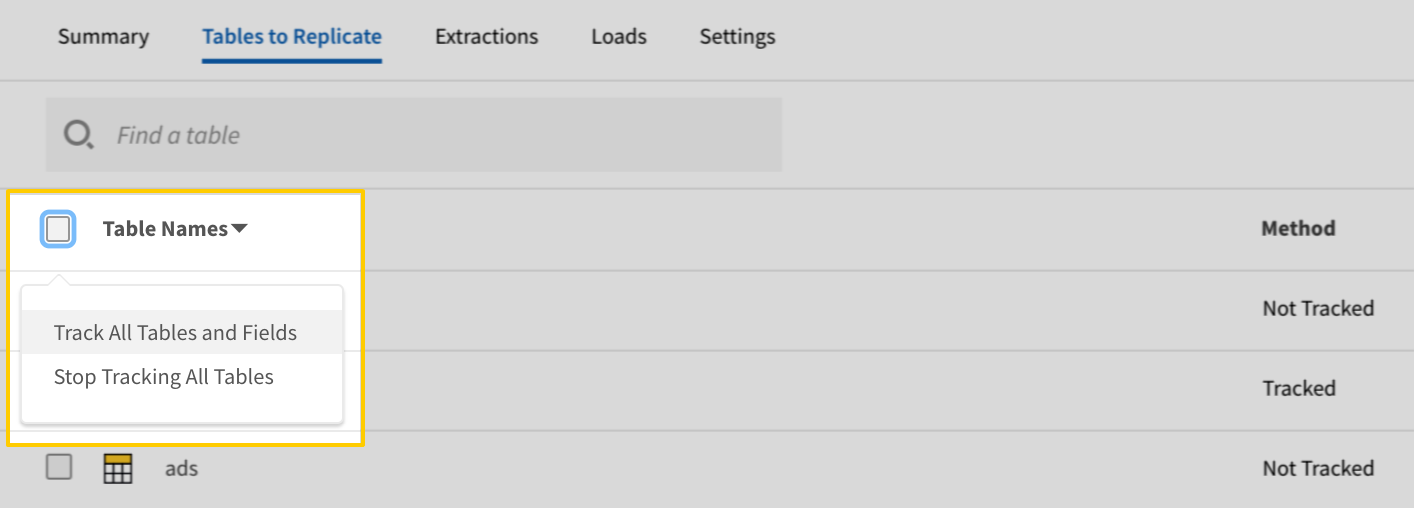
The Track all Tables and Fields menu in the Tables to Replicate tab - Click the Finalize Your Selections button at the bottom of the page to save your data selections.
Initial and historical replication jobs
After you finish setting up NetSuite, its Sync Status may show as Pending on either the Stitch Dashboard or in the Integration Details page.
For a new integration, a Pending status indicates that Stitch is in the process of scheduling the initial replication job for the integration. This may take some time to complete.
Initial replication jobs with Anchor Scheduling
If using Anchor Scheduling, an initial replication job may not kick off immediately. This depends on the selected Replication Frequency and Anchor Time. Refer to the Anchor Scheduling documentation for more information.
Free historical data loads
The first seven days of replication, beginning when data is first replicated, are free. Rows replicated from the new integration during this time won’t count towards your quota. Stitch offers this as a way of testing new integrations, measuring usage, and ensuring historical data volumes don’t quickly consume your quota.
NetSuite replication
In this section:
Custom records
For each custom record type in NetSuite, a table for that custom record type will be available for selection in Stitch.
Table names for custom record types
Custom record tables are named custrecord_[custom_record_name], where [custom_record_name] is the value of the ID field in the Custom Record Setup page in NetSuite.
For example: If a custom record were named promo discount in NetSuite, the corresponding table for those records would be named custrecord_promo_discount.
If the ID field in the Custom Record Setup page is left blank, NetSuite will auto-assign a numerical ID to the record. In Stitch, the table for the custom record would then be something like custrecord_123, where 123 is the ID auto-assigned by NetSuite.
Replication methods for custom record types
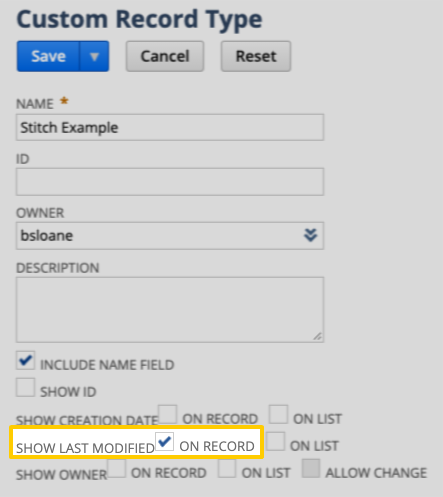
The Replication Method Stitch uses to replicate data for a custom record type depends on whether the Show Last Modified setting is checked in NetSuite for the custom record. This determines whether the NetSuite SuiteTalk API will return a timestamp column to use as a Replication Key.
-
If the record definition has the Show Last Modified setting enabled, Stitch will use Key-based Incremental Replication. This means that only new and updated records for the record type will be replicated during each job.
-
If the record definition doesn’t have this setting enabled, Stitch will use Full Table Replication. This means that all records for the record type will be replicated in full during each job.
To check the configuration of this setting for a custom record type in NetSuite:
- Type
page: record typesinto global search and click the Page: Record Types result. - Locate and click the custom record type in the list. This will open the Custom Record Type page.
- Locate the Show Last Modified setting.
In the example to the right, both of these settings are enabled for the Stitch Example custom record type.
Deleted records
Accounting for deleted records is especially important if you’re performing any sort of aggregate function - for example, totaling invoices or balancing your books.
To account for deletes in NetSuite, Stitch’s NetSuite integration offers a table named Deleted. Once set to replicate, this table acts as a log for records deleted in NetSuite for supported record types.
In this section:
Identify deleted records in other tables
To account for deleted records, you can use a LEFT JOIN to tie deleted records back to the appropriate table.
For example: The following query would return all invoice records that exist in the Transaction and Deleted tables:
SELECT *
     FROM netsuite.Transaction tran
LEFT JOIN netsuite.Deleted del
       ON tran.internalId = del.internalId
      AND tran.type = 'invoice'
      AND del.type = 'invoice'
If you’re using a destination that is case-insensitive, some queries may result in errors. If this occurs, try using LOWER to resolve the issue:
SELECT *
     FROM netsuite.Transaction tran
LEFT JOIN netsuite.Deleted del
       ON tran.internalId = del.internalId
AND LOWER(tran.type) = LOWER(del.type)
To filter out deleted records from other data, you can run a query like this one:
SELECT *
     FROM netsuite.Transaction tran
LEFT JOIN netsuite.Deleted del
       ON tran.internalId = del.internalId
AND LOWER(tran.type) = LOWER(del.type)
    WHERE del.deletedDate is null;
Refer to the Deleted table schema for more info about the available fields in the Deleted table.
Record types with delete support
According to NetSuite’s documentation, only certain record types support the getDeleted API operation Stitch uses to retrieve deleted record data from the SuiteTalk API.
In the table below are the record types that have delete support and the name of the Stitch table that contains the data for that record type. If a record type is listed, records of this type will be logged in the Deleted table when they are deleted in NetSuite.
Note: If a record type isn’t in this list, it doesn’t have delete support. Records not listed here will not be included in the Deleted table even if they are deleted in NetSuite.
| NetSuite record type | Stitch table name |
| AdvInterCompanyJournalEntry | Transaction |
| AssemblyBuild | Transaction |
| AssemblyItem | Item |
| AssemblyUnbuild | Transaction |
| BillingSchedule | BillingSchedule |
| Bin | Bin |
| BinTransfer | Transaction |
| BinWorksheet | Transaction |
| Bom | Bom |
| BomRevision | BomRevision |
| CalendarEvent | CalendarEvent |
| Campaign | Campaign |
| CashRefund | Transaction |
| CashSale | Transaction |
| Charge | Charge |
| Check | Transaction |
| Contact | Contact |
| ContactCategory | ContactCategory |
| CostCategory | CostCategory |
| CouponCode | CouponCode |
| CreditMemo | Transaction |
| CurrencyRate | CurrencyRate |
| customRecord | customrecord_[custom_record_name] |
| CustomTransaction | Transaction |
| Customer | Customer |
| CustomerCategory | CustomerCategory |
| CustomerMessage | CustomerMessage |
| CustomerDeposit | Transaction |
| CustomerPayment | Transaction |
| CustomerRefund | Transaction |
| CustomerStatus | CustomerStatus |
| CustomerSubsidiaryRelationship | CustomerSubsidiaryRelationship |
| Deposit | Transaction |
| DepositApplication | Transaction |
| DescriptionItem | Item |
| DiscountItem | Item |
| DownloadItem | Item |
| Employee | Employee |
| Estimate | Transaction |
| ExpenseReport | Transaction |
| File | File |
| Folder | Folder |
| GiftCertificateItem | Item |
| GlobalAccountMapping | GlobalAccountMapping |
| InterCompanyJournalEntry | Transaction |
| InterCompanyTransferOrder | Transaction |
| InventoryAdjustment | Transaction |
| InventoryCostRevaluation | Transaction |
| InventoryItem | Item |
| InventoryNumber | InventoryNumber |
| InventoryTransfer | Transaction |
| Invoice | Transaction |
| Issue | Issue |
| ItemAccountMapping | ItemAccountMapping |
| ItemDemandPlan | ItemDemandPlan |
| ItemFulfillment | Transaction |
| ItemSupplyPlan | ItemSupplyPlan |
| ItemGroup | Item |
| ItemRevision | ItemRevision |
| Job | Job |
| JobStatus | JobStatus |
| JournalEntry | Transaction |
| KitItem | Item |
| LotNumberedAssemblyItem | Item |
| LotNumberedInventoryItem | Item |
| MarkupItem | Item |
| Message | Message |
| ManufacturingCostTemplate | ManufacturingCostTemplate |
| ManufacturingOperationTask | ManufacturingOperationTask |
| ManufacturingRouting | ManufacturingRouting |
| MerchandiseHierarchyNode | MerchandiseHierarchyNode |
| Nexus | Nexus |
| NonInventoryPurchaseItem | Item |
| NonInventoryResaleItem | Item |
| NonInventorySaleItem | Item |
| Note | Note |
| NoteType | NoteType |
| Opportunity | Opportunity |
| OtherChargePurchaseItem | Item |
| OtherChargeResaleItem | Item |
| OtherChargeSaleItem | Item |
| OtherNameCategory | OtherNameCategory |
| Partner | Partner |
| Paycheck | Transaction |
| PaymentItem | Item |
| PaymentMethod | PaymentMethod |
| PayrollItem | PayrollItem |
| PhoneCall | PhoneCall |
| PriceLevel | PriceLevel |
| PricingGroup | PricingGroup |
| ProjectTask | ProjectTask |
| PromotionCode | PromotionCode |
| PurchaseOrder | Transaction |
| ResourceAllocation | ResourceAllocation |
| ReturnAuthorization | Transaction |
| SalesOrder | Transaction |
| SalesTaxItem | Item |
| SerializedAssemblyItem | Item |
| SerializedInventoryItem | Item |
| ServicePurchaseItem | Item |
| ServiceResaleItem | Item |
| ServiceSaleItem | Item |
| StatisticalJournalEntry | Transaction |
| SubtotalItem | Item |
| SupportCase | SupportCase |
| Task | Task |
| Term | Term |
| TimeSheet | TimeSheet |
| TransferOrder | Transaction |
| Usage | Usage |
| Vendor | Vendor |
| VendorBill | Transaction |
| VendorCredit | Transaction |
| VendorPayment | Transaction |
| VendorReturnAuthorization | Transaction |
| VendorSubsidiaryRelationship | VendorSubsidiaryRelationship |
| WinLossReason | WinLossReason |
| WorkOrder | Transaction |
| WorkOrderIssue | Transaction |
| WorkOrderCompletion | Transaction |
| WorkOrderClose | Transaction |
Supported NetSuite transaction types
Stitch supports replicating the transaction types listed below. Data for these records can be found in the Transaction table:
-
AssemblyBuild
-
AssemblyUnbuild
-
BinTransfer
-
BinWorksheet
-
CashRefund
-
CashSale
-
Check
-
CreditMemo
-
CustomerDeposit
-
CustomerPayment
-
CustomerRefund
-
Deposit
-
DepositApplication
-
Estimate
-
ExpenseReport
-
InventoryTransfer
-
InterCompanyJournalEntry
-
InventoryAdjustment
-
InventoryCostRevaluation
-
Invoice
-
ItemFulfillment
-
ItemReceipt
-
JournalEntry
-
PaycheckJournal
-
PurchaseOrder
-
ReturnAuthorization
-
SalesOrder
-
StatisticalJournalEntry
-
TransferOrder
-
VendorBill
-
VendorCredit
-
VendorPayment
-
VendorReturnAuthorization
-
WorkOrder
-
WorkOrderClose
-
WorkOrderCompletion
-
WorkOrderIssue
Supported NetSuite item types
Stitch supports replicating the item types listed below. Data for these records can be found in the Item table:
-
AssemblyItem
-
DescriptionItem
-
DiscountItem
-
DownloadItem
-
GiftCertificateItem
-
InventoryItem
-
ItemGroup
-
KitItem
-
LotNumberedAssemblyItem
-
LotNumberedInventoryItem
-
MarkupItem
-
NonInventoryPurchaseItem
-
NonInventoryResaleItem
-
NonInventorySaleItem
-
OtherChargePurchaseItem
-
OtherChargeResaleItem
-
OtherChargeSaleItem
-
PaymentItem
-
SerializedAssemblyItem
-
SerializedInventoryItem
-
ServicePurchaseItem
-
ServiceResaleItem
-
ServiceSaleItem
-
SubtotalItem
Unsupported NetSuite record types
Stitch supports replicating all record types from NetSuite’s 2017.2 WSDL, with the exception of the following:
-
AccountingTransaction
-
AssemblyItemBom
-
Entity
-
InventoryDetail
-
InventoryNumberbin
-
ItemBinNumber
-
MseSubsidary
-
OriginatingLead
-
Pricing
-
ProjectTaskAssignment
-
TaxDetail
NetSuite table reference
Schemas and versioning
Schemas and naming conventions can change from version to version, so we recommend verifying your integration’s version before continuing.
The schema and info displayed below is for version 1 of this integration.
To ensure we can provide you with up-to-date documentation, this section will only cover a few of the most popular tables Stitch’s NetSuite integration offers.
Refer to the NetSuite SuiteTalk Schema Browser for info on objects not listed here, including the fields available in each object.
Note: Stitch currently supports the replication of the majority of NetSuite objects, with the exception of those listed in the Unsupported Objects section.
Table and column names in your destination
Depending on your destination, table and column names may not appear as they are outlined below.
For example: Object names are lowercased in Redshift (CusTomERs > customers), while case is maintained in PostgreSQL destinations (CusTomERs > CusTomERs). Refer to the Loading Guide for your destination for more info.
Account
The Account table contains info about the accounts in the Chart of Accounts in your NetSuite account.
Account table replication requirements
Replicating this table requires the ** (View)** permission in NetSuite. Refer to the Configure the Stitch role section for instructions on adding this permission.
|
Full Table |
|
|
Primary Key |
internalId |
| Useful links |

AccountingPeriod
The AccountingPeriod table contains info about the accounting periods in your NetSuite account.
AccountingPeriod table replication requirements
Replicating this table requires the ** (View)** permission in NetSuite. Refer to the Configure the Stitch role section for instructions on adding this permission.
|
Full Table |
|
|
Primary Key |
internalId |
| Useful links |
Address
The Address table contains info about the custom address forms in your NetSuite account.
Custom address forms can apply to entity, transaction, subsidiary, company information, location, and workplace records in NetSuite. As custom address forms inherit the permissions set on the parent record, the permissions required for the parent record are required to access custom address data.
For example: To get custom address data for a location, the user must have the permission for accessing location data.
BillingAccount
The BillingAccount table contains info about the billing accounts in your NetSuite account. A billing account is a record used to show all billing information for a customer or subcustomer. A billing account contains billing-specific information, including billing schedule, default payment terms, bill-to address, and currency.
BillingAccount table replication requirements
Replicating this table requires the ** (View)** permission in NetSuite. Refer to the Configure the Stitch role section for instructions on adding this permission.
|
Full Table |
|
|
Primary Key |
internalId |
| Useful links |
BillingSchedule
The BillingSchedule table contains info about the billing schedules in your NetSuite account. Billing schedules are used to define how bills for transactions are relayed to customers. In general, a billing schedule determines the frequency with which the customer is billed and the amount of each bill. However, the exact effect of a billing schedule varies depending on its type.
BillingSchedule table replication requirements
Replicating this table requires the ** (View)** permission in NetSuite. Refer to the Configure the Stitch role section for instructions on adding this permission.
|
Full Table |
|
|
Primary Key |
internalId |
| Useful links |
Bin
The Bin table contains info about bins, or places in your warehouse where you store inventory items.
Bin table replication requirements
Replicating this table requires the ** (View)** permission in NetSuite. Refer to the Configure the Stitch role section for instructions on adding this permission.
|
Full Table |
|
|
Primary Key |
internalId |
| Useful links |
Budget
The Budget table contains info about the budgets in your NetSuite account. A budget records the expected values of income and expenses for your business. Budgets can be created for specific customers, items, departments, classes, locations, or any combination of these criteria.
Budget table replication requirements
Replicating this table requires the ** (View)** permission in NetSuite. Refer to the Configure the Stitch role section for instructions on adding this permission.
|
Full Table |
|
|
Primary Key |
internalId |
| Useful links |
CalendarEvent
The CalendarEvent table contains info about the scheduled activities, or events, that are on the calendar in your NetSuite account.
CalendarEvent table replication requirements
Replicating this table requires the ** (View)** permission in NetSuite. Refer to the Configure the Stitch role section for instructions on adding this permission.
|
Key-based Incremental |
|
|
Primary Key |
internalId |
|
Replication Key |
lastModifiedDate |
| Useful links |

Classification
The Classification table contains info about the classifications in your NetSuite account.
As classifications inherit the permissions set on the parent record, the permissions required for the parent record are required to access classification data.
For example: To get classification data for a location, the user must have the permission for accessing location data.
|
Full Table |
|
|
Primary Key |
internalId |
| Useful links |
ConsolidatedExchangeRate
The ConsolidatedExchangeRate table contains info about consolidated exchange rates. This is used in NetSuite OneWorld for consolidation purposes, ensuring currency amounts correctly roll up from child to parent subsidiaries.
ConsolidatedExchangeRate table replication requirements
Replicating this table requires the ** (View)** permission in NetSuite. Refer to the Configure the Stitch role section for instructions on adding this permission.
|
Full Table |
|
|
Primary Key |
internalId |
| Useful links |
ContactCategory
The ContactCategory table contains info about the types of contacts in your NetSuite account.
ContactCategory table replication requirements
Replicating this table requires the ** (View)** permission in NetSuite. Refer to the Configure the Stitch role section for instructions on adding this permission.
|
Full Table |
|
|
Primary Key |
internalId |
| Useful links |
ContactRole
The ContactRole table contains info about contact roles in your NetSuite account.
ContactRole table replication requirements
Replicating this table requires the ** (View)** permission in NetSuite. Refer to the Configure the Stitch role section for instructions on adding this permission.
|
Full Table |
|
|
Primary Key |
internalId |
| Useful links |
CostCategory
The CostCategory table contains info about cost categories, which are used to classify different types of costs associated with items.
CostCategory table replication requirements
Replicating this table requires the ** (View)** permission in NetSuite. Refer to the Configure the Stitch role section for instructions on adding this permission.
|
Full Table |
|
|
Primary Key |
internalId |
| Useful links |
CouponCode
The CouponCode table contains info about the coupon codes in your NetSuite account.
CouponCode table replication requirements
Replicating this table requires the ** (View)** permission in NetSuite. Refer to the Configure the Stitch role section for instructions on adding this permission.
|
Full Table |
|
|
Primary Key |
internalId |
| Useful links |
CurrencyRate
The CurrencyRate table contains info about currency rate records in you NetSuite account. These are also known as Exchange Rate records in NetSuite.
CurrencyRate table replication requirements
Replicating this table requires the ** (View)** permission in NetSuite. Refer to the Configure the Stitch role section for instructions on adding this permission.
|
Full Table |
|
|
Primary Key |
internalId |
| Useful links |
CustomList
The CustomList table contains info about
|
Full Table |
|
|
Primary Key |
internalId |
| Useful links |
Customer
The Customer table contains info about customers.
Customer table replication requirements
Replicating this table requires the ** (View)** permission in NetSuite. Refer to the Configure the Stitch role section for instructions on adding this permission.
|
Key-based Incremental |
|
|
Primary Key |
internalId |
|
Replication Key |
lastModifiedDate |
| Useful links |
CustomerCategory
The CustomerCategory table contains info about the types of customers in your NetSuite account.
CustomerCategory table replication requirements
Replicating this table requires the ** (View)** permission in NetSuite. Refer to the Configure the Stitch role section for instructions on adding this permission.
|
Full Table |
|
|
Primary Key |
internalId |
| Useful links |
CustomerMessage
The CustomerMessage table contains info about standardized customer messages in your NetSuite account.
CustomerMessage table replication requirements
Replicating this table requires the ** (View)** permission in NetSuite. Refer to the Configure the Stitch role section for instructions on adding this permission.
|
Full Table |
|
|
Primary Key |
internalId |
| Useful links |
CustomerStatus
The CustomerStatus table contains info about the stages for leads, prospects, and customers in your NetSuite sales cycle.
CustomerStatus table replication requirements
Replicating this table requires the ** (View)** permission in NetSuite. Refer to the Configure the Stitch role section for instructions on adding this permission.
|
Full Table |
|
|
Primary Key |
internalId |
| Useful links |
Deleted
The Deleted table contains info about deleted records.
Deleted table replication requirements
Replicating this table requires the ** (View)** permission in NetSuite. Refer to the Configure the Stitch role section for instructions on adding this permission.
Objects with delete support
According to NetSuite’s documentation, only certain objects support the `` operation Stitch uses to retrieve deleted record data from the SuiteTalk API.
Refer to the Deleted records section for more info and a list of record types with delete support.
|
Key-based Incremental |
|
|
Primary Keys |
internalId type |
|
Replication Key |
deletedDate |
| Useful links |
Department
The Department table contains info about the departments in your NetSuite account.
Department table replication requirements
Replicating this table requires the ** (View)** permission in NetSuite. Refer to the Configure the Stitch role section for instructions on adding this permission.
|
Full Table |
|
|
Primary Key |
internalId |
| Useful links |
EntityGroup
The EntityGroup table contains info about the groups in your NetSuite account.
EntityGroup table replication requirements
Replicating this table requires the ** (View)** permission in NetSuite. Refer to the Configure the Stitch role section for instructions on adding this permission.
|
Full Table |
|
|
Primary Key |
internalId |
| Useful links |
ExpenseCategory
The ExpenseCategory table contains info about the expense categories in your NetSuite account.
ExpenseCategory table replication requirements
Replicating this table requires the ** (View)** permission in NetSuite. Refer to the Configure the Stitch role section for instructions on adding this permission.
|
Full Table |
|
|
Primary Key |
internalId |
| Useful links |
FairValuePrice
The FairValuePrice table contains info about the fair value price list in your NetSuite account.
FairValuePrice table replication requirements
Replicating this table requires the ** (View)** permission in NetSuite. Refer to the Configure the Stitch role section for instructions on adding this permission.
|
Full Table |
|
|
Primary Key |
internalId |
| Useful links |
Folder
The Folder table contains info about the folders in your NetSuite File Cabinet.
Folder table replication requirements
Replicating this table requires the ** (View)** permission in NetSuite. Refer to the Configure the Stitch role section for instructions on adding this permission.
|
Full Table |
|
|
Primary Key |
internalId |
| Useful links |
GiftCertificate
The GiftCertificate table contains info about the gift certificates in your NetSuite account.
GiftCertificate table replication requirements
Replicating this table requires the ** (View)** permission in NetSuite. Refer to the Configure the Stitch role section for instructions on adding this permission.
|
Key-based Incremental |
|
|
Primary Key |
internalId |
|
Replication Key |
lastModifiedDate |
| Useful links |
GlobalAccountMapping
The GlobalAccountMapping table contains the global account mapping record details in your NetSuite account.
For NetSuite accounts using Multi-Book Accounting, the global account mapping record enables you to configure secondary accounting books to post to accounts different from the primary book. These mappings are used by transactions where the user can manually select the account to which the transaction posts.
GlobalAccountMapping table replication requirements
Replicating this table requires the ** (View)** permission in NetSuite. Refer to the Configure the Stitch role section for instructions on adding this permission.
|
Full Table |
|
|
Primary Key |
internalId |
| Useful links |
HcmJob
HcmJob table replication requirements
Replicating this table requires the ** (View)** permission in NetSuite. Refer to the Configure the Stitch role section for instructions on adding this permission.
|
Full Table |
|
|
Primary Key |
internalId |
| Useful links |
InboundShipment
The InboundShipment table contains info about inbound shipments in your NetSuite account.
InboundShipment table replication requirements
Replicating this table requires the ** (View)** permission in NetSuite. Refer to the Configure the Stitch role section for instructions on adding this permission.
|
Full Table |
|
|
Primary Key |
internalId |
| Useful links |
InventoryNumber
The InventoryNumber table contains info about the serial or lot numbers in your NetSuite account.
InventoryNumber table replication requirements
Replicating this table requires the ** (View)** permission in NetSuite. Refer to the Configure the Stitch role section for instructions on adding this permission.
|
Full Table |
|
|
Primary Key |
internalId |
| Useful links |
Issue
The Issue table contains info about the support cases in your NetSuite account.
Issue table replication requirements
Replicating this table requires the ** (View)** permission in NetSuite. Refer to the Configure the Stitch role section for instructions on adding this permission.
|
Key-based Incremental |
|
|
Primary Key |
internalId |
|
Replication Key |
lastModifiedDate |
| Useful links |
ItemAccountMapping
The ItemAccountMapping table contains details about the item account mapping record in your NetSuite account.
For accounts using NetSuite Multi-Book Accounting, the item account mapping record enables you to configure secondary accounting books to post to accounts different from the primary book, based on the item that is the subject of the transaction. These mappings are used by transactions where the item determines the account to which the transaction posts.
ItemAccountMapping table replication requirements
Replicating this table requires the ** (View)** permission in NetSuite. Refer to the Configure the Stitch role section for instructions on adding this permission.
|
Full Table |
|
|
Primary Key |
internalId |
| Useful links |
ItemDemandPlan
The ItemDemandPlan table contains info about item demand plans in your NetSuite account. An item demand plan transaction stores the quantity expected to be needed, during specified time periods, for an item.
ItemDemandPlan table replication requirements
Replicating this table requires the ** (View)** permission in NetSuite. Refer to the Configure the Stitch role section for instructions on adding this permission.
|
Full Table |
|
|
Primary Key |
internalId |
| Useful links |
ItemRevision
The ItemRevision table contains info about item revisions in your NetSuite account.
ItemRevision table replication requirements
Replicating this table requires the ** (View)** permission in NetSuite. Refer to the Configure the Stitch role section for instructions on adding this permission.
|
Full Table |
|
|
Primary Key |
internalId |
| Useful links |
ItemSupplyPlan
The ItemSupplyPlan table contains info about the item supply plans in your NetSuite account. An item supply plan lists the purchase orders or work orders required to ensure that item quantity meets expected demand.
ItemSupplyPlan table replication requirements
Replicating this table requires the ** (View)** permission in NetSuite. Refer to the Configure the Stitch role section for instructions on adding this permission.
|
Full Table |
|
|
Primary Key |
internalId |
| Useful links |
Job
The Job table contains info about the projects in your NetSuite account.
Job table replication requirements
Replicating this table requires the ** (View)** permission in NetSuite. Refer to the Configure the Stitch role section for instructions on adding this permission.
|
Full Table |
|
|
Primary Key |
internalId |
| Useful links |
JobStatus
The JobStatus table contains info about the statuses that can be applied to projects in your NetSuite account.
JobStatus table replication requirements
Replicating this table requires the ** (View)** permission in NetSuite. Refer to the Configure the Stitch role section for instructions on adding this permission.
|
Full Table |
|
|
Primary Key |
internalId |
| Useful links |
JobType
The JobType table contains info about the types that can be applied to projects in your NetSuite account.
JobType table replication requirements
Replicating this table requires the ** (View)** permission in NetSuite. Refer to the Configure the Stitch role section for instructions on adding this permission.
|
Full Table |
|
|
Primary Key |
internalId |
| Useful links |
ManufacturingCostTemplate
The ManufacturingCostTemplate table contains info about the manufacturing cost templates in your NetSuite account.
A manufacturing cost template is a list of rates that can be associated with completing a specific operation. The template defines the activities that occur and related costs to be recorded each time this step is completed.
ManufacturingCostTemplate table replication requirements
Replicating this table requires the ** (View)** permission in NetSuite. Refer to the Configure the Stitch role section for instructions on adding this permission.
|
Full Table |
|
|
Primary Key |
internalId |
| Useful links |
ManufacturingOperationTask
The ManufacturingOperationTask table contains info about manufacturing operation tasks in your NetSuite account.
After a WIP work order that has a designated routing is saved in NetSuite, manufacturing operation tasks are created based on the routing. Each of these tasks is a step that must be done in order for the assembly process to be finished.
ManufacturingOperationTask table replication requirements
Replicating this table requires the ** (View)** permission in NetSuite. Refer to the Configure the Stitch role section for instructions on adding this permission.
|
Full Table |
|
|
Primary Key |
internalId |
| Useful links |
ManufacturingRouting
The ManufacturingRouting table contains info about the manufacturing routing templates in your NetSuite account.
A manufacturing routing is a template that contains a list of steps required to build an assembly item. Each step is in a sequential order necessary to complete the operational sequence for completing the assembly. After you have created a routing record, that routing can be selected on a work order to direct the completion of the assembly. The routing determines the work center, cost template, labor resources, and machine resources that will be used during the assembly.
ManufacturingRouting table replication requirements
Replicating this table requires the ** (View)** permission in NetSuite. Refer to the Configure the Stitch role section for instructions on adding this permission.
|
Full Table |
|
|
Primary Key |
internalId |
| Useful links |
Message
The Message table contains info about the messages in your NetSuite account.
Message table replication requirements
Replicating this table requires the ** (View)** permission in NetSuite. Refer to the Configure the Stitch role section for instructions on adding this permission.
|
Key-based Incremental |
|
|
Primary Key |
internalId |
|
Replication Key |
lastModifiedDate |
| Useful links |
Note
The Note table contains info about the notes in your NetSuite account.
Note table replication requirements
Replicating this table requires the ** (View)** permission in NetSuite. Refer to the Configure the Stitch role section for instructions on adding this permission.
|
Key-based Incremental |
|
|
Primary Key |
internalId |
|
Replication Key |
lastModifiedDate |
| Useful links |
NoteType
The NoteType table contains info about the types that can be applied to notes in your NetSuite account.
NoteType table replication requirements
Replicating this table requires the ** (View)** permission in NetSuite. Refer to the Configure the Stitch role section for instructions on adding this permission.
|
Full Table |
|
|
Primary Key |
internalId |
| Useful links |
Opportunity
The Opportunity table contains info about the opportunities in your NetSuite account.
Opportunity table replication requirements
Replicating this table requires the ** (View)** permission in NetSuite. Refer to the Configure the Stitch role section for instructions on adding this permission.
|
Full Table |
|
|
Primary Key |
internalId |
|
Replication Key |
lastModifiedDate |
| Useful links |
OtherNameCategory
The OtherNameCategory table contains info about the other name categories in your NetSuite account. Other name category values are used on other name records to categorize them. The list of other name records is a collection of records for people or companies who are not vendors, customers, or employees.
OtherNameCategory table replication requirements
Replicating this table requires the ** (View)** permission in NetSuite. Refer to the Configure the Stitch role section for instructions on adding this permission.
|
Full Table |
|
|
Primary Key |
internalId |
| Useful links |
PartnerCategory
The PartnerCategory table contains info about the categories that can be applied to partners in your NetSuite account.
PartnerCategory table replication requirements
Replicating this table requires the ** (View)** permission in NetSuite. Refer to the Configure the Stitch role section for instructions on adding this permission.
|
Full Table |
|
|
Primary Key |
internalId |
| Useful links |
Paycheck
The Paycheck table contains info about the paycheck records in your NetSuite account.
Paycheck table replication requirements
Replicating this table requires the ** (View)** permission in NetSuite. Refer to the Configure the Stitch role section for instructions on adding this permission.
|
Key-based Incremental |
|
|
Primary Key |
internalId |
|
Replication Key |
lastModifiedDate |
| Useful links |
PaymentMethod
The PaymentMethod table contains info about the customer payment methods in your NetSuite account.
PaymentMethod table replication requirements
Replicating this table requires the ** (View)** permission in NetSuite. Refer to the Configure the Stitch role section for instructions on adding this permission.
|
Full Table |
|
|
Primary Key |
internalId |
| Useful links |
PayrollItem
The PayrollItem table contains info about the payroll items, or payroll transaction line items, in your NetSuite account.
PayrollItem table replication requirements
Replicating this table requires the ** (View)** permission in NetSuite. Refer to the Configure the Stitch role section for instructions on adding this permission.
|
Full Table |
|
|
Primary Key |
internalId |
| Useful links |
PhoneCall
The PhoneCall table contains info about the phone call records in your NetSuite account.
PhoneCall table replication requirements
Replicating this table requires the ** (View)** permission in NetSuite. Refer to the Configure the Stitch role section for instructions on adding this permission.
|
Key-based Incremental |
|
|
Primary Key |
internalId |
|
Replication Key |
lastModifiedDate |
| Useful links |
PriceLevel
The PriceLevel table contains info about the price level list in your NetSuite account. Price level defines a list of values that are used by opportunity and item records to set the price level for a specific item.
PriceLevel table replication requirements
Replicating this table requires the ** (View)** permission in NetSuite. Refer to the Configure the Stitch role section for instructions on adding this permission.
|
Full Table |
|
|
Primary Key |
internalId |
| Useful links |
PricingGroup
The PricingGroup table contains info about the pricing groups in your NetSuite account.
PricingGroup table replication requirements
Replicating this table requires the ** (View)** permission in NetSuite. Refer to the Configure the Stitch role section for instructions on adding this permission.
|
Full Table |
|
|
Primary Key |
internalId |
| Useful links |
ProjectTask
The ProjectTask table contains info about the project tasks in your NetSuite account.
ProjectTask table replication requirements
Replicating this table requires the ** (View)** permission in NetSuite. Refer to the Configure the Stitch role section for instructions on adding this permission.
|
Full Table |
|
|
Primary Key |
internalId |
| Useful links |
PromotionCode
The PromotionCode table contains info about the promotion codes in your NetSuite account.
PromotionCode table replication requirements
Replicating this table requires the ** (View)** permission in NetSuite. Refer to the Configure the Stitch role section for instructions on adding this permission.
|
Full Table |
|
|
Primary Key |
internalId |
| Useful links |
ResourceAllocation
The ResourceAllocation table contains info about resource allocations, or employee time reservations, in your NetSuite account.
ResourceAllocation table replication requirements
Replicating this table requires the ** (View)** permission in NetSuite. Refer to the Configure the Stitch role section for instructions on adding this permission.
|
Full Table |
|
|
Primary Key |
internalId |
| Useful links |
RevRecSchedule
The RevRecSchedule table contains info about the revenue recognition schedules in your NetSuite account. A revenue recognition schedule indicates the posting periods in which revenue should be recognized, and the amount to be recognized in each period, for an item sale.
RevRecSchedule table replication requirements
Replicating this table requires the ** (View)** permission in NetSuite. Refer to the Configure the Stitch role section for instructions on adding this permission.
|
Full Table |
|
|
Primary Key |
internalId |
| Useful links |
RevRecTemplate
The RevRecTemplate table contains info about the revenue recognition templates in your NetSuite account. A revenue recognition template indicates how revenue from associated items should be posted.
RevRecTemplate table replication requirements
Replicating this table requires the ** (View)** permission in NetSuite. Refer to the Configure the Stitch role section for instructions on adding this permission.
|
Full Table |
|
|
Primary Key |
internalId |
| Useful links |
SalesRole
The SalesRole table contains info about the sales roles in your NetSuite account.
SalesRole table replication requirements
Replicating this table requires the ** (View)** permission in NetSuite. Refer to the Configure the Stitch role section for instructions on adding this permission.
|
Full Table |
|
|
Primary Key |
internalId |
| Useful links |
SalesTaxItem
The SalesTaxItem table contains info about the sales tax items in your NetSuite account.
SalesTaxItem table replication requirements
Replicating this table requires the ** (View)** permission in NetSuite. Refer to the Configure the Stitch role section for instructions on adding this permission.
|
Full Table |
|
|
Primary Key |
internalId |
| Useful links |
SiteCategory
The SiteCategory table contains info about the categories used to organize your website.
SiteCategory table replication requirements
Replicating this table requires the ** (View)** permission in NetSuite. Refer to the Configure the Stitch role section for instructions on adding this permission.
|
Full Table |
|
|
Primary Key |
internalId |
| Useful links |
Solution
The Solution table contains info about the solutions, or answers to customer issues, in your NetSuite account.
Solution table replication requirements
Replicating this table requires the ** (View)** permission in NetSuite. Refer to the Configure the Stitch role section for instructions on adding this permission.
|
Key-based Incremental |
|
|
Primary Key |
internalId |
|
Replication Key |
lastModifiedDate |
| Useful links |
Subsidiary
The Subsidiary table contains info about the subsidiary records in your NetSuite account. A subsidiary represents a separate company within your global organization.
Subsidiary table replication requirements
Replicating this table requires the ** (View)** permission in NetSuite. Refer to the Configure the Stitch role section for instructions on adding this permission.
|
Full Table |
|
|
Primary Key |
internalId |
| Useful links |
SupportCase
The SupportCase table contains info about the support cases in your NetSuite account.
SupportCase table replication requirements
Replicating this table requires the ** (View)** permission in NetSuite. Refer to the Configure the Stitch role section for instructions on adding this permission.
|
Key-based Incremental |
|
|
Primary Key |
internalId |
|
Replication Key |
lastModifiedDate |
| Useful links |
Task
The Task table contains info about the tasks in your NetSuite account.
Task table replication requirements
Replicating this table requires the ** (View)** permission in NetSuite. Refer to the Configure the Stitch role section for instructions on adding this permission.
|
Key-based Incremental |
|
|
Primary Key |
internalId |
|
Replication Key |
lastModifiedDate |
| Useful links |
TaxGroup
The TaxGroup table contains info about the tax groups in your NetSuite account.
TaxGroup table replication requirements
Replicating this table requires the ** (View)** permission in NetSuite. Refer to the Configure the Stitch role section for instructions on adding this permission.
|
Full Table |
|
|
Primary Key |
internalId |
| Useful links |
TaxType
The TaxType table contains info about the tax types in your NetSuite account. A tax type determines where the tax paid or collected is tracked on the balance sheet. The balance sheet account to which NetSuite posts the collection or payment of tax is called the tax control account.
TaxType table replication requirements
Replicating this table requires the ** (View)** permission in NetSuite. Refer to the Configure the Stitch role section for instructions on adding this permission.
|
Full Table |
|
|
Primary Key |
internalId |
| Useful links |
Term
The Term table contains info about the terms in your NetSuite account. Terms are used to specify when payment is due on customer invoices.
Term table replication requirements
Replicating this table requires the ** (View)** permission in NetSuite. Refer to the Configure the Stitch role section for instructions on adding this permission.
TimeBill
The TimeBill table contains info about the time transactions in your NetSuite account. Also known as time bills, these transactions records the hours worked by an employee. This transaction can be used to record billable hours and invoice customers.
TimeBill table replication requirements
Replicating this table requires the ** (View)** permission in NetSuite. Refer to the Configure the Stitch role section for instructions on adding this permission.
|
Key-based Incremental |
|
|
Primary Key |
internalId |
|
Replication Key |
lastModifiedDate |
| Useful links |
TimeEntry
The TimeEntry table contains info about the time entries in your NetSuite account.
TimeEntry table replication requirements
Replicating this table requires the ** (View)** permission in NetSuite. Refer to the Configure the Stitch role section for instructions on adding this permission.
|
Key-based Incremental |
|
|
Primary Key |
internalId |
|
Replication Key |
lastModifiedDate |
| Useful links |
TimeSheet
The TimeSheet table contains info about the time sheets in your NetSuite account.
TimeSheet table replication requirements
Replicating this table requires the ** (View)** permission in NetSuite. Refer to the Configure the Stitch role section for instructions on adding this permission.
|
Full Table |
|
|
Primary Key |
internalId |
| Useful links |
UnitsType
The UnitsType table contains info about the unit types, or Units of Measure, in your NetSuite account.
UnitsType table replication requirements
Replicating this table requires the ** (View)** permission in NetSuite. Refer to the Configure the Stitch role section for instructions on adding this permission.
|
Full Table |
|
|
Primary Key |
internalId |
| Useful links |
Usage
The Usage table contains info about the subscription billing lines in your NetSuite account. For example: Money, time, cellular data, internet data, etc.
Usage table replication requirements
Replicating this table requires the ** (View)** permission in NetSuite. Refer to the Configure the Stitch role section for instructions on adding this permission.
|
Full Table |
|
|
Primary Key |
internalId |
| Useful links |
Vendor
The Vendor table contains info about the vendors in your NetSuite account.
Vendor table replication requirements
Replicating this table requires the ** (View)** permission in NetSuite. Refer to the Configure the Stitch role section for instructions on adding this permission.
|
Key-based Incremental |
|
|
Primary Key |
internalId |
|
Replication Key |
lastModifiedDate |
| Useful links |
VendorCategory
The VendorCategory table contains info about the categories that can be applied to vendors in your NetSuite account.
VendorCategory table replication requirements
Replicating this table requires the ** (View)** permission in NetSuite. Refer to the Configure the Stitch role section for instructions on adding this permission.
|
Full Table |
|
|
Primary Key |
internalId |
| Useful links |
WinLossReason
The WinLossReason table contains info about the win/loss reasons in your NetSuite account.
WinLossReason table replication requirements
Replicating this table requires the ** (View)** permission in NetSuite. Refer to the Configure the Stitch role section for instructions on adding this permission.
|
Full Table |
|
|
Primary Key |
internalId |
| Useful links |