# lastworkdate 指令碼與圖表函數
lastworkdate 函數會傳回開始於 start\_date,並考慮到所有選用的列出 holiday,而可達到 no\_of\_workdays (星期一至星期五) 的最早結束日期。start\_date 和 holiday 應該是有效的日期或時間戳記。
lastworkdate(start\_date, no\_of\_workdays {, holiday})
傳回的資料類型: 整數
顯示如何使用 `lastworkdate()` 函數的行事曆
顯示如何使用 `lastworkdate()` 函數的行事曆
顯示如何使用 `lastworkdate()`lastworkdate() 函數的行事曆 
限制
對於工作週不是星期一開始和星期五結束的相關地區或情境,沒有方法可修改 `lastworkdate()` 函數。
假日參數必須是字串常數。這不接受運算式。
什麼情況下使用
若使用者想要根據專案開始時間和將會發生在該期間的假期,計算提出的專案或指派工作結束日期,`lastworkdate()` 函數通常用來作為運算式的一部分。
## 區域設定
除非另有說明,否則此主題中的範例皆使用下列日期格式:MM/DD/YYYY。日期格式是在資料載入指令碼的 `SET DateFormat` 陳述式中指定。由於地區設定和其他因素,您系統中的預設日期格式可能會不同。您可以變更以下範例中的格式,以滿足您的需求。或者,您可以在載入指令碼中變更格式,以符合這些範例。
應用程式中的預設地區設定是根據安裝 Qlik Sense 之電腦或伺服器的地區系統設定。若您存取的 Qlik Sense 伺服器設定為瑞典,資料載入編輯器將會對日期、時間和貨幣使用瑞典文地區設定。這些地區格式設定與 Qlik Sense 使用者介面中顯示的語言無關。Qlik Sense 將會以您正在使用的瀏覽器語言顯示。
引數
| 引數 | 描述 |
| --- | --- |
| start\_date | 要評估的開始日期。 |
| no\_of\_workdays | 要達到的工作日數目。 |
| holiday | 要從工作日中排除的假期。假日以字串常數日期表示。您可以指定多個假日日期,以逗點分隔。
範例: ` '12/25/2013', '12/26/2013', '12/31/2013', '01/01/2014' ` |
## 範例 1 - 基本範例
[](https://help.qlik.com/en-US/sense/Subsystems/Hub/Content/Sense_Hub/Scripting/DateAndTimeFunctions/lastworkdate.htm)
#### 載入指令碼和結果
概述
開啟資料載入編輯器並將下面的載入指令碼新增至新的區段。
載入指令碼包含:
* 資料集 包含專案 ID、專案開始日期和專案所需的預計花費天數。資料集載入到稱為「`Projects`」的表格。
* 包含設定為 欄位「`end_date`」之 `lastworkdate()` 函數,並識別每個專案的排定結束時間的 前置載入。
載入指令碼
```
SET DateFormat='MM/DD/YYYY';
Projects:
Load
*,
LastWorkDate(start_date,effort) as end_date
;
Load
id,
start_date,
effort
Inline
[
id,start_date,effort
1,01/01/2022,14
2,02/10/2022,17
3,05/17/2022,5
4,06/01/2022,12
5,08/10/2022,26
];
```
結果
載入資料並開啟工作表。建立新的表格並將這些欄位新增為維度:
* `id`
* `start_date`
* `effort`
* `end_date`
結果表格
| ID | start\_date | 努力 | end\_date |
| --- | --- | --- | --- |
| 1 | 01/01/2022 | 14 | 01/20/2022 |
| 2 | 02/10/2022 | 17 | 03/04/2022 |
| 3 | 05/17/2022 | 5 | 05/23/2022 |
| 4 | 06/01/2022 | 12 | 06/16/2022 |
| 5 | 08/10/2022 | 26 | 09/14/2022 |
因為沒有已排程的假期,該函數會將定義的工作天數星期一至星期五加到開始日期,以尋找可能的最早結束日期。
下列行事曆顯示專案 3 的開始和結束日期,其中工作日以綠色醒目提示。
行事曆顯示專案 3 的開始和結束日期
行事曆顯示專案 3 的開始和結束日期
行事曆顯示專案 3 的開始和結束日期 
## 範例 2 - 單一假期
[](https://help.qlik.com/en-US/sense/Subsystems/Hub/Content/Sense_Hub/Scripting/DateAndTimeFunctions/lastworkdate.htm)
#### 載入指令碼和結果
概述
開啟資料載入編輯器並將下面的載入指令碼新增至新的區段。
載入指令碼包含:
* 資料集包含專案 ID、專案開始日期和專案所需的預計花費天數。資料集載入到稱為「`Projects`」的表格。
* 包含設定為「`end_date`」欄位之 `lastworkdate()` 函數,並識別每個專案之排定結束時間的前置載入。
不過,有一個排程於 2022 年 5 月 18 日的假期。前置載入中的 `lastworkdate()` 函數會在第三引數中納入該假期,以識別每個專案的排定結束時間。
載入指令碼
```
SET DateFormat='MM/DD/YYYY';
Projects:
Load
*,
LastWorkDate(start_date,effort, '05/18/2022') as end_date
;
Load
id,
start_date,
effort
Inline
[
id,start_date,effort
1,01/01/2022,14
2,02/10/2022,17
3,05/17/2022,5
4,06/01/2022,12
5,08/10/2022,26
];
```
結果
載入資料並開啟工作表。建立新的表格並將這些欄位新增為維度:
* `id`
* `start_date`
* `effort`
* `end_date`
結果表格
| ID | start\_date | 努力 | end\_date |
| --- | --- | --- | --- |
| 1 | 01/01/2022 | 14 | 01/20/2022 |
| 2 | 02/10/2022 | 17 | 03/04/2022 |
| 3 | 05/17/2022 | 5 | 05/24/2022 |
| 4 | 06/01/2022 | 12 | 06/16/2022 |
| 5 | 08/10/2022 | 26 | 09/14/2022 |
輸入單一排程假期作為 `lastworkdate()` 函數中的第三引數。因此,專案 3 的結束日期會往後偏移一天,因為假期發生在結束日期之前的工作天之一。
下列行事曆顯示專案 3 的開始和結束日期,並顯示假期將專案的結束日期變更一天。
行事曆顯示專案 3 的開始和結束日期,其中假期為 5 月 18 日
行事曆顯示專案 3 的開始和結束日期,其中假期為 5 月 18 日
行事曆顯示專案 3 的開始和結束日期,其中假期為 5 月 18 日 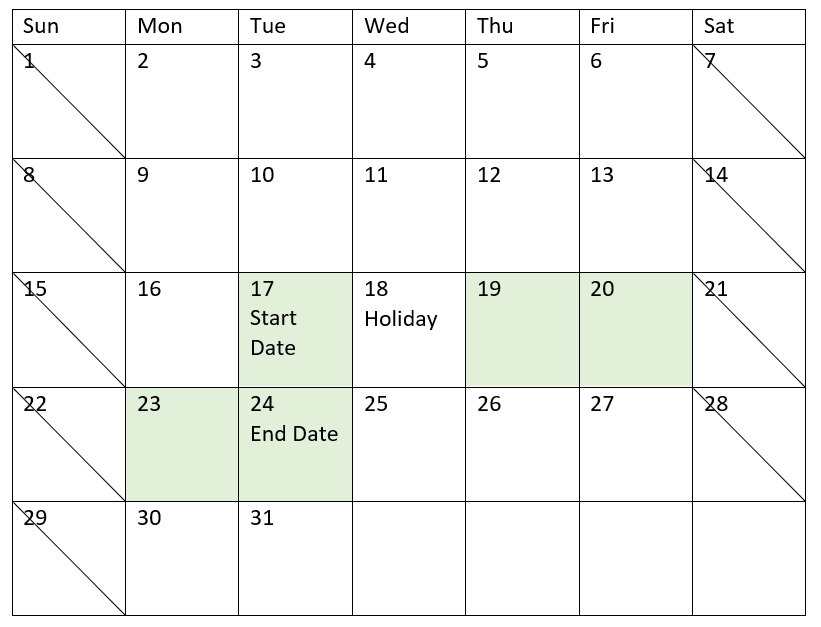
## 範例 3 - 多個假期
[](https://help.qlik.com/en-US/sense/Subsystems/Hub/Content/Sense_Hub/Scripting/DateAndTimeFunctions/lastworkdate.htm)
#### 載入指令碼和結果
概述
開啟資料載入編輯器並將下面的載入指令碼新增至新的區段。
載入指令碼包含:
* 資料集包含專案 ID、專案開始日期和專案所需的預計花費天數。資料集載入到稱為「`Projects`」的表格。
* 包含設定為「`end_date`」欄位之 `lastworkdate()` 函數,並識別每個專案之排定結束時間的前置載入。
不過,有三個假期排程於 5 月 19、20、21 和 22 日。前置載入中的 `lastworkdate()` 函數會在第三引數中納入每個假期,以識別每個專案的排定結束時間。
載入指令碼
```
SET DateFormat='MM/DD/YYYY';
Projects:
Load
*,
LastWorkDate(start_date,effort, '05/19/2022','05/20/2022','05/21/2022','05/22/2022') as end_date
;
Load
id,
start_date,
effort
Inline
[
id,start_date,effort
1,01/01/2022,14
2,02/10/2022,17
3,05/17/2022,5
4,06/01/2022,12
5,08/10/2022,26
];
```
結果
載入資料並開啟工作表。建立新的表格並將這些欄位新增為維度:
* `id`
* `start_date`
* `effort`
* `end_date`
結果表格
| ID | start\_date | 努力 | end\_date |
| --- | --- | --- | --- |
| 1 | 01/01/2022 | 14 | 01/20/2022 |
| 2 | 02/10/2022 | 17 | 03/04/2022 |
| 3 | 05/17/2022 | 5 | 05/25/2022 |
| 4 | 06/01/2022 | 12 | 06/16/2022 |
| 5 | 08/10/2022 | 26 | 09/14/2022 |
在開始日期和工作天數之後輸入四個假期作為 `lastworkdate()` 函數中的引數清單。
下列行事曆顯示專案 3 的開始和結束日期,並顯示假期將專案的結束日期變更三天。
行事曆顯示專案 3 的開始和結束日期,其中假期為 5 月 19 至 22 日
行事曆顯示專案 3 的開始和結束日期,其中假期為 5 月 19 至 22 日
行事曆顯示專案 3 的開始和結束日期,其中假期為 5 月 19 至 22 日 
## 範例 4 - 單一假期 (圖表)
[](https://help.qlik.com/en-US/sense/Subsystems/Hub/Content/Sense_Hub/Scripting/DateAndTimeFunctions/lastworkdate.htm)
#### 載入指令碼和圖表運算式
概述
使用與第一個範例相同的資料集和情境。
不過,在此範例中,資料集保持不變並且會載入到 應用程式 中。會計算 `end_date` 欄位作為圖表中的量值。
載入指令碼
```
SET DateFormat='MM/DD/YYYY';
Projects:
Load
id,
start_date,
effort
Inline
[
id,start_date,effort
1,01/01/2022,14
2,02/10/2022,17
3,05/17/2022,5
4,06/01/2022,12
5,08/10/2022,26
];
```
結果
載入資料並開啟工作表。建立新的表格並將這些欄位新增為維度:
* `id`
* `start_date`
* `effort`
若要計算 end\_date,建立下列量值:
* `=LastWorkDate(start_date,effort,'05/18/2022')`
結果表格
| ID | start\_date | 努力 | =LastWorkDate(start\_date,effort,'05/18/2022') |
| --- | --- | --- | --- |
| 1 | 01/01/2022 | 14 | 01/20/2022 |
| 2 | 02/10/2022 | 17 | 03/04/2022 |
| 3 | 05/17/2022 | 5 | 05/23/2022 |
| 4 | 06/01/2022 | 12 | 06/16/2022 |
| 5 | 08/10/2022 | 26 | 09/14/2022 |
輸入單一排程假期作為圖表中的量值。因此,專案 3 的結束日期會往後偏移一天,因為假期發生在結束日期之前的工作天之一。
下列行事曆顯示專案 3 的開始和結束日期,並顯示假期將專案的結束日期變更一天。
行事曆顯示專案 3 的開始和結束日期,其中假期為 5 月 18 日
行事曆顯示專案 3 的開始和結束日期,其中假期為 5 月 18 日
行事曆顯示專案 3 的開始和結束日期,其中假期為 5 月 18 日 