# GetAlternativeCount - 图表函数
GetAlternativeCount() 用于查找标识字段中可能(浅灰色)值的数量。
语法:
GetAlternativeCount (field\_name)
返回数据类型: 整数
信息注释
选择栏中使用的颜色以及每个选择项状态都可以使用自定义主题进行修改。如果您所用的是使用自定义主题的应用程序,您可能会注意到您的选择显示的颜色与该帮助主题中描述的颜色不同。
参数
| 参数 | 描述 |
| --- | --- |
| field\_name | 包含要度量的数据范围的字段。 |
下表列出了与此函数相关的其他函数。
相关函数
| 函数 | 交互 |
| --- | --- |
| [GetStateCounts - 图表函数](https://help.qlik.com/zh-CN/cloud-services/Subsystems/Hub/Content/Sense_Hub/ChartFunctions/FieldFunctions/getstatecounts.htm) | 使用 GetStateCounts(),您可以使用单个函数调用组合以下计数的计算:
-
所选包含值的计数。
-
可能的值计数。
-
替代值的计数。
-
排除值的计数,不包括替代和选定的排除值。
-
所选排除值的计数。
|
| [GetSelectedCount - 图表函数](https://help.qlik.com/zh-CN/cloud-services/Subsystems/Hub/Content/Sense_Hub/ChartFunctions/FieldFunctions/getselectedcount.htm) | 返回所选包含值的计数。 |
| [GetPossibleCount - 图表函数](https://help.qlik.com/zh-CN/cloud-services/Subsystems/Hub/Content/Sense_Hub/ChartFunctions/FieldFunctions/getpossiblecount.htm) | 返回可能值的计数。 |
| [GetAlternativeCount - 图表函数](https://help.qlik.com/zh-CN/cloud-services/Subsystems/Hub/Content/Sense_Hub/ChartFunctions/FieldFunctions/getalternativecount.htm#) | 返回排除值的计数,不包括替代和选定的排除值。 |
示例:图表表达式
| 示例 | 结果 |
| --- | --- |
| `GetAlternativeCount ([First name])` | 如果在 `First Name` 字段中没有进行选择,则返回 `0` 。如果已进行选择,则返回的值是不同可用值的总数减去所选值的数量。 |
## 示例 - GetAlternativeCount 基本要素
[](https://help.qlik.com/en-US/cloud-services/Subsystems/Hub/Content/Sense_Hub/ChartFunctions/FieldFunctions/getalternativecount.htm)
#### 图表表达式
概述
打开数据加载编辑器,并将下面的加载脚本添加到新部分。
加载脚本包含:
* 加载到名为 `Example` 的数据表中的数据集。
* 数据表中有以下字段:
* `FirstName`
* `LastName`
* `Initials`
* `HasCellphone`
加载脚本
```
Example:
LOAD * inline [
FirstName|LastName|Initials|HasCellphone
John|Anderson|JA|Yes
Sue|Brown|SB|Yes
Mark|Carr|MC|No
Peter|Devonshire|PD|No
Jane|Elliot|JE|Yes
Peter|Franc|PF|Yes ] (delimiter is '|');
```
结果
加载数据并打开工作表。创建新的筛选窗格并将此字段添加为维度:
* `FirstName`
添加 KPI,然后创建以下度量:
* `=GetAlternativeCount (FirstName)`,用于查找 `FirstName` 字段中的替代值的个数。
采用 `GetAlternativeCount` 函数的 KPI 显示值 `0`。如果从`FirstName` 筛选器窗格中选择 `Jane` ,KPI 返回值 `4` ,因为有四个唯一且排除在外的(灰色)值。现在选择 `Mark` ,这样 `Jane` 和 `Mark` 都hui 被选中。`GetAlternativeCount` 度量的 KPI 值返回 `3`,因为有 3 个唯一且排除在外的值,即 `John`、`Peter`, 和 `Sue`。
从 FirstName 筛选器窗格中选择 Jane 和 Mark 后,KPI 结果显示 3 个唯一且排除的值
从 FirstName 筛选器窗格中选择 Jane 和 Mark 后,KPI 结果显示 3 个唯一且排除的值
从 FirstNameFirstName 筛选器窗格中选择 JaneJane 和 Mark Mark 后,KPI 结果显示 3 个唯一且排除的值 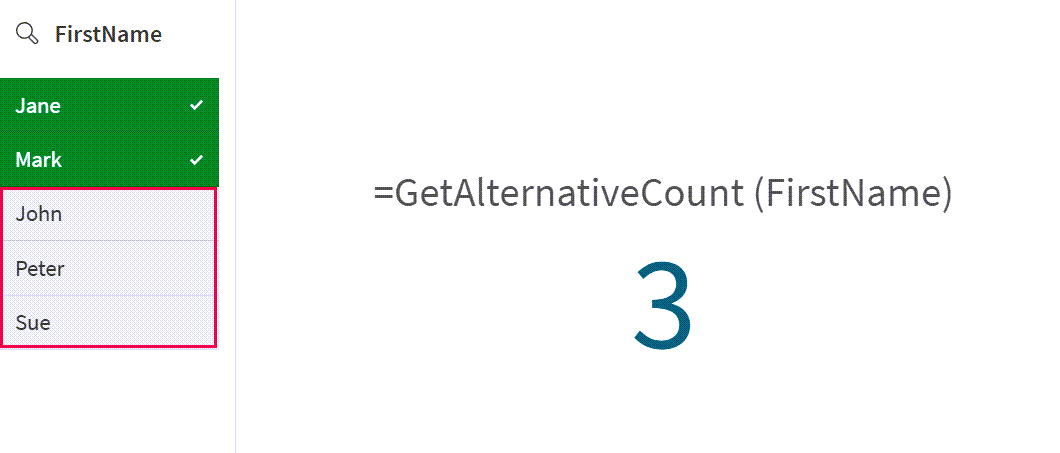
您可以看到 `GetAlternativeCount` 函数返回的值是如何随着额外选择项的增加而变化的。
## 示例 - GetAlternativeCount 场景
[](https://help.qlik.com/en-US/cloud-services/Subsystems/Hub/Content/Sense_Hub/ChartFunctions/FieldFunctions/getalternativecount.htm)
#### 图表表达式
概述
打开数据加载编辑器,并将下面的加载脚本添加到新部分。
加载脚本包含:
* 加载到名为 `CustomerTypeData` 的数据表中的数据集。
* 数据表中有以下字段:
* `CustomerID`
* `CustomerType`
加载脚本
```
CustomerTypeData:
LOAD * INLINE [
CustomerID, CustomerType
C001, Retail
C002, Wholesale
C003, Distributor
C004, Retail
C005, Wholesale
];
```
结果
加载数据并打开工作表。创建新的筛选窗格并将此字段添加为维度:
* `CustomerType`
添加 KPI,然后创建以下度量:
* `=GetAlternativeCount (CustomerType)`,用于查找 `CustomerType` 字段中的替代值的个数。
采用 `GetAlternativeCount` 函数的 KPI 显示为值 `0`,因为 `CustomerType` 字段中未选择任何值。
从 `CustomerType` 筛选器窗格中选择 `Retail`。`GetAlternativeCount` 返回值`2` ,因为 `CustomerType` 字段中有两个唯一且排除在外的(浅灰色)值。.
从 CustomerType 筛选器窗格中选择 Retail 后,KPI 结果显示 2 个唯一且排除的值
从 CustomerType 筛选器窗格中选择 Retail 后,KPI 结果显示 2 个唯一且排除的值
从 CustomerTypeCustomerType 筛选器窗格中选择 RetailRetail 后,KPI 结果显示 2 个唯一且排除的值 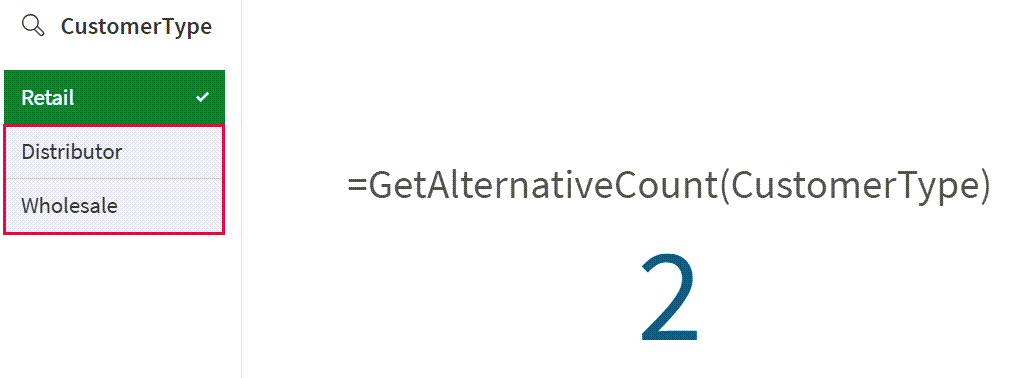
结果显示,虽然有多个值,但`GetAlternativeCount` 函数只显示未选择项目的唯一计数。
## 示例 - 具有可用值的 GetAlternativeCount 场景
[](https://help.qlik.com/en-US/cloud-services/Subsystems/Hub/Content/Sense_Hub/ChartFunctions/FieldFunctions/getalternativecount.htm)
#### 图表表达式
概述
本例以之前的情景为基础。数据集包括第二个数据表,用于演示每个字段中的选择如何改变 `GetAlternativeCount` 函数返回的结果。
打开数据加载编辑器,并将下面的加载脚本添加到新部分。
加载脚本包含:
* 加载到以下 2 个内联数据表和相应字段中的数据集:
* `CustomerTypeData`:包括字段 `CustomerID` 和 `CustomerType`。
* `CustomerSegment`:包括字段 `CustomerType` 和 `Segment`。
加载脚本
```
CustomerTypeData:
LOAD * INLINE [
CustomerID, CustomerType
C001, Retail
C002, Wholesale
C003, Distributor
C004, Retail
C005, Wholesale
];
CustomerSegment:
Load * Inline [
CustomerType, Segment
Retail, Fashion
Retail, Home
Wholesale, Fashion
Wholesale, Drinks
Distributor, Food
];
```
结果
1. 加载数据并打开工作表。创建一个新的筛选器窗格,并将这些字段添加为维度:
* `CustomerType`
* `Segment`
2. 添加 KPI,然后创建以下度量:
* `=GetAlternativeCount (CustomerType)`,用于查找 `CustomerType` 字段中的替代值的个数。
采用 `GetAlternativeCount` 函数的 KPI 显示为值 `0`,因为 `CustomerType` 或 `Segment` 字段中未选择任何值。
3. 从 `Segment` 筛选器中选择 `Drinks` 和 `Fashion`。KPI 仍然返回`0` ,因为 `CustomerType` 字段中没有选择任何值。
KPI 结果在 `Segment` 筛选器中进行选择后显示零个唯一值和排除值
KPI 结果在 `Segment` 筛选器中进行选择后显示零个唯一值和排除值
KPI 结果在 `Segment`Segment 筛选器中进行选择后显示零个唯一值和排除值 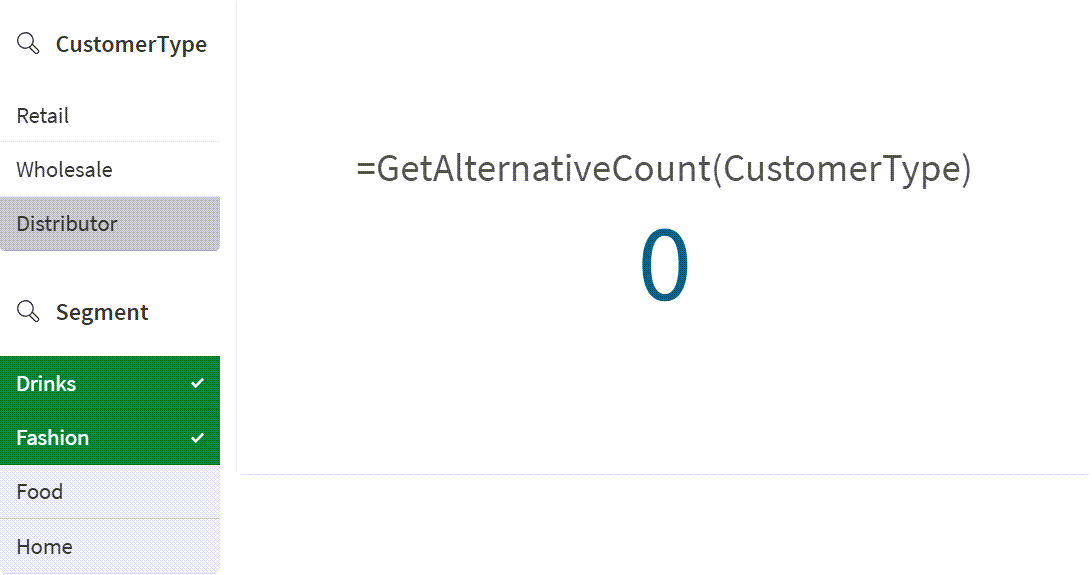
4. 在 `CustomerType` 字段中选择 `Retail` ,并保留 `Segment` 筛选器中的选择项。
`GetAlternativeCount` 函数现在返回 `1`,因为 `CustomerType` 字段 `Wholesale` 中只有一个唯一且被排除(浅灰色)的值。
KPI 结果显示,在 `CustomerType` 和 `Segment` 筛选器中进行选择后,有 1 个唯一且排除的值
KPI 结果显示,在 `CustomerType` 和 `Segment` 筛选器中进行选择后,有 1 个唯一且排除的值
KPI 结果显示,在 `CustomerType`CustomerType 和 `Segment`Segment 筛选器中进行选择后,有 1 个唯一且排除的值 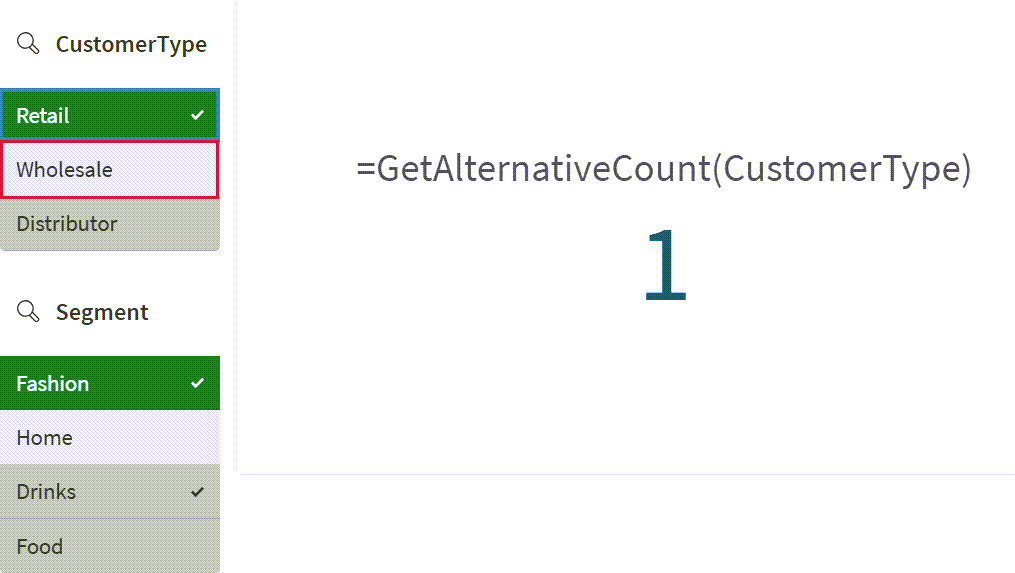
虽然 `CustomerType` 字段中没有选择 `Wholesale` 和 `Distributor` 这两个值(这两个值分别显示为浅灰色和深灰色),但由于 `Segment` 筛选器中的选择,只有 `Wholesale` 这一个值可在 `CustomerType` 中选择。