
Viewing code and executing the Route
Procedure
-
Click the Code tab at the bottom of the
design workspace to check the generated code.
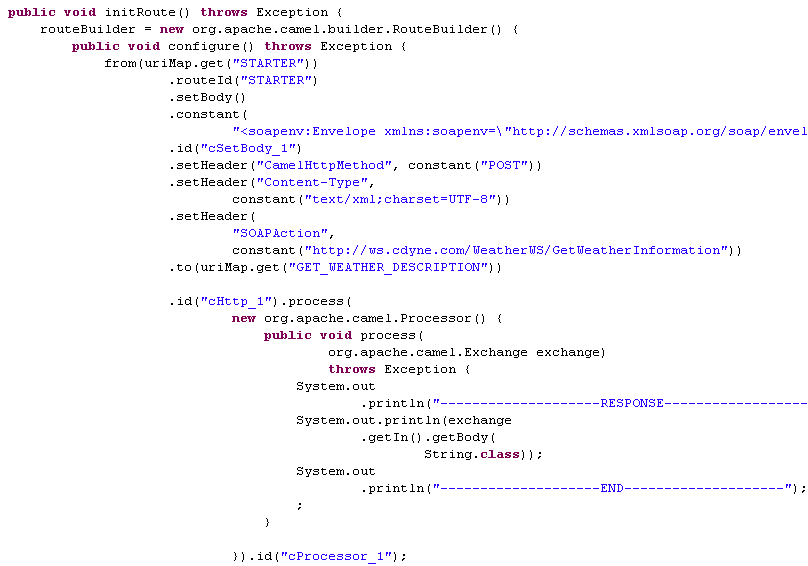 As shown above, the message exchange starts from the endpoint STARTER, gets its body set to <soapenv:Envelope xmlns:soapenv=\"http://schemas.xmlsoap.org/soap/envelope/\"xmlns:weat=\"http://ws.cdyne.com/WeatherWS/\"><soapenv:Header/><soapenv:Body><weat:GetWeatherDefinitionInformation/></soapenv:Body></soapenv:Envelope> at cSetBody_1, and then is sent out to the specified website by cHttp_1. Finally, the response is printed out via cProcessor_1.
 -
Press F6 to execute the Route.
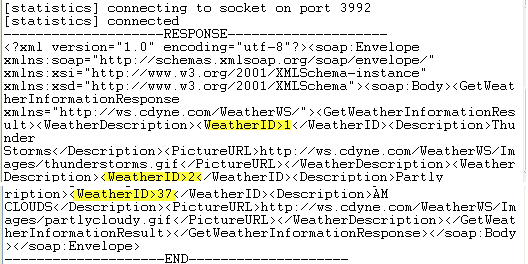 As shown above, the retrieved file defines up to 37 weather conditions with detailed description.