# WRank - Script function
WRank() evaluates the rows of a table in the load script, and for each row, displays the relative position of the value of the field evaluated in the load script. When evaluating the table, the function compares the result with the result of the other rows containing the current partition and returns the ranking of the current row within the segment.
Partitions in a table
Partitions in a table
Partitions in a table 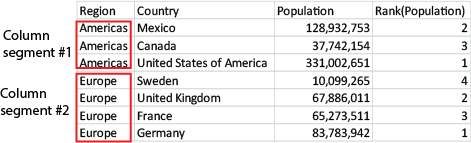
WRank can only be used in a Window function. The Window function must include a sorting type and sorting expression. The ranking is applied on the sorting expression.
Syntax:
WRank ([mode[, fmt]])
Return data type: dual
Arguments:
Arguments
| Argument | Description |
| --- | --- |
| mode | Optionally, specifies the number representation of the function result. |
| fmt | Optionally, specifies the text representation of the function result. |
The ranking is returned as a dual value, which in the case when each row has a unique ranking, is an integer between 1 and the number of rows in the current partition.
In the case where several rows share the same ranking, the text and number representation can be controlled with the mode and fmt parameters.
###### mode
The first argument, mode, can take the following values:
modemode values
| Value | Description |
| --- | --- |
| 0 (default) | If all ranks within the sharing group fall on the low side of the middle
value of the entire ranking, all rows get the lowest rank within the sharing
group.
If all ranks within the sharing group fall on the high side of the middle
value of the entire ranking, all rows get the highest rank within the
sharing group.
If ranks within the sharing group span over
the middle value of the entire ranking, all rows get the value corresponding
to the average of the top and bottom ranking in the entire partition. |
| 1 | Lowest rank on all rows. |
| 2 | Average rank on all rows. |
| 3 | Highest rank on all rows. |
| 4 | Lowest rank on first row, then incremented by one for each row. |
###### fmt
The second argument, fmt, can take the following values:
fmtfmt values
| Value | Description |
| --- | --- |
| 0 (default) | Low value
- high value on all rows (for example 3 - 4). |
| 1 | Low value on all rows. |
| 2 | Low value on first row, blank on the following
rows. |
The order of rows for mode 4 and fmt 2 is determined by the load order of the table fields.
## Example - Adding a ranked field
[](https://help.qlik.com/en-US/sense/Subsystems/Hub/Content/Sense_Hub/Scripting/WindowFunctions/WRank.htm)
#### Example: Adding a ranked field
Load script
Create a new tab in the data load editor, and then load the following data as an inline load. Create the table below in Qlik Sense to see the results.
```
Transactions:
Load
*,
Window(WRank(0),customer_id, 'Desc', transaction_amount) as TransactionRanking;
Load * Inline [
transaction_id, transaction_date, transaction_amount, transaction_quantity, customer_id, size, color_code
3750, 20180830, 23.56, 2, 2038593, L, Red
3751, 20180907, 556.31, 6, 203521, M, Orange
3752, 20180916, 5.75, 1, 5646471, S, Blue
3753, 20180922, 125.00, 7, 3036491, L, Black
3754, 20180922, 484.21, 13, 049681, XS, Red
3756, 20180922, 59.18, 2, 2038593, M, Blue
3757, 20180923, 177.42, 21, 203521, XL, Black
3758, 20180924, 153.42, 14, 2038593, L, Red
3759, 20180925, 7.42, 5, 203521, M, Orange
3760, 20180925, 80.12, 18, 5646471, M, Blue
3761, 20180926, 3.42, 7, 3036491, XS, Black
3763, 20180926, 63.55, 12, 049681, S, Red
3763, 20180927, 177.56, 10, 2038593, L, Blue
3764, 20180927, 325.95, 8, 203521, XL, Black
];
```
Results
Results for adding a ranked field
| transaction\_id | transaction\_date | transaction\_amount | transaction\_quantity | customer\_id | size | color\_code | TransactionRanking |
| --- | --- | --- | --- | --- | --- | --- | --- |
| 3750 | 20180830 | 23.56 | 2 | 2038593 | L | Red | 4-4 |
| 3751 | 20180907 | 556.31 | 6 | 203521 | M | Orange | 1-1 |
| 3752 | 20180916 | 5.75 | 1 | 5646471 | S | Blue | 2-2 |
| 3754 | 20180922 | 484.21 | 13 | 049681 | XS | Red | 1-1 |
| 3756 | 20180922 | 59.18 | 2 | 2038593 | M | Blue | 3-3 |
| 3753 | 20180922 | 125.00 | 7 | 3036491 | L | Black | 1-1 |
| 3757 | 20180923 | 177.42 | 21 | 203521 | XL | Black | 3-3 |
| 3758 | 20180924 | 153.42 | 14 | 2038593 | L | Red | 2-2 |
| 3759 | 20180925 | 7.42 | 5 | 203521 | M | Orange | 4-4 |
| 3760 | 20180925 | 80.12 | 18 | 5646471 | M | Blue | 1-1 |
| 3763 | 20180926 | 63.55 | 12 | 049681 | S | Red | 2-2 |
| 3761 | 20180926 | 3.42 | 7 | 3036491 | XS | Black | 2-2 |
| 3764 | 20180927 | 325.95 | 8 | 203521 | XL | Black | 2-2 |
| 3763 | 20180927 | 177.56 | 10 | 2038593 | L | Blue | 1-1 |
## Example - Adding a ranked field using fmt for a single digit result
[](https://help.qlik.com/en-US/sense/Subsystems/Hub/Content/Sense_Hub/Scripting/WindowFunctions/WRank.htm)
#### Example: Adding a ranked field using fmt for a single digit result
Load script
Create a new tab in the data load editor, and then load the following data as an inline load. Create the table below in Qlik Sense to see the results.
```
Transactions:
Load
*,Window(WRank(0,1),customer_id, 'Desc', transaction_amount) as TransactionRanking;
Load * Inline [
transaction_id, transaction_date, transaction_amount, transaction_quantity, customer_id, size, color_code
3750, 20180830, 23.56, 2, 2038593, L, Red
3751, 20180907, 556.31, 6, 203521, M, Orange
3752, 20180916, 5.75, 1, 5646471, S, Blue
3753, 20180922, 125.00, 7, 3036491, L, Black
3754, 20180922, 484.21, 13, 049681, XS, Red
3756, 20180922, 59.18, 2, 2038593, M, Blue
3757, 20180923, 177.42, 21, 203521, XL, Black
3758, 20180924, 153.42, 14, 2038593, L, Red
3759, 20180925, 7.42, 5, 203521, M, Orange
3760, 20180925, 80.12, 18, 5646471, M, Blue
3761, 20180926, 3.42, 7, 3036491, XS, Black
3763, 20180926, 63.55, 12, 049681, S, Red
3763, 20180927, 177.56, 10, 2038593, L, Blue
3764, 20180927, 325.95, 8, 203521, XL, Black
];
```
Results
Results for adding a ranked field using fmtfmt for a single digit result
| transaction\_id | transaction\_date | transaction\_amount | transaction\_quantity | customer\_id | size | color\_code | TransactionRanking |
| --- | --- | --- | --- | --- | --- | --- | --- |
| 3750 | 20180830 | 23.56 | 2 | 2038593 | L | Red | 4 |
| 3751 | 20180907 | 556.31 | 6 | 203521 | M | Orange | 1 |
| 3752 | 20180916 | 5.75 | 1 | 5646471 | S | Blue | 2 |
| 3754 | 20180922 | 484.21 | 13 | 049681 | XS | Red | 1 |
| 3756 | 20180922 | 59.18 | 2 | 2038593 | M | Blue | 3 |
| 3753 | 20180922 | 125.00 | 7 | 3036491 | L | Black | 1 |
| 3757 | 20180923 | 177.42 | 21 | 203521 | XL | Black | 3 |
| 3758 | 20180924 | 153.42 | 14 | 2038593 | L | Red | 2 |
| 3759 | 20180925 | 7.42 | 5 | 203521 | M | Orange | 4 |
| 3760 | 20180925 | 80.12 | 18 | 5646471 | M | Blue | 1 |
| 3763 | 20180926 | 63.55 | 12 | 049681 | S | Red | 2 |
| 3761 | 20180926 | 3.42 | 7 | 3036491 | XS | Black | 2 |
| 3764 | 20180927 | 325.95 | 8 | 203521 | XL | Black | 2 |
| 3763 | 20180927 | 177.56 | 10 | 2038593 | L | Blue | 1 |
## Example - Adding a ranked field with multiple partitions
[](https://help.qlik.com/en-US/sense/Subsystems/Hub/Content/Sense_Hub/Scripting/WindowFunctions/WRank.htm)
#### Example: Adding a ranked field with multiple partitions
Load script
Create a new tab in the data load editor, and then load the following data as an inline load. Create the table below in Qlik Sense to see the results.
```
Transactions:
Load
*,Window(WRank(0,1),customer_id, size, color_code, 'Desc', transaction_amount) as TransactionRanking;
Load * Inline [
transaction_id, transaction_date, transaction_amount, transaction_quantity, customer_id, size, color_code
3750, 20180830, 23.56, 2, 2038593, L, Red
3751, 20180907, 556.31, 6, 203521, M, Orange
3752, 20180916, 5.75, 1, 5646471, S, Blue
3753, 20180922, 125.00, 7, 3036491, L, Black
3754, 20180922, 484.21, 13, 049681, XS, Red
3756, 20180922, 59.18, 2, 2038593, M, Blue
3757, 20180923, 177.42, 21, 203521, XL, Black
3758, 20180924, 153.42, 14, 2038593, L, Red
3759, 20180925, 7.42, 5, 203521, M, Orange
3760, 20180925, 80.12, 18, 5646471, M, Blue
3761, 20180926, 3.42, 7, 3036491, XS, Black
3763, 20180926, 63.55, 12, 049681, S, Red
3763, 20180927, 177.56, 10, 2038593, L, Blue
3764, 20180927, 325.95, 8, 203521, XL, Black
];
```
Results
Results for adding a ranked field using fmtfmt for a single digit result
| transaction\_id | transaction\_date | transaction\_amount | transaction\_quantity | customer\_id | size | color\_code | TransactionRanking |
| --- | --- | --- | --- | --- | --- | --- | --- |
| 3750 | 20180830 | 23.56 | 2 | 2038593 | L | Red | 2 |
| 3751 | 20180907 | 556.31 | 6 | 203521 | M | Orange | 1 |
| 3752 | 20180916 | 5.75 | 1 | 5646471 | S | Blue | 1 |
| 3754 | 20180922 | 484.21 | 13 | 049681 | XS | Red | 1 |
| 3756 | 20180922 | 59.18 | 2 | 2038593 | M | Blue | 1 |
| 3753 | 20180922 | 125.00 | 7 | 3036491 | L | Black | 1 |
| 3757 | 20180923 | 177.42 | 21 | 203521 | XL | Black | 2 |
| 3758 | 20180924 | 153.42 | 14 | 2038593 | L | Red | 1 |
| 3759 | 20180925 | 7.42 | 5 | 203521 | M | Orange | 2 |
| 3760 | 20180925 | 80.12 | 18 | 5646471 | M | Blue | 1 |
| 3763 | 20180926 | 63.55 | 12 | 049681 | S | Red | 1 |
| 3761 | 20180926 | 3.42 | 7 | 3036491 | XS | Black | 1 |
| 3764 | 20180927 | 325.95 | 8 | 203521 | XL | Black | 1 |
| 3763 | 20180927 | 177.56 | 10 | 2038593 | L | Blue | 1 |
## Limitations
WRank has the following limitations:
* If your fmt value is 0 and you want to use the text part of the dual result for WRank, you must use Text() with Window(WRank). For example: Text(Window(WRank(0), Unit, 'DESC', Age)) as UnitWRankedByAgeText.