# Dual - Script and chart function
Dual() combines a number and a string into a single record, such that the number representation of the record can be used for sorting and calculation purposes, while the string value can be used for display purposes.
[Dual Function](https://play.vidyard.com/vNa9jcN6DizzYQ1hDZ5VAr)
Syntax:
Dual(text, number)
Return data type: dual
Information noteAll dual return values are right-aligned.
Arguments
| Argument | Description |
| --- | --- |
| text | The string value to be used in combination with the number argument. |
| number | The number to be used in combination with the string in the string argument. |
In Qlik Sense, all field values are potentially dual values. This means that the field values can have both a numeric value and a textual value. An example is a date that could have a numeric value of 40908 and the textual representation '2011-12-31'.
Information noteWhen several data items read into one field have different string representations but the same valid number representation, they will all share the first string representation encountered.
Tip noteThe dual function is typically used early in the script, before other data is read into the field concerned, in order to create that first string representation, which will be shown in filter panes.
Example: Chart expressions
| Example | Description |
| --- | --- |
| `Dual(IF(DayOfWeek = 0, 'Monday',`
`IF(DayOfWeek = 1, 'Tuesday',`
`If(DayOfWeek = 2 ,'Wednesday',`
`If(DayOfWeek = 3 ,'Thursday', If(DayOfWeek = 4 ,'Friday', If(DayOfWeek = 5 ,'Saturday', If(DayOfWeek = 6 ,'Sunday'`
`))))))), DayOfWeek)` | The field `DayOfWeek` can be used in a visualization as a dimension. In a table, the week days are automatically sorted into their correct number sequence, instead of alphabetical order. |
| `Dual(Pick( Priority , 'Low','Medium','High'), Priority)` | The field `Priority` can be used in a visualization as a dimension. In a table, the field `Priority` is automatically sorted into its correct number sequence, instead of alphabetical order. |
| `Dual('Q' & Ceil(Month(Date)/3), Ceil(Month(Date)/3))` | The field `Date` can be used in a visualization as a dimension. The text values `Q1` to `Q4` are created and assigned the numeric values `1` to `4`. |
| `Dual(WeekYear(Date) & '-W' & Week(Date), WeekStart(Date))` | The field `Date` can be used in a visualization as a dimension. This example creates text values of the form `'2012-W22'` and at the same time, assigns a numeric value corresponding to the date number of the first day of the week, for example: `41057`. |
Example: Load scripts
| Example | Description |
| --- | --- |
| Add the following examples to your script and run it.
`Load dual ( NameDay,NumDay ) as DayOfWeek inline`
`[ NameDay,NumDay`
`Monday,0`
`Tuesday,1`
`Wednesday,2`
`Thursday,3`
`Friday,4`
`Saturday,5`
`Sunday,6 ];` | The field `DayOfWeek` can be used in a visualization as a dimension for example. In a table, the week days they are automatically sorted into their correct number sequence, instead of alphabetical order. |
| `Load
Dual('Q' & Ceil(Month(Now())/3), Ceil(Month(Now())/3)) as Quarter
AutoGenerate 1;` | This example finds the current quarter. It is displayed as `Q1` when the Now function is run in the first three months of the year, `Q2` for the second three months, and so on. However, when used in sorting, the field `Quarter` will behave as its numerical value: 1 to 4. |
| `Dual('Q' & Ceil(Month(Date)/3), Ceil(Month(Date)/3)) as Quarter` | As in the previous example, the field `Quarter` is created with the text values `Q1` to `Q4`, and assigned the numeric values `1` to `4`. In order to use this in the script the values for `Date` must be loaded. |
| `Dual(WeekYear(Date) & '-W' & Week(Date), WeekStart(Date)) as YearWeek` | This example creates a field `YearWeek` with text values of the form `2012-W22` and at the same time, assigns a numeric value corresponding to the date number of the first day of the week, for example: `41057`. In order to use this in the script the values for `Date` must be loaded. |
## Example - Dual fundamentals
[](https://help.qlik.com/en-US/sense/Subsystems/Hub/Content/Sense_Hub/Scripting/FormattingFunctions/Dual.htm)
#### Chart expression
Overview
A dataset contains customer service data. You want to review the number of calls by the day of the week.
Open the Data load editor and add the load script below to a new section.
The load script contains:
* A dataset which is loaded into a data table called `Example`.
* The following fields in the data table:
* `DayOfWeek`
* `NoOfCalls`
Load script
```
Example:
Load * inline [
DayOfWeek, NoOfCalls
0, 25000
1, 30000
2, 27500
3, 32000
4, 23250
5, 28950
6, 32350
];
```
Results
Load the data and open a sheet. Create a new bar chart, and then add a dimension using one of the following methods:
1. In the dimension expression, add the following:
```
=Dual(IF(DayOfWeek = 0, 'Monday',
IF(DayOfWeek = 1, 'Tuesday',
If(DayOfWeek = 2 ,'Wednesday',
If(DayOfWeek = 3 ,'Thursday',
If(DayOfWeek = 4 ,'Friday',
If(DayOfWeek = 5 ,'Saturday',
If(DayOfWeek = 6 ,'Sunday'
))))))), DayOfWeek)
```
2. This method is more efficient. In the dimension expression, add the following:
```
=Dual(pick( DayOfWeek +1 , 'Monday','Tuesday','Wednesday', 'Thursday','Friday', 'Saturday','Sunday' ), DayOfWeek)
```
Create the following measure:
* `=Sum(NoOfCalls)`, to calculate the number of calls.
Results: Bar chart showing the number of calls by weekday
Results: Bar chart showing the number of calls by weekday
Results: Bar chart showing the number of calls by weekday 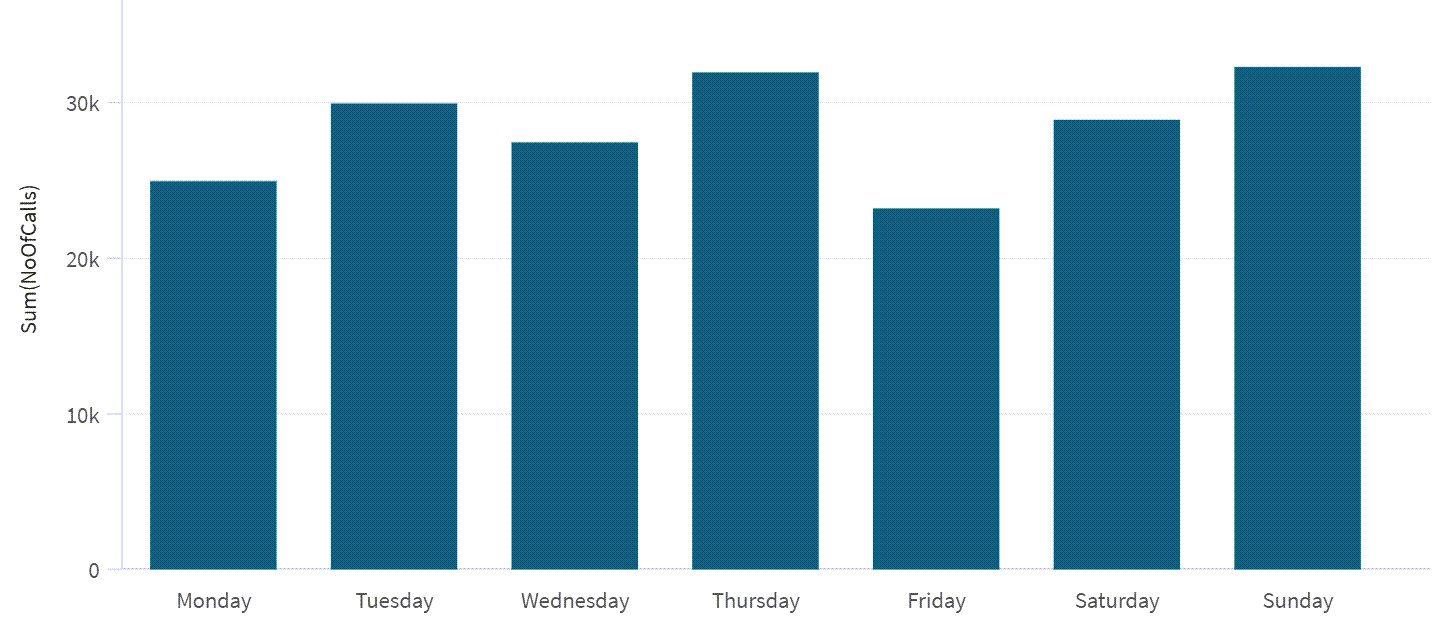
The bar chart shows the number of calls by the day of the week. It automatically sorts the days of the week in the correct order.
## Example - Dual scenario
[](https://help.qlik.com/en-US/sense/Subsystems/Hub/Content/Sense_Hub/Scripting/FormattingFunctions/Dual.htm)
#### Chart expression
Overview
A dataset contains customer support feedback. You want to sort and display the feedback showing the negative responses first followed by the positive responses.
Open the Data load editor and add the load script below to a new section.
The load script contains:
* A dataset which is loaded into a data table called Example.
* The following fields in the data table:
* ResponseType
* NoOfResponses
Load script
```
Example:
Load * inline [
ResponseType, NoOfResponses
1, 350
2, 560
3, 4350
4, 2350
5, 5350
];
```
Results
Load the data and open a sheet. Create a new bar chart and add the following expression to a dimension.
* =Dual(pick( ResponseType , 'Very Bad','Bad','Average', 'Good','Very Good'), ResponseType)
Create the following measure:
* =Sum(NoOfResponses), to calculate the number of responses.
Results: Bar chart showing the number of responses by response type
Results: Bar chart showing the number of responses by response type
Results: Bar chart showing the number of responses by response type 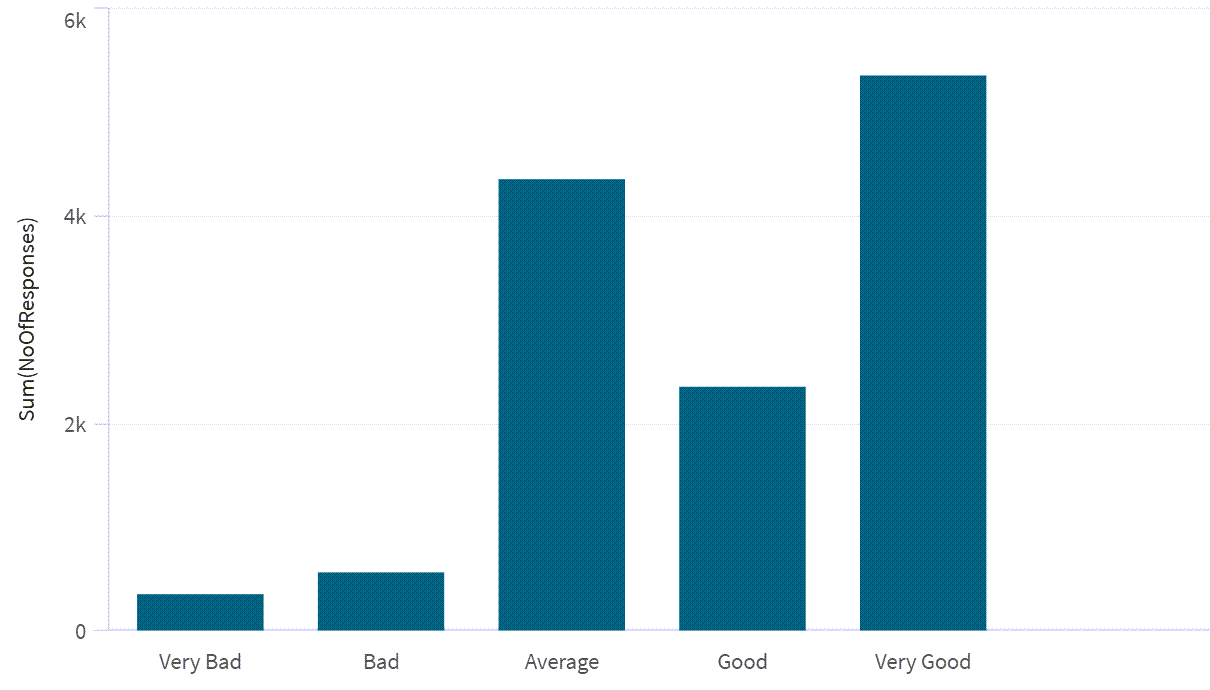
The bar chart shows the number of responses by response type. Note that the bars are automatically sorted from negative to positive. The response type, which is a numeric value, has been assigned a text description.