# weekday - Script and chart function
This function returns a dual value with:
* A day name as defined in the environment variable DayNames.
* An integer between 0-6 corresponding to the nominal day of the week (0-6).
Syntax:
weekday(date [,first\_week\_day=0])
Return data type: dual
The `weekday()` function determines which day of the week a date occurs on. It then returns a string value representing that day.
Diagram of `weekday()` function that returns the name of the day a date falls on
Diagram of `weekday()` function that returns the name of the day a date falls on
Diagram of `weekday()`weekday() function that returns the name of the day a date falls on 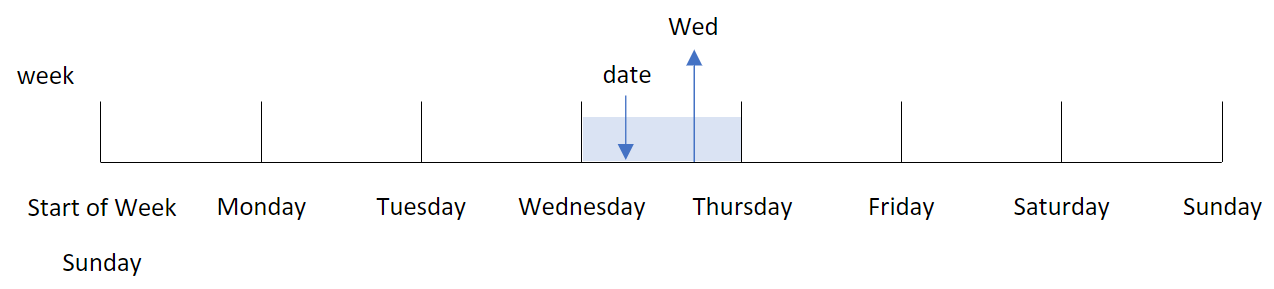
The result returns the number value corresponding to that day of the week (0-6), based on the week’s start day. For example, if the first day of the week is set to Sunday, a Wednesday will return a number value of `3`. This start day is determined either by the `FirstWeekDay` system variable or the `first_week_day` function parameter.
You can use this number value as a part of an arithmetic expression. For example, multiply it by `1` to return the value itself.
Diagram of `weekday()` function with the number value of the day being shown instead of the name of the day
Diagram of `weekday()` function with the number value of the day being shown instead of the name of the day
Diagram of `weekday()`weekday() function with the number value of the day being shown instead of the name of the day 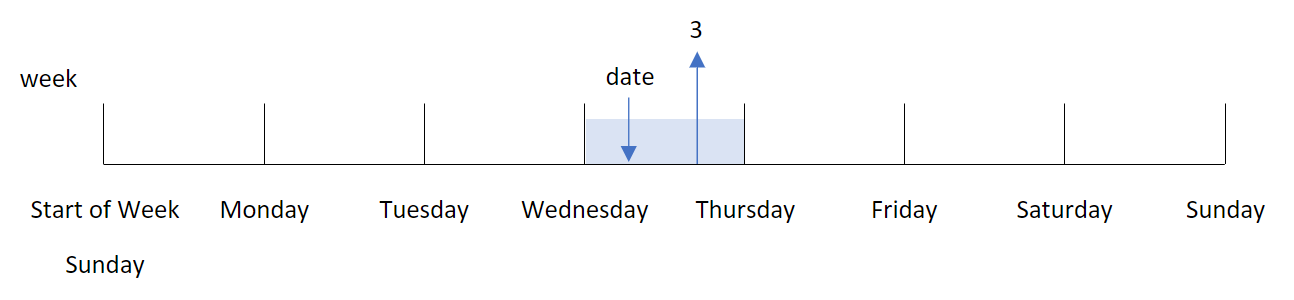
When to use it
The `weekday()` function is useful when you want to compare aggregations by day of the week. For example, if you want to compare the average sales of products by weekday.
These dimensions can be created in the load script by using the function to create a field in a Master Calendar table; or created directly in a chart as a calculated measure.
Related topics
| Topics | Interaction |
| --- | --- |
| [FirstWeekDay](https://help.qlik.com/en-US/sense/November2025/Subsystems/Hub/Content/Sense_Hub/Scripting/NumberInterpretationVariables/FirstWeekDay.htm) | Defines the start day of each week. |
| |
| --- |
Arguments
| Argument | Description |
| --- | --- |
| date | The date or timestamp to evaluate. |
| first\_week\_day | Specifies the day on which the week starts. If omitted, the value of variable FirstWeekDay is used.
[FirstWeekDay](https://help.qlik.com/en-US/sense/November2025/Subsystems/Hub/Content/Sense_Hub/Scripting/NumberInterpretationVariables/FirstWeekDay.htm) |
You can use the following values to set the day on which the week starts in the `first_week_day` argument:
first\_week\_day values
| Day | Value |
| --- | --- |
| Monday | 0 |
| Tuesday | 1 |
| Wednesday | 2 |
| Thursday | 3 |
| Friday | 4 |
| Saturday | 5 |
| Sunday | 6 |
## Regional settings
Unless otherwise specified, the examples in this topic use the following date format: MM/DD/YYYY. The date format is specified in the `SET DateFormat` statement in your data load script. The default date formatting may be different in your system, due to your regional settings and other factors. You can change the formats in the examples below to suit your requirements. Or you can change the formats in your load script to match these examples.
Default regional settings in apps are based on the regional system settings of the computer or server where Qlik Sense is installed. If the Qlik Sense server you are accessing is set to Sweden, the Data load editor will use Swedish regional settings for dates, time, and currency. These regional format settings are not related to the language displayed in the Qlik Sense user interface. Qlik Sense will be displayed in the same language as the browser you are using.
Information noteUnless stated otherwise, `FirstWeekDay` is set to `0` in these examples.
Function examples
| Example | Result |
| --- | --- |
| `weekday('10/12/1971')` | Returns 'Tue' and 1. |
| `weekday('10/12/1971' , 6)` | Returns 'Tue' and 2.
In this example, Sunday (`6`) is the first day of the week. |
| `SET FirstWeekDay=6;`
`...`
`weekday('10/12/1971')` | Returns 'Tue' and 2. |
## Example 1 - Weekday string
[](https://help.qlik.com/en-US/sense/Subsystems/Hub/Content/Sense_Hub/Scripting/DateAndTimeFunctions/weekday.htm)
#### Load script and results
Overview
Open the Data load editor and add the load script below to a new section.
The load script contains:
* A dataset containing a set of transactions for 2022 which is loaded into a table called ‘`Transactions`’.
* The `FirstWeekDay` system variable which is set to 6 (Sunday).
* The `DayNames` variable which is set to use the default day names.
* A preceding load which contains the `weekday()` function, which is set as the ‘`week_day`’ field and returns the weekday the transactions took place.
Load script
```
SET DateFormat='MM/DD/YYYY';
SET DayNames='Mon;Tue;Wed;Thu;Fri;Sat;Sun';
SET FirstWeekDay=6;
Transactions:
Load
*,
WeekDay(date) as week_day
;
Load
*
Inline
[
id,date,amount
8188,01/01/2022,37.23
8189,01/02/2022,17.17
8190,01/03/2022,88.27
8191,01/04/2022,57.42
8192,01/05/2022,53.80
8193,01/06/2022,82.06
8194,01/07/2022,40.39
];
```
Results
Load the data and open a sheet. Create a new table and add these fields as dimensions:
* `id`
* `date`
* `week_day`
Results table
| id | date | week\_day |
| --- | --- | --- |
| 8188 | 01/01/2022 | Sat |
| 8189 | 01/02/2022 | Sun |
| 8190 | 01/03/2022 | Mon |
| 8191 | 01/04/2022 | Tue |
| 8192 | 01/05/2022 | Wed |
| 8193 | 01/06/2022 | Thu |
| 8194 | 01/07/2022 | Fri |
The ‘`week_day`’ field is created in the preceding load statement by using the `weekday()` function and passing the date field as the function’s argument.
The `weekday()` function returns the weekday string value; that is, it returns the name of the weekday which is set by the `DayNames` system variable.
Diagram of `weekday()` function that returns Wednesday as the weekday for transaction 8192
Diagram of `weekday()` function that returns Wednesday as the weekday for transaction 8192
Diagram of `weekday()`weekday() function that returns Wednesday as the weekday for transaction 8192 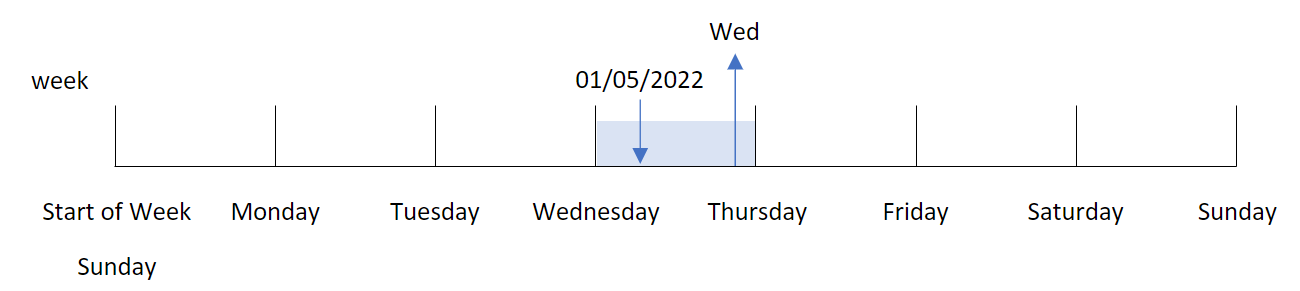
Transaction 8192 took place on January 5. The `FirstWeekDay` system variable sets the first day of the week as Sunday. The `weekday()` function transaction took place on a Wednesday and returns this value, in the abbreviated form of the `DayNames` system variable, in the `week_day` field.
The values in the ‘`week_day`’ field are right aligned in the column because there is a dual number and text result for the field (Wednesday, 3). To convert the field value into its number equivalent, the field can be wrapped inside the `num()` function. For example, in Transaction 8192, the Wednesday value would be converted into the number 3.
## Example 2 - first\_week\_day
[](https://help.qlik.com/en-US/sense/Subsystems/Hub/Content/Sense_Hub/Scripting/DateAndTimeFunctions/weekday.htm)
#### Load script and results
Overview
Open the Data load editor and add the load script below to a new section.
The load script contains:
* A dataset containing a set of transactions for 2022 which is loaded into a table called ‘`Transactions`’.
* The `FirstWeekDay` system variable which is set to 6 (Sunday).
* The `DayNames` variable which is set to use the default day names.
* A preceding load which contains the `weekday()` function, which is set as the ‘`week_day`’ field and returns the weekday the transactions took place.
Load script
```
SET DateFormat='MM/DD/YYYY';
SET DayNames='Mon;Tue;Wed;Thu;Fri;Sat;Sun';
SET FirstWeekDay=6;
Transactions:
Load
*,
WeekDay(date,1) as week_day
;
Load
*
Inline
[
id,date,amount
8188,01/01/2022,37.23
8189,01/02/2022,17.17
8190,01/03/2022,88.27
8191,01/04/2022,57.42
8192,01/05/2022,53.80
8193,01/06/2022,82.06
8194,01/07/2022,40.39
];
```
Results
Load the data and open a sheet. Create a new table and add these fields as dimensions:
* `id`
* `date`
* `week_day`
Results table
| id | date | week\_day |
| --- | --- | --- |
| 8188 | 01/01/2022 | Sat |
| 8189 | 01/02/2022 | Sun |
| 8190 | 01/03/2022 | Mon |
| 8191 | 01/04/2022 | Tue |
| 8192 | 01/05/2022 | Wed |
| 8193 | 01/06/2022 | Thu |
| 8194 | 01/07/2022 | Fri |
Diagram of `weekday()` function that shows Wednesday has the dual number value of 1
Diagram of `weekday()` function that shows Wednesday has the dual number value of 1
Diagram of `weekday()`weekday() function that shows Wednesday has the dual number value of 1 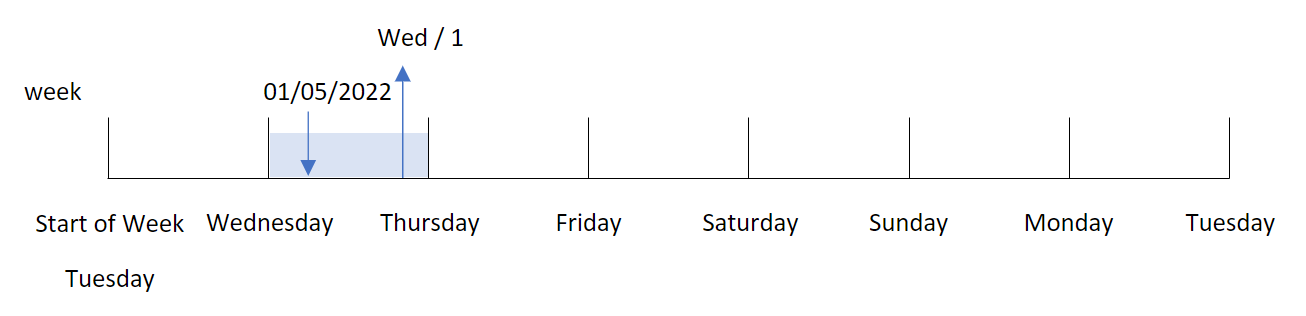
Because the `first_week_day` argument is set to `1` in the `weekday()` function, the first day of the week is Tuesday. Therefore, all transactions that take place on a Tuesday will have a dual number value of `0`.
Transaction 8192 took place on January 5. The `weekday()` function identifies that this is a Wednesday, and so the expression would return the dual number value of `1`.
## Example 3 - Chart object example
[](https://help.qlik.com/en-US/sense/Subsystems/Hub/Content/Sense_Hub/Scripting/DateAndTimeFunctions/weekday.htm)
#### Load script and chart expression
Overview
Open the Data load editor and add the load script below to a new section.
The load script contains:
* A dataset containing a set of transactions for 2022 which is loaded into a table called ‘`Transactions`’.
* The `FirstWeekDay` system variable which is set to `6` (Sunday).
* The `DayNames` variable which is set to use the default day names.
However, in this example, the dataset is unchanged and loaded into the application. The calculation that identifies the weekday value is created as a measure in a chart in the app.
Load script
```
SET DateFormat='MM/DD/YYYY';
SET DayNames='Mon;Tue;Wed;Thu;Fri;Sat;Sun';
SET FirstWeekDay=6;
Transactions:
Load
*
Inline
[
id,date,amount
8188,01/01/2022,37.23
8189,01/02/2022,17.17
8190,01/03/2022,88.27
8191,01/04/2022,57.42
8192,01/05/2022,53.80
8193,01/06/2022,82.06
8194,01/07/2022,40.39
];
```
Results
Load the data and open a sheet. Create a new table and add these fields as dimensions:
* `id`
* `date`
To calculate the weekday value, create the following measure:
* `=weekday(date)`
Results table
| id | date | =weekday(date) |
| --- | --- | --- |
| 8188 | 01/01/2022 | Sat |
| 8189 | 01/02/2022 | Sun |
| 8190 | 01/03/2022 | Mon |
| 8191 | 01/04/2022 | Tue |
| 8192 | 01/05/2022 | Wed |
| 8193 | 01/06/2022 | Thu |
| 8194 | 01/07/2022 | Fri |
The ‘`=weekday(date)`’ field is created in the chart by using the `weekday()` function and passing the date field as the function’s argument.
The `weekday()` function returns the weekday string value; that is, it returns the name of the weekday which is set by the `DayNames` system variable.
Diagram of `weekday()` function that returns Wednesday as the weekday for transaction 8192
Diagram of `weekday()` function that returns Wednesday as the weekday for transaction 8192
Diagram of `weekday()`weekday() function that returns Wednesday as the weekday for transaction 8192 
Transaction 8192 took place on January 5. The `FirstWeekDay` system variable sets the first day of the week as Sunday. The `weekday()` function transaction took place on a Wednesday and returns this value, in the abbreviated form of the `DayNames` system variable, in the `=weekday(date)` field.
## Example 4 - Scenario
[](https://help.qlik.com/en-US/sense/Subsystems/Hub/Content/Sense_Hub/Scripting/DateAndTimeFunctions/weekday.htm)
#### Load script and results
Overview
Open the Data load editor and add the load script below to a new section.
The load script contains:
* A dataset containing a set of transactions for 2022 which is loaded into a table called ‘`Transactions`’.
* The `FirstWeekDay` system variable which is set to `6` (Sunday).
* The `DayNames` variable which is set to use the default day names.
The end user would like a chart that presents the average sales by weekday for the transactions.
Load script
```
SET DateFormat='MM/DD/YYYY';
SET DayNames='Mon;Tue;Wed;Thu;Fri;Sat;Sun';
SET FirstWeekDay=6;
Transactions:
LOAD
RecNo() AS id,
MakeDate(2022, 1, Ceil(Rand() * 31)) as date,
Rand() * 1000 AS amount
Autogenerate(1000);
```
Results
Load the data and open a sheet. Create a new table and add these fields as dimensions:
* `=weekday(date)`
* `=avg(amount)`
Set the measure’s Number Formatting to Money.
Results table
| weekday(date) | Avg(amount) |
| --- | --- |
| Sun | $536.96 |
| Mon | $500.80 |
| Tue | $515.63 |
| Wed | $509.21 |
| Thu | $482.70 |
| Fri | $441.33 |
| Sat | $505.22 |