# networkdays - Script and chart function
The networkdays function returns the number of working days (Monday-Friday) between and including start\_date and end\_date taking into account any optionally listed holiday.
Syntax:
networkdays (start\_date, end\_date [, holiday])
Return data type: integer
Calendar diagram displaying date range returned by networkdays function
Calendar diagram displaying date range returned by networkdays function
Calendar diagram displaying date range returned by networkdays function 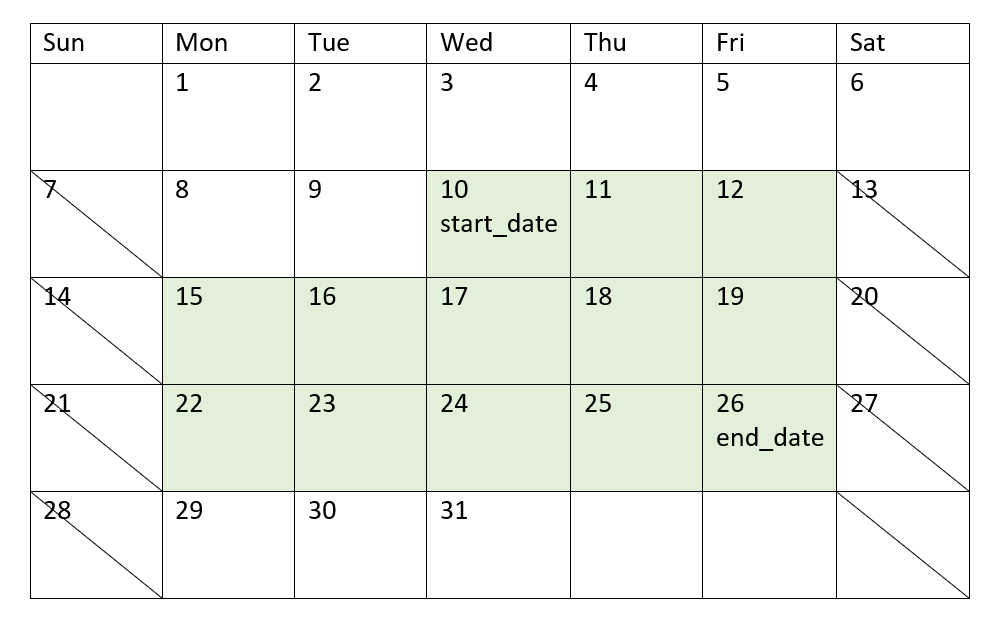
The `networkdays` function has the following limitations:
* There is no method to modify workdays. In other words, there is no way to modify the function for regions or situations that involve anything other than working Monday to Friday.
* The `holiday` parameter must be a string constant. Expressions are not accepted.
Arguments
| Argument | Description |
| --- | --- |
| start\_date | The start date to evaluate. |
| end\_date | The end date to evaluate. |
| holiday | Holiday periods to exclude from working days. A holiday is stated as a string constant date. You can specify multiple holiday dates, separated by commas.
Example: ` '12/25/2013', '12/26/2013', '12/31/2013', '01/01/2014' ` |
## When to use it
The `networkdays()` function is commonly used as part of an expression when the user would like the calculation to use the number of working week days that occur between two dates. For example, if a user would like to calculate the total wages that will be earned by an employee on a PAYE (pay-as-you-earn) contract.
Function examples
| Example | Result |
| --- | --- |
| `networkdays ('12/19/2013', '01/07/2014')` | Returns
14. This example does not take holidays into account. |
| `networkdays ('12/19/2013', '01/07/2014', '12/25/2013', '12/26/2013')` | Returns
12. This example takes the holiday 12/25/2013 to 12/26/2013 into account. |
| `networkdays ('12/19/2013', '01/07/2014', '12/25/2013', '12/26/2013', '12/31/2013', '01/01/2014')` | Returns 10. This example takes two holiday periods into account. |
## Regional settings
Unless otherwise specified, the examples in this topic use the following date format: MM/DD/YYYY. The date format is specified in the `SET DateFormat` statement in your data load script. The default date formatting may be different in your system, due to your regional settings and other factors. You can change the formats in the examples below to suit your requirements. Or you can change the formats in your load script to match these examples.
Default regional settings in apps are based on the regional system settings of the computer or server where Qlik Sense is installed. If the Qlik Sense server you are accessing is set to Sweden, the Data load editor will use Swedish regional settings for dates, time, and currency. These regional format settings are not related to the language displayed in the Qlik Sense user interface. Qlik Sense will be displayed in the same language as the browser you are using.
## Example 1 – Basic example
[](https://help.qlik.com/en-US/sense/Subsystems/Hub/Content/Sense_Hub/Scripting/DateAndTimeFunctions/networkdays.htm)
#### Load script and results
Overview
Open the Data load editor and add the load script below to a new section.
The load script contains:
* A dataset containing project IDs, their start dates, and their end dates. This information is loaded into a table called `Projects`.
* The date field provided in the `DateFormat` system variable (MM/DD/YYYY) format.
* The creation of an additional field, `net_work_days`, to calculate the number of working days involved in each project.
Load script
```
SET DateFormat='MM/DD/YYYY';
Projects:
Load
*,
networkdays(start_date,end_date) as net_work_days
;
Load
id,
start_date,
end_date
Inline
[
id,start_date,end_date
1,01/01/2022,01/18/2022
2,02/10/2022,02/17/2022
3,05/17/2022,07/05/2022
4,06/01/2022,06/12/2022
5,08/10/2022,08/26/2022
];
```
Results
Load the data and open a sheet. Create a new table and add these fields as dimensions:
* `id`
* `start_date`
* `end_date`
* `net_work_days`
Results table
| id | start\_date | end\_date | net\_work\_days |
| --- | --- | --- | --- |
| 1 | 01/01/2022 | 01/18/2022 | 12 |
| 2 | 02/10/2022 | 02/17/2022 | 6 |
| 3 | 05/17/2022 | 07/05/2022 | 36 |
| 4 | 06/01/2022 | 06/12/2022 | 8 |
| 5 | 08/10/2022 | 08/26/2022 | 13 |
Because there are no scheduled holidays (this would have been present in the third argument of the `networkdays()` function), the function subtracts the `start_date` from the `end_date`, as well as all weekends, to calculate the number of working days between the two dates.
Calendar diagram highlighting work days for project 5 (no holidays)
Calendar diagram highlighting work days for project 5 (no holidays)
Calendar diagram highlighting work days for project 5 (no holidays) 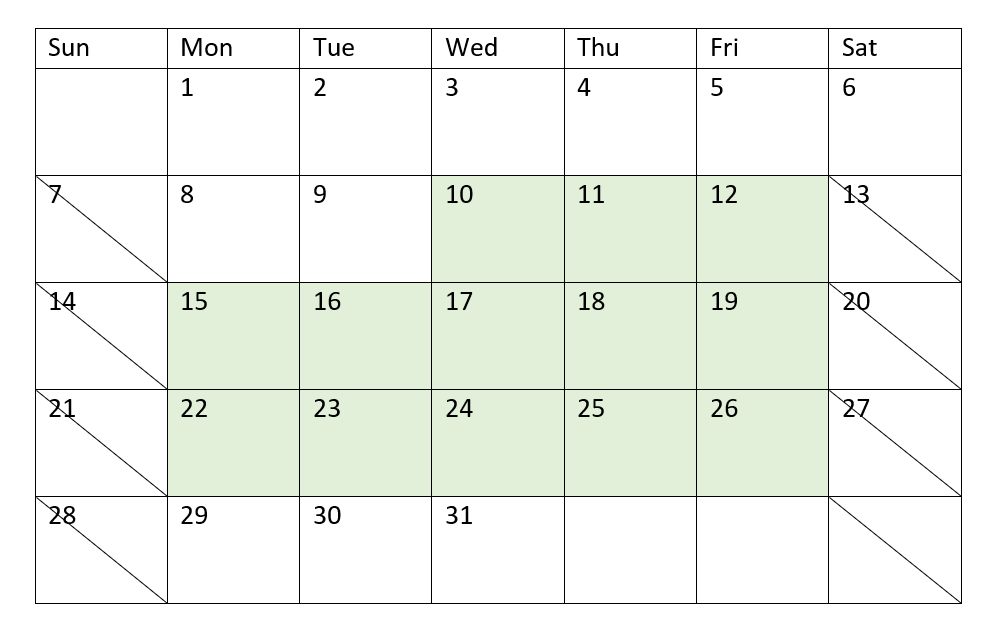
The calendar above visually outlines the project with `id` of 5. Project 5 begins on Wednesday, August 10, 2022 and ends on August 26, 2022. With all Saturdays and Sundays ignored, there are 13 working days between, and including, these two dates.
## Example 2 – Single holiday
[](https://help.qlik.com/en-US/sense/Subsystems/Hub/Content/Sense_Hub/Scripting/DateAndTimeFunctions/networkdays.htm)
#### Load script and results
Overview
Open the Data load editor and add the load script below to a new section.
The load script contains:
* The same dataset and scenario from the previous example.
* The date field provided in the `DateFormat` system variable (MM/DD/YYYY) format.
* The creation of an additional field, `net_work_days`, to calculate the number of working days involved in each project.
In this example, there is a one-day holiday scheduled on August 19, 2022.
Load script
```
SET DateFormat='MM/DD/YYYY';
Projects:
Load
*,
networkdays(start_date,end_date,'08/19/2022') as net_work_days
;
Load
id,
start_date,
end_date
Inline
[
id,start_date,end_date
1,01/01/2022,01/18/2022
2,02/10/2022,02/17/2022
3,05/17/2022,07/05/2022
4,06/01/2022,06/12/2022
5,08/10/2022,08/26/2022
];
```
Results
Load the data and open a sheet. Create a new table and add these fields as dimensions:
* `id`
* `start_date`
* `end_date`
* `net_work_days`
Results table
| id | start\_date | end\_date | net\_work\_days |
| --- | --- | --- | --- |
| 1 | 01/01/2022 | 01/18/2022 | 12 |
| 2 | 02/10/2022 | 02/17/2022 | 6 |
| 3 | 05/17/2022 | 07/05/2022 | 36 |
| 4 | 06/01/2022 | 06/12/2022 | 8 |
| 5 | 08/10/2022 | 08/26/2022 | 12 |
The single scheduled holiday is entered as the third argument in the `networkdays()` function.
Calendar diagram highlighting work days for project 5 (single holiday)
Calendar diagram highlighting work days for project 5 (single holiday)
Calendar diagram highlighting work days for project 5 (single holiday) 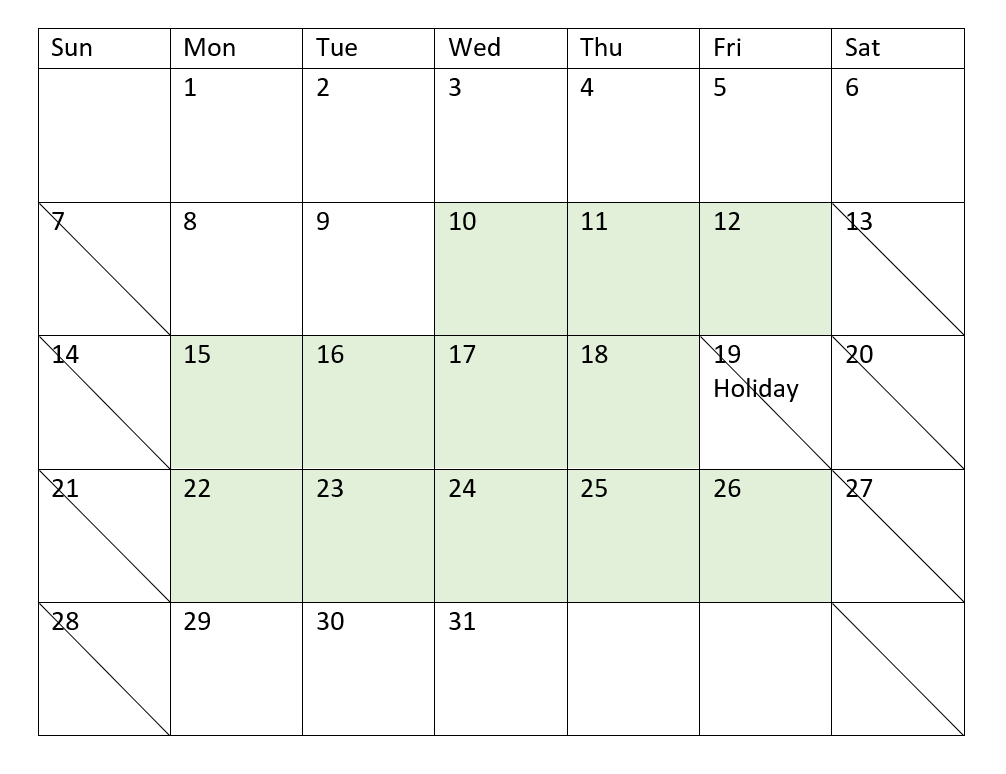
The calendar above visually outlines project 5, demonstrating this adjustment to include the holiday. This holiday occurs during project 5 on Friday, August 19, 2022. As a result, the total `net_work_days` value for project 5 decreases by one day, from 13 to 12 days.
## Example 3 – Multiple holidays
[](https://help.qlik.com/en-US/sense/Subsystems/Hub/Content/Sense_Hub/Scripting/DateAndTimeFunctions/networkdays.htm)
#### Load script and results
Overview
Open the Data load editor and add the load script below to a new section.
The load script contains:
* The same dataset and scenario from the first example.
* The date field provided in the `DateFormat` system variable (MM/DD/YYYY) format.
* The creation of an additional field, `net_work_days`, to calculate the number of working days involved in each project.
However, in this example, there are four holidays scheduled from August 18 to August 21, 2022.
Load script
```
SET DateFormat='MM/DD/YYYY';
Projects:
Load
*,
networkdays(start_date,end_date,'08/18/2022','08/19/2022','08/20/2022','08/21/2022') as net_work_days
;
Load
id,
start_date,
end_date
Inline
[
id,start_date,end_date
1,01/01/2022,01/18/2022
2,02/10/2022,02/17/2022
3,05/17/2022,07/05/2022
4,06/01/2022,06/12/2022
5,08/10/2022,08/26/2022
];
```
Results
Load the data and open a sheet. Create a new table and add these fields as dimensions:
* `id`
* `start_date`
* `end_date`
* `net_work_days`
Results table
| id | start\_date | end\_date | net\_work\_days |
| --- | --- | --- | --- |
| 1 | 01/01/2022 | 01/18/2022 | 12 |
| 2 | 02/10/2022 | 02/17/2022 | 6 |
| 3 | 05/17/2022 | 07/05/2022 | 36 |
| 4 | 06/01/2022 | 06/12/2022 | 8 |
| 5 | 08/10/2022 | 08/26/2022 | 11 |
The four scheduled holidays are entered as a comma separated list, from the third argument onwards in the `networkdays()` function.
Calendar diagram highlighting work days for project 5 (multiple holidays)
Calendar diagram highlighting work days for project 5 (multiple holidays)
Calendar diagram highlighting work days for project 5 (multiple holidays) 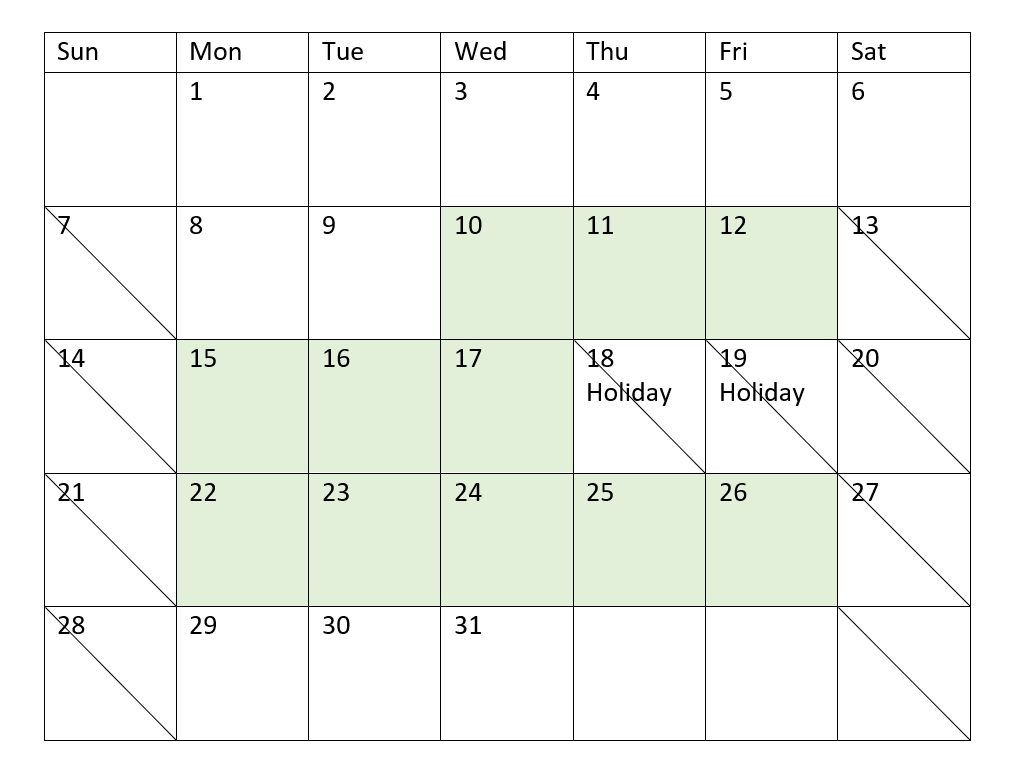
The calendar above visually outlines project 5, demonstrating this adjustment to include these holidays. This period of scheduled holidays occurs during project 5, with two of the days occurring on a Thursday and Friday. As a result, the total `net_work_days` value for project 5 decreases from 13 to 11 days.
## Example 4 – Single holiday
[](https://help.qlik.com/en-US/sense/Subsystems/Hub/Content/Sense_Hub/Scripting/DateAndTimeFunctions/networkdays.htm)
#### Load script and chart expression
Overview
Open the Data load editor and add the load script below to a new section.
The load script contains:
* The same dataset and scenario from the first example.
* The date field provided in the DateFormat system variable (MM/DD/YYYY) format.
There is a one-day holiday scheduled on August 19, 2022.
However, in this example, the unchanged dataset is loaded into the application. The net\_work\_days field is calculated as a measure in a chart object.
Load script
```
SET DateFormat='MM/DD/YYYY';
Projects:
Load
id,
start_date,
end_date
Inline
[
id,start_date,end_date
1,01/01/2022,01/18/2022
2,02/10/2022,02/17/2022
3,05/17/2022,07/05/2022
4,06/01/2022,06/12/2022
5,08/10/2022,08/26/2022
];
```
Results
Load the data and open a sheet. Create a new table and add these fields as dimensions:
* id
* start\_date
* end\_date
Create the following measure:
= networkdays(start\_date,end\_date,’08/19/2022’)
Results table
| id | start\_date | end\_date | net\_work\_days |
| --- | --- | --- | --- |
| 1 | 01/01/2022 | 01/18/2022 | 12 |
| 2 | 02/10/2022 | 02/17/2022 | 6 |
| 3 | 05/17/2022 | 07/05/2022 | 36 |
| 4 | 06/01/2022 | 06/12/2022 | 8 |
| 5 | 08/10/2022 | 08/26/2022 | 12 |
The single scheduled holiday is entered as the third argument in the networkdays() function.
Calendar diagram showing net work days with single holiday (chart object)
Calendar diagram showing net work days with single holiday (chart object)
Calendar diagram showing net work days with single holiday (chart object) 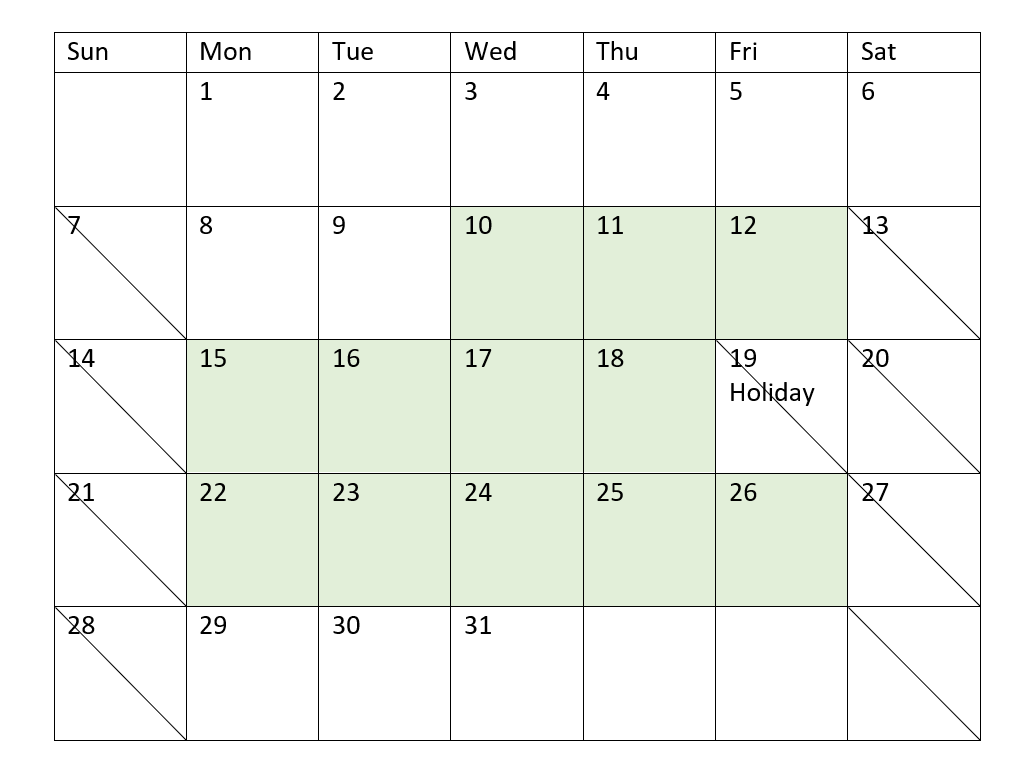
The calendar above visually outlines project 5, demonstrating this adjustment to include the holiday. This holiday occurs during project 5 on Friday, August 19, 2022. As a result, the total net\_work\_days value for project 5 decreases by one day, from 13 to 12 days.