# monthsname - Script and chart function
This function returns a display value representing the range of the months of the period (formatted according to the MonthNames script variable) as well as the year. The underlying numeric value corresponds to a timestamp of the first millisecond of the month, bi-month, quarter, four-month period, or half-year containing a base date.
Syntax:
MonthsName(n\_months, date[, period\_no[, first\_month\_of\_year]])
Return data type: dual
Diagram of monthsname function
Diagram of monthsname function
Diagram of monthsname function 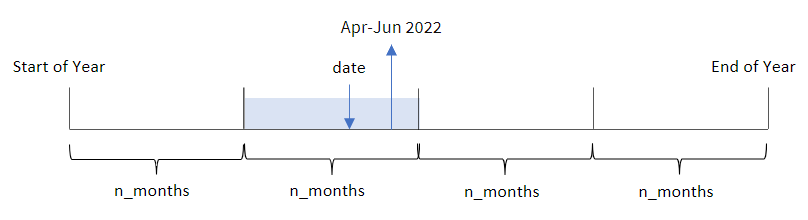
The `monthsname()` function divides the year into segments based on the `n_months` agrument provided. It then evaluates the segment to which each provided `date` belongs, and returns the start and end month names of that segment, as well as the year. The function also provides the ability to return these boundaries from preceding or following segments, as well as redefining which is the first month of the year.
The following segments of the year are available in the function as `n_month` arguments:
Possible `n_month`n\_month arguments
| Periods | Number of months |
| --- | --- |
| month | 1 |
| bi-month | 2 |
| quarter | 3 |
| four months | 4 |
| half-year | 6 |
Arguments
| Argument | Description |
| --- | --- |
| n\_months | The number of months that defines the period. An integer or expression that resolves to an integer that must be one of: 1 (equivalent to the inmonth() function), 2 (bi-month), 3 (equivalent to the inquarter()function), 4 (four-month period), or 6 (half year). |
| date | The date or timestamp to evaluate. |
| period\_no | The period can be offset by period\_no, an integer, or expression resolving to an integer, where the value 0 indicates the period that contains base\_date. Negative values in period\_no indicate preceding periods and
positive values indicate succeeding periods. |
| first\_month\_of\_year | If you
want to work with (fiscal) years not starting in January, indicate
a value between 2 and 12 in first\_month\_of\_year. |
## When to use it
The `monthsname()` function is useful when you would like to provide the user with the functionality to compare aggregations by a period of their choosing. For example, you could provide an input variable to let the user see the total sales of products by month, quarter, or half-year.
These dimensions can be created either in the load script by adding the function as a field in a Master Calendar table, or alternatively, by creating the dimension directly in a chart as a calculated dimension.
Function examples
| Example | Result |
| --- | --- |
| `monthsname(4, '10/19/2013')` | Returns 'Sep-Dec 2013.' In this and the other examples, the SET Monthnames statement is set to Jan;Feb;Mar, and so on. |
| `monthsname(4, '10/19/2013', -1)` | Returns 'May-Aug 2013'. |
| ` monthsname(4, '10/19/2013', 0, 2) ` | Returns 'Oct-Jan 2014', since the year is specified to begin in month 2. Therefore, the four-month period ends on the first month of the following year. |
## Regional settings
Unless otherwise specified, the examples in this topic use the following date format: MM/DD/YYYY. The date format is specified in the `SET DateFormat` statement in your data load script. The default date formatting may be different in your system, due to your regional settings and other factors. You can change the formats in the examples below to suit your requirements. Or you can change the formats in your load script to match these examples.
Default regional settings in apps are based on the regional system settings of the computer or server where Qlik Sense is installed. If the Qlik Sense server you are accessing is set to Sweden, the Data load editor will use Swedish regional settings for dates, time, and currency. These regional format settings are not related to the language displayed in the Qlik Sense user interface. Qlik Sense will be displayed in the same language as the browser you are using.
## Example 1 – Basic example
[](https://help.qlik.com/en-US/sense/Subsystems/Hub/Content/Sense_Hub/Scripting/DateAndTimeFunctions/monthsname.htm)
#### Load script and results
Overview
Open the Data load editor and add the load script below to a new section.
The load script contains:
* A dataset containing a set of transactions for 2022, which is loaded into a table called `Transactions`.
* The date field provided in the `DateFormat` system variable (MM/DD/YYYY) format.
* The creation of a field, `bi_monthly_range`, that groups transactions into bi-monthly segments and returns the boundary names of that segment for each transaction.
Load script
```
SET DateFormat='MM/DD/YYYY';
Transactions:
Load
*,
monthsname(2,date) as bi_monthly_range
;
Load
*
Inline
[
id,date,amount
8188,2/19/2022,37.23
8189,3/7/2022,17.17
8190,3/30/2022,88.27
8191,4/5/2022,57.42
8192,4/16/2022,53.80
8193,5/1/2022,82.06
8194,5/7/2022,40.39
8195,5/22/2022,87.21
8196,6/15/2022,95.93
8197,6/26/2022,45.89
8198,7/9/2022,36.23
8199,7/22/2022,25.66
8200,7/23/2022,82.77
8201,7/27/2022,69.98
8202,8/2/2022,76.11
8203,8/8/2022,25.12
8204,8/19/2022,46.23
8205,9/26/2022,84.21
8206,10/14/2022,96.24
8207,10/29/2022,67.67
];
```
Results
Load the data and open a sheet. Create a new table and add these fields as dimensions:
* `date`
* `bi_monthly_range`
Results table
| date | bi\_monthly\_range |
| --- | --- |
| 2/19/2022 | Jan-Feb 2022 |
| 3/7/2022 | Mar-Apr 2022 |
| 3/30/2022 | Mar-Apr 2022 |
| 4/5/2022 | Mar-Apr 2022 |
| 4/16/2022 | Mar-Apr 2022 |
| 5/1/2022 | May-Jun 2022 |
| 5/7/2022 | May-Jun 2022 |
| 5/22/2022 | May-Jun 2022 |
| 6/15/2022 | May-Jun 2022 |
| 6/26/2022 | May-Jun 2022 |
| 7/9/2022 | Jul-Aug 2022 |
| 7/22/2022 | Jul-Aug 2022 |
| 7/23/2022 | Jul-Aug 2022 |
| 7/27/2022 | Jul-Aug 2022 |
| 8/2/2022 | Jul-Aug 2022 |
| 8/8/2022 | Jul-Aug 2022 |
| 8/19/2022 | Jul-Aug 2022 |
| 9/26/2022 | Sep-Oct 2022 |
| 10/14/2022 | Sep-Oct 2022 |
| 10/29/2022 | Sep-Oct 2022 |
The `bi_monthly_range` field is created in the preceding load statement by using the `monthsname()` function. The first argument provided is 2, dividing the year into bi-monthly segments. The second argument identifies which field is being evaluated.
Diagram of monthsname function, basic example
Diagram of monthsname function, basic example
Diagram of monthsname function, basic example 
Transaction 8195 takes place on May 22. The `monthsname()` function initially divides the year into bi-monthly segments. Transaction 8195 falls into the segment between May 1 and June 30. Therefore, the function returns these months in the `MonthNames` system variable format, as well as the year, May-Jun 2022.
## Example 2 – period\_no
[](https://help.qlik.com/en-US/sense/Subsystems/Hub/Content/Sense_Hub/Scripting/DateAndTimeFunctions/monthsname.htm)
#### Load script and results
Overview
Open the Data load editor and add the load script below to a new section.
The load script contains:
* The same inline dataset and scenario as the first example.
* The creation of a field, `prev_bi_monthly_range`, that groups transactions into bi-monthly segments and returns the previous segment boundary names for each transaction.
Add your other text here, as needed, with lists etc.
Load script
```
SET DateFormat='MM/DD/YYYY';
Transactions:
Load
*,
MonthsName(2,date,-1) as prev_bi_monthly_range
;
Load
*
Inline
[
id,date,amount
8188,2/19/2022,37.23
8189,3/7/2022,17.17
8190,3/30/2022,88.27
8191,4/5/2022,57.42
8192,4/16/2022,53.80
8193,5/1/2022,82.06
8194,5/7/2022,40.39
8195,5/22/2022,87.21
8196,6/15/2022,95.93
8197,6/26/2022,45.89
8198,7/9/2022,36.23
8199,7/22/2022,25.66
8200,7/23/2022,82.77
8201,7/27/2022,69.98
8202,8/2/2022,76.11
8203,8/8/2022,25.12
8204,8/19/2022,46.23
8205,9/26/2022,84.21
8206,10/14/2022,96.24
8207,10/29/2022,67.67
];
```
Results
Load the data and open a sheet. Create a new table and add these fields as dimensions:
* `date`
* `prev_bi_monthly_range`
Results table
| date | prev\_bi\_monthly\_range |
| --- | --- |
| 2/19/2022 | Nov-Dec 2021 |
| 3/7/2022 | Jan-Feb 2022 |
| 3/30/2022 | Jan-Feb 2022 |
| 4/5/2022 | Jan-Feb 2022 |
| 4/16/2022 | Jan-Feb 2022 |
| 5/1/2022 | Mar-Apr 2022 |
| 5/7/2022 | Mar-Apr 2022 |
| 5/22/2022 | Mar-Apr 2022 |
| 6/15/2022 | Mar-Apr 2022 |
| 6/26/2022 | Mar-Apr 2022 |
| 7/9/2022 | May-Jun 2022 |
| 7/22/2022 | May-Jun 2022 |
| 7/23/2022 | May-Jun 2022 |
| 7/27/2022 | May-Jun 2022 |
| 8/2/2022 | May-Jun 2022 |
| 8/8/2022 | May-Jun 2022 |
| 8/19/2022 | May-Jun 2022 |
| 9/26/2022 | Jul-Aug 2022 |
| 10/14/2022 | Jul-Aug 2022 |
| 10/29/2022 | Jul-Aug 2022 |
In this example, -1 is used as the `period_no` argument in the `monthsname()` function. After initially dividing a year into bi-monthly segments, the function then returns the previous segment boundaries for when a transaction takes place.
Diagram of monthsname function, period\_no example
Diagram of monthsname function, period\_no example
Diagram of monthsname function, period\_no example 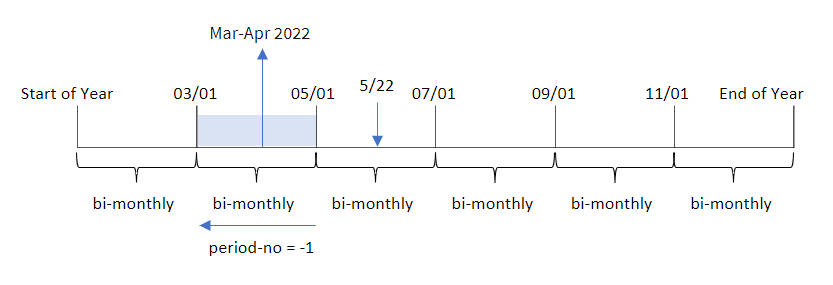
Transaction 8195 occurs in the segment between May and June. Therefore, the previous bi-monthly segment was between March 1 and April 30, and so the function returns Mar-Apr 2022.
## Example 3 – first\_month\_of\_year
[](https://help.qlik.com/en-US/sense/Subsystems/Hub/Content/Sense_Hub/Scripting/DateAndTimeFunctions/monthsname.htm)
#### Load script and results
Overview
Open the Data load editor and add the load script below to a new section.
The load script contains:
* The same inline dataset and scenario as the first example.
* The creation of a different field, `bi_monthly_range`, that groups transactions into bi-monthly segments and returns the segment boundaries for each transaction.
However, in this example, we also need to set April as the first month of the financial year.
Load script
```
SET DateFormat='MM/DD/YYYY';
Transactions:
Load
*,
MonthsName(2,date,0,4) as bi_monthly_range
;
Load
*
Inline
[
id,date,amount
8188,2/19/2022,37.23
8189,3/7/2022,17.17
8190,3/30/2022,88.27
8191,4/5/2022,57.42
8192,4/16/2022,53.80
8193,5/1/2022,82.06
8194,5/7/2022,40.39
8195,5/22/2022,87.21
8196,6/15/2022,95.93
8197,6/26/2022,45.89
8198,7/9/2022,36.23
8199,7/22/2022,25.66
8200,7/23/2022,82.77
8201,7/27/2022,69.98
8202,8/2/2022,76.11
8203,8/8/2022,25.12
8204,8/19/2022,46.23
8205,9/26/2022,84.21
8206,10/14/2022,96.24
8207,10/29/2022,67.67
];
```
Results
Load the data and open a sheet. Create a new table and add these fields as dimensions:
* `date`
* `bi_monthly_range`
Results table
| date | bi\_monthly\_range |
| --- | --- |
| 2/19/2022 | Feb-Mar 2021 |
| 3/7/2022 | Feb-Mar 2021 |
| 3/30/2022 | Feb-Mar 2021 |
| 4/5/2022 | Apr-May 2022 |
| 4/16/2022 | Apr-May 2022 |
| 5/1/2022 | Apr-May 2022 |
| 5/7/2022 | Apr-May 2022 |
| 5/22/2022 | Apr-May 2022 |
| 6/15/2022 | Jun-Jul 2022 |
| 6/26/2022 | Jun-Jul 2022 |
| 7/9/2022 | Jun-Jul 2022 |
| 7/22/2022 | Jun-Jul 2022 |
| 7/23/2022 | Jun-Jul 2022 |
| 7/27/2022 | Jun-Jul 2022 |
| 8/2/2022 | Aug-Sep 2022 |
| 8/8/2022 | Aug-Sep 2022 |
| 8/19/2022 | Aug-Sep 2022 |
| 9/26/2022 | Aug-Sep 2022 |
| 10/14/2022 | Oct-Nov 2022 |
| 10/29/2022 | Oct-Nov 2022 |
By using 4 as the `first_month_of_year` argument in the `monthsname()` function, the function begins the year on April 1. It then divides the year into bi-monthly segments: Apr-May,Jun-Jul,Aug-Sep,Oct-Nov,Dec-Jan,Feb-Mar.
Paragraph text for Results.
Transaction 8195 took place on May 22 and falls into the segment between April 1 and May 31. Therefore, the function returns Apr-May 2022.
Diagram of monthsname function, first\_month\_of\_year example
Diagram of monthsname function, first\_month\_of\_year example
Diagram of monthsname function, first\_month\_of\_year example 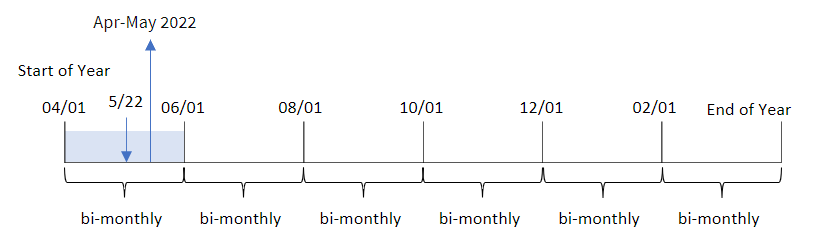
## Example 4 – Chart object example
[](https://help.qlik.com/en-US/sense/Subsystems/Hub/Content/Sense_Hub/Scripting/DateAndTimeFunctions/monthsname.htm)
#### Load script and chart expression
Overview
Open the Data load editor and add the load script below to a new tab.
The load script contains the same inline dataset and scenario as the first example. However, in this example, the unchanged dataset is loaded into the application. The calculation that groups transactions into bi-monthly segments and returns the segment boundaries for each transaction is created as a measure in a chart object of the application.
Load script
```
SET DateFormat='MM/DD/YYYY';
Transactions:
Load
*
Inline
[
id,date,amount
8188,2/19/2022,37.23
8189,3/7/2022,17.17
8190,3/30/2022,88.27
8191,4/5/2022,57.42
8192,4/16/2022,53.80
8193,5/1/2022,82.06
8194,5/7/2022,40.39
8195,5/22/2022,87.21
8196,6/15/2022,95.93
8197,6/26/2022,45.89
8198,7/9/2022,36.23
8199,7/22/2022,25.66
8200,7/23/2022,82.77
8201,7/27/2022,69.98
8202,8/2/2022,76.11
8203,8/8/2022,25.12
8204,8/19/2022,46.23
8205,9/26/2022,84.21
8206,10/14/2022,96.24
8207,10/29/2022,67.67
];
```
Results
Load the data and open a sheet. Create a new table and add this field as a dimension:date.
Create the following measure:
=monthsname(2,date)
Results table
| date | =monthsname(2,date) |
| --- | --- |
| 2/19/2022 | Jan-Feb 2022 |
| 3/7/2022 | Mar-Apr 2022 |
| 3/30/2022 | Mar-Apr 2022 |
| 4/5/2022 | Mar-Apr 2022 |
| 4/16/2022 | Mar-Apr 2022 |
| 5/1/2022 | May-Jun 2022 |
| 5/7/2022 | May-Jun 2022 |
| 5/22/2022 | May-Jun 2022 |
| 6/15/2022 | May-Jun 2022 |
| 6/26/2022 | May-Jun 2022 |
| 7/9/2022 | Jul-Aug 2022 |
| 7/22/2022 | Jul-Aug 2022 |
| 7/23/2022 | Jul-Aug 2022 |
| 7/27/2022 | Jul-Aug 2022 |
| 8/2/2022 | Jul-Aug 2022 |
| 8/8/2022 | Jul-Aug 2022 |
| 8/19/2022 | Jul-Aug 2022 |
| 9/26/2022 | Sep-Oct 2022 |
| 10/14/2022 | Sep-Oct 2022 |
| 10/29/2022 | Sep-Oct 2022 |
The bi\_monthly\_range field is created as a measure in the chart object by using the monthsname() function. The first argument provided is 2, dividing the year into bi-monthly segments. The second argument identifies which field is being evaluated.
Diagram of monthsname function, chart object example
Diagram of monthsname function, chart object example
Diagram of monthsname function, chart object example 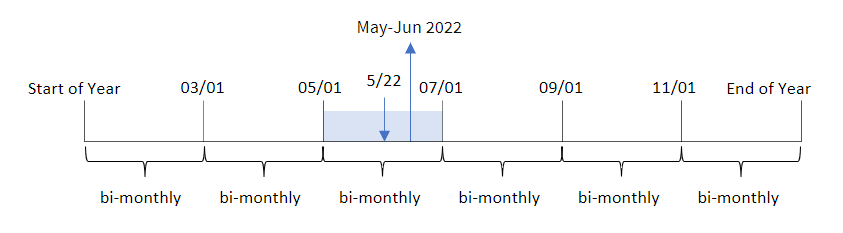
Transaction 8195 takes place on May 22. The monthsname() function initially divides the year into bi-monthly segments. Transaction 8195 falls into the segment between May 1 and June 30. Therefore, the function returns these months in the MonthNames system variable format, as well as the year, May-Jun 2022.
## Example 5 – Scenario
[](https://help.qlik.com/en-US/sense/Subsystems/Hub/Content/Sense_Hub/Scripting/DateAndTimeFunctions/monthsname.htm)
#### Load script and chart expression
Overview
Open the Data load editor and add the load script below to a new section.
The load script contains:
* A dataset containing transactions for 2022, which is loaded into a table called Transactions.
* The date field provided in the DateFormat system variable (MM/DD/YYYY) format.
The end user would like a chart object that displays total sales by a period of their own choosing. This could be achieved even when this dimension is not available in the data model, using the monthsname() function as a calculated dimension that is dynamically modified by a variable input control.
Load script
```
SET vPeriod = 1;
SET DateFormat='MM/DD/YYYY';
Transactions:
Load
*
Inline
[
id,date,amount
8188,'1/7/2022',17.17
8189,'1/19/2022',37.23
8190,'2/28/2022',88.27
8191,'2/5/2022',57.42
8192,'3/16/2022',53.80
8193,'4/1/2022',82.06
8194,'5/7/2022',40.39
8195,'5/16/2022',87.21
8196,'6/15/2022',95.93
8197,'6/26/2022',45.89
8198,'7/9/2022',36.23
8199,'7/22/2022',25.66
8200,'7/23/2022',82.77
8201,'7/27/2022',69.98
8202,'8/2/2022',76.11
8203,'8/8/2022',25.12
8204,'8/19/2022',46.23
8205,'9/26/2022',84.21
8206,'10/14/2022',96.24
8207,'10/29/2022',67.67
];
```
Results
Load the data and open a sheet.
At the start of the load script, a variable (vPeriod) has been created that will be tied to the variable input control. Next, configure the variable as a custom object in the sheet.
Do the following:
1. In the assets panel, click Custom objects.
2. Select Qlik Dashboard bundle, create a Variable input object.
3. Enter a title for the chart object.
4. Under Variable, select vPeriod as the Name and set the object to show as a Drop down.
5. Under Values, configure the object to use dynamic values. Enter the following:
='1~month|2~bi-month|3~quarter|4~tertial|6~half-year'
Next, create the results table.
Do the following:
1. Create a new table and add the following calculated dimension:
=monthsname($(vPeriod),date)
2. Add this measure to calculate the total sales:
=sum(amount)
3. Set the measure's Number formatting to Money. Click the Done editing icon. You can now modify the data shown in the table by adjusting the time segment in the variable object.
This is what the results table will look like when the tertial option is selected:
Results table
| monthsname($(vPeriod),date) | =sum(amount) |
| --- | --- |
| Jan-Apr 2022 | 253.89 |
| May-Aug 2022 | 713.58 |
| Sep-Dec 2022 | 248.12 |