# inweek - Script and chart function
This function returns True if timestamp lies inside the week containing base\_date.
Syntax:
InWeek (timestamp, base\_date, period\_no[, first\_week\_day])
Return data type: Boolean
In Qlik Sense, the Boolean true value is represented by -1, and the false value is represented by 0.
Diagram of `inweek()` function's range
Diagram of `inweek()` function's range
Diagram of `inweek()`inweek() function's range 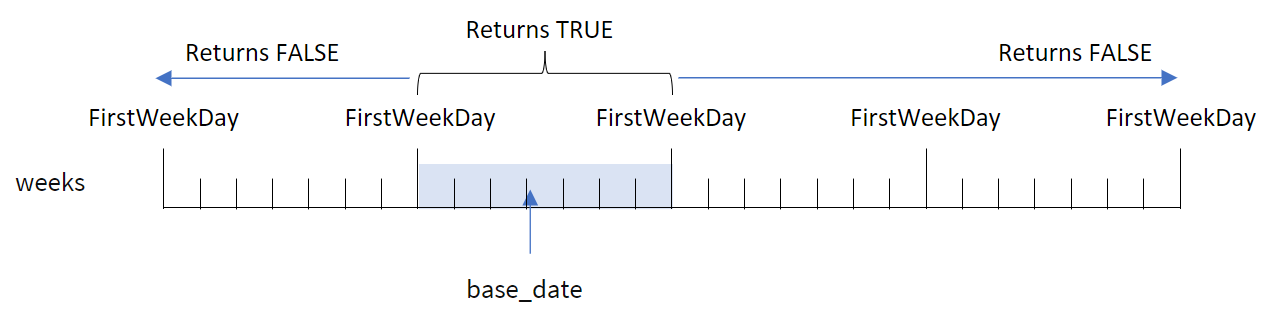
The `inweek()` function uses the `base_date` argument to identify which seven-day period the date falls into. The start day of the week is based on the `FirstWeekDay` system variable. However, you can also change the first day of the week by using the `first_week_day` argument of the `inweek()` function.
After the selected week has been defined, the function will return Boolean results when comparing the prescribed date values to that week segment.
When to use it
The `InWeek` function returns a Boolean result. Typically, this type of function will be used as a condition in an `if expression`. The `InWeek` function returns an aggregation or calculation which depends on whether a date evaluated occurred in the week with the selected date of the `base_date` argument.
For example, the `InWeek` function can be used to identify all equipment manufactured in a specific week.
Arguments
| Argument | Description |
| --- | --- |
| timestamp | The date that you want to compare with base\_date. |
| base\_date | Date that is used to evaluate the week. |
| period\_no | The week can be offset by period\_no.
period\_no is an integer, where the
value 0 indicates the week which contains base\_date.
Negative values in period\_no indicate
preceding weeks and positive values indicate succeeding weeks. |
| first\_week\_day | By default, the first day of the week is Sunday (as determined by the FirstWeekDay system variable), starting at midnight between Saturday and Sunday. The first\_week\_day parameter supersedes the FirstWeekDay variable. To indicate the week starting on another day, specify a flag between 0 and 6. |
first\_week\_day values
| Day | Value |
| --- | --- |
| Monday | 0 |
| Tuesday | 1 |
| Wednesday | 2 |
| Thursday | 3 |
| Friday | 4 |
| Saturday | 5 |
| Sunday | 6 |
## Regional settings
Unless otherwise specified, the examples in this topic use the following date format: MM/DD/YYYY. The date format is specified in the `SET DateFormat` statement in your data load script. The default date formatting may be different in your system, due to your regional settings and other factors. You can change the formats in the examples below to suit your requirements. Or you can change the formats in your load script to match these examples.
Default regional settings in apps are based on the regional system settings of the computer or server where Qlik Sense is installed. If the Qlik Sense server you are accessing is set to Sweden, the Data load editor will use Swedish regional settings for dates, time, and currency. These regional format settings are not related to the language displayed in the Qlik Sense user interface. Qlik Sense will be displayed in the same language as the browser you are using.
Function examples
| Example | Result |
| --- | --- |
| ` inweek ('01/12/2006', '01/14/2006', 0) ` | Returns TRUE |
| ` inweek ('01/12/2006', '01/20/2006', 0 ) ` | Returns FALSE |
| ` inweek ('01/12/2006', '01/14/2006', -1 ) ` | Returns FALSE |
| ` inweek ('01/07/2006', '01/14/2006', -1) ` | Returns TRUE |
| ` inweek ('01/12/2006', '01/09/2006', 0, 3) ` | Returns FALSE because `first_week_day` is specified as 3 (Thursday), which makes 01/12/2006 the first day of the week following the week containing 01/09/2006. |
These topics may help you work with this function:
Related topics
| Topic | Default Flag / Value | Description |
| --- | --- | --- |
| [FirstWeekDay](https://help.qlik.com/en-US/sense/November2025/Subsystems/Hub/Content/Sense_Hub/Scripting/NumberInterpretationVariables/FirstWeekDay.htm) | 6 / Sunday | Defines the start day of each week. |
## Example 1 - No additional arguments
[](https://help.qlik.com/en-US/sense/Subsystems/Hub/Content/Sense_Hub/Scripting/DateAndTimeFunctions/inweek.htm)
#### Load script and results
Overview
Open the Data load editor and add the load script below to a new section.
The load script contains:
* A dataset containing a set of transactions for the month of January 2022 which is loaded into a table called ‘`Transactions`’.
* The `FirstWeekDay` system variable which is set to `6` (Sunday).
* A preceding load which contains the following:
* The `inweek()` function, set as the field ‘`in_week`’ that determines which transactions took place in the week of January 14, 2022.
* The `weekday()` function, set as the field ‘`week_day`’ that shows which day of the week corresponds to each date.
Load script
```
SET FirstWeekDay=6;
SET DateFormat='MM/DD/YYYY';
Transactions:
Load
*,
weekday(date) as week_day,
inweek(date,'01/14/2022', 0) as in_week
;
Load
*
Inline
[
id,date,amount
8188,'01/02/2022',37.23
8189,'01/05/2022',17.17
8190,'01/06/2022',88.27
8191,'01/08/2022',57.42
8192,'01/09/2022',53.80
8193,'01/10/2022',82.06
8194,'01/11/2022',40.39
8195,'01/12/2022',87.21
8196,'01/13/2022',95.93
8197,'01/14/2022',45.89
8198,'01/15/2022',36.23
8199,'01/16/2022',25.66
8200,'01/17/2022',82.77
8201,'01/18/2022',69.98
8202,'01/26/2022',76.11
8203,'01/27/2022',25.12
8204,'01/28/2022',46.23
8205,'01/29/2022',84.21
8206,'01/30/2022',96.24
8207,'01/31/2022',67.67
];
```
Results
Load the data and open a sheet. Create a new table and add these fields as dimensions:
* `date`
* `week_day`
* `in_week`
Results table
| date | week\_day | in\_week |
| --- | --- | --- |
| 01/02/2022 | Sun | 0 |
| 01/05/2022 | Wed | 0 |
| 01/06/2022 | Thu | 0 |
| 01/08/2022 | Sat | 0 |
| 01/09/2022 | Sun | -1 |
| 01/10/2022 | Mon | -1 |
| 01/11/2022 | Tue | -1 |
| 01/12/2022 | Wed | -1 |
| 01/13/2022 | Thu | -1 |
| 01/14/2022 | Fri | -1 |
| 01/15/2022 | Sat | -1 |
| 01/16/2022 | Sun | 0 |
| 01/17/2022 | Mon | 0 |
| 01/18/2022 | Tue | 0 |
| 01/26/2022 | Wed | 0 |
| 01/27/2022 | Thu | 0 |
| 01/28/2022 | Fri | 0 |
| 01/29/2022 | Sat | 0 |
| 01/30/2022 | Sun | 0 |
| 01/31/2022 | Mon | 0 |
The ‘`in_week`’ field is created in the preceding load statement by using the `inweek()` function. The first argument identifies which field is being evaluated. The second argument is a hard-coded date for January 14 which is the `base_date`. The `base_date` argument works in with the `FirstWeekDay` system variable to identify the comparator week. A `period_no` of `0` — meaning that the function is not comparing weeks preceding or following the segmented week — is the final argument.
The `FirstWeekDay` system variable determines that weeks begin on a Sunday and end on a Saturday. Therefore, January would be broken into weeks according to the diagram below, with the dates between January 9 and 15 providing the valid period for the `inweek()` calculation:
Diagram of calendar with the `inweek()` function's range highlighted
Diagram of calendar with the `inweek()` function's range highlighted
Diagram of calendar with the `inweek()`inweek() function's range highlighted 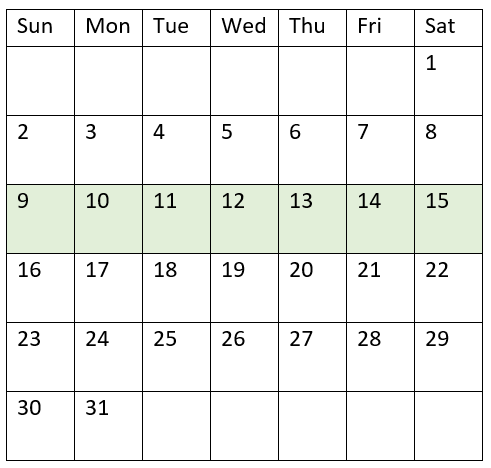
Any transaction that occurs between January 9 and the 15 of January returns a Boolean result of `TRUE`.
## Example 2 - period\_no
[](https://help.qlik.com/en-US/sense/Subsystems/Hub/Content/Sense_Hub/Scripting/DateAndTimeFunctions/inweek.htm)
#### Load script and results
Overview
Open the Data load editor and add the load script below to a new section.
The load script contains:
* The same dataset containing a set of transactions for 2022 is loaded into a table called ‘`Transactions`’.
* The `FirstWeekDay` system variable which is set to `6` (Sunday).
* A preceding load which contains the following:
* The `inweek ()` function, set as the field ‘`prev_week`’ that determines which transactions took place a full week before the week of January 14, 2022.
* The `weekday()` function, set as the field ‘`week_day`’ that shows which day of the week corresponds to each date.
Load script
```
SET FirstWeekDay=6;
SET DateFormat='MM/DD/YYYY';
Transactions:
Load
*,
weekday(date) as week_day,
inweek(date,'01/14/2022', -1) as prev_week
;
Load
*
Inline
[
id,date,amount
8188,'01/02/2022',37.23
8189,'01/05/2022',17.17
8190,'01/06/2022',88.27
8191,'01/08/2022',57.42
8192,'01/09/2022',53.80
8193,'01/10/2022',82.06
8194,'01/11/2022',40.39
8195,'01/12/2022',87.21
8196,'01/13/2022',95.93
8197,'01/14/2022',45.89
8198,'01/15/2022',36.23
8199,'01/16/2022',25.66
8200,'01/17/2022',82.77
8201,'01/18/2022',69.98
8202,'01/26/2022',76.11
8203,'01/27/2022',25.12
8204,'01/28/2022',46.23
8205,'01/29/2022',84.21
8206,'01/30/2022',96.24
8207,'01/31/2022',67.67
];
```
Results
Load the data and open a sheet. Create a new table and add these fields as dimensions:
* `date`
* `week_day`
* `prev_week`
Results table
| date | week\_day | prev\_week |
| --- | --- | --- |
| 01/02/2022 | Sun | -1 |
| 01/05/2022 | Wed | -1 |
| 01/06/2022 | Thu | -1 |
| 01/08/2022 | Sat | -1 |
| 01/09/2022 | Sun | 0 |
| 01/10/2022 | Mon | 0 |
| 01/11/2022 | Tue | 0 |
| 01/12/2022 | Wed | 0 |
| 01/13/2022 | Thu | 0 |
| 01/14/2022 | Fri | 0 |
| 01/15/2022 | Sat | 0 |
| 01/16/2022 | Sun | 0 |
| 01/17/2022 | Mon | 0 |
| 01/18/2022 | Tue | 0 |
| 01/26/2022 | Wed | 0 |
| 01/27/2022 | Thu | 0 |
| 01/28/2022 | Fri | 0 |
| 01/29/2022 | Sat | 0 |
| 01/30/2022 | Sun | 0 |
| 01/31/2022 | Mon | 0 |
Using `-1` as the `period_no` argument in the `inweek()` function shifts the boundaries of the comparator week back by a full seven days. With a `period_no` of `0` the week would be between January 9 and 15. But in this example, the `period_no` of `-1` shifts the start and end boundary of this segment backwards by one week. The date boundaries become January 2 to January 8.
Diagram of calendar with the `inweek()` function's range highlighted
Diagram of calendar with the `inweek()` function's range highlighted
Diagram of calendar with the `inweek()`inweek() function's range highlighted 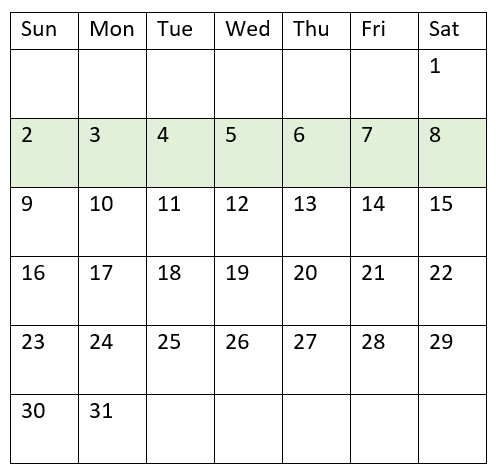
Therefore, any transaction that occurs between January 2 and January 8 will return a Boolean result of TRUE.
## Example 3 - first\_week\_day
[](https://help.qlik.com/en-US/sense/Subsystems/Hub/Content/Sense_Hub/Scripting/DateAndTimeFunctions/inweek.htm)
#### Load script and results
Overview
Open the Data load editor and add the load script below to a new section.
The load script contains:
* The same dataset containing a set of transactions for 2022 is loaded into a table called ‘`Transactions`’.
* The `FirstWeekDay` system variable which is set to `6` (Sunday).
* A preceding load which contains the following:
* The `inweek()` function, set as the field ‘`in_week`’ that determines which transactions took place in the week of January 14, 2022.
* The `weekday()` function, set as the field ‘`week_day`’ that shows which day of the week corresponds to each date.
Load script
```
SET FirstWeekDay=6;
SET DateFormat='MM/DD/YYYY';
Transactions:
Load
*,
weekday(date) as week_day,
inweek(date,'01/14/2022', 0, 0) as in_week
;
Load
*
Inline
[
id,date,amount
8188,'01/02/2022',37.23
8189,'01/05/2022',17.17
8190,'01/06/2022',88.27
8191,'01/08/2022',57.42
8192,'01/09/2022',53.80
8193,'01/10/2022',82.06
8194,'01/11/2022',40.39
8195,'01/12/2022',87.21
8196,'01/13/2022',95.93
8197,'01/14/2022',45.89
8198,'01/15/2022',36.23
8199,'01/16/2022',25.66
8200,'01/17/2022',82.77
8201,'01/18/2022',69.98
8202,'01/26/2022',76.11
8203,'01/27/2022',25.12
8204,'01/28/2022',46.23
8205,'01/29/2022',84.21
8206,'01/30/2022',96.24
8207,'01/31/2022',67.67
];
```
Results
Load the data and open a sheet. Create a new table and add these fields as dimensions:
* `date`
* `week_day`
* `in_week`
Results table
| date | week\_day | in\_week |
| --- | --- | --- |
| 01/02/2022 | Sun | 0 |
| 01/05/2022 | Wed | 0 |
| 01/06/2022 | Thu | 0 |
| 01/08/2022 | Sat | 0 |
| 01/09/2022 | Sun | 0 |
| 01/10/2022 | Mon | -1 |
| 01/11/2022 | Tue | -1 |
| 01/12/2022 | Wed | -1 |
| 01/13/2022 | Thu | -1 |
| 01/14/2022 | Fri | -1 |
| 01/15/2022 | Sat | -1 |
| 01/16/2022 | Sun | -1 |
| 01/17/2022 | Mon | 0 |
| 01/18/2022 | Tue | 0 |
| 01/26/2022 | Wed | 0 |
| 01/27/2022 | Thu | 0 |
| 01/28/2022 | Fri | 0 |
| 01/29/2022 | Sat | 0 |
| 01/30/2022 | Sun | 0 |
| 01/31/2022 | Mon | 0 |
Using `0` as the `first_week_day` argument in the `inweek()` function supersedes the `FirstWeekDay` system variable and sets Monday as the first day of the week.
Diagram of calendar with the `inweek()` function's range highlighted
Diagram of calendar with the `inweek()` function's range highlighted
Diagram of calendar with the `inweek()`inweek() function's range highlighted 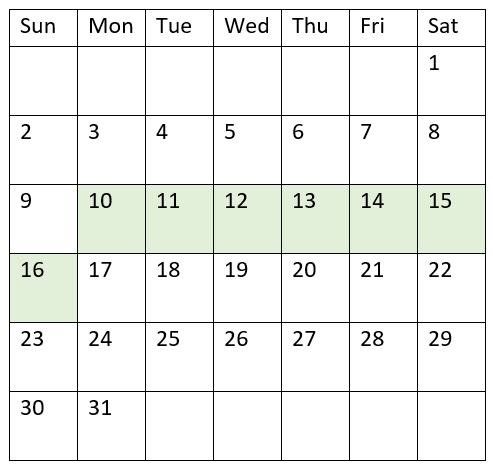
Therefore, any transaction that occurs between January 10 and 16 will return a Boolean result of TRUE.
## Example 4 - Chart object example
[](https://help.qlik.com/en-US/sense/Subsystems/Hub/Content/Sense_Hub/Scripting/DateAndTimeFunctions/inweek.htm)
#### Load script and chart expression
Overview
The same dataset and scenario as the first example are used.
However, in this example, the dataset is unchanged and loaded into the application. Create a measure in the results table to determine which transactions took place in the week of January 14, 2022.
Load script
```
SET FirstWeekDay=6;
SET DateFormat='MM/DD/YYYY';
Transactions:
Load
*
Inline
[
id,date,amount
8188,'01/02/2022',37.23
8189,'01/05/2022',17.17
8190,'01/06/2022',88.27
8191,'01/08/2022',57.42
8192,'01/09/2022',53.80
8193,'01/10/2022',82.06
8194,'01/11/2022',40.39
8195,'01/12/2022',87.21
8196,'01/13/2022',95.93
8197,'01/14/2022',45.89
8198,'01/15/2022',36.23
8199,'01/16/2022',25.66
8200,'01/17/2022',82.77
8201,'01/18/2022',69.98
8202,'01/26/2022',76.11
8203,'01/27/2022',25.12
8204,'01/28/2022',46.23
8205,'01/29/2022',84.21
8206,'01/30/2022',96.24
8207,'01/31/2022',67.67
];
```
Results
Load the data and open a sheet. Create a new table and add this field as a dimension:
* `date`
Create the following measures:
* `=inweek (date,'01/14/2022',0)`, to calculate whether transactions took place in the same week as January 14.
* `=weekday(date)`, to show which day of the week corresponds to each date.
Results table
| date | week\_day | =inweek (date,'01/14/2022',0) |
| --- | --- | --- |
| 01/02/2022 | Sun | 0 |
| 01/05/2022 | Wed | 0 |
| 01/06/2022 | Thu | 0 |
| 01/08/2022 | Sat | 0 |
| 01/09/2022 | Sun | -1 |
| 01/10/2022 | Mon | -1 |
| 01/11/2022 | Tue | -1 |
| 01/12/2022 | Wed | -1 |
| 01/13/2022 | Thu | -1 |
| 01/14/2022 | Fri | -1 |
| 01/15/2022 | Sat | -1 |
| 01/16/2022 | Sun | 0 |
| 01/17/2022 | Mon | 0 |
| 01/18/2022 | Tue | 0 |
| 01/26/2022 | Wed | 0 |
| 01/27/2022 | Thu | 0 |
| 01/28/2022 | Fri | 0 |
| 01/29/2022 | Sat | 0 |
| 01/30/2022 | Sun | 0 |
| 01/31/2022 | Mon | 0 |
The ‘`in_week`’ measure is created in chart by using the `inweek()` function. The first argument identifies which field is being evaluated. The second argument is a hard-coded date for January 14 which is the `base_date`. The `base_date` argument works in with the `FirstWeekDay` system variable to identify the comparator week. A `period_no` of `0` is the final argument.
The `FirstWeekDay` system variable determines that weeks begin on a Sunday and end on a Saturday. Therefore, January would be broken into weeks according to the diagram below, with the dates between January 9 and 15 providing the valid period for the `inweek()` calculation:
Diagram of calendar with the `inweek()` function's range highlighted
Diagram of calendar with the `inweek()` function's range highlighted
Diagram of calendar with the `inweek()`inweek() function's range highlighted 
Any transaction that occurs between January 9 and the 15 of January returns a Boolean result of `TRUE`.
## Example 5 - Scenario
[](https://help.qlik.com/en-US/sense/Subsystems/Hub/Content/Sense_Hub/Scripting/DateAndTimeFunctions/inweek.htm)
#### Load script and results
Overview
Open the Data load editor and add the load script below to a new section.
The load script contains:
* A dataset which is loaded into a table called ‘Products’.
* The table contains the following fields:
* product ID
* product type
* manufacture date
* cost price
It has been identified that due to equipment error, products that were manufactured in the week of January 12 were defective. The end user would like a chart that displays, by week, the status of which products manufactured were ‘defective’ or ‘faultless’ and the cost of the products manufactured in that week.
Load script
```
Products:
Load
*
Inline
[
product_id,manufacture_date,cost_price
8188,'01/02/2022',37.23
8189,'01/05/2022',17.17
8190,'01/06/2022',88.27
8191,'01/08/2022',57.42
8192,'01/09/2022',53.80
8193,'01/10/2022',82.06
8194,'01/11/2022',40.39
8195,'01/12/2022',87.21
8196,'01/13/2022',95.93
8197,'01/14/2022',45.89
8198,'01/15/2022',36.23
8199,'01/16/2022',25.66
8200,'01/17/2022',82.77
8201,'01/18/2022',69.98
8202,'01/26/2022',76.11
8203,'01/27/2022',25.12
8204,'01/28/2022',46.23
8205,'01/29/2022',84.21
8206,'01/30/2022',96.24
8207,'01/31/2022',67.67
];
```
Results
Load the data and open a sheet. Create a new table and add this field as a dimension:
* =weekname(manufacture\_date)
Create the following measures:
* =if(only(inweek(manufacture\_date,makedate(2022,01,12),0)),'Defective','Faultless'), to identify which of the products are defective and which are faultless using the inweek() function.
* =sum(cost\_price), to show the sum of the cost of each product.
Do the following:
1. Set the measure’s Number Formatting to Money.
2. Under Appearance, turn off Totals.
Results table
| weekname(manufacture\_date) | =if(only(inweek(manufacture\_date,makedate(2022,01,12),0)), 'Defective','Faultless') | Sum(cost\_price) |
| --- | --- | --- |
| 2022/02 | Faultless | 200.09 |
| 2022/03 | Defective | 441.51 |
| 2022/04 | Faultless | 178.41 |
| 2022/05 | Faultless | 231.67 |
| 2022/06 | Faultless | 163.91 |
The inweek() function returns a Boolean value when evaluating the manufacturing dates of each of the products. For any product manufactured in the week of January 12, the inweek() function returns a Boolean value of TRUE and marks the products as ‘Defective’. For any product returning a value of FALSE, and therefore not manufactured in that week, it marks the products as ‘Faultless’.