# inmonths - Script and chart function
This function finds if a timestamp falls within the same month, bi-month, quarter, four-month period, or half-year as a base date. It is also possible to find if the timestamp falls within a previous or following time period.
Syntax:
InMonths(n\_months, timestamp, base\_date, period\_no [, first\_month\_of\_year])
Return data type: Boolean
In Qlik Sense, the Boolean true value is represented by -1, and the false value is represented by 0.
Diagram of `inmonths()` function
Diagram of `inmonths()` function
Diagram of `inmonths()`inmonths() function 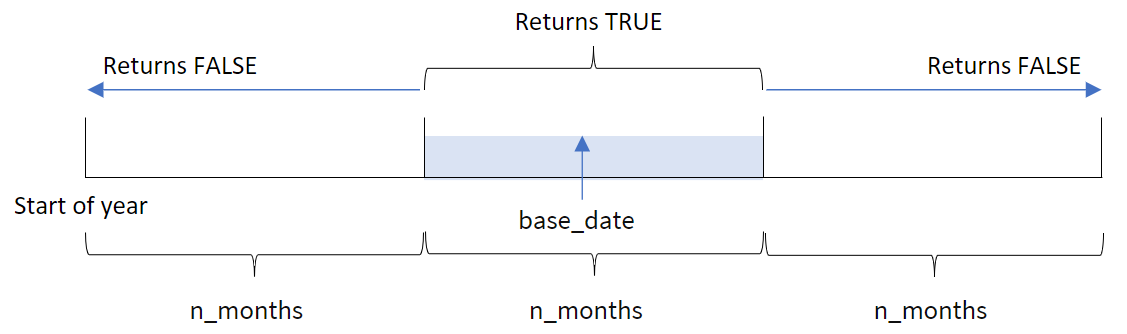
The `inmonths()` function divides the year into segments based on the `n_months` argument provided. It then determines whether each timestamp evaluated falls into the same segment as the `base_date` argument. If, however, a `period_no` argument is provided, the function determines whether the timestamps fall into a previous or following period from the `base_date`.
The following segments of the year are available in the function as `n_month` arguments.
`n_month`n\_month arguments
| Period | Number of months |
| --- | --- |
| month | 1 |
| bi-month | 2 |
| quarter | 3 |
| four months | 4 |
| half-year | 6 |
When to use it
The `inmonths()` function returns a Boolean result. Typically, this type of function will be used as a condition in an `if expression`. By using the `inmonths()` function, you can select the period that you want to be evaluated. For example, letting the user identify products manufactured in the month, quarter, or half-year of a certain period.
Return data type: Boolean
In Qlik Sense, the Boolean true value is represented by -1, and the false value is represented by 0.
Arguments
| Argument | Description |
| --- | --- |
| n\_months | The number of months that defines the period. An integer or expression that resolves to an integer that must be one of: 1 (equivalent to the inmonth() function), 2 (bi-month), 3 (equivalent to the inquarter()function), 4 (four-month period), or 6 (half year). |
| timestamp | The date that you want to compare with base\_date. |
| base\_date | Date that is used to evaluate the period. |
| period\_no | The period can be offset by period\_no, an integer, or expression resolving to an integer, where the value 0 indicates the period that contains base\_date. Negative values in period\_no indicate preceding periods and
positive values indicate succeeding periods. |
| first\_month\_of\_year | If you
want to work with (fiscal) years not starting in January, indicate
a value between 2 and 12 in first\_month\_of\_year. |
You can use the following values to set the first month of year in the `first_month_of_year` argument:
first\_month\_of\_year values
| Month | Value |
| --- | --- |
| February | 2 |
| March | 3 |
| April | 4 |
| May | 5 |
| June | 6 |
| July | 7 |
| August | 8 |
| September | 9 |
| October | 10 |
| November | 11 |
| December | 12 |
## Regional settings
Unless otherwise specified, the examples in this topic use the following date format: MM/DD/YYYY. The date format is specified in the `SET DateFormat` statement in your data load script. The default date formatting may be different in your system, due to your regional settings and other factors. You can change the formats in the examples below to suit your requirements. Or you can change the formats in your load script to match these examples.
Default regional settings in apps are based on the regional system settings of the computer or server where Qlik Sense is installed. If the Qlik Sense server you are accessing is set to Sweden, the Data load editor will use Swedish regional settings for dates, time, and currency. These regional format settings are not related to the language displayed in the Qlik Sense user interface. Qlik Sense will be displayed in the same language as the browser you are using.
Function examples
| Example | Result |
| --- | --- |
| `inmonths(4, '01/25/2013', '04/25/2013', 0)` | Returns TRUE. Because the value of timestamp, 01/25/2013, lies within the four-month period 01/01/2013 to 04/30/2013, in which the value of `base_date`, 04/25/2013 lies. |
| `inmonths(4, '05/25/2013', '04/25/2013', 0)` | Returns FALSE. Because 05/25/2013 is outside the same period as the previous example. |
| `inmonths(4, '11/25/2012', '02/01/2013', -1 )` | Returns TRUE. Because the value of `period_no`, `-1`, shifts the search period back one period of four months (the value of n-months), which makes the search period 09/01/2012 to 12/31/2012. |
| `inmonths(4, '05/25/2006', '03/01/2006', 0, 3)` | Returns TRUE. Because the value of `first_month_of_year` is set to `3`, which makes the search period 03/01/2006 to 07/30/2006 instead of 01/01/2006 to 04/30/2006. |
## Example 1 - No additional arguments
[](https://help.qlik.com/en-US/sense/Subsystems/Hub/Content/Sense_Hub/Scripting/DateAndTimeFunctions/inmonths.htm)
#### Load script and results
Overview
Open the Data load editor and add the load script below to a new section.
The load script contains:
* A dataset containing a set of transactions for 2022 is loaded into a table called ‘`Transactions`’.
* A preceding load with an additional variable ‘`in_months`’, that determines which transactions took place in the same quarter as May 15, 2022.
Load script
```
SET DateFormat='MM/DD/YYYY';
Transactions:
Load
*,
inmonths(3,date,'05/15/2022', 0) as in_months
;
Load
*
Inline
[
id,date,amount
8188,'2/19/2022',37.23
8189,'3/7/2022',17.17
8190,'3/30/2022',88.27
8191,'4/5/2022',57.42
8192,'4/16/2022',53.80
8193,'5/1/2022',82.06
8194,'5/7/2022',40.39
8195,'5/22/2022',87.21
8196,'6/15/2022',95.93
8197,'6/26/2022',45.89
8198,'7/9/2022',36.23
8199,'7/22/2022',25.66
8200,'7/23/2022',82.77
8201,'7/27/2022',69.98
8202,'8/2/2022',76.11
8203,'8/8/2022',25.12
8204,'8/19/2022',46.23
8205,'9/26/2022',84.21
8206,'10/14/2022',96.24
8207,'10/29/2022',67.67
];
```
Results
Load the data and open a sheet. Create a new table and add these fields as dimensions:
* `date`
* `in_months`
Results table
| date | in\_months |
| --- | --- |
| 2/19/2022 | 0 |
| 3/7/2022 | 0 |
| 3/30/2022 | 0 |
| 4/5/2022 | -1 |
| 4/16/2022 | -1 |
| 5/1/2022 | -1 |
| 5/7/2022 | -1 |
| 5/22/2022 | -1 |
| 6/15/2022 | -1 |
| 6/26/2022 | -1 |
| 7/9/2022 | 0 |
| 7/22/2022 | 0 |
| 7/23/2022 | 0 |
| 7/27/2022 | 0 |
| 8/2/2022 | 0 |
| 8/8/2022 | 0 |
| 8/19/2022 | 0 |
| 9/26/2022 | 0 |
| 10/14/2022 | 0 |
| 10/29/2022 | 0 |
The ‘`in_months`’ field is created in the preceding load statement by using the `inmonths()` function. The first argument provided is `3` which divides the year into quarter segments. The second argument identifies which field is being evaluated, the date field in this example. The third argument is a hard-coded date for the for May 15 which is the `base_date` and a `period_no` of `0` is the final argument.
Diagram of `inmonths()` function with quarter segments
Diagram of `inmonths()` function with quarter segments
Diagram of `inmonths()`inmonths() function with quarter segments 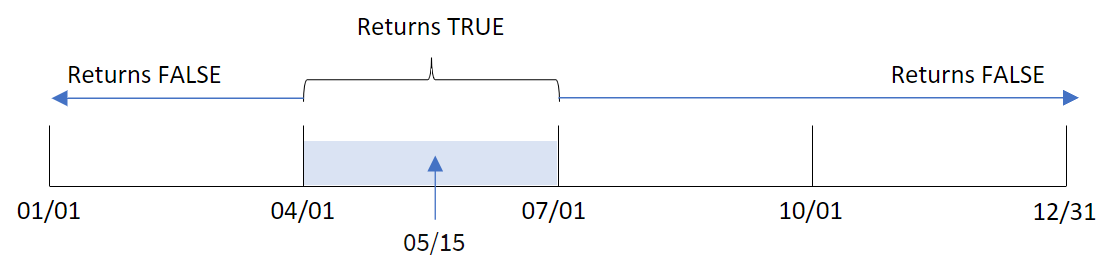
May falls into the second quarter of the year. Therefore, any transaction that occurs between April 1 and June 30 will return a Boolean result of TRUE. This is validated in the results table.
## Example 2 - period\_no
[](https://help.qlik.com/en-US/sense/Subsystems/Hub/Content/Sense_Hub/Scripting/DateAndTimeFunctions/inmonths.htm)
#### Load script and results
Overview
Open the Data load editor and add the load script below to a new section.
The load script contains:
* A dataset containing a set of transactions for 2022 is loaded into a table called ‘`Transactions`’.
* A preceding load with an additional variable, ‘`previous_quarter`’, that determines whether transactions took place in the quarter before May 15, 2022.
Load script
```
SET DateFormat='MM/DD/YYYY';
Transactions:
Load
*,
inmonths(3,date,'05/15/2022', -1) as previous_quarter
;
Load
*
Inline
[
id,date,amount
8188,'2/19/2022',37.23
8189,'3/7/2022',17.17
8190,'3/30/2022',88.27
8191,'4/5/2022',57.42
8192,'4/16/2022',53.80
8193,'5/1/2022',82.06
8194,'5/7/2022',40.39
8195,'5/22/2022',87.21
8196,'6/15/2022',95.93
8197,'6/26/2022',45.89
8198,'7/9/2022',36.23
8199,'7/22/2022',25.66
8200,'7/23/2022',82.77
8201,'7/27/2022',69.98
8202,'8/2/2022',76.11
8203,'8/8/2022',25.12
8204,'8/19/2022',46.23
8205,'9/26/2022',84.21
8206,'10/14/2022',96.24
8207,'10/29/2022',67.67
];
```
Results
Load the data and open a sheet. Create a new table and add these fields as dimensions:
* `date`
* `previous_quarter`
Results table
| date | previous quarter |
| --- | --- |
| 2/19/2022 | -1 |
| 3/7/2022 | -1 |
| 3/30/2022 | -1 |
| 4/5/2022 | 0 |
| 4/16/2022 | 0 |
| 5/1/2022 | 0 |
| 5/7/2022 | 0 |
| 5/22/2022 | 0 |
| 6/15/2022 | 0 |
| 6/26/2022 | 0 |
| 7/9/2022 | 0 |
| 7/22/2022 | 0 |
| 7/23/2022 | 0 |
| 7/27/2022 | 0 |
| 8/2/2022 | 0 |
| 8/8/2022 | 0 |
| 8/19/2022 | 0 |
| 9/26/2022 | 0 |
| 10/14/2022 | 0 |
| 10/29/2022 | 0 |
The function evaluates whether transactions occurred in the first quarter of the year by using `-1` as the `period_no` argument in the `inmonths()` function. May 15 is the `base_date` and falls into the second quarter of the year (April-June).
Diagram of `inmonths()` function with quarter segments and the `period_no` set to `-1`
Diagram of `inmonths()` function with quarter segments and the `period_no` set to `-1`
Diagram of `inmonths()`inmonths() function with quarter segments and the `period_no`period\_no set to `-1`-1 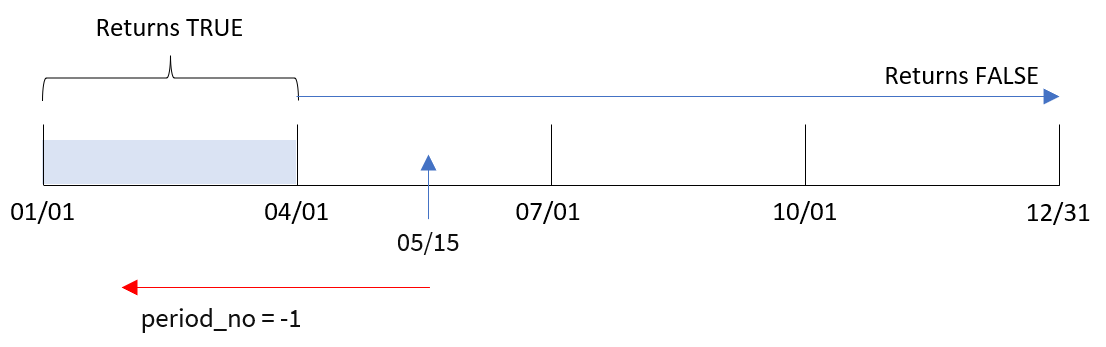
Therefore, any transaction that occurs between January and March will return a Boolean result of TRUE.
## Example 3 - first\_month\_of\_year
[](https://help.qlik.com/en-US/sense/Subsystems/Hub/Content/Sense_Hub/Scripting/DateAndTimeFunctions/inmonths.htm)
#### Load script and results
Overview
Open the Data load editor and add the load script below to a new section.
The load script contains:
* A dataset containing a set of transactions for 2022 is loaded into a table called ‘`Transactions`’.
* A preceding load with an additional variable, ‘`in_months`’, that determines which transactions took place in the same quarter as May 15, 2022.
In this example, the organizational policy is for March to be the first month of the financial year.
Load script
```
SET DateFormat='MM/DD/YYYY';
Transactions:
Load
*,
inmonths(3,date,'05/15/2022', 0, 3) as in_months
;
Load
*
Inline
[
id,date,amount
8188,'2/19/2022',37.23
8189,'3/7/2022',17.17
8190,'3/30/2022',88.27
8191,'4/5/2022',57.42
8192,'4/16/2022',53.80
8193,'5/1/2022',82.06
8194,'5/7/2022',40.39
8195,'5/22/2022',87.21
8196,'6/15/2022',95.93
8197,'6/26/2022',45.89
8198,'7/9/2022',36.23
8199,'7/22/2022',25.66
8200,'7/23/2022',82.77
8201,'7/27/2022',69.98
8202,'8/2/2022',76.11
8203,'8/8/2022',25.12
8204,'8/19/2022',46.23
8205,'9/26/2022',84.21
8206,'10/14/2022',96.24
8207,'10/29/2022',67.67
];
```
Results
Load the data and open a sheet. Create a new table and add these fields as dimensions:
* `date`
* `in_months`
Results table
| date | in\_months |
| --- | --- |
| 2/19/2022 | 0 |
| 3/7/2022 | -1 |
| 3/30/2022 | -1 |
| 4/5/2022 | -1 |
| 4/16/2022 | -1 |
| 5/1/2022 | -1 |
| 5/7/2022 | -1 |
| 5/22/2022 | -1 |
| 6/15/2022 | 0 |
| 6/26/2022 | 0 |
| 7/9/2022 | 0 |
| 7/22/2022 | 0 |
| 7/23/2022 | 0 |
| 7/27/2022 | 0 |
| 8/2/2022 | 0 |
| 8/8/2022 | 0 |
| 8/19/2022 | 0 |
| 9/26/2022 | 0 |
| 10/14/2022 | 0 |
| 10/29/2022 | 0 |
By using `3` as the `first_month_of_year` argument in the `inmonths()` function, the function begins the year on March 1. The `inmonths()` function then divides the year into quarters: Mar-May, Jun-Aug, Sep-Nov, Dec-Feb. Therefore, May 15 falls into the first quarter of the year (March-May).
Diagram of `inmonths()` function with March set as first month of the year
Diagram of `inmonths()` function with March set as first month of the year
Diagram of `inmonths()`inmonths() function with March set as first month of the year 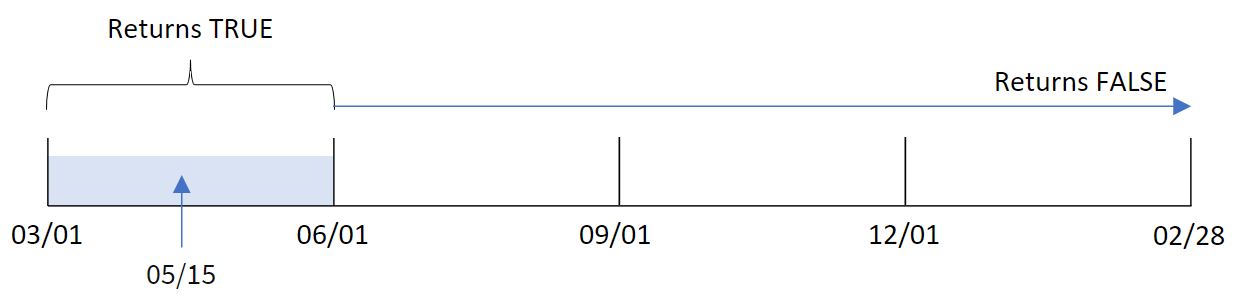
Any transaction that occurs in these months will return a Boolean result of TRUE.
## Example 4 - Chart object example
[](https://help.qlik.com/en-US/sense/Subsystems/Hub/Content/Sense_Hub/Scripting/DateAndTimeFunctions/inmonths.htm)
#### Load script and chart expression
Overview
The same dataset and scenario from the first example are used.
However, in this example, the dataset is unchanged and loaded into the application. The calculation that determines whether transactions took place in the same quarter as May 15, 2022 is created as a measure in a chart in the app.
Load script
```
SET DateFormat='MM/DD/YYYY';
Transactions:
Load
*
Inline
[
id,date,amount
8188,'2/19/2022',37.23
8189,'3/7/2022',17.17
8190,'3/30/2022',88.27
8191,'4/5/2022',57.42
8192,'4/16/2022',53.80
8193,'5/1/2022',82.06
8194,'5/7/2022',40.39
8195,'5/22/2022',87.21
8196,'6/15/2022',95.93
8197,'6/26/2022',45.89
8198,'7/9/2022',36.23
8199,'7/22/2022',25.66
8200,'7/23/2022',82.77
8201,'7/27/2022',69.98
8202,'8/2/2022',76.11
8203,'8/8/2022',25.12
8204,'8/19/2022',46.23
8205,'9/26/2022',84.21
8206,'10/14/2022',96.24
8207,'10/29/2022',67.67
];
```
Results
Load the data and open a sheet. Create a new table and add this field as a dimension:
* `date`
To calculate whether transactions took place in the same quarter as May 15, create the following measure:
`=inmonths(3,date,'05/15/2022', 0)`
Results table
| date | =inmonths(3,date,'05/15/2022', 0) |
| --- | --- |
| 2/19/2022 | 0 |
| 3/7/2022 | 0 |
| 3/30/2022 | 0 |
| 4/5/2022 | -1 |
| 4/16/2022 | -1 |
| 5/1/2022 | -1 |
| 5/7/2022 | -1 |
| 5/22/2022 | -1 |
| 6/15/2022 | -1 |
| 6/26/2022 | -1 |
| 7/9/2022 | 0 |
| 7/22/2022 | 0 |
| 7/23/2022 | 0 |
| 7/27/2022 | 0 |
| 8/2/2022 | 0 |
| 8/8/2022 | 0 |
| 8/19/2022 | 0 |
| 9/26/2022 | 0 |
| 10/14/2022 | 0 |
| 10/29/2022 | 0 |
The ‘`in_months`’ field is created in the chart by using the `inmonths()` function. The first argument provided is `3` which divides the year into quarter segments. The second argument identifies which field is being evaluated, the date field in this example. The third argument is a hard-coded date for the for May 15 which is the `base_date` and a `period_no` of `0` is the final argument.
Diagram of `inmonths()` function with quarter segments
Diagram of `inmonths()` function with quarter segments
Diagram of `inmonths()`inmonths() function with quarter segments 
May falls into the second quarter of the year. Therefore, any transaction that occurs between April 1 and June 30 will return a Boolean result of TRUE. This is validated in the results table.
## Example 5 - Scenario
[](https://help.qlik.com/en-US/sense/Subsystems/Hub/Content/Sense_Hub/Scripting/DateAndTimeFunctions/inmonths.htm)
#### Load script and results
Overview
Open the Data load editor and add the load script below to a new section.
The load script contains:
* A dataset which is loaded into a table called ‘Products’.
* The table contains the following fields:
* product ID
* product type
* manufacture date
* cost price
The end user would like a chart that displays, by product type, the cost of products manufactured in the first segment of 2021. The user would like to be able to define the length of this segment.
Load script
```
SET vPeriod = 1;
Products:
Load
*
Inline
[
product_id,product_type,manufacture_date,cost_price
8188,product A,'2/19/2022',37.23
8189,product D,'3/7/2022',17.17
8190,product C,'3/30/2022',88.27
8191,product B,'4/5/2022',57.42
8192,product D,'4/16/2022',53.80
8193,product D,'5/1/2022',82.06
8194,product A,'5/7/2022',40.39
8195,product B,'5/22/2022',87.21
8196,product C,'6/15/2022',95.93
8197,product B,'6/26/2022',45.89
8198,product C,'7/9/2022',36.23
8199,product D,'7/22/2022',25.66
8200,product D,'7/23/2022',82.77
8201,product A,'7/27/2022',69.98
8202,product A,'8/2/2022',76.11
8203,product B,'8/8/2022',25.12
8204,product B,'8/19/2022',46.23
8205,product B,'9/26/2022',84.21
8206,product C,'10/14/2022',96.24
8207,product D,'10/29/2022',67.67
];
```
Results
Load the data and open a sheet.
At the start of the load script a variable, vPeriod, is created that is tied to the variable input control.
Do the following:
1. In the assets panel, click Custom objects.
2. Select Qlik Dashboard bundle, create a Variable input object.
3. Enter a title for the chart object.
4. Under Variable, select vPeriod as the name and set the object to show as a Drop down.
5. Under Values, click Dynamic values. Enter the following:
```
='1~month|2~bi-month|3~quarter|4~tertial|6~half-year'.
```
6. Add a new table to the sheet.
7. Under Data in the properties panel, add product\_type as a dimension.
8. Add the following expression as a measure:
=sum(if(inmonths($(vPeriod),manufacture\_date,makedate(2022,01,01),0),cost\_price,0))
9. Set the measure’s Number formatting to Money.
Results table
| product\_type | =sum(if(inmonths($(vPeriod),manufacture\_date,makedate(2022,01,01),0),cost\_price,0)) |
| --- | --- |
| product A | $88.27 |
| product B | $37.23 |
| product C | $17.17 |
| product D | $0.00 |
The inmonths() function uses the user input as its argument to define the size of the starting segment of the year. The function passes in the manufacture date of each of the products as the inmonths() function’s second argument. By using January 1 as the third argument in the inmonths() function, products with manufacture dates that fall in the opening segment of the year will return a Boolean value of TRUE and therefore the sum function will add the costs of those products.