# NoConcatenate
The NoConcatenate prefix forces two loaded tables with identical field sets to be treated as two separate internal tables, when they would otherwise be automatically concatenated.
Syntax:
NoConcatenate( loadstatement | selectstatement )
By default, if a table is loaded that contains an identical number of fields and matching field names to a table loaded earlier in the script, Qlik Sense will auto concatenate these two tables. This will happen even if the second table is named differently.
However, if the script prefix `NoConcatenate` is included before the load statement or select statement of the second table, then these two tables will be loaded separately.
A typical use case for `NoConcatenate` is when you may need to create a temporary copy of a table to perform some temporary transformations on that copy, while retaining a copy of the original data. `NoConcatenate` ensures that you can make that copy without implicitly adding it back onto the source table.
## Regional settings
Unless otherwise specified, the examples in this topic use the following date format: MM/DD/YYYY. The date format is specified in the `SET DateFormat` statement in your data load script. The default date formatting may be different in your system, due to your regional settings and other factors. You can change the formats in the examples below to suit your requirements. Or you can change the formats in your load script to match these examples.
Default regional settings in apps are based on the regional system settings of the computer or server where Qlik Sense is installed. If the Qlik Sense server you are accessing is set to Sweden, the Data load editor will use Swedish regional settings for dates, time, and currency. These regional format settings are not related to the language displayed in the Qlik Sense user interface. Qlik Sense will be displayed in the same language as the browser you are using.
Function example
| Example | Result |
| --- | --- |
| `Source:
LOAD A,B from file1.csv;
`
` CopyOfSource:
NoConcatenate
LOAD A,B resident Source; ` | A table with `A` and `B` as measures is loaded. A second table with the same fields is loaded separately by using the `NoConcatenate` variable. |
## Example 1 – Implicit concatenation
[](https://help.qlik.com/en-US/sense/Subsystems/Hub/Content/Sense_Hub/Scripting/ScriptPrefixes/NoConcatenate.htm)
#### Load script and results
Overview
In this example, you will add two load scripts in sequential order.
Open the Data load editor and add the load script below to a new tab.
The load script contains:
* An initial dataset with dates and amounts that is sent to a table named `Transactions`.
First load script
```
Transactions:
LOAD
*
Inline [
id, date, amount
1, 08/30/2018, 23.56
2, 09/07/2018, 556.31
3, 09/16/2018, 5.75
4, 09/22/2018, 125.00
5, 09/22/2018, 484.21
6, 09/22/2018, 59.18
7, 09/23/2018, 177.42
];
```
Results
Load the data and open a sheet. Create a new table and add these fields as dimensions:
* `id`
* `date`
* `amount`
First results table
| id | date | amount |
| --- | --- | --- |
| 1 | 08/30/2018 | 23.56 |
| 2 | 09/07/2018 | 556.31 |
| 3 | 09/16/2018 | 5.75 |
| 4 | 09/22/2018 | 125.00 |
| 5 | 09/22/2018 | 484.21 |
| 6 | 09/22/2018 | 59.18 |
| 7 | 09/23/2018 | 177.42 |
Second load script
Open the Data load editor and add the load script below to a new tab.
The load script contains:
* A second dataset with identical fields is sent to a table named `Sales`.
```
Sales:
LOAD
*
Inline [
id, date, amount
8, 10/01/2018, 164.27
9, 10/03/2018, 384.00
10, 10/06/2018, 25.82
11, 10/09/2018, 312.00
12, 10/15/2018, 4.56
13, 10/16/2018, 90.24
14, 10/18/2018, 19.32
];
```
Results
Load the data and go to the table.
Second results table
| id | date | amount |
| --- | --- | --- |
| 1 | 08/30/2018 | 23.56 |
| 2 | 09/07/2018 | 556.31 |
| 3 | 09/16/2018 | 5.75 |
| 4 | 09/22/2018 | 125.00 |
| 5 | 09/22/2018 | 484.21 |
| 6 | 09/22/2018 | 59.18 |
| 7 | 09/23/2018 | 177.42 |
| 8 | 10/01/2018 | 164.27 |
| 9 | 10/03/2018 | 384.00 |
| 10 | 10/06/2018 | 25.82 |
| 11 | 10/09/2018 | 312.00 |
| 12 | 10/15/2018 | 4.56 |
| 13 | 10/16/2018 | 90.24 |
| 14 | 10/18/2018 | 19.32 |
When the script runs, the `Sales` table is implicitly concatenated onto the existing `Transactions` table due to the two datasets sharing an identical number of fields, with identical field names. This happens despite the second table name tag attempting to name the result set `‘Sales’`.
You can see that the Sales dataset is implicitly concatenated by looking at the Data load progress log.
Data load progress log showing Transactions data being implicitly concatenated.
Data load progress log showing Transactions data being implicitly concatenated.
Data load progress log showing Transactions data being implicitly concatenated. 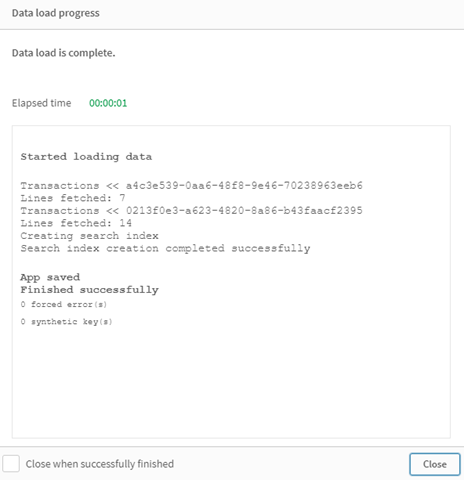
## Example 2 – Use case scenario
[](https://help.qlik.com/en-US/sense/Subsystems/Hub/Content/Sense_Hub/Scripting/ScriptPrefixes/NoConcatenate.htm)
#### Load script and results
Overview
In this use case scenario you have:
* A transactions dataset with:
* id
* date
* amount (in GBP)
* A currency table with:
* Conversion rates for USD to GBP
* A second transactions dataset with:
* id
* date
* amount (in USD)
You will load five scripts in sequential order.
* The first load script contains an initial dataset with dates and amounts in GBP that is sent to a table named `Transactions`.
* The second load script contains:
* A second dataset with dates and amounts in USD that is sent to a table named `Transactions_in_USD`.
* The `noconcatenate` prefix which is placed before the load statement of the `Transactions_in_USD` dataset to prevent implicit concatenation.
* The third load script contains the `join` prefix which will be used create a currency exchange rate between GBP and USD in the `Transactions_in_USD` table.
* The fourth load script contains the `concatenate` prefix which will add the `Transactions_in_USD` to the initial `Transactions` table.
* The fifth load script contains the `drop table` statement which will remove the `Transactions_in_USD` table its data has been concatenated to the `Transactions` table.
First load script
```
Transactions:
Load * Inline [
id, date, amount
1, 12/30/2018, 23.56
2, 12/07/2018, 556.31
3, 12/16/2018, 5.75
4, 12/22/2018, 125.00
5, 12/22/2018, 484.21
6, 12/22/2018, 59.18
7, 12/23/2018, 177.42
];
```
Results
Load the data and open a sheet. Create a new table and add these fields as dimensions:
* `id` `date` `amount`
First load script results
| id | date | amount |
| --- | --- | --- |
| 1 | 12/30/2018 | 23.56 |
| 2 | 12/07/2018 | 556.31 |
| 3 | 12/16/2018 | 5.75 |
| 4 | 12/22/2018 | 125.00 |
| 5 | 12/22/2018 | 484.21 |
| 6 | 12/22/2018 | 59.18 |
| 7 | 12/23/2018 | 177.42 |
The table shows the initial dataset with amounts in GBP.
Second load script
```
Transactions_in_USD:
NoConcatenate
Load * Inline [
id, date, amount
8, 01/01/2019, 164.27
9, 01/03/2019, 384.00
10, 01/06/2019, 25.82
11, 01/09/2019, 312.00
12, 01/15/2019, 4.56
13, 01/16/2019, 90.24
14, 01/18/2019, 19.32
];
```
Results
Load the data and go to the table.
Second load script results
| id | date | amount |
| --- | --- | --- |
| 1 | 12/30/2018 | 23.56 |
| 2 | 12/07/2018 | 556.31 |
| 3 | 12/16/2018 | 5.75 |
| 4 | 12/22/2018 | 125.00 |
| 5 | 12/22/2018 | 484.21 |
| 6 | 12/22/2018 | 59.18 |
| 7 | 12/23/2018 | 177.42 |
| 8 | 01/01/2019 | 164.27 |
| 9 | 01/03/2019 | 384.00 |
| 10 | 01/06/2019 | 25.82 |
| 11 | 01/09/2019 | 312.00 |
| 12 | 01/15/2019 | 4.56 |
| 13 | 01/16/2019 | 90.24 |
| 14 | 01/18/2019 | 19.32 |
You will see that the second dataset from the `Transactions_in_USD` table has been added.
Third load script
This load script joins a currency exchange rate from USD to GBP to the `Transactions_in_USD` table.
```
Join (Transactions_in_USD)
Load * Inline [
rate
0.7
];
```
Results
Load the data and go to the Data model viewer. Select the `Transactions_in_USD` table and you will see that every existing record has a 'rate' field value of 0.7.
Fourth load script
Using resident load, this load script will concatenate the `Transactions_in_USD` table to the `Transactions` table after converting the amounts into USD.
```
Concatenate (Transactions)
LOAD
id,
date,
amount * rate as amount
Resident Transactions_in_USD;
```
Results
Load the data and go to the table. You will see new entries with amounts in GBP from lines eight to fourteen.
Fourth load script results
| id | date | amount |
| --- | --- | --- |
| 1 | 12/30/2018 | 23.56 |
| 2 | 12/07/2018 | 556.31 |
| 3 | 12/16/2018 | 5.75 |
| 4 | 12/22/2018 | 125.00 |
| 5 | 12/22/2018 | 484.21 |
| 6 | 12/22/2018 | 59.18 |
| 7 | 12/23/2018 | 177.42 |
| 8 | 01/01/2019 | 114.989 |
| 8 | 01/01/2019 | 164.27 |
| 9 | 01/03/2019 | 268.80 |
| 9 | 01/03/2019 | 384.00 |
| 10 | 01/06/2019 | 18.074 |
| 10 | 01/06/2019 | 25.82 |
| 11 | 01/09/2019 | 218.40 |
| 11 | 01/09/2019 | 312.00 |
| 12 | 01/15/2019 | 3.192 |
| 12 | 01/15/2019 | 4.56 |
| 13 | 01/16/2019 | 63.168 |
| 13 | 01/16/2019 | 90.24 |
| 14 | 01/18/2019 | 13.524 |
| 14 | 01/18/2019 | 19.32 |
Fifth load script
This load script will drop the duplicate entries from the fourth load script results table, leaving only entries with amounts in GBP.
```
drop tables Transactions_in_USD;
```
Results
Load the data and go to the table.
Fifth load script results
| id | date | amount |
| --- | --- | --- |
| 1 | 12/30/2018 | 23.56 |
| 2 | 12/07/2018 | 556.31 |
| 3 | 12/16/2018 | 5.75 |
| 4 | 12/22/2018 | 125.00 |
| 5 | 12/22/2018 | 484.21 |
| 6 | 12/22/2018 | 59.18 |
| 7 | 12/23/2018 | 177.42 |
| 8 | 01/01/2019 | 114.989 |
| 9 | 01/03/2019 | 268.80 |
| 10 | 01/06/2019 | 18.074 |
| 11 | 01/09/2019 | 218.40 |
| 12 | 01/15/2019 | 3.192 |
| 13 | 01/16/2019 | 63.168 |
| 14 | 01/18/2019 | 13.524 |
After loading the fifth load script, the results table shows all fourteen transactions that existed in both transaction datasets; however, transactions 8-14 have had their amounts converted to GBP.
If we remove the NoConcatenate prefix that was used before the Transactions\_in\_USD in the second load script, the script will fail with the error:“Table 'Transactions\_in\_USD' not found”. This is because the Transactions\_in\_USD table would have been auto concatenated onto the original Transactions table.
## Learn more
* [Concatenating tables](https://help.qlik.com/en-US/sense/November2024/Subsystems/Hub/Content/Sense_Hub/LoadData/concatenate-tables.htm)
* [Load](https://help.qlik.com/en-US/sense/November2024/Subsystems/Hub/Content/Sense_Hub/Scripting/ScriptRegularStatements/Load.htm)
* [Select](https://help.qlik.com/en-US/sense/November2024/Subsystems/Hub/Content/Sense_Hub/Scripting/ScriptRegularStatements/Select.htm)