# Top - chart function
Top() evaluates an expression at the first (top) row of a column segment in a table. The row for which it is calculated depends on the value of offset, if present, the default being the top row. For charts other than tables, theTop() evaluation is made on the first row of the current column in the chart's straight table equivalent.
Syntax:
Top([TOTAL] expr [ , offset [,count ]])
Return data type: dual
Arguments
| Argument | Description |
| --- | --- |
| expr | The expression or field containing the data to be measured. |
| offset | Specifying an offset of n, greater than 1, moves the evaluation of the expression
down n rows below the top row.
Specifying a negative offset number makes the Top
function work like the Bottom function
with the corresponding positive offset number. |
| count | By specifying a third parameter count
greater than 1, the function will return a range of count values, one for each of the last count rows of the current column segment. In this form, the
function can be used as an argument to any of the special range
functions. [Range functions](https://help.qlik.com/en-US/sense/May2026/Subsystems/Hub/Content/Sense_Hub/ChartFunctions/RangeFunctions/RangeFunctionsInCharts.htm) |
| TOTAL | If the table is one-dimensional or if the qualifier TOTAL is used as argument, the current column segment is always equal to the
entire column.
[Defining the aggregation scope](https://help.qlik.com/en-US/sense/May2026/Subsystems/Hub/Content/Sense_Hub/ChartFunctions/define-aggregation-scope.htm) |
Information noteA column segment is defined as a consecutive subset of cells having the same values for the dimensions in the current sort order. Inter-record chart functions are computed in the column segment excluding the right-most dimension in the equivalent straight table chart. If there is only one dimension in the chart, or if the TOTAL qualifier is specified, the expression evaluates across full table.
Information noteIf the table or table equivalent has multiple vertical dimensions, the current column segment will include only rows with the same values as the current row in all dimension columns, except for the column showing the last dimension in the inter-field sort order.
Limitations:
* Recursive calls will return NULL.
* Sorting on y-values in charts or sorting by expression columns in tables is not allowed when this chart function is used in any of the chart's expressions. These sort alternatives are therefore automatically disabled. When you use this chart function in a visualization or table, the sorting of the visualization will revert back to the sorted input to this function.
Example: Chart expressions
| Example | Result |
| --- | --- |
| `Top( Sum(Sales) )` | Returns the value of `Sales` for the first (top) row of a column segment in a table. |
## Example - Top fundamentals
[](https://help.qlik.com/en-US/sense/Subsystems/Hub/Content/Sense_Hub/ChartFunctions/InterRecordFunctions/top.htm)
#### Chart expression
Overview
Open the Data load editor and add the load script below to a new section.
The load script contains:
* A dataset which is loaded into a data table called `Example`.
* The following fields in the data table:
* `Year`
* `Sales`
Load script
```
Example:
LOAD * INLINE [
Year, Sales
2019, 1000
2020, 1500
2021, 1200
2022, 1800
2023, 1700
];
```
Results
Load the data and open a sheet. Create a new table and add this field as a dimension:
* `Year`
Create the following measures:
* `=Sum(Sales)`, to find the annual sales.
* `=Top(Sum(Sales))`, to find the sales value for the first year, that is the first (top) row of a column in a table.
* `=Sum(Sales) - Top(Sum(Sales))`, to calculate the variance between the `Sales` value of the current row and the value for the first (top) row of a column.
* `=Sum(Sales)-Top(Sum(Sales), 3)`, to calculate the variance between the sales value of the current row and the value of the 3rd row from the top.
* `=(Sales - Top(Sales)) / Top(Sales)`, to return the change in `Sales` as a ratio / percentage as compared to first row. To show this value as a percentage, under Number formatting, select Number > Formatting Simple > 12.34%.
Sort the table on the dimension `Year` in ascending order.
Results table
| Year | Sum(Sales) | Top(Sum(Sales)) | Sum(Sales) - Top(Sum(Sales)) | Sum(Sales)-Top(Sum(Sales), 3) | (Sales - Top(Sales)) / Top(Sales) |
| --- | --- | --- | --- | --- | --- |
| Totals | 7200 | 1000 | 6200 | 6000 | - |
| 2019 | 1000 | 1000 | 0 | -200 | 0.00% |
| 2020 | 1500 | 1000 | 500 | 300 | 50.00% |
| 2021 | 1200 | 1000 | 200 | 0 | 20.00% |
| 2022 | 1800 | 1000 | 800 | 600 | 80.00% |
| 2023 | 1700 | 1000 | 700 | 500 | 70.00% |
Looking at the results, you can compare the `Sales` values in the current period with the top (or first) period.
* The `Sum(Sales) - Top(Sum(Sales))` measure returns the change in `Sales` values comparing the current period to the first period.
* The `Sum(Sales)-Top(Sum(Sales), 3)` measure returns the sum of `Sales` for the current row minus the third period from the top.
* The `=(Sales - Top(Sales)) / Top(Sales)` measure returns the change in `Sales` compared to the first period as a percentage.
Tip noteThis function can also be used in charts other than tables, for example bar charts.
Do the following:
Create a bar chart, and then add this field as a dimension:
* `Year`
Create the following measure:
* `=Sum(Sales)- Top(Sum(Sales))`, to return the variance in sales between the current period and the top period.
Bar chart showing results for the Top function
Bar chart showing results for the Top function
Bar chart showing results for the TopTop function 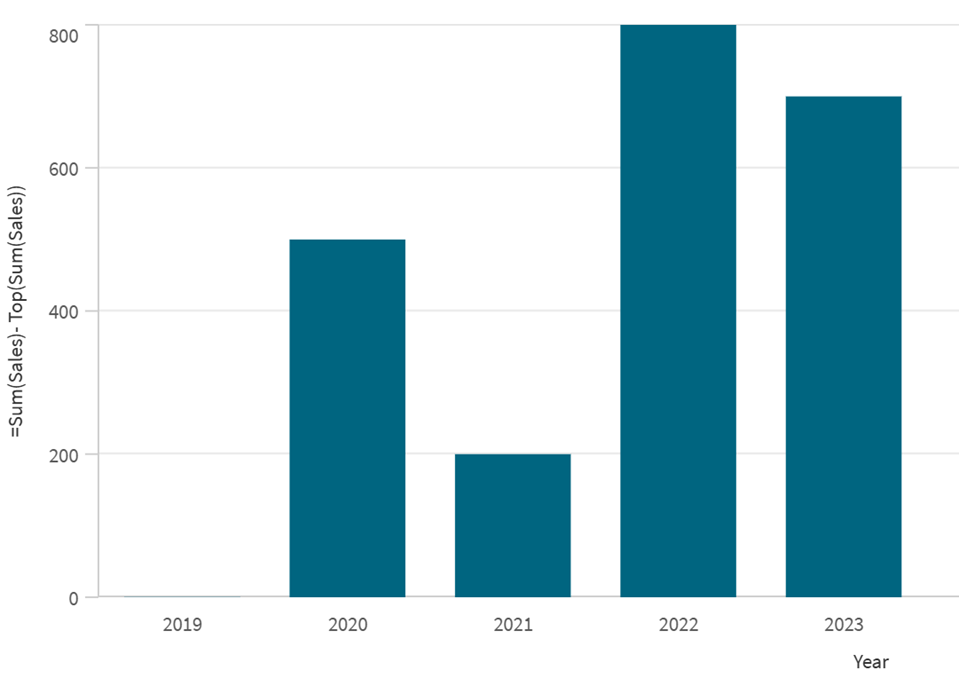
Using the `Top` function in a bar chart provides a visual comparison of the variance between the sales of the current period versus the top (or first) period.
## Example - Top scenario
[](https://help.qlik.com/en-US/sense/Subsystems/Hub/Content/Sense_Hub/ChartFunctions/InterRecordFunctions/top.htm)
#### Chart expression
Overview
Open the Data load editor and add the load script below to a new section.
The load script contains:
* A dataset which is loaded into a data table called `Example`.
* The following fields in the data table:
* `OrderID`
* `Product`
* `SalesValue`
* `OrderDate`
Load script
```
Example:
LOAD * INLINE [
OrderID, Product, SalesValue, OrderDate
1, "Product A", 500, '2023-01-10'
2, "Product B", 300, '2023-01-15'
3, "Product C", 450, '2023-02-01'
4, "Product D", 700, '2023-02-20'
5, "Product E", 350, '2023-03-05'
];
```
Results
Load the data and open a sheet. Create a new table and add this field as a dimension:
* `Product`
Create the following measures:
* `=RangeAvg(Top(Sum(SalesValue),1,3))` to return the average of the three top rows.
* `=Sum(SalesValue) - RangeAvg (Top(Sum(SalesValue),1,3))` to calculate the variance between the current row and the average of the three top rows.
* `=Sum(SalesValue)` to calculate the total `SalesValue` for the current row.
Results table
| Product | RangeAvg(Top(Sum(SalesValue),1,3)) | Sum(SalesValue) - RangeAvg (Top(Sum(SalesValue),1,3)) | Sum(SalesValue) |
| --- | --- | --- | --- |
| Totals | 416.67 | 1883.33 | 2300 |
| 2019 | 416.67 | 83.33 | 500 |
| 2020 | 416.67 | --116.67 | 300 |
| 2021 | 416.67 | 33.33 | 450 |
| 2022 | 416.67 | 283.33 | 700 |
| 2023 | 416.67 | -66.67 | 350 |
The results show how you can use the combination of the `RangeSum` and the `Top` function to analyze and compare sales values.
## Example - Chart expression using Top
[](https://help.qlik.com/en-US/sense/Subsystems/Hub/Content/Sense_Hub/ChartFunctions/InterRecordFunctions/top.htm)
#### Chart expression
Overview
Open the Data load editor and add the load script below to a new section.
The load script contains:
* Two data tables called `Monthnames` and `Sales2013`.
Load script
```
Monthnames:
LOAD *, Dual(MonthText,MonthNumber) as Month INLINE [
MonthText, MonthNumber
Jan, 1
Feb, 2
Mar, 3
Apr, 4
May, 5
Jun, 6
Jul, 7
Aug, 8
Sep, 9
Oct, 10
Nov, 11
Dec, 12
];
Sales2013:
Crosstable (MonthText, Sales) LOAD * inline [
Customer|Jan|Feb|Mar|Apr|May|Jun|Jul|Aug|Sep|Oct|Nov|Dec
Astrida|46|60|70|13|78|20|45|65|78|12|78|22
Betacab|65|56|22|79|12|56|45|24|32|78|55|15
Canutility|77|68|34|91|24|68|57|36|44|90|67|27
Divadip|57|36|44|90|67|27|57|68|47|90|80|94
] (delimiter is '|');
```
Results
Load the data and open a sheet. Create a new table and add this field as a dimension:
* `Customer`
Create the following measures:
* `=Sum(Sales)`, to calculate the sum of sales.
* `=Top(Sum(Sales))`, to show the sum of sales of the `Customer` in the top row.
* `=Sum(Sales)+Top(Sum(Sales))`, to add the `Sum(Sales)` value of the current `Customer` with the `Customer` in the top row.
* `=Sum(Sales)+Top(Sum(Sales), 3)`, to add the `Sum(Sales)` value of the current `Customer` with the value for the `Customer` that is third from the top row.
Results table
| Customer | Sum(Sales) | Top(Sum(Sales)) | Sum(Sales)+Top(Sum(Sales)) | Sum(Sales)+Top(Sum(Sales), 3) |
| --- | --- | --- | --- | --- |
| Totals | 2566 | 587 | 3153 | 3249 |
| Astrida | 587 | 587 | 1174 | 1270 |
| Betacab | 539 | 587 | 1126 | 1222 |
| Canutilty | 683 | 587 | 1270 | 1366 |
| Divadip | 757 | 587 | 1344 | 1440 |
The measure `Top(Sum(Sales))` returns `587` for all rows because this is the value of the top row: `Astrida`.
For the measure `Sum(Sales)+Top(Sum(Sales))`, the row `Betacab` returns `1126`, which is the result of adding the `Sum(Sales)` value for `Betacab` and `Astrida`, the `Customer` in the top row.
For the measure `Sum(Sales)+Top(Sum(Sales), 3)`, the argument `offset` is set to `3`. The expression adds the `Sum(Sales)` value for the current row and the third row from the top, `Canutility`. For example, the value `1440` is returned for customer `Divadip`. This is the result of adding the `Sum(Sales)` value for `Divadip` and the `SumSales` for `Canutility` (`757`+`683`).
## Learn more
* [Bottom - chart function](https://help.qlik.com/en-US/sense/May2026/Subsystems/Hub/Content/Sense_Hub/ChartFunctions/InterRecordFunctions/bottom.htm)
* [Above - chart function](https://help.qlik.com/en-US/sense/May2026/Subsystems/Hub/Content/Sense_Hub/ChartFunctions/InterRecordFunctions/above.htm)
* [Sum - chart function](https://help.qlik.com/en-US/sense/May2026/Subsystems/Hub/Content/Sense_Hub/ChartFunctions/BasicAggregationFunctions/sum.htm)
* [RangeAvg Script and chart function](https://help.qlik.com/en-US/sense/May2026/Subsystems/Hub/Content/Sense_Hub/ChartFunctions/RangeFunctions/rangeavg.htm)
* [Range functions](https://help.qlik.com/en-US/sense/May2026/Subsystems/Hub/Content/Sense_Hub/ChartFunctions/RangeFunctions/RangeFunctionsInCharts.htm)