# monthname - script and chart function
This function returns a display value showing the month (formatted according to the MonthNames script variable) and year with an underlying numeric value corresponding to a timestamp of the first millisecond of the first day of the month.
Syntax:
MonthName(date[, period\_no])
Return data type: dual
Diagram of monthname function
Diagram of monthname function
Diagram of monthname function 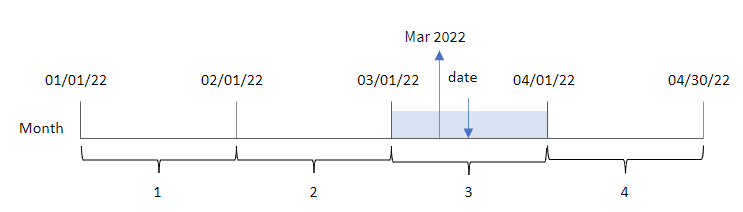
Arguments
| Argument | Description |
| --- | --- |
| date | The date or timestamp to evaluate. |
| period\_no | period\_no is an integer, which, if
0 or omitted, indicates the month that contains date.
Negative values in period\_no indicate
preceding months and positive values indicate succeeding months. |
Function examples
| Example | Result |
| --- | --- |
| `monthname('10/19/2013')` | Returns Oct
2013 |
| `monthname('10/19/2013', -1)` | Returns Sep 2013 |
## Regional settings
Unless otherwise specified, the examples in this topic use the following date format: MM/DD/YYYY. The date format is specified in the `SET DateFormat` statement in your data load script. The default date formatting may be different in your system, due to your regional settings and other factors. You can change the formats in the examples below to suit your requirements. Or you can change the formats in your load script to match these examples.
Default regional settings in apps are based on the regional system settings of the computer or server where Qlik Sense is installed. If the Qlik Sense server you are accessing is set to Sweden, the Data load editor will use Swedish regional settings for dates, time, and currency. These regional format settings are not related to the language displayed in the Qlik Sense user interface. Qlik Sense will be displayed in the same language as the browser you are using.
## Example 1 – Basic example
[](https://help.qlik.com/en-US/sense/Subsystems/Hub/Content/Sense_Hub/Scripting/DateAndTimeFunctions/monthname.htm)
#### Load script and results
Overview
Open the Data load editor and add the load script below to a new section.
The load script contains:
* A dataset containing a set of transactions for 2022, which is loaded into a table called `Transactions`.
* The date field provided in the `DateFormat` system variable (MM/DD/YYYY) format.
* The creation of a field, `transaction_month`, that returns the month in which the transactions took place.
Load script
```
SET DateFormat='MM/DD/YYYY';
SET MonthNames='Jan;Feb;Mar;Apr;May;Jun;Jul;Aug;Sep;Oct;Nov;Dec';
Transactions:
Load
*,
monthname(date) as transaction_month
;
Load
*
Inline
[
id,date,amount
8188,1/7/2022,17.17
8189,1/19/2022,37.23
8190,2/28/2022,88.27
8191,2/5/2022,57.42
8192,3/16/2022,53.80
8193,4/1/2022,82.06
8194,5/7/2022,40.39
8195,5/16/2022,87.21
8196,6/15/2022,95.93
8197,6/26/2022,45.89
8198,7/9/2022,36.23
8199,7/22/2022,25.66
8200,7/23/2022,82.77
8201,7/27/2022,69.98
8202,8/2/2022,76.11
8203,8/8/2022,25.12
8204,8/19/2022,46.23
8205,9/26/2022,84.21
8206,10/14/2022,96.24
8207,10/29/2022,67.67
];
```
Results
Load the data and open a sheet. Create a new table and add these fields as dimensions:
* `date`
* `transaction_month`
Results table
| date | transaction\_month |
| --- | --- |
| 1/7/2022 | Jan 2022 |
| 1/19/2022 | Jan 2022 |
| 2/5/2022 | Feb 2022 |
| 2/28/2022 | Feb 2022 |
| 3/16/2022 | Mar 2022 |
| 4/1/2022 | Apr 2022 |
| 5/7/2022 | May 2022 |
| 5/16/2022 | May 2022 |
| 6/15/2022 | Jun 2022 |
| 6/26/2022 | Jun 2022 |
| 7/9/2022 | Jul 2022 |
| 7/22/2022 | Jul 2022 |
| 7/23/2022 | Jul 2022 |
| 7/27/2022 | Jul 2022 |
| 8/2/2022 | Aug 2022 |
| 8/8/2022 | Aug 2022 |
| 8/19/2022 | Aug 2022 |
| 9/26/2022 | Sep 2022 |
| 10/14/2022 | Oct 2022 |
| 10/29/2022 | Oct 2022 |
The `transaction_month` field is created in the preceding load statement by using the `monthname()` function and passing the `date` field as the function’s argument.
Diagram of monthname function, basic example
Diagram of monthname function, basic example
Diagram of monthname function, basic example 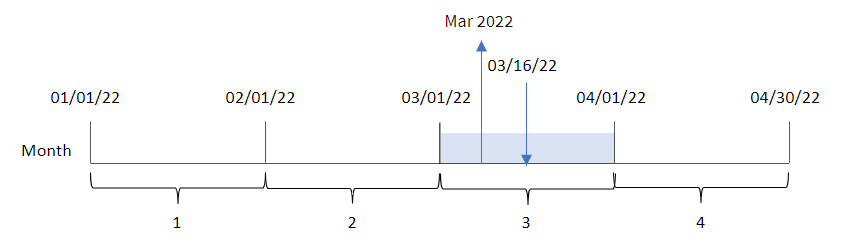
The `monthname()` function identifies that transaction 8192 took place in March 2022, and returns this value using the `MonthNames` system variable.
## Example 2 – period\_no
[](https://help.qlik.com/en-US/sense/Subsystems/Hub/Content/Sense_Hub/Scripting/DateAndTimeFunctions/monthname.htm)
#### Load script and results
Overview
Open the Data load editor and add the load script below to a new section.
The load script contains:
* The same inline dataset and scenario as the first example.
* The creation of a field, `transaction_previous_month`, that returns the timestamp for the end of the month before the transaction took place.
Load script
```
SET DateFormat='MM/DD/YYYY';
SET MonthNames='Jan;Feb;Mar;Apr;May;Jun;Jul;Aug;Sep;Oct;Nov;Dec';
Transactions:
Load
*,
monthname(date,-1) as transaction_previous_month
;
Load
*
Inline
[
id,date,amount
8188,1/7/2022,17.17
8189,1/19/2022,37.23
8190,2/28/2022,88.27
8191,2/5/2022,57.42
8192,3/16/2022,53.80
8193,4/1/2022,82.06
8194,5/7/2022,40.39
8195,5/16/2022,87.21
8196,6/15/2022,95.93
8197,6/26/2022,45.89
8198,7/9/2022,36.23
8199,7/22/2022,25.66
8200,7/23/2022,82.77
8201,7/27/2022,69.98
8202,8/2/2022,76.11
8203,8/8/2022,25.12
8204,8/19/2022,46.23
8205,9/26/2022,84.21
8206,10/14/2022,96.24
8207,10/29/2022,67.67
];
```
Results
Load the data and open a sheet. Create a new table and add these fields as dimensions:
* `date`
* `transaction_previous_month`
Results table
| date | transaction\_previous\_month |
| --- | --- |
| 1/7/2022 | Dec 2021 |
| 1/19/2022 | Dec 2021 |
| 2/5/2022 | Jan 2022 |
| 2/28/2022 | Jan 2022 |
| 3/16/2022 | Feb 2022 |
| 4/1/2022 | Mar 2022 |
| 5/7/2022 | Apr 2022 |
| 5/16/2022 | Apr 2022 |
| 6/15/2022 | May 2022 |
| 6/26/2022 | May 2022 |
| 7/9/2022 | Jun 2022 |
| 7/22/2022 | Jun 2022 |
| 7/23/2022 | Jun 2022 |
| 7/27/2022 | Jun 2022 |
| 8/2/2022 | Jul 2022 |
| 8/8/2022 | Jul 2022 |
| 8/19/2022 | Jul 2022 |
| 9/26/2022 | Aug 2022 |
| 10/14/2022 | Sep 2022 |
| 10/29/2022 | Sep 2022 |
In this instance, because a `period_no` of -1 was used as the offset argument in the `monthname()` function, the function first identifies the month that the transactions take place in. It then shifts to one month prior and returns the month name and year.
Diagram of monthname function, period\_no example
Diagram of monthname function, period\_no example
Diagram of monthname function, period\_no example 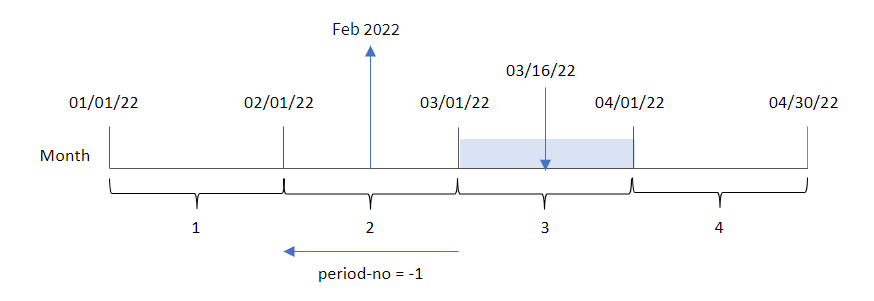
Transaction 8192 took place on March 16. The `monthname()` function identifies that the month before the transaction took place was February and returns the month, in the `MonthNames` system variable format, along with the year 2022.
## Example 3 – Chart object example
[](https://help.qlik.com/en-US/sense/Subsystems/Hub/Content/Sense_Hub/Scripting/DateAndTimeFunctions/monthname.htm)
#### Load script and chart expression
Overview
Open the Data load editor and add the load script below to a new tab.
The load script contains the same inline dataset and scenario as the first example. However, in this example, the unchanged dataset is loaded into the application. The calculation that returns a timestamp for the end of the month when the transactions took place is created as a measure in a chart object of the application.
Load script
```
SET DateFormat='MM/DD/YYYY';
SET MonthNames='Jan;Feb;Mar;Apr;May;Jun;Jul;Aug;Sep;Oct;Nov;Dec';
Transactions:
Load
*
Inline
[
id,date,amount
8188,1/7/2022,17.17
8189,1/19/2022,37.23
8190,2/28/2022,88.27
8191,2/5/2022,57.42
8192,3/16/2022,53.80
8193,4/1/2022,82.06
8194,5/7/2022,40.39
8195,5/16/2022,87.21
8196,6/15/2022,95.93
8197,6/26/2022,45.89
8198,7/9/2022,36.23
8199,7/22/2022,25.66
8200,7/23/2022,82.77
8201,7/27/2022,69.98
8202,8/2/2022,76.11
8203,8/8/2022,25.12
8204,8/19/2022,46.23
8205,9/26/2022,84.21
8206,10/14/2022,96.24
8207,10/29/2022,67.67
];
```
Results
Load the data and open a sheet. Create a new table and add this field as a dimension:`date`.
Create the following measure:
`=monthname(date)`
Results table
| date | =monthname(date) |
| --- | --- |
| 1/7/2022 | Jan 2022 |
| 1/19/2022 | Jan 2022 |
| 2/5/2022 | Feb 2022 |
| 2/28/2022 | Feb 2022 |
| 3/16/2022 | Mar 2022 |
| 4/1/2022 | Apr 2022 |
| 5/7/2022 | May 2022 |
| 5/16/2022 | May 2022 |
| 6/15/2022 | Jun 2022 |
| 6/26/2022 | Jun 2022 |
| 7/9/2022 | Jul 2022 |
| 7/22/2022 | Jul 2022 |
| 7/23/2022 | Jul 2022 |
| 7/27/2022 | Jul 2022 |
| 8/2/2022 | Aug 2022 |
| 8/8/2022 | Aug 2022 |
| 8/19/2022 | Aug 2022 |
| 9/26/2022 | Sep 2022 |
| 10/14/2022 | Oct 2022 |
| 10/29/2022 | Oct 2022 |
The `month_name` measure is created in the chart object by using the `monthname()` function and passing the `date` field as the function’s argument.
Diagram of monthname function, chart object example
Diagram of monthname function, chart object example
Diagram of monthname function, chart object example 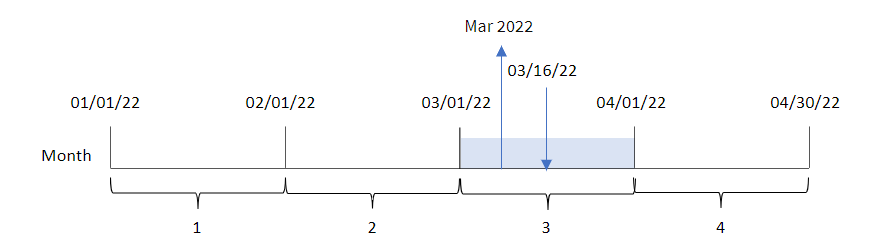
The `monthname()` function identifies that transaction 8192 took place in March 2022, and returns this value using the `MonthNames` system variable.