# monthend - script and chart function
This function returns a value corresponding to a timestamp of the last millisecond of the last day of the month containing `date`. The default output format will be the `DateFormat` set in the script.
Syntax:
MonthEnd(date[, period\_no])
In other words, the `monthend()` function determines which month the date falls into. It then returns a timestamp, in date format, for the last millisecond of that month.
Diagram of `monthend` function.
Diagram of `monthend` function.
Diagram of `monthend`monthend function. 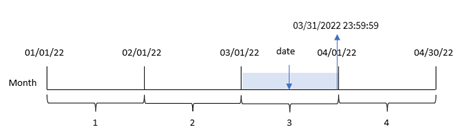
When to use it
The `monthend()` function is used as part of an expression when you would like the calculation to use the fraction of the month that has not yet occurred. For example, if you want to calculate the total interest not yet incurred during the month.
Return data type: dual
Arguments
| Argument | Description |
| --- | --- |
| date | The date or timestamp to evaluate. |
| period\_no | period\_no is an integer, which, if
0 or omitted, indicates the month that contains date.
Negative values in period\_no indicate
preceding months and positive values indicate succeeding months. |
## Regional settings
Unless otherwise specified, the examples in this topic use the following date format: MM/DD/YYYY. The date format is specified in the `SET DateFormat` statement in your data load script. The default date formatting may be different in your system, due to your regional settings and other factors. You can change the formats in the examples below to suit your requirements. Or you can change the formats in your load script to match these examples.
Default regional settings in apps are based on the regional system settings of the computer or server where Qlik Sense is installed. If the Qlik Sense server you are accessing is set to Sweden, the Data load editor will use Swedish regional settings for dates, time, and currency. These regional format settings are not related to the language displayed in the Qlik Sense user interface. Qlik Sense will be displayed in the same language as the browser you are using.
Function examples
| Example | Result |
| --- | --- |
| `monthend('02/19/2012')` | Returns 02/29/2012 23:59:59. |
| `monthend('02/19/2001', -1)` | Returns
01/31/2001 23:59:59. |
## Example 1 – Basic example
[](https://help.qlik.com/en-US/sense/Subsystems/Hub/Content/Sense_Hub/Scripting/DateAndTimeFunctions/monthend.htm)
#### Load script and results
Overview
Open the Data load editor and add the load script below to a new section.
The load script contains:
* A dataset containing a set of transactions for 2022 that is loaded into a table called ‘`Transactions`’.
* A date field in the`DateFormat` system variable (`MM/DD/YYYY`) format.
* A preceding load statement that contains:
* The `monthend()` function which is set as the ‘`end_of_month`’ field.
* The `timestamp` function which is set as the ‘`end_of_month_timestamp`’ field.
Load script
```
SET DateFormat='MM/DD/YYYY';
Transactions:
Load
*,
monthend(date) as end_of_month,
timestamp(monthend(date)) as end_of_month_timestamp
;
Load
*
Inline
[
id,date,amount
8188,1/7/2022,17.17
8189,1/19/2022,37.23
8190,2/28/2022,88.27
8191,2/5/2022,57.42
8192,3/16/2022,53.80
8193,4/1/2022,82.06
8194,5/7/2022,40.39
8195,5/16/2022,87.21
8196,6/15/2022,95.93
8197,6/26/2022,45.89
8198,7/9/2022,36.23
8199,7/22/2022,25.66
8200,7/23/2022,82.77
8201,7/27/2022,69.98
8202,8/2/2022,76.11
8203,8/8/2022,25.12
8204,8/19/2022,46.23
8205,9/26/2022,84.21
8206,10/14/2022,96.24
8207,10/29/2022,67.67
];
```
Results
Load the data and open a sheet. Create a new table and add these fields as dimensions:
* `id`
* `date`
* `end_of_month`
* `end_of_month_timestamp`
Results table
| id | date | end\_of\_month | end\_of\_month\_timestamp |
| --- | --- | --- | --- |
| 8188 | 1/7/2022 | 01/31/2022 | 1/31/2022 11:59:59 PM |
| 8189 | 1/19/2022 | 01/31/2022 | 1/31/2022 11:59:59 PM |
| 8190 | 2/5/2022 | 02/28/2022 | 2/28/2022 11:59:59 PM |
| 8191 | 2/28/2022 | 02/28/2022 | 2/28/2022 11:59:59 PM |
| 8192 | 3/16/2022 | 03/31/2022 | 3/31/2022 11:59:59 PM |
| 8193 | 4/1/2022 | 04/30/2022 | 4/30/2022 11:59:59 PM |
| 8194 | 5/7/2022 | 05/31/2022 | 5/31/2022 11:59:59 PM |
| 8195 | 5/16/2022 | 05/31/2022 | 5/31/2022 11:59:59 PM |
| 8196 | 6/15/2022 | 06/30/2022 | 6/30/2022 11:59:59 PM |
| 8197 | 6/26/2022 | 06/30/2022 | 6/30/2022 11:59:59 PM |
| 8198 | 7/9/2022 | 07/31/2022 | 7/31/2022 11:59:59 PM |
| 8199 | 7/22/2022 | 07/31/2022 | 7/31/2022 11:59:59 PM |
| 8200 | 7/23/2022 | 07/31/2022 | 7/31/2022 11:59:59 PM |
| 8201 | 7/27/2022 | 07/31/2022 | 7/31/2022 11:59:59 PM |
| 8202 | 8/2/2022 | 08/31/2022 | 8/31/2022 11:59:59 PM |
| 8203 | 8/8/2022 | 08/31/2022 | 8/31/2022 11:59:59 PM |
| 8204 | 8/19/2022 | 08/31/2022 | 8/31/2022 11:59:59 PM |
| 8205 | 9/26/2022 | 09/30/2022 | 9/30/2022 11:59:59 PM |
| 8206 | 10/14/2022 | 10/31/2022 | 10/31/2022 11:59:59 PM |
| 8207 | 10/29/2022 | 10/31/2022 | 10/31/2022 11:59:59 PM |
The ‘`end_of_month`’ field is created in the preceding load statement by using the `monthend()` function and passing the date field as the function’s argument.
The `monthend()` function identifies which month the date value falls into returning a timestamp for the last millisecond of that month.
Diagram of `monthend` function with March as the selected month.
Diagram of `monthend` function with March as the selected month.
Diagram of `monthend`monthend function with March as the selected month. 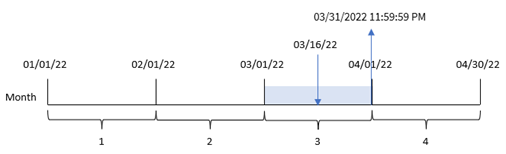
Transaction 8192 took place on March 16. The `monthend()` function returns the last millisecond of that month, which is March 31 at 11:59:59 PM.
## Example 2 – period\_no
[](https://help.qlik.com/en-US/sense/Subsystems/Hub/Content/Sense_Hub/Scripting/DateAndTimeFunctions/monthend.htm)
#### Load script and results
Overview
The same dataset and scenario as the first example are used.
In this example, the task is to create a field, ‘`previous_month_end`’, that returns the timestamp for the end of the month before the transaction took place.
Load script
```
SET DateFormat='MM/DD/YYYY';
Transactions:
Load
*,
monthend(date,-1) as previous_month_end,
timestamp(monthend(date,-1)) as previous_month_end_timestamp
;
Load
*
Inline
[
id,date,amount
8188,1/7/2022,17.17
8189,1/19/2022,37.23
8190,2/28/2022,88.27
8191,2/5/2022,57.42
8192,3/16/2022,53.80
8193,4/1/2022,82.06
8194,5/7/2022,40.39
8195,5/16/2022,87.21
8196,6/15/2022,95.93
8197,6/26/2022,45.89
8198,7/9/2022,36.23
8199,7/22/2022,25.66
8200,7/23/2022,82.77
8201,7/27/2022,69.98
8202,8/2/2022,76.11
8203,8/8/2022,25.12
8204,8/19/2022,46.23
8205,9/26/2022,84.21
8206,10/14/2022,96.24
8207,10/29/2022,67.67
];
```
Results
Load the data and open a sheet. Create a new table and add these fields as dimensions:
* `id`
* `date`
* `previous_month_end`
* `previous_month_end_timestamp`
Results table
| id | date | previous\_month\_end | previous\_month\_end\_timestamp |
| --- | --- | --- | --- |
| 8188 | 1/7/2022 | 12/31/2021 | 12/31/2021 11:59:59 PM |
| 8189 | 1/19/2022 | 12/31/2021 | 12/31/2021 11:59:59 PM |
| 8190 | 2/5/2022 | 01/31/2022 | 1/31/2022 11:59:59 PM |
| 8191 | 2/28/2022 | 01/31/2022 | 1/31/2022 11:59:59 PM |
| 8192 | 3/16/2022 | 02/28/2022 | 2/28/2022 11:59:59 PM |
| 8193 | 4/1/2022 | 03/31/2022 | 3/31/2022 11:59:59 PM |
| 8194 | 5/7/2022 | 04/30/2022 | 4/30/2022 11:59:59 PM |
| 8195 | 5/16/2022 | 04/30/2022 | 4/30/2022 11:59:59 PM |
| 8196 | 6/15/2022 | 05/31/2022 | 5/31/2022 11:59:59 PM |
| 8197 | 6/26/2022 | 05/31/2022 | 5/31/2022 11:59:59 PM |
| 8198 | 7/9/2022 | 06/30/2022 | 6/30/2022 11:59:59 PM |
| 8199 | 7/22/2022 | 06/30/2022 | 6/30/2022 11:59:59 PM |
| 8200 | 7/23/2022 | 06/30/2022 | 6/30/2022 11:59:59 PM |
| 8201 | 7/27/2022 | 06/30/2022 | 6/30/2022 11:59:59 PM |
| 8202 | 8/2/2022 | 07/31/2022 | 7/31/2022 11:59:59 PM |
| 8203 | 8/8/2022 | 07/31/2022 | 7/31/2022 11:59:59 PM |
| 8204 | 8/19/2022 | 07/31/2022 | 7/31/2022 11:59:59 PM |
| 8205 | 9/26/2022 | 08/31/2022 | 8/31/2022 11:59:59 PM |
| 8206 | 10/14/2022 | 09/30/2022 | 9/30/2022 11:59:59 PM |
| 8207 | 10/29/2022 | 09/30/2022 | 9/30/2022 11:59:59 PM |
The `monthend()`function first identifies the month that the transactions take place in as a`period_no` of `-1` is used as the offset argument. It then shifts one month prior and identifies the final millisecond of that month.
Diagram of `monthend` function with the period\_no variable.
Diagram of `monthend` function with the period\_no variable.
Diagram of `monthend`monthend function with the period\_no variable. 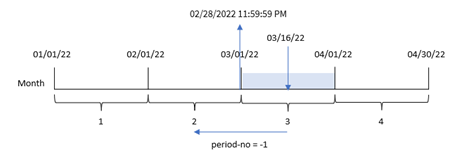
Transaction 8192 took place on March 16. The `monthend()` function identifies that the month before the transaction took place in was February. It then returns the final millisecond of that month, February 28 at 11:59:59 PM.
## Example 3 – Chart example
[](https://help.qlik.com/en-US/sense/Subsystems/Hub/Content/Sense_Hub/Scripting/DateAndTimeFunctions/monthend.htm)
#### Load script and chart expression
Overview
The same dataset and scenario as the first example are used.
In this example, the dataset is unchanged and loaded into the app. The task is to create a calculation that returns a timestamp for the end of the month when the transactions took place as a measure in a chart of the app.
Load script
```
Transactions:
Load
*
Inline
[
id,date,amount
8188,1/7/2022,17.17
8189,1/19/2022,37.23
8190,2/28/2022,88.27
8191,2/5/2022,57.42
8192,3/16/2022,53.80
8193,4/1/2022,82.06
8194,5/7/2022,40.39
8195,5/16/2022,87.21
8196,6/15/2022,95.93
8197,6/26/2022,45.89
8198,7/9/2022,36.23
8199,7/22/2022,25.66
8200,7/23/2022,82.77
8201,7/27/2022,69.98
8202,8/2/2022,76.11
8203,8/8/2022,25.12
8204,8/19/2022,46.23
8205,9/26/2022,84.21
8206,10/14/2022,96.24
8207,10/29/2022,67.67
];
```
Results
Load the data and open a sheet. Create a new table and add these fields as dimensions:
* `date`
* `id`
To calculate the end date of the month that a transaction takes place in, create the following measures:
* `=monthend(date)`
* `=timestamp(monthend(date))`
Results table
| id | date | =monthend(date) | =timestamp(monthend(date)) |
| --- | --- | --- | --- |
| 8188 | 10/14/2022 | 10/31/2022 | 10/31/2022 11:59:59 PM |
| 8189 | 10/29/2022 | 10/31/2022 | 10/31/2022 11:59:59 PM |
| 8190 | 9/26/2022 | 09/30/2022 | 9/30/2022 11:59:59 PM |
| 8191 | 8/2/2022 | 08/31/2022 | 8/31/2022 11:59:59 PM |
| 8192 | 8/8/2022 | 08/31/2022 | 8/31/2022 11:59:59 PM |
| 8193 | 8/19/2022 | 08/31/2022 | 8/31/2022 11:59:59 PM |
| 8194 | 7/9/2022 | 07/31/2022 | 7/31/2022 11:59:59 PM |
| 8195 | 7/22/2022 | 07/31/2022 | 7/31/2022 11:59:59 PM |
| 8196 | 7/23/2022 | 07/31/2022 | 7/31/2022 11:59:59 PM |
| 8197 | 7/27/2022 | 07/31/2022 | 7/31/2022 11:59:59 PM |
| 8198 | 6/15/2022 | 06/30/2022 | 6/30/2022 11:59:59 PM |
| 8199 | 6/26/2022 | 06/30/2022 | 6/30/2022 11:59:59 PM |
| 8200 | 5/7/2022 | 05/31/2022 | 5/31/2022 11:59:59 PM |
| 8201 | 5/16/2022 | 05/31/2022 | 5/31/2022 11:59:59 PM |
| 8202 | 4/1/2022 | 04/30/2022 | 4/30/2022 11:59:59 PM |
| 8203 | 3/16/2022 | 03/31/2022 | 3/31/2022 11:59:59 PM |
| 8204 | 2/5/2022 | 02/28/2022 | 2/28/2022 11:59:59 PM |
| 8205 | 2/28/2022 | 02/28/2022 | 2/28/2022 11:59:59 PM |
| 8206 | 1/7/2022 | 01/31/2022 | 1/31/2022 11:59:59 PM |
| 8207 | 1/19/2022 | 01/31/2022 | 1/31/2022 11:59:59 PM |
The ‘`end_of_month`’ measure is created in the chart by using the`monthend()` function and passing the date field as the function’s argument.
The `monthend()` function identifies which month the date value falls into and returns a timestamp for the last millisecond of that month.
Diagram of `monthend` function with the period\_no variable.
Diagram of `monthend` function with the period\_no variable.
Diagram of `monthend`monthend function with the period\_no variable. 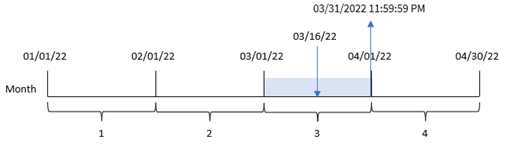
Transaction 8192 took place on March 16. The `monthend()` function returns the last millisecond of that month, which is March 31 at 11:59:59 PM.
## Example 4 – Scenario
[](https://help.qlik.com/en-US/sense/Subsystems/Hub/Content/Sense_Hub/Scripting/DateAndTimeFunctions/monthend.htm)
#### Load script and results
Overview
In this example, a dataset is loaded into a table called ‘`Employee_Expenses`’. The table contains the following fields:
* Employee IDs
* Employee names
* The average daily expense claims of each employee.
The end user would like a chart that displays, by employee id and employee name, the estimated expense claim for the remainder of the month.
Load script
```
Employee_Expenses:
Load
*
Inline
[
employee_id,employee_name,avg_daily_claim
182,Mark, $15
183,Deryck, $12.5
184,Dexter, $12.5
185,Sydney,$27
186,Agatha,$18
];
```
Results
Load the data and open a sheet. Create a new table and add these fields as dimensions:
* `employee_id`
* `employee_name`
To calculate the accumulated interest, create this measure:
`=floor(monthend(today(1),0)-today(1))*avg_daily_claim`
Information noteThis measure is dynamic and will produce different table results depending on the date when you load the data.
Set the measure’s Number formatting to Money.
Results table
| employee\_id | employee\_name | =floor(monthend(today(1),0)-today(1))\*avg\_daily\_claim |
| --- | --- | --- |
| 182 | Mark | $30.00 |
| 183 | Deryck | $25.00 |
| 184 | Dexter | $25.00 |
| 185 | Sydney | $54.00 |
| 186 | Agatha | $36.00 |
The `monthend()`function returns the end date of the current month by using today’s date as its only argument. The expression returns the number of days that remain this month by subtracting today’s date from the month end date.
This value is then multiplied by the average daily expense claim by each employee to calculate the estimated value of claims each employee is expected to make in the remaining month.