# Creating box plots
This section describes how to create box plots with the Visualization API and qlik-visual.
## Creating a basic box plot
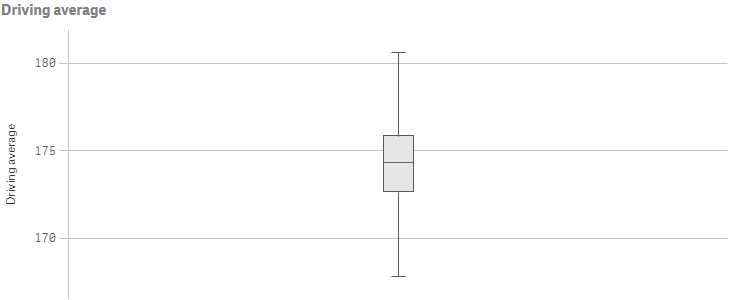
In this example we want to create a basic box plot, containing one dimension and one measure, and with a custom title.
1. Create the chart
Create the container for the chart. The visualization type is boxplot.
Visualization API
```
app.visualization.create(
'boxplot',
[],
{}
)
```
qlik-visual
```
```
2. Define the dimension and the measure as columns
```
[
{
"qDef": {
"qFieldDefs": [
"Date.autoCalendar.Year"
],
"qFieldLabels": [
"Year"
]
}
},
{
"qDef": {
"qLabel": "Driving average",
"qDef": "Avg({}DrDist)"
}
}
]
```
3. Define the title in the options
```
{
"showTitles": true,
"title": "Driving average"
}
```
### Result
### Code examples
[](https://help.qlik.com/en-US/sense-developer/Subsystems/Mashups/Content/Sense_Mashups/Create/Visualizations/Boxplot/create-boxplot.htm)
#### Visualization API
```
app.visualization.create(
'boxplot',
[
{
"qDef": {
"qFieldDefs": [
"Date.autoCalendar.Year"
],
"qFieldLabels": [
"Year"
]
}
},
{
"qDef": {
"qLabel": "Driving average",
"qDef": "Avg({}DrDist)"
}
}
],
{
"showTitles": true,
"title": "Driving average"
}
).then(function(vis){
vis.show("QV01");
});
```
[](https://help.qlik.com/en-US/sense-developer/Subsystems/Mashups/Content/Sense_Mashups/Create/Visualizations/Boxplot/create-boxplot.htm)
#### qlik-visual
```
```
## Calculation presets and presentation
The box plot elements are configured in the options within the boxplotDef. You can select to use one of three calculation preset modes:
* tukey
* fractiles
* stdDev
1. Set the preset mode
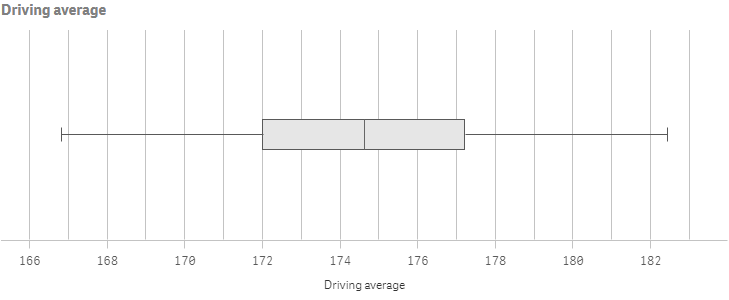
In this example we select to use the Standard deviation preset with two standard deviations.
"boxplotDef": { /\*Standard deviation preset\*/ "calculations": { "auto": true, "mode": "stdDev", "parameters": { "stdDev": 3 } } }
2. Show whiskers
Enable ticks at the end of each whisker: "presentation": {"whiskers": {"show": true}}.
"boxplotDef": { /\*Standard deviation preset\*/ "calculations": { "auto": true, "mode": "stdDev", "parameters": { "stdDev": 3 } }, /\*Show whiskers\*/ "presentation": { "whiskers": { "show": true } } }
3. Orientation
You might also want to change the way the box plot is presented by changing to horizontal orientation: "orientation": "horizontal".
"orientation": "horizontal"
4. Grid line spacing
This example also uses narrow grid line spacing.
"orientation": "horizontal", "gridlines": { "auto": false, "spacing": 3 }
### Result
### Code examples
[](https://help.qlik.com/en-US/sense-developer/Subsystems/Mashups/Content/Sense_Mashups/Create/Visualizations/Boxplot/create-boxplot.htm)
#### Visualization API
```
app.visualization.create(
'boxplot',
[
{
"qDef": {
"qFieldDefs": [
"Date.autoCalendar.Year"
],
"qFieldLabels": [
"Year"
]
}
},
{
"qDef": {
"qLabel": "Driving average",
"qDef": "Avg({}DrDist)"
}
}
],
{
"boxplotDef": {
"calculations": {
"auto": true,
"mode": "stdDev",
"parameters": {
"stdDev": 3
}
},
"presentation": {
"whiskers": {
"show": true
}
}
},
"showTitles": true,
"title": "Driving average",
"orientation": "horizontal",
"gridlines": {
"auto": false,
"spacing": 3
}
}
).then(function(vis){
vis.show("QV01");
});
```
[](https://help.qlik.com/en-US/sense-developer/Subsystems/Mashups/Content/Sense_Mashups/Create/Visualizations/Boxplot/create-boxplot.htm)
#### qlik-visual
```
```
## Color settings
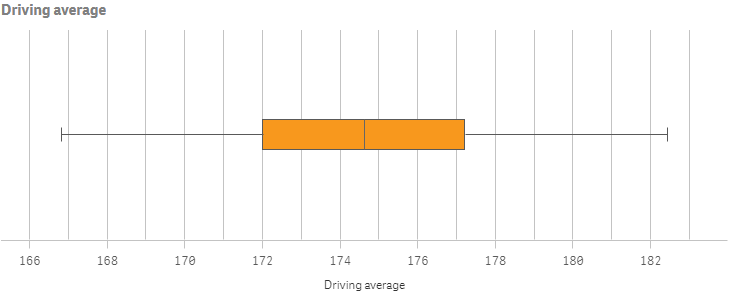
In this example we will add custom colors to the box and the points.
1. Box color
Box color settings are specified in the color object within the boxplotDef.
"color": { /\*Box color\*/ "box": { "paletteColor": { "index": 9, "color": "#f8981d" } } }
2. Point / outlier color
Point, or outlier, color settings are also specified in the color object within the boxplotDef.
"color": { /\*Box color\*/ "box": { "paletteColor": { "index": 9, "color": "#f8981d" } }, /\*Outlier color\*/ "point": { "paletteColor": { "index": -1, "color": "#214152" } } }
### Result
### Code examples
[](https://help.qlik.com/en-US/sense-developer/Subsystems/Mashups/Content/Sense_Mashups/Create/Visualizations/Boxplot/create-boxplot.htm)
#### Visualization API
```
app.visualization.create(
'boxplot',
[
{
"qDef": {
"qFieldDefs": [
"Date.autoCalendar.Year"
],
"qFieldLabels": [
"Year"
]
}
},
{
"qDef": {
"qLabel": "Driving average",
"qDef": "Avg({}DrDist)"
}
}
],
{
"boxplotDef": {
"calculations": {
"auto": true,
"mode": "stdDev",
"parameters": {
"stdDev": 3
}
},
"presentation": {
"whiskers": {
"show": true
}
},
"color": {
"box": {
"paletteColor": {
"index": 9,
"color": "#f8981d"
}
},
"point": {
"paletteColor": {
"index": -1,
"color": "#214152"
}
}
}
},
"showTitles": true,
"title": "Driving average",
"orientation": "horizontal",
"gridlines": {
"auto": false,
"spacing": 3
}
}
).then(function(vis){
vis.show("QV01");
});
```
[](https://help.qlik.com/en-US/sense-developer/Subsystems/Mashups/Content/Sense_Mashups/Create/Visualizations/Boxplot/create-boxplot.htm)
#### qlik-visual
```
```
## Using inner and outer dimensions
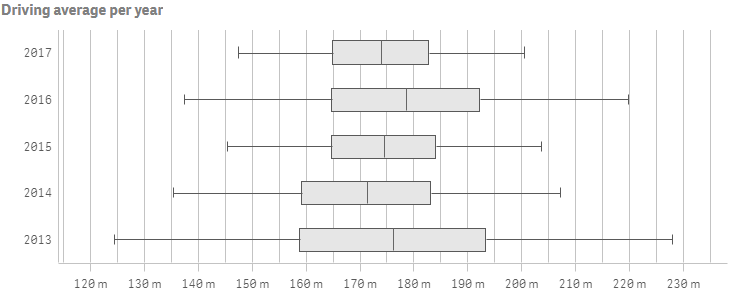
When creating box plots with a single dimension, you will receive a single box visualization. In this example we will add a second dimension which will give us one box for each value of the second, or outer, dimension.
1. Adding the inner dimension
This example uses Date as the inner dimension. Dimensions are defined as columns.
{ /\*Inner dimension\*/ "qDef": { "qFieldDefs": [ "Date.autoCalendar.Date" ], "qFieldLabels": [ "Date" ] } }
2. Adding the outer dimension
This example uses Year as the outer dimension. Dimensions are defined as columns.
{ /\*Inner dimension\*/ "qDef": { "qFieldDefs": [ "Date.autoCalendar.Date" ], "qFieldLabels": [ "Date" ] } }, { /\*Outer dimension\*/ "qDef": { "qFieldDefs": [ "Date.autoCalendar.Year" ], "qFieldLabels": [ "Year" ] } }
3. Adding the measure
We then add a measure with some special number formatting. The measure to be used is average driving distance on par 4 and par 5 holes, which is added as a set statement. We define that the letter m (meaning meters) precedes the number on the measure axis.
{ "qDef": { "qLabel": "Driving average", "qDef": "Avg({<Par={'4','5'}>}DrDist)", /\*Special number format\*/ "qNumFormat": { "qType": "F", "qnDec": 2, "qUseThou": 0, "qFmt": "#,##0 m" }, "numFormatFromTemplate": false } }
4. Measure axis
This example shows only labels and uses narrow scale on the measure axis.
"measureAxis": { "show": "labels", "spacing": 0.5 }
5. Dimension axis
This example shows only labels on the dimension axis.
"measureAxis": { "show": "labels", "spacing": 0.5 }, "dimensionAxis": { "show": "labels" }
### Result
### Code examples
[](https://help.qlik.com/en-US/sense-developer/Subsystems/Mashups/Content/Sense_Mashups/Create/Visualizations/Boxplot/create-boxplot.htm)
#### Visualization API
```
app.visualization.create(
'boxplot',
[
{
"qDef": {
"qFieldDefs": [
"Date.autoCalendar.Date"
],
"qFieldLabels": [
"Date"
]
}
},
{
"qDef": {
"qFieldDefs": [
"Date.autoCalendar.Year"
],
"qFieldLabels": [
"Year"
]
}
},
{
"qDef": {
"qLabel": "Driving average",
"qDef": "Avg({}DrDist)",
"qNumFormat": {
"qType": "F",
"qnDec": 2,
"qUseThou": 0,
"qFmt": "#,##0 m"
},
"numFormatFromTemplate": false
}
}
],
{
"boxplotDef": {
"calculations": {
"auto": true,
"mode": "stdDev",
"parameters": {
"stdDev": 3
}
},
"presentation": {
"whiskers": {
"show": true
}
},
"sorting": {
"autoSort": false,
"elementId": "firstWhisker",
"sortCriteria": {
"sortByNumeric": -1
}
}
},
"showTitles": true,
"title": "Driving average per year",
"orientation": "horizontal",
"gridlines": {
"auto": false,
"spacing": 3
},
"measureAxis": {
"show": "labels",
"spacing": 0.5
},
"dimensionAxis": {
"show": "labels"
}
}
).then(function(vis){
vis.show("QV01");
});
```
[](https://help.qlik.com/en-US/sense-developer/Subsystems/Mashups/Content/Sense_Mashups/Create/Visualizations/Boxplot/create-boxplot.htm)
#### qlik-visual
```
```