# List builder
The List builder is used for building lists that are not a part of the Qlik Sense app your mashup is connected to.
You access the List builder by clicking Options > Lists > Add list.
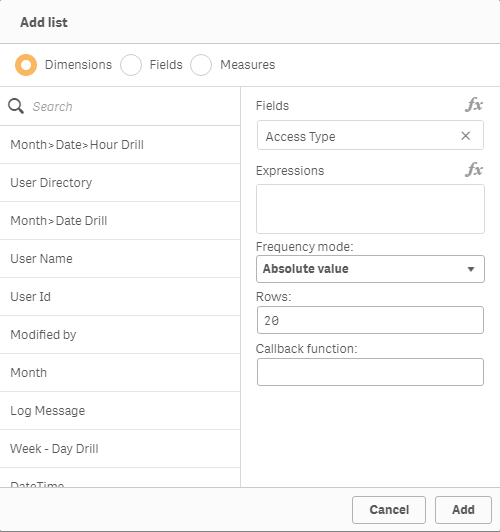
List builder items
| Item | Description |
| --- | --- |
| Dimensions | Lists all the master dimensions available in the selected app. |
| Fields | Lists all fields available in the selected app. |
| Measures | Lists all the master measures available in the selected app. |
| Field | Lists all dimensions and fields selected for the list. |
| Expressions | Lists the measures and expressions in the list.
You can add an expression by clicking the Expression button. |
| Frequency mode | Defines the frequency mode, and is used to calculate the frequency of a value in a list object.
- No frequency: no frequency is calculated.
- Absolute value: the absolute value.
- Percent: the percentage (between 0 and 100).
- Relative: same as percent but between 0 and 1.
Refers to the qFrequencyMode property in qListObjectDef. |
| Rows | Determines the maximum number of rows received back from the Qlik associative engine.
Refers to the qHeight of qInitialDataFetch property in qListObjectDef. |
| Callback | Name of your callback. |
## Code rendering in Mashup editor
When you have saved your list you can go to the \*.js tab and check the code rendered by the Mashup editor. The rendered code is placed at the bottom of the JavaScript file:
```
//create cubes and lists -- inserted here --
```
Example: Code rendering of added list
In this example, we use the helpdesk mashup example. We add a new hypercube, select the Status field, and name the callback StatusList. The following lines of code are generated by the Mashup editor, and can be viewed on the \*.js tab:
```
//create cubes and lists -- inserted here --
app.createList({
"qFrequencyMode": "V",
"qDef": {
"qFieldDefs": [
"Status"
]
},
"qExpressions": [],
"qInitialDataFetch": [
{
"qHeight": 20,
"qWidth": 1
}
],
"qLibraryId": null
},StatusList);
```
The Mashup editor also generates the placeholder for your callback:
```
//callbacks -- inserted here --
function StatusList(reply, app){}
```
## Learn more
* [Creating a list](https://help.qlik.com/en-US/sense-developer/May2026/Subsystems/Dev-Hub/Content/Sense_Dev-Hub/Howtos/dev-hub-create-field-list.htm)