# Creating KPIs
This section describes how to create KPIs with the Visualization API and qlik-visual.
## Creating a basic KPI
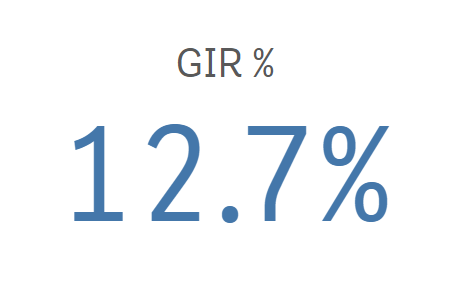
In this example we create a basic KPI, containing a single measure. Measure titles are displayed in the visualization by default.
1. Create the chart
Create the container for the chart. The visualization type is kpi.
Visualization API
```
app.visualization.create(
'kpi',
[],
{}
)
```
qlik-visual
```
```
2. Define measure
Define the measure as a column. Note that the number formatting is defined to display the value as a percentage.
Information noteIn a KPI visualization, you can have one or two measures and no dimensions.
```
[
{
"qDef": {
"qLabel": "GIR %",
"qDef": "Avg(GIR)",
"qNumFormat": {
"qType": "F",
"qnDec": 2,
"qUseThou": 0,
"qFmt": "0.0%",
"qDec": ".",
"qThou": ","
}
}
}
]
```
3. Style the text
Since measure titles are displayed by default, "showMeasureTitle": true can be omitted. Visualization titles are therefore disabled by default, which means that "showTitles": false can also be omitted.
In this example we select to center align the text and use large font size.
```
{
"showTitles": false,
"showMeasureTitle": true,
"textAlign": "center",
"fontSize": "L"
}
```
### Result
### Code examples
[](https://help.qlik.com/en-US/sense-developer/Subsystems/Mashups/Content/Sense_Mashups/Create/Visualizations/KPI/create-kpi.htm)
#### Visualization API
```
app.visualization.create(
'kpi',
[
{
"qDef": {
"qLabel": "GIR %",
"qDef": "Avg(GIR)",
"qNumFormat": {
"qType": "F",
"qnDec": 2,
"qUseThou": 0,
"qFmt": "0.0%",
"qDec": ".",
"qThou": ","
}
}
}
],
{
"showTitles": false,
"showMeasureTitle": true,
"textAlign": "center",
"fontSize": "L"
}
).then(function(vis){
vis.show("QV01");
});
```
[](https://help.qlik.com/en-US/sense-developer/Subsystems/Mashups/Content/Sense_Mashups/Create/Visualizations/KPI/create-kpi.htm)
#### qlik-visual
```
```
## Using two measures with different colors
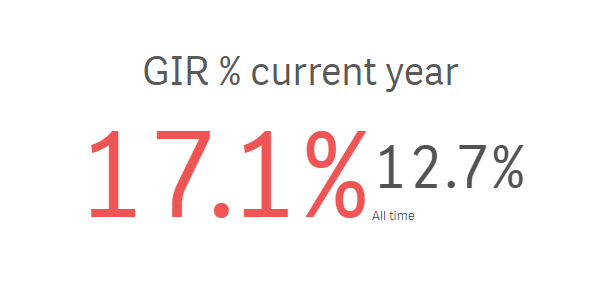
In this example we add a second measure, where the second value automatically becomes a complementary value and is shown with a smaller font size. We also apply different colors for the two measures.
1. Define the first measure
Define the measure as a column. The first measure is defined to display the current year value as a percentage.
{ "qDef": { "qLabel": "GIR % current year", "qDef": "Avg({<[Date.autoCalendar.YearsAgo]={'0'}>}GIR)", "qNumFormat": { "qType": "F", "qnDec": 2, "qUseThou": 0, "qFmt": "0.0%", "qDec": ".", "qThou": "," } } }
2. Define the second measure
Define the measure as a column. The second measure is to display the all time value as a percentage.
{ "qDef": { "qLabel": "GIR % current year", "qDef": "Avg({<[Date.autoCalendar.YearsAgo]={'0'}>}GIR)", "qNumFormat": { "qType": "F", "qnDec": 2, "qUseThou": 0, "qFmt": "0.0%", "qDec": ".", "qThou": "," } } }, { "qDef": { "qLabel": "All time", "qDef": "Avg(GIR)", "qNumFormat": { "qType": "F", "qnDec": 2, "qUseThou": 0, "qFmt": "0.0%", "qDec": ".", "qThou": "," } } }
3. Coloring the first measure
The first measure is to be displayed in the color #f05555 which is not in the default color palette. The following is added to the column definition for the first measure.
"conditionalColoring": { "paletteSingleColor": { "index": -1, "color": "#f05555" } }
4. Coloring the second measure
The second measure is to be displayed in the color #545352, defined in the default color palette as "index": 14. The following is added to the column definition for the second measure.
"conditionalColoring": { "paletteSingleColor": { "index": 14, "color": "#545352" } }
### Result
### Code examples
[](https://help.qlik.com/en-US/sense-developer/Subsystems/Mashups/Content/Sense_Mashups/Create/Visualizations/KPI/create-kpi.htm)
#### Visualization API
```
app.visualization.create(
'kpi',
[
{
"qDef": {
"qLabel": "GIR % current year",
"qDef": "Avg({<[Date.autoCalendar.YearsAgo]={'0'}>}GIR)",
"qNumFormat": {
"qType": "F",
"qnDec": 2,
"qUseThou": 0,
"qFmt": "0.0%",
"qDec": ".",
"qThou": ","
},
"conditionalColoring": {
"paletteSingleColor": {
"index": -1,
"color": "#f05555"
}
}
}
},
{
"qDef": {
"qLabel": "All time",
"qDef": "Avg(GIR)",
"qNumFormat": {
"qType": "F",
"qnDec": 2,
"qUseThou": 0,
"qFmt": "0.0%",
"qDec": ".",
"qThou": ","
},
"conditionalColoring": {
"paletteSingleColor": {
"index": 14,
"color": "#545352"
}
}
}
}
],
{
"showTitles": false,
"showMeasureTitle": true,
"textAlign": "center",
"fontSize": "L"
}
).then(function(vis){
vis.show("QV01");
});
```
[](https://help.qlik.com/en-US/sense-developer/Subsystems/Mashups/Content/Sense_Mashups/Create/Visualizations/KPI/create-kpi.htm)
#### qlik-visual
```
```
## Using conditional colors and symbols
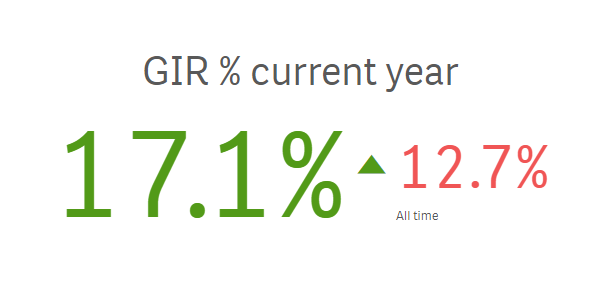
When you use conditional colors for your KPI visualization, you have the option to use symbols to be displayed next to your measure value. In this example, conditional coloring is used on the first measure. Two color segments are defined where different colors are used for values above and below the defined limit.
You can also add symbols to the values. In this example the Arrow down icon is defined as symbol for values below the limit and the Arrow up icon is defined as symbol for values above the limit.
1. Enable conditional coloring
Conditional colors is defined in the conditionalColoring object. We enable conditional coloring for the first measure: "useConditionalColoring": true.
"conditionalColoring": { "useConditionalColoring": true }
2. Define the color segment limit
We want to use two color segments so we define the limit in the segments object. The limit is an expression: Avg(GIR).
"conditionalColoring": { "useConditionalColoring": true, "segments": { "limits": [ { "value": { "qValueExpression": { "qExpr": "Avg(GIR)" } }, "gradient": false } ] } }
3. Define segment colors and icons
The two color segments, above and below the limit specified in the previous step, are defined in the paletteColors object. We define different colors and icons for the segments: the Arrow down icon is defined as symbol for values below the limit and the Arrow up icon is defined as symbol for values above the limit.
"conditionalColoring": { "useConditionalColoring": true, "segments": { "limits": [ { "value": { "qValueExpression": { "qExpr": "Avg(GIR)" } }, "gradient": false } ], "paletteColors": [ { "color": "#ae5798", "icon": "S", "index": -1 }, { "color": "#529a18", "icon": "R", "index": -1 } ] } }
4. Coloring the second measure
Single color is used on the second measure. In this example a shade of the color red (#f05555) is used:
"conditionalColoring": { "useConditionalColoring": false, "singleColor": 3, "paletteSingleColor": { "index": -1, "color": "#f05555" } }
### Result
### Code examples
[](https://help.qlik.com/en-US/sense-developer/Subsystems/Mashups/Content/Sense_Mashups/Create/Visualizations/KPI/create-kpi.htm)
#### Visualization API
```
app.visualization.create(
'kpi',
[
{
"qDef": {
"qLabel": "GIR % current year",
"qDef": "Avg({<[Date.autoCalendar.YearsAgo]={'0'}>}GIR)",
"qNumFormat": {
"qType": "F",
"qnDec": 2,
"qUseThou": 0,
"qFmt": "0.0%",
"qDec": ".",
"qThou": ","
},
"conditionalColoring": {
"useConditionalColoring": true,
"segments": {
"limits": [
{
"value": {
"qValueExpression": {
"qExpr": "Avg(GIR)"
}
},
"gradient": false
}
],
"paletteColors": [
{
"color": "#ae5798",
"icon": "S",
"index": -1
},
{
"color": "#529a18",
"icon": "R",
"index": -1
}
]
}
}
}
},
{
"qDef": {
"qLabel": "All time",
"qDef": "Avg(GIR)",
"qNumFormat": {
"qType": "F",
"qnDec": 2,
"qUseThou": 0,
"qFmt": "0.0%",
"qDec": ".",
"qThou": ","
},
"conditionalColoring": {
"useConditionalColoring": false,
"singleColor": 3,
"paletteSingleColor": {
"index": -1,
"color": "#f05555"
}
}
}
}
],
{
"showTitles": false,
"showMeasureTitle": true,
"textAlign": "center",
"fontSize": "L"
}
).then(function(vis){
vis.show("QV01");
});
```
[](https://help.qlik.com/en-US/sense-developer/Subsystems/Mashups/Content/Sense_Mashups/Create/Visualizations/KPI/create-kpi.htm)
#### qlik-visual
```
```