# Custom switch properties
The switch definition property template can be used to add a custom property of switch type. When defining a switch property, the following fields can be used:
Definition properties
| Field | Description |
| --- | --- |
| type | Used for all custom property type definitions. Can be either string, integer, number, array or boolean.
This field is mandatory and should always be "boolean" for a switch property type definition.
Information noteThe switch effect is achieved by defining the component field to "switch", see below. |
| component | Used for defining how the property is visualized in the property panel. Used to override the default component that comes with the type setting.
This field is mandatory for a switch property and should always be "switch". |
| label | Used for defining the label that is displayed in the property panel. |
| ref | Name or ID used to reference a property. |
| defaultValue | Used for defining the default value of your custom property. |
| options | Array of options. Can be value and label.
Example:
```
options: [{
value: "v",
label: "Vertical"
}, {
value: "h",
label: "Horizontal"
}],
``` |
## Examples
Defining a custom property of switch type can look like below.
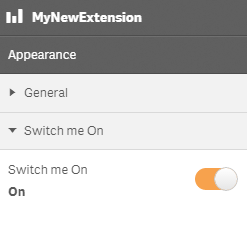
Example: Add custom switch property to Appearance accordion
Information noteCustomization of properties always start with items:.
```
return {
type: "items",
component: "accordion",
items: {
settings: {
uses: "settings",
items: {
MySwitchProp: {
type: "boolean",
component: "switch",
label: "Switch me On",
ref: "myproperties.border",
options: [{
value: true,
label: "On"
}, {
value: false,
label: "Not On"
}],
defaultValue: true
}
}
}
```
This is what it looks like in the property panel
You can also define a new accordion item as a switch property.
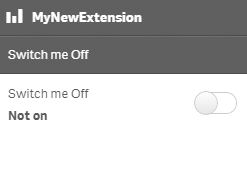
Example: Add custom switch property as a new accordion item
```
return {
type: "items",
component: "accordion",
items: {
MyAccordion: {
type: "boolean",
component: "switch",
label: "Switch me Off",
ref: "myproperties.border",
options: [{
value: true,
label: "On"
}, {
value: false,
label: "Not on"
}],
defaultValue: false
}
```
This is what it looks like in the property panel