# Moving selections
You can use the keyboard keys to move the current selection in an active list box or in an opened multi box field.
Keyboard movement shortcuts
| Key | Movement |
| --- | --- |
| Down Arrow | Moves the current selection(s) one step downwards
in the list box. When the last value is reached, the selection will wrap
back to the first value. When no selection is made, the list box will
just scroll down one cell at a time. |
| Up Arrow | Moves the current selection(s) one step upwards
in the list box. When the first value is reached, the selection will wrap
back to the last value. When no selection is made, the list box will just
scroll up one cell at a time. |
| Page Up | Moves the current selection one interval equal
to the distance between the outermost selections, upwards in the list
box. When the first value is reached, the selections will wrap back to
the last set of values. When no selection is made, the list box will just
scroll up one page at a time. |
| Page Down | Moves the current selections one interval
equal to the distance between the outermost selections, downwards in the
list box. When the last set of values value is reached, the selections
will wrap back to the first set of values. When no selection is made,
the list box will just scroll down one page at a time. |
Example:
In the list box below, with E and F selected, using the different keys produces the following result:
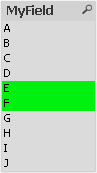
Example results
| Key | Movement |
| --- | --- |
| Down Arrow | F and G will be selected. |
| Up Arrow | D and E will be selected. |
| Page Up | C and D will be selected. |
| Page Down | G and H will be selected. |