# PatchEndpoint
## General
### Description
Updates an existing endpoint's settings.
### URL
https://[host]/attunityenterprisemanager/api/v1/servers/[server]/endpoints/[endpoint]
### HTTP Method
PATCH
### Required user role
Required User Role: See [Required Enterprise Manager permissions](https://help.qlik.com/en-US/enterprise-manager/May2025/Content/EnterpriseManager/EnterpriseManager_APIGuide/Introduction/AEMPermissions.htm).
### Limitations
* The /db\_settings/$type setting (or /db\_settings/connectioninfo/$type setting for Java-based endpoints) cannot be updated. Java-based endpoints are as follows: Salesforce (Incremental Load), Salesforce (Streaming CDC), MongoDB, and SAP Extractor.
* If a task which uses the endpoint is currently running, changing the endpoint setting will only take effect after the task is restarted
## Request parameters
Request parameters
| Location | Name | Required | Description/Example |
| --- | --- | --- | --- |
| URL | host [string] | Yes | The host name of the Enterprise Manager machine.
Example:
computer.network.net |
| URL | server [string] | Yes | The Replicate server name as defined in Enterprise Manager.
Example: my\_s3\_endpoint |
| Header | EnterpriseManager.APISessionID [string] | Yes | wCo0\_KvjEUFROvfHF5KGrw |
## Request body
`[`
`{ "op":"OPERATION", "path":"PATH", "value":"VALUE" }`
`...`
`]`
## Request parameters
Request parameters
| Name | Description |
| --- | --- |
| op | The operation to execute. Supported operations are ‘add’,’replace’,’remove’, or ’test’.
Information note
'move’ and ‘copy’ operations are not supported.
The ‘add’ operation replaces an existing field or adds a new one, if it does not exist.
|
| [](https://help.qlik.com/en-US/enterprise-manager/Content/EnterpriseManager/EnterpriseManager_APIGuide/CurlAPI/api_patchEndpointSettings.htm)path | The path of the endpoint field that you want to edit or test.
The path should be in the following format:
/db\_settings/endpoint-setting
Example:
/db\_settings/bucketName
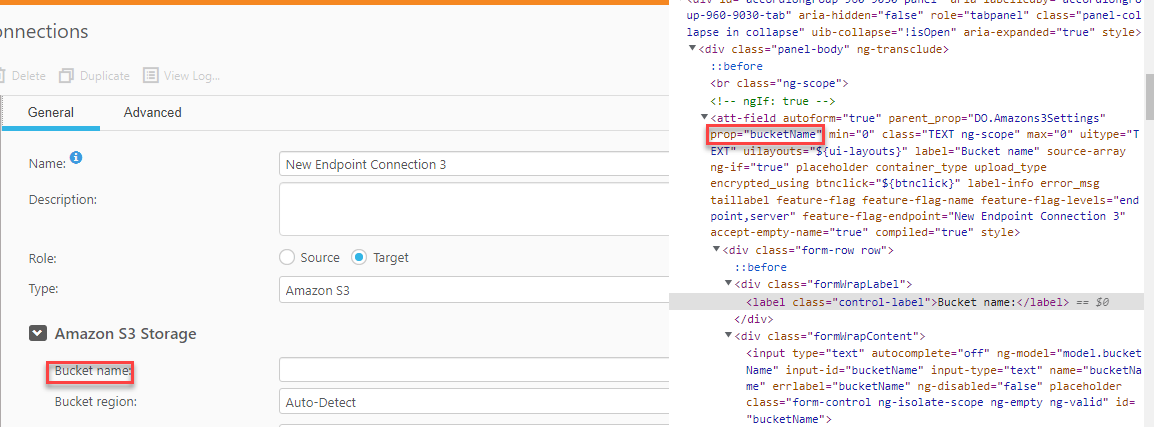
To find the code equivalent of the user interface label, do one the following:
Export the relevant task (remember to choose the With Endpoints option) and then locate the "db_settings" section in the JSON file.
Utilize the browser's Inspect option as follows:
Right-click the label in the endpoint settings and select Inspect from the context menu.
Search for the prop= string above the <label> tag.
The example below shows the Elements tab with prop="bucketName", which corresponds to the Bucket name label in the endpoint settings.
Example: Code equivalent of an endpoint setting
Example: Code equivalent of an endpoint setting
Example: Code equivalent of an endpoint setting
 |
| value | The new value for the specified field. |
## cURL example
### Request
`curl -i -k -X PATCH --header "EnterpriseManager.APISessionID: wCo0_KvjEUFROvfHF5KGrw" https://computer.network.net/attunityenterprisemanager/api/v1/servers/myrepsrv1/endpoints/my_s3 -T "C:\mypatch.json"`
## Request body (JSON file)
`[`
` { "op":"replace", "path":"/db_settings/bucketName", `
`"value":"my_new_bucket" }`
`]`
### Response
`Headers:`
`HTTP/1.1 200 OK`
`Content-Length: 0`
`Content-Type: application/json; charset=utf-8`
## Error response
All of the [general errors](https://help.qlik.com/en-US/enterprise-manager/May2025/Content/EnterpriseManager/EnterpriseManager_APIGuide/CurlAPI/error_handling.htm) as well as the errors listed in the table below.
Error responses
| HTTP Code | Enterprise Manager Code | Text | Description |
| --- | --- | --- | --- |
| 500 | AEM\_PATCH\_ENDPOINT\_INNER\_ERR | Failed to patch replication endpoint {endpoint} on server {server}. | Replicate experienced an error/exception when trying to patch the specified endpoint. |
| 500 | AEM\_ENDPOINT\_NOT\_FOUND | Replication endpoint {endpoint} on server {server} could not be found. | Returned if Qlik Enterprise Manager cannot find the endpoint to patch. |