# Using the test assistant
Use the Test assistant to ask questions about your data and verify that your data has been correctly transferred and is up-to-date. It also lets verify that you are not sharing any wrong or confidential data.
Warning noteThis feature uses artificial intelligence. It is the user’s responsibility to review and verify any AI output before using or sharing it, and to evaluate whether the use of it is appropriate for any particular use case and whether it complies with applicable laws.
Information noteYou need a Qlik Talend Cloud Enterprise subscription.
## Asking questions
Start the test assistant from the Data task page:
1. Run the data task.
2. When it is completed, click Test assistant in the menu bar. The Test assistant opens in the right panel.
To ask a question, enter it and send it by:
* Pressing ENTER on your keyboard.
* Clicking Enter.
The data can be used by the test assistant only when they are defined as Metadata.
1. Navigate to the Datasets tab.
2. Select the Metadata check box.
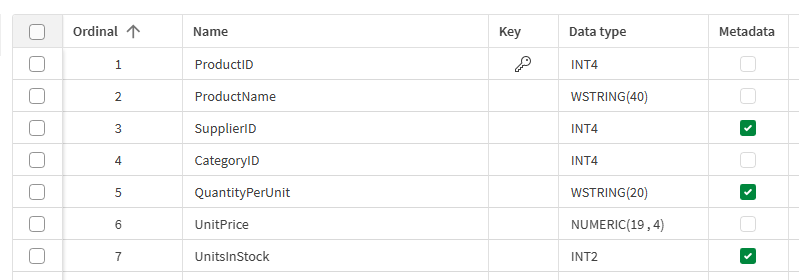
3. Run the task. Once it is completed, you can ask questions about the selected data.
## The questions history
You can view, copy, delete, and re-ask previous questions. You can also copy the answers.
Conversations cannot be saved.
Click the Questions history icon and hover over the question and select the action: Copy, Resend, or Delete.

Deleting a question from the history cannot be undone.
## Settings
This table describes the settings of the Test assistantTest assistant tab.
| Settings | Description |
| --- | --- |
| Number of documents in context | The number of relevant documents that will be passed to the model as context. |
| Prompt template | Enter the template the AI must follow to filter the documents to be included. |
| Filter | Enter the expression to filter the documents to be included.
As the filter is based on the metadata and the file-based knowledge marts do not have metadata, think carefully of the filter you are configuring. It might be more relevant to exclude data instead of including them.
For more information, see [Using the test assistant](https://help.qlik.com/en-US/cloud-services/Subsystems/Hub/Content/Sense_Hub/DataIntegration/KnowledgeMart/Test-Assistant.htm#). |
| Document retrieval | Select the option from the drop-down list:
- Show retrieved context: The test assistant provides the documents from which it generates the answer.
- Don't show retrieved context: The test assistant generates an answer but does not provide the documents.
|
| Answers generation | Select the option from the drop-down list:
- Generate answers: The test assistant generates an answer based on the documents.
- Don't generate answers: The test assistant answers with documents only.
|
## Examples of filters
The test assistant can help you define the Filter to use in the Settings but the filter format depends on the vector databases.
### Examples for knowledge marts
The table below shows some examples of questions you can ask and the filters returned by the test assistant.
| Vector database | Questions | Answer to use as a filter | Format | Documentation |
| --- | --- | --- | --- | --- |
| Elasticsearch | Write a filter for documents where metadata.UnitsInStock = 39 | `{'terms': {'metadata.UnitsInStock': [39]}}` | JSON | [Boolean query](https://www.elastic.co/docs/reference/query-languages/query-dsl/query-dsl-bool-query#filter-clause)
[Query DSL](https://www.elastic.co/guide/en/elasticsearch/reference/current/query-filter-context.html) |
| OpenSearch | Write a filter for documents where metadata.UnitsInStock = 39 | `{'terms': {'metadata.UnitsInStock': [39]}}` | JSON | [Full-text queries](https://docs.opensearch.org/docs/latest/query-dsl/full-text/index/) |
| Pinecone | Mongo-style filter to get vectors where UnitsInStock = 39 | `{"UnitsInStock": 39}` | JSON | [Filter by metadata](https://docs.pinecone.io/guides/search/filter-by-metadata) |
| Snowflake Cortex | Write a Cortex SQL query to filter rows where metadata.UnitsInStock = 39 | `"metadata":"UnitsInStock" = 39` | SQL | SQL syntax |
| Databricks | Write a Databricks SQL query to filter rows where metadata.UnitsInStock = 39 | `{"metadata LIKE": "%\"UnitsInStock\":39%"}` | SQL | SQL syntax |
Remember that the answers depend on your data, those are only examples.
### Examples for file-based knowledge marts
Use the Filter to limit the search to specific files. The table below shows some examples:
| Vector database | Filter | Format | Documentation |
| --- | --- | --- | --- |
| Elasticsearch | `{"terms": {"source_id.keyword": ["gs://ai-ready/test/hello.txt"]}}` | JSON | [Boolean query](https://www.elastic.co/docs/reference/query-languages/query-dsl/query-dsl-bool-query#filter-clause)
[Query DSL](https://www.elastic.co/guide/en/elasticsearch/reference/current/query-filter-context.html) |
| OpenSearch | `{"terms": {"source_id.keyword": ["gs://ai-ready/test/hello.txt"]}}` | JSON | [Full-text queries](https://docs.opensearch.org/docs/latest/query-dsl/full-text/index/) |
| Pinecone | `{"source_id": "s3://username-filebased/docxfiles/newF/cv.docx"}` | JSON | [Filter by metadata](https://docs.pinecone.io/guides/search/filter-by-metadata) |
| Snowflake Cortex | `"source_id" like "s3://username-filebased/pdf/small_pdf/%"` | SQL | SQL syntax |
| Databricks | `"source_id" like "s3://username-filebased/pdf/small_pdf/%"` | SQL | SQL syntax |
Remember that the answers depend on your data, those are only examples.